TLS inspection is when a work network unlocks secure web traffic, checks it, then locks it again.
This guide is for employees, new IT staff and developers who have heard the term or hit a strange certificate error at work. You do not need to be technical to be affected: if you use a work laptop, your web traffic may pass through a company inspection box.
In short
- Many workplaces unlock the secure (HTTPS) traffic from work devices, check it for threats, then lock it again.
- Your laptop accepts this because IT installed a company certificate that it trusts.
- The padlock still shows, but the company box can read what passes through it.
- If a tool shows a certificate error at work, ask IT for help. Never switch the checks off.
What you will learn
- Explain what TLS inspection is in one sentence.
- Spot the signs that your work network inspects secure traffic.
- Explain why switching off certificate checks is risky.
- Ask IT the right questions about what is inspected and why.
- Secure link (TLS)
- the lock that protects data while it travels between your device and a website.
- Website ID card (certificate)
- a digital document that proves a website is who it claims to be.
- Middle box (proxy)
- a computer that sits between you and the internet and passes traffic on.
What is TLS inspection?
Think of a company post room that opens every parcel, checks it, then reseals it with company tape. The parcel still arrives sealed. But someone in the middle has looked inside.
Most web traffic is protected by TLS, the lock behind the padlock in your browser. Normally only your device and the website can read what is inside. That is great for privacy, but it also hides malware and data leaks from a company's security tools.
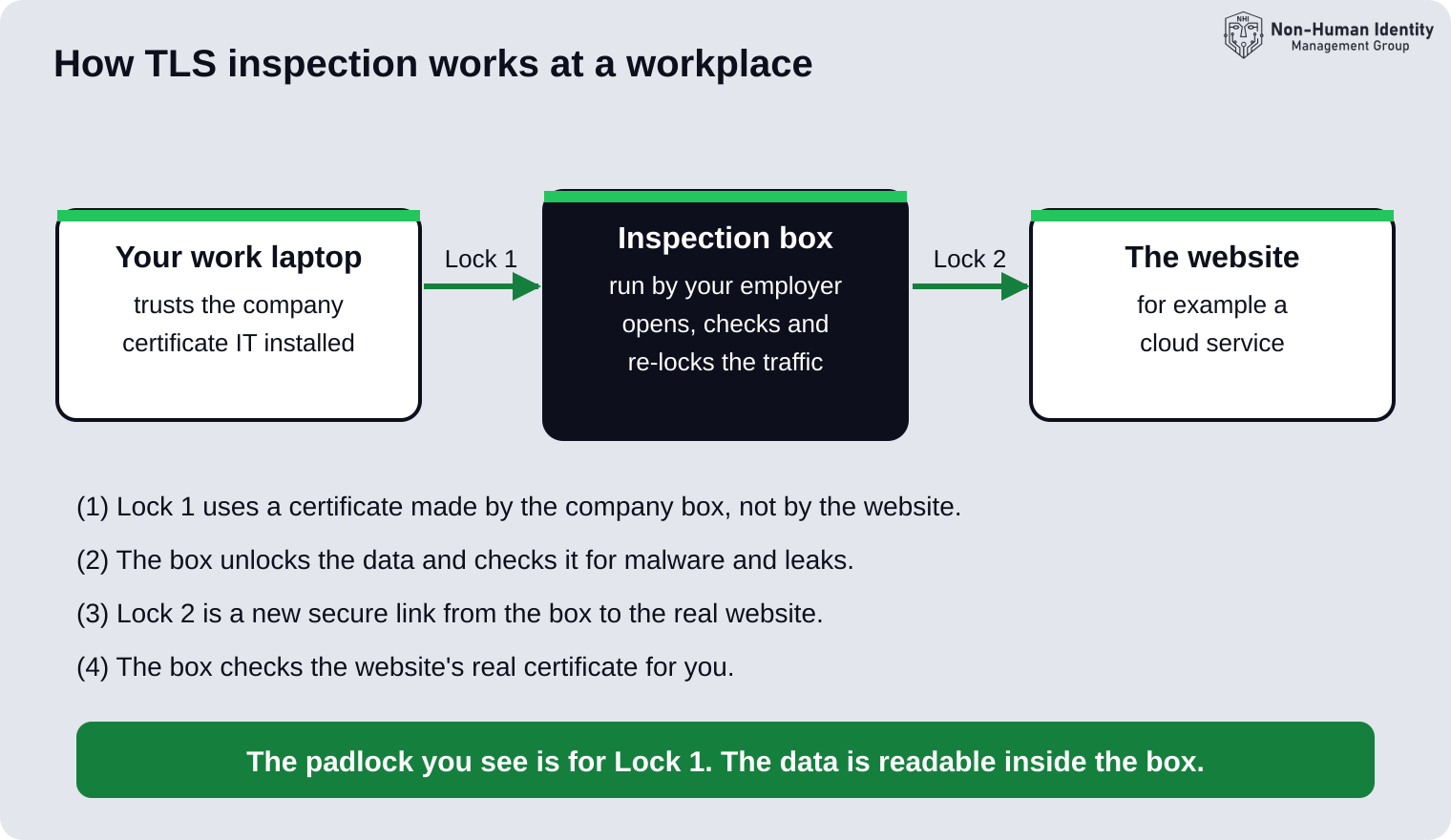
So many workplaces put a proxy (a middle box that passes traffic on) between staff and the internet. It ends your secure link, looks at the data, then opens a new secure link to the real website. After the check, the traffic is locked again and sent on.[1] This is also called SSL inspection, HTTPS inspection or "break and inspect".
Your browser does not complain because IT has added a company root certificate to your laptop. A root certificate is a master ID card that your device trusts. Any website ID card signed by it is accepted too.[2]
Where the comparison stops working: you would notice a parcel with company tape on it. With TLS inspection, the padlock looks the same unless you open the certificate details and check who issued it.
Why does it matter?
TLS inspection helps a company spot threats hidden in secure traffic. But it moves trust to the box in the middle. Your laptop can now check only that box, not the real site. So the box must check the site well for you.[2] In a 2017 study, nearly all the inspection products tested made links less safe, and many added serious flaws.[3]
If you use a work laptop
What could happen: personal browsing on a work device may be read by the inspection box.
Check this: read your workplace's monitoring or acceptable use policy, and keep personal banking on your own device.
If you are a developer
What could happen: a coding tool fails with a certificate error, and you are tempted to switch its checks off.
Check this: ask IT for the company certificate and add it to the tool, so the checks stay on.
Next: How to make developer tools trust a TLS-inspecting corporate proxy safely
If you are new to IT work
What could happen: you get tickets about "certificate errors" that are really caused by inspection.
Check this: learn how to look at who issued a certificate, so you can tell the company box from the real site.
If you manage staff
What could happen: staff do not know their traffic is checked, which damages trust and may break privacy rules.
Check this: make sure the monitoring policy says what is inspected, why, and what is left alone.
What does it look like?
You can see inspection by clicking the padlock and opening the certificate details. Here is a made-up view of what you might find on a work laptop.
Example only. All values are made up.
Website:      shop.example.com
Issued to:    shop.example.com
Issued by:    EXAMPLE Corp Inspection CA 0000   (1)
Valid until:  31 Dec 2099                       (2)
Status:       This certificate is trusted       (3)
- In a real screen, this line would show the name of your employer or a security product. That is the usual sign of inspection.
- The dates are set by the inspection box, not by the website.
- The browser trusts it because IT installed the company's root certificate on this laptop.
Why this is risky: if a fake certificate is ever trusted in the same way, the screen looks just the same. That is why only IT should add trusted certificates.
The safer way: trust only the company certificate that IT gives you in an official way. If you are not sure, ask IT what the "Issued by" name should be.
How does it work?
Here is what happens when you open a secure website on an inspected work network.
- The request. Your laptop asks for a secure website, and the request goes to the company's inspection box first.
- The stand-in. The box makes its own certificate for that website and signs it with the company root certificate. Your laptop trusts it, so the padlock appears.
- The check. The box unlocks the traffic and checks it for things like malware, phishing or data leaving the company.[1]
- The real link. The box opens its own secure link to the real website and checks the website's real certificate.[2]
- The relay. The box passes data both ways, locked again on each side.
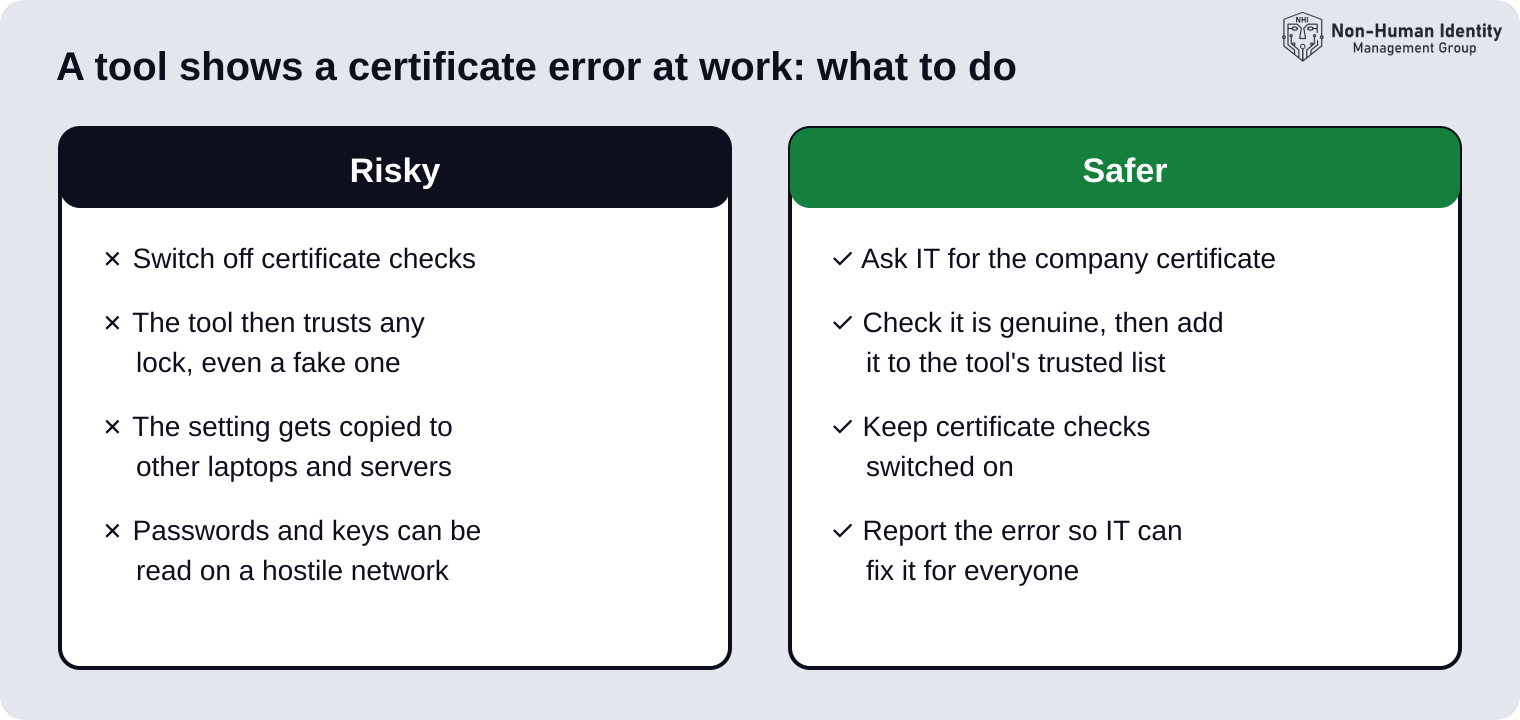
Some apps and coding tools keep their own list of trusted certificates. They do not see the company certificate IT added to the laptop, so they show errors such as "self-signed certificate in certificate chain". The tool is doing its job: it has spotted that someone is in the middle. The fix is to add the company certificate to the tool, not to turn the checks off. For example, the npm coding tool has a setting for an extra certificate file, and its certificate checking is on by default.[4]
A worked example
Idris Iyer is a new developer at Slate Printers, a fictional print firm with forty staff. On his first morning, the tool he uses to download code packages fails. The error says "self-signed certificate in certificate chain".
A colleague's old note on the team wiki suggests a quick fix: switch off certificate checking. Idris remembers the post room. Turning the checks off would mean the tool accepts any resealed parcel, from anyone. That might include a fake Wi-Fi hotspot when he works from a café.
So he messages Kaia Bergmann, who looks after the network. Kaia explains that the firm's web gateway inspects secure traffic, and that his laptop trusts the company certificate. His coding tool keeps its own trusted list, so it does not.
Kaia sends him the company certificate file from the IT portal, with its fingerprint (a short code that proves the file is genuine). Idris checks the fingerprint matches, then points his tool at the file. The download works, and the checks stay on.
Idris also mentions the wiki note. Kaia replaces it with the right steps. She then searches the firm's shared settings files for the "checks off" line and finds it on two build servers. She fixes both.
Last, Kaia reminds Idris what the gateway skips. The firm's policy lists health and banking sites as not inspected. She shows him where staff can read it.
Myths and mistakes
| What people think | What is true |
|---|---|
| The padlock means nobody else can see my traffic. | It means the link to the next machine is locked. On an inspected network, that machine is the company box. |
| TLS inspection is a kind of hacking. | It works like an interception attack, but it is set up openly by the organisation that runs the devices. |
| Switching off certificate checks is a harmless quick fix. | It makes the tool trust any certificate, on any network, and the setting tends to spread. |
| The company box is always safe. | It holds a powerful key and must check websites properly. Studies have found many products that do this badly.[3] |
| Everything I do on a work laptop is inspected. | Many organisations exempt some sites or apps. Your workplace policy should say which. |
What can I do this week?
- Click the padlock on a work laptop and see who issued the certificate.
- Read your work's rules on how staff are monitored.
- Ask IT where to get the company certificate and its fingerprint.
- Look in your own tool settings for lines that turn checks off, and remove them.
- Keep your own bank and health apps on your own phone.
Checklist
- Staff are told, in writing, that secure traffic is inspected and why.
- The policy lists what is not inspected, such as health or banking sites.
- The company certificate comes only from IT, with a published fingerprint.
- Coding tools and build servers add the company certificate instead of switching checks off.
- Nobody's settings, scripts or build servers turn certificate checks off.
- The inspection box checks the real website's certificate and blocks bad ones.
- Access to the inspection box and its private key is tightly limited.
Common questions
Can my employer see my HTTPS traffic?
Yes, if your work device trusts a company certificate and your traffic passes through an inspection box. The box can then read what passes through it. Many workplaces skip some sites, such as banking or health. Your work's rules on monitoring should say what is checked and why.
How can I tell if TLS inspection is happening?
Look at who issued the website's certificate. Click the padlock, open the certificate details and read the "Issued by" line. If it names your employer or a security product, the traffic is probably being inspected.
Is TLS inspection legal?
Often, yes, but rules on watching staff vary by country. In the UK, the data protection regulator says employers must tell workers about monitoring in a clear way, apart from rare exceptions.[5] This page is general information, not legal advice. Check your local rules.
Why does my coding tool fail when my browser works?
Your tool probably keeps its own list of trusted certificates. IT added the company certificate to the laptop's list. The browser uses that list, but the tool does not. Add the company certificate to the tool's settings and keep its checks switched on.
Does TLS inspection make a network safer?
It can, because it lets security tools see threats hidden in secure traffic. It also adds risk. The box in the middle becomes a prize for attackers, and it must check sites correctly. Whether it helps depends on how well it is set up and run.
Where next?
Ready for the detail? Read the practitioner guide: How to make developer tools trust a TLS-inspecting corporate proxy safely. It goes further into per-tool settings, building one trusted certificate bundle and finding "checks off" settings that have already spread.
Also useful:
- TLS and HTTPS for Beginners
- Public Key Infrastructure for Beginners
- M1020 SSL/TLS Inspection
- Man-in-the-Middle Attacks Guide
Related NHI Mgmt Group resources: How TLS Works Guide · Proxies and Forward vs Reverse Proxy Security Guide · DNS Filtering vs Secure Web Gateway
Key terms
- TLS
- The technology that protects data while it travels between two computers.
- HTTPS
- The secure version of the web's language, which uses TLS to lock traffic and check the website.
- Proxy
- A computer that sits between users and the internet and passes traffic on for them.
- An organisation or system that signs certificates, so devices that trust it accept them.
- Root certificate
- A top-level certificate that a device trusts, so it accepts any certificate signed by it.
- Trust store
- The list of certificates a device or tool accepts as trusted.
- Secure web gateway
- A company service that checks web traffic for threats and policy breaks, often using TLS inspection.
Sources and further reading
- SSL/TLS Inspection (M1020), version 1.1. MITRE ATT&CK, MITRE Corporation, 24 December 2024. https://attack.mitre.org/mitigations/M1020/, accessed 28 Nov 2026.
- Will Dormann. The Risks of SSL Inspection. SEI Blog, Software Engineering Institute, Carnegie Mellon University, 13 March 2015. https://www.sei.cmu.edu/blog/the-risks-of-ssl-inspection/, accessed 28 Nov 2026.
- Z. Durumeric et al. The Security Impact of HTTPS Interception. NDSS Symposium 2017, Internet Society. https://www.ndss-symposium.org/ndss2017/ndss-2017-programme/security-impact-https-interception/, accessed 28 Nov 2026.
- config: cafile and strict-ssl. npm Docs, GitHub. https://docs.npmjs.com/cli/v10/using-npm/config, accessed 28 Nov 2026.
- Employment practices and data protection: monitoring workers, Data protection and monitoring workers. Information Commissioner's Office (ICO). https://ico.org.uk/for-organisations/uk-gdpr-guidance-and-resources/employment/monitoring-workers/data-protection-and-monitoring-workers/, accessed 28 Nov 2026.