A token signing key is a secret a sign-in service uses to stamp access tokens so apps trust them.
This guide is for anyone who wants to know why a single stolen key has led to some of the largest identity breaches. You do not need to write code. If your organisation uses single sign-on, cloud email or connected apps, it already relies on signing keys.
In short
- When you sign in, a sign-in service gives you a token, a digital pass. It signs the token with a secret key so apps know the pass is genuine.[1]
- Apps check the signature, not the person. So whoever holds the signing key may be able to make passes that apps accept.
- In 2023, attackers used a stolen Microsoft signing key to forge tokens and read email at about 25 organisations.[3]
- Keep signing keys in locked hardware, change them on a schedule, remove access when people leave and watch for odd tokens.
What you will learn
- Explain what a token signing key does, in one sentence.
- Spot why a stolen signing key is worse than a stolen password.
- Check who looks after your organisation's signing keys.
- Ask what would happen if a signing key had to be replaced today.
- Digital pass (token)
- a small piece of data that proves you, or a program, may use an app for a while.
- Stamp for passes (signing key)
- a secret used to sign tokens so apps can tell they are genuine.
- Forged token
- a fake pass made by someone who has a copy of the signing key.
What is a token signing key?
Think of a wax seal on a letter. The seal shows who sent it and that nobody opened it on the way. Only the person with the seal ring can make that exact mark.
A token signing key is the seal ring for digital passes. When you sign in, the sign-in service checks who you are. It then gives you a token, a digital pass, and signs it with its private signing key. Apps check the signature with a matching public key, a key that anyone may see and that only checks seals.[1] If the seal fits, the app lets you in.
The signing key is a kind of non-human identity (NHI). An NHI is a digital identity, or the credential behind it, that represents a machine, application, automated process, service or AI agent. It lets that machine or program authenticate, carry out tasks and connect to other systems without a person.[7] No person types it in. Software uses it all day.
Where the comparison stops working: a stolen seal ring leaves an empty box. A copied signing key leaves the original in place, so a theft can go unseen.
Why does it matter?
A stolen password opens one account. A stolen signing key may let an attacker make passes for many accounts. Forged passes carry a genuine seal, so they can be hard to spot.[4]
If you manage IT for a business
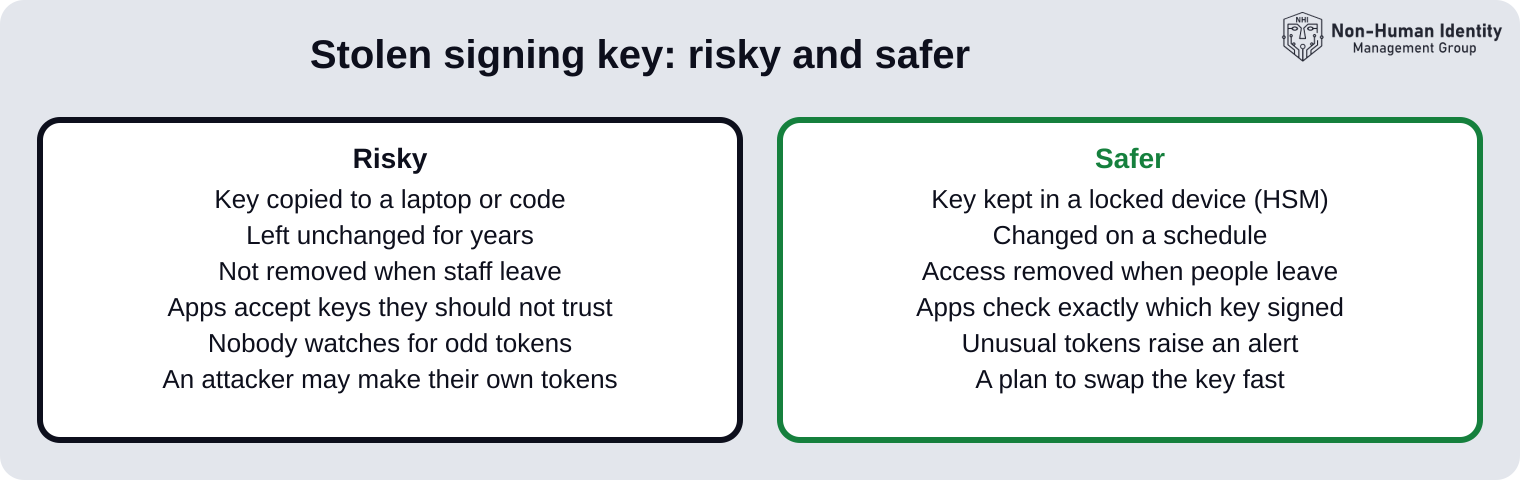
What could happen: an attacker who gains admin rights copies the key behind your single sign-on and signs in as anyone.
Check this: ask where your sign-on signing keys are kept and who can reach them.
If you build apps
What could happen: a sample key copied from the internet ends up in your live app, and strangers know it.
Check this: make sure every key in use was created for you, and fetch public keys from the issuer.
If you lead a team
What could happen: an engineer leaves, and a signing key they had access to stays the same for years.
Check this: add signing keys to your leaver checklist, and change them when key staff go.
What does it look like?
Here is the top part of a made-up token. It has been turned into readable text. Apps read these labels to pick a key.
Example only. All values are made up.
{
  "alg": "EXAMPLE-ALG",               (1)
  "kid": "FAKE-KEY-ID-0000",          (2)
  "iss": "https://login.example.com"  (3)
}
signature: FAKE-SIGNATURE-0000        (4)
- The method used to make the seal.
- Which signing key made the seal. Apps use this to pick the right public key.
- Who issued the pass. In a real file, this line would contain the sign-in service's address.
- The seal itself, made with the private signing key.
Why this is risky: someone with a copy of the private key can write any labels. Their seal will still fit.
The safer way: keep the private key where it is hard to copy. Have apps check exactly which issuer and key they trust.[1]
How does it work?
- You sign in. The sign-in service, sometimes called an identity provider, checks your password or other proof.
- It signs a token. The service puts details about you in a token and signs it with its private key.[1] A common token format is the JSON Web Token, set out in an internet standard.[2]
- The app checks the seal. The app gets the public key from the sign-in service's published list. It checks that the seal fits.[1]
- The app lets you in. It does not ask for your password again while the token is valid.
- Keys are changed over time. This is called key rotation. Microsoft, for example, rolls its keys over from time to time, and in an emergency can do so at once.[1]
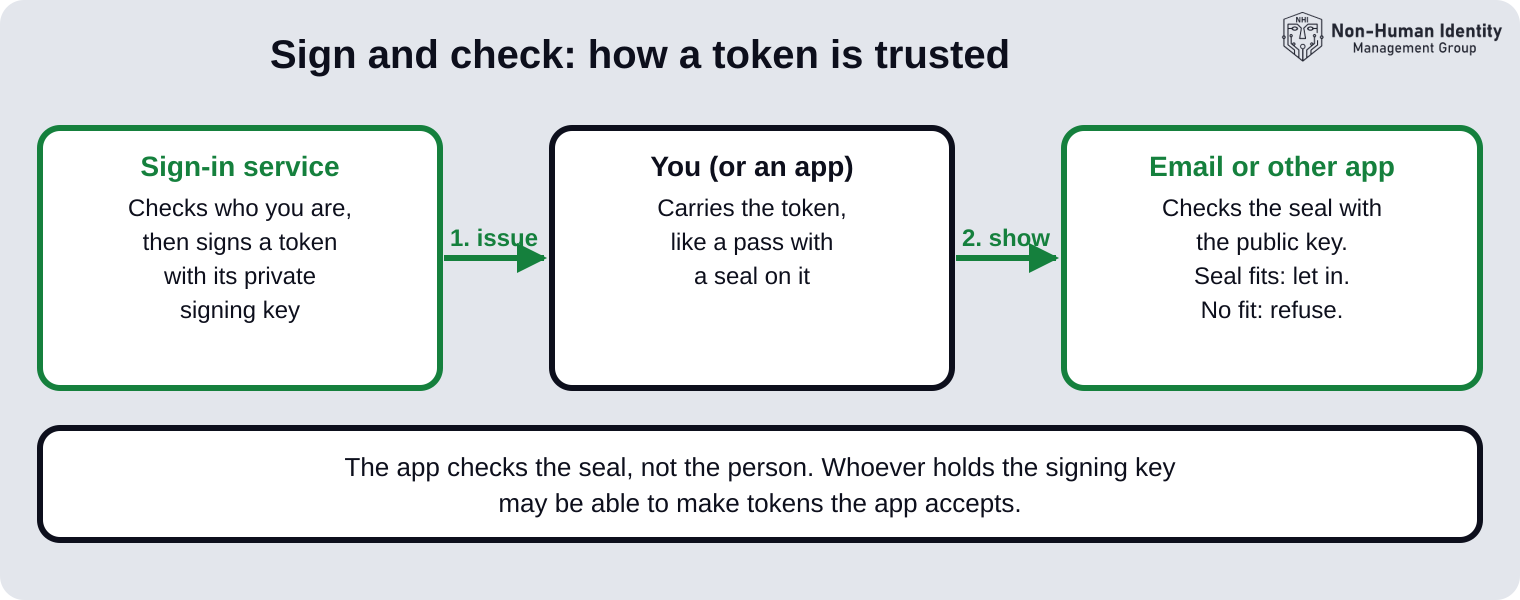
That last point is the weak spot. The app trusts the seal. If an attacker copies the private key, they can make their own token with any name in it. This is called token forgery. Some real cases show how it plays out:
- Storm-0558 (2023). Microsoft said a China-based group got a Microsoft consumer signing key. The group forged tokens to read email in Outlook. A checking flaw meant the key also worked for business email. About 25 organisations were affected.[3]
- Forged SAML tokens (2020). In the SolarWinds attacks, Microsoft warned that intruders with admin rights could take a sign-on signing certificate. With it, they could forge tokens for any existing user.[4]
- ASP.NET machine keys (2025). Microsoft found over 3,000 keys published online that some websites had copied. These keys sign page data. Attackers used one to run their own code on a server.[5]
- Coupang (2025). The online shop said a former employee took an internal security key while still working there. He then used it to access basic data from about 33 million accounts.[6]
A worked example
Hugo Strand looks after IT for a made-up design firm called Brightmoor Studio. Staff sign in once and then reach email, files and the booking app through single sign-on.
A security review asks a simple question: where is the signing key for single sign-on, and who can reach it? Hugo finds out that the firm uses a cloud sign-in service. The service holds and rotates the key, so nobody at Brightmoor has a copy.[1]
But the booking app is different. A contractor built it two years ago. It has its own signing key for staff tokens. Hugo finds the key in a settings file on a shared drive, and it has never been changed.
Hugo treats the key as possibly exposed. He works with the contractor to create a new key and stores it in the cloud provider's key vault. The app now reads the key from there. Then they switch off the old key. Staff have to sign in again once. Once the change has taken effect, old tokens should no longer give access.
Hugo also sets two new rules. Signing keys go on the list of things to change when a contractor or key engineer leaves. And the booking app now refuses tokens from any issuer it does not expect.
He checks the sign-in records he has. He finds no sign of odd tokens in the records available to him, and he writes down what he checked.
Myths and mistakes
| What people think | What is true |
|---|---|
| Multi-factor sign-in protects us from forged tokens. | Forged tokens do not pass through the normal sign-in step, so extra checks there may never run. |
| A signing key is just another password. | A password opens one account. A signing key may let someone make passes for many accounts. |
| Sample keys from online guides are fine to use. | Microsoft found thousands of published keys, and attackers used one. Create your own.[5] |
| Changing the key is enough after a theft. | Microsoft says rotating alone may not be enough. Look for what the attacker did, and rebuild if needed.[5] |
| Apps should save the public key once and keep it. | Keys change. Apps should fetch them from the issuer and handle changes on their own.[1] |
What can I do this week?
- List the services that sign tokens for your organisation, such as your sign-in service and any home-built apps.
- Ask where each signing key is kept, who can reach it and when it was last changed.
- Search shared drives and code for files that hold signing keys, with your IT team's help.
- Add signing keys to your leaver checklist for engineers and contractors.
- Write down who would replace a key in an emergency, and how long it would take.
Checklist
- We know every service that signs tokens for us.
- Each signing key has a named owner.
- Private signing keys are kept in a vault or locked hardware, not in files.
- Keys are changed on a schedule.
- Apps fetch public keys from the issuer and accept only the issuers they expect.
- Access to keys is removed when people leave.
- Unusual tokens or sign-ins raise an alert.
- We have a tested plan to replace a key quickly.
Common questions
Is a signing key the same as an encryption key?
Not quite. An encryption key hides what is inside. A signing key proves who made something and that it was not changed. A signed token can often still be read by anyone who has it. The signature only shows it is genuine.[2]
What is a hardware security module?
It is a locked device that keeps keys inside and does the signing itself. Programs ask it to sign, but the private key is designed not to leave the device. This makes copying the key much harder. Many cloud providers offer this as a service.
How would we know if a signing key was stolen?
Often only by its effects. Look for tokens signed by an old or unknown key, sign-ins with no matching record in the sign-in service, or access at odd times. In the Storm-0558 case, a customer spotted unusual email access and reported it.[3]
Do small businesses need to worry about this?
Mostly through their suppliers. If you use a cloud sign-in service, it usually manages the keys for you. The risk grows when apps are built in-house or by contractors, because those apps may hold their own keys. Ask your supplier how they protect theirs.
Where next?
Ready for the detail? Read the practitioner guide: Signing keys and certificates in breaches. It goes further into the attack patterns across real breaches, the detection signals to watch and the controls that limit the damage.
Also useful:
- JSON Web Tokens for Beginners
- Digital Signatures for Beginners
- Hardware Security Modules for Beginners
- JSON Web Key Sets (JWKS) and Signing Key Rotation Guide
- NHI Foundation Level Training
Related NHI Mgmt Group resources: Microsoft Storm-0558 Key Breach 2023[3] · Coupang Breach 2025[6] · Golden SAML and Federation Trust Abuse Defence Guide · Non-Human Identities for Beginners
Key terms
- Token signing key
- A private key a sign-in service uses to sign tokens so apps can trust them.
- Public key
- The shareable half of a key pair, used here to check a signature.
- JSON Web Token
- A common, compact token format that carries details and is usually signed.
- Token forgery
- Making a fake token that an app accepts, often by using a stolen signing key.
- Golden SAML
- An attack where a stolen sign-on signing certificate is used to forge SAML tokens.
- Key rotation
- Replacing a key with a new one on a schedule or after a problem.
- Hardware security module
- A locked device that stores keys and uses them without letting them out.
Sources and further reading
- Signing key rollover in the Microsoft identity platform. Microsoft Learn. https://learn.microsoft.com/en-us/entra/identity-platform/signing-key-rollover, accessed 28 Nov 2026.
- RFC 7519, JSON Web Token (JWT). M. Jones, J. Bradley, N. Sakimura, IETF, May 2015. https://www.rfc-editor.org/rfc/rfc7519, accessed 28 Nov 2026.
- Analysis of Storm-0558 techniques for unauthorized email access. Microsoft Threat Intelligence, 14 July 2023. https://www.microsoft.com/en-us/security/blog/2023/07/14/analysis-of-storm-0558-techniques-for-unauthorized-email-access/, accessed 28 Nov 2026.
- Advice for incident responders on recovery from systemic identity compromises. Microsoft Security, 21 December 2020. https://www.microsoft.com/en-us/security/blog/2020/12/21/advice-for-incident-responders-on-recovery-from-systemic-identity-compromises/, accessed 28 Nov 2026.
- Code injection attacks using publicly disclosed ASP.NET machine keys. Microsoft Threat Intelligence, 6 February 2025. https://www.microsoft.com/en-us/security/blog/2025/02/06/code-injection-attacks-using-publicly-disclosed-asp-net-machine-keys/, accessed 28 Nov 2026.
- Update on Coupang Korea cybersecurity incident. Coupang, 25 December 2025. https://www.aboutcoupang.com/English/news/news-details/2025/update-on-coupang-korea-cybersecurity-incident/, accessed 28 Nov 2026.
- The Ultimate Guide to Non-Human Identities. Lalit Choda, NHI Mgmt Group, January 2025. https://nhimg.org/the-ultimate-guide-to-non-human-identities, accessed 27 Nov 2026.