Single sign-on (SSO) is a way of signing in once, with one trusted account, and then using many different applications without signing in to each one separately.
This guide is for newcomers, students, career changers and managers who keep hearing about SSO and want to know what it really does. It explains the idea in plain English, introduces the identity provider that sits at the centre of SSO, walks through a sign-in step by step and follows a small fictional company as it switches SSO on. It also covers what SSO changes for security, both the gains and the new risks.
By the end of this guide you will be able to:
- Explain what single sign-on is and what an identity provider does.
- Understand why SSO helps security and where it concentrates risk.
- Describe what happens, step by step, when you sign in with SSO.
- Identify practical first steps to plan SSO for a small organisation.
Key takeaways
- One sign-in, many apps. You prove who you are once to an identity provider, and connected apps trust that proof instead of asking for their own password.
- The identity provider becomes the front door. Strong sign-in rules, such as multi-factor authentication, can be set in one place and apply to every connected app.
- SSO is not one shared password. Your password goes only to the identity provider; the apps receive a signed message saying you have signed in.
- It also concentrates risk. If the main account or the identity provider is compromised, many apps are exposed at once, so it needs the strongest protection you have.
- SSO is for people, not software. Scripts, services and other non-human identities sign in with their own credentials and need their own controls.
What it is, in plain English
Without SSO, every application keeps its own list of usernames and passwords. A typical employee might have separate logins for email, the HR system, the expenses tool, the project tracker and a dozen more. Each one is another password to remember, reuse or write down, and another account for IT to create and remove.
With SSO, the applications hand the job of checking who you are to one trusted service, called an identity provider (IdP). The IdP holds your account, checks your password and any second factor, and then tells each application, "this person has signed in, and here is who they are". The applications are called service providers or relying parties, because they rely on the IdP's answer. Microsoft describes SSO as letting users sign in once with one set of credentials and then open every assigned application without signing in again.[2]
A helpful comparison is a wristband at a festival. You show your ticket and ID once at the main gate, and you get a wristband. After that, each stage and tent checks your wristband instead of asking for your ticket again. The gate is the identity provider, the wristband is the signed proof, and the stages are the applications. Where the analogy breaks down: a wristband lasts all weekend, while SSO proofs are short-lived and digitally signed, and each app can ask you to sign in again or apply its own extra checks.
In the standards, the technical name for this arrangement is federation. The US National Institute of Standards and Technology (NIST) describes federation as authenticating a person to a relying party without that relying party checking their password or other authenticators directly, and notes that it is sometimes known as single sign-on.[1] If you want to know where SSO ends and federation between organisations begins, see Federation vs SSO.
Why it matters to you
- If you run a small business: SSO means staff have one strong account instead of many weak ones, and when someone leaves, disabling one account cuts off every connected app.
- If you are new to a security job: the identity provider is one of the most important systems you will look after. Knowing how SSO works helps you read sign-in logs and spot problems.
- If you are a manager: SSO gives you one place to see who can reach which apps, which helps with audits, starters and leavers, and it usually means fewer password reset requests to the help desk.[2]
SSO changes security in two directions. On the plus side, sign-in rules live in one place. You can require multi-factor authentication (MFA), a second proof such as an app prompt or security key, on the IdP and every connected app benefits. Apps that use SSO no longer need to store their own copy of your password.[2] NIST's control catalogue, SP 800-53, covers this ground in its identification and authentication controls, such as IA-2 for an organisation's own users and IA-8 for outside users.[3]
On the other side, SSO puts many eggs in one basket. A stolen main account, a hijacked sign-in session or a misconfigured identity provider can open many apps at once. The digital keys the IdP uses to sign its messages become very valuable, because anyone holding them could create convincing proofs. We suggest treating the IdP and its administrator accounts as some of your most sensitive systems. For the attacks that target this trust, see the Golden SAML and Federation Trust Abuse Defence Guide.
How it works, step by step
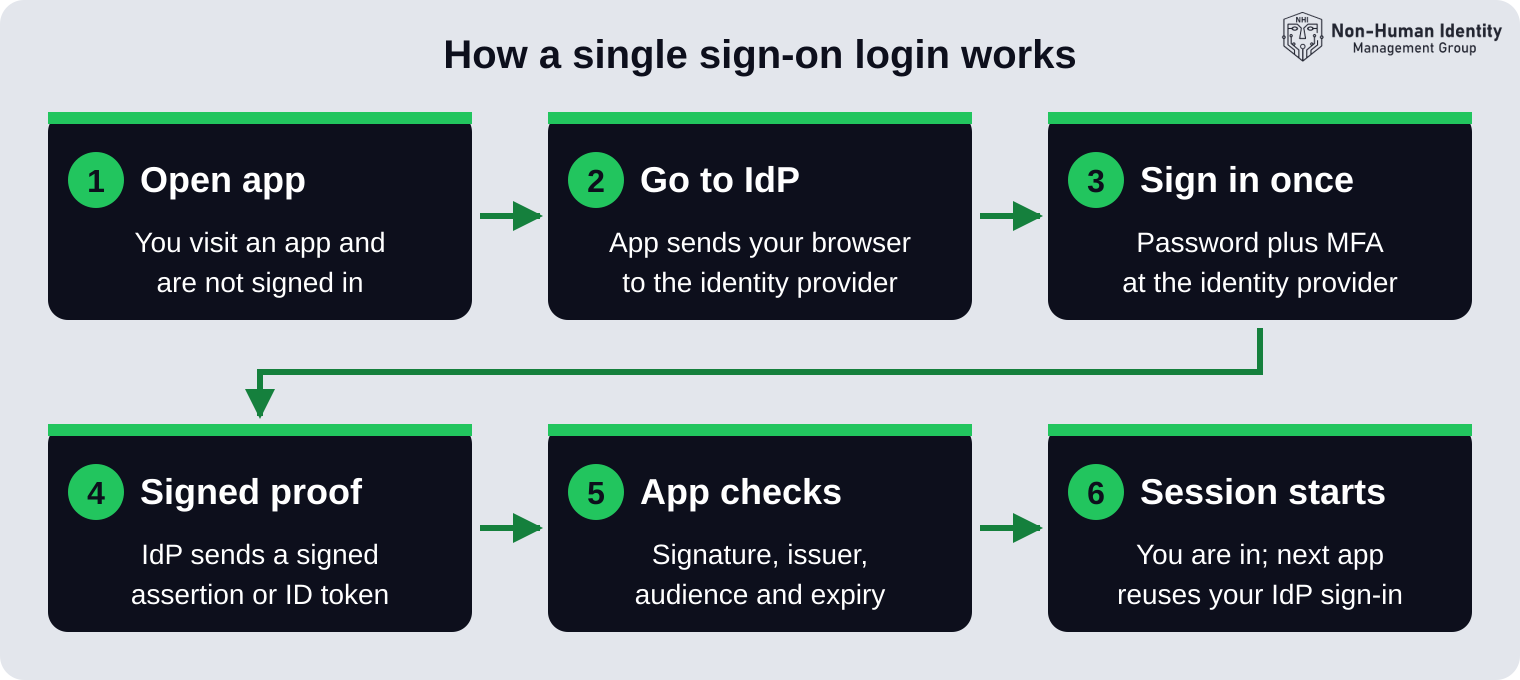
The exact messages differ between protocols, but a typical sign-in to a web application looks like this.
- Set up the trust. Before anyone signs in, an administrator connects the application to the identity provider. They exchange settings such as web addresses and the public key the app will use to check the IdP's signature, and decide which people may use the app.
- Open the app. You go to the application. It sees you are not signed in and sends your browser to the identity provider.
- Sign in at the IdP. The IdP asks for your password and, if required, MFA. If you already signed in there earlier that day, it may skip this step, which is the "single" in single sign-on.
- Receive the signed proof. The IdP creates a short, digitally signed message about you and sends your browser back to the app with it. In SAML this is called an assertion; in OpenID Connect it is called an ID token.[4][5]
- Check the proof. The app checks the signature, that the message came from the IdP it trusts, that it is meant for this app and that it has not expired. NIST describes an assertion as a verifiable statement about the person's account that the relying party validates.[1]
- Start a session. If everything checks out, the app starts its own session for you, usually held in a browser cookie, and lets you in.
- Repeat without retyping. When you open a second connected app, the same journey happens, but the IdP recognises your existing sign-in and sends a fresh proof without asking for your password again.
Two protocols do most of this work for web and mobile apps, and the table below shows how they compare at a beginner level. Both are open standards.
| Protocol | What the signed proof is called | Where you often meet it |
|---|---|---|
| SAML 2.0 (Security Assertion Markup Language) | Assertion, an XML document that carries statements about the person[5] | Long-established business web applications and many software as a service products[2] |
| OpenID Connect (OIDC) | ID token, a JSON Web Token with details about the sign-in event[4] | Modern web, mobile and API scenarios; it is an identity layer on top of OAuth 2.0[2][4] |
This guide does not go into the protocols themselves. For those, read SAML for Beginners and OpenID Connect for Beginners.
Useful distinctions
- Password-based "SSO" is not the same as federation. Some products offer to store a password for an older app and type it in for you. Microsoft lists this as password-based SSO, separate from federation-based SSO with SAML or OIDC, and says a simple linked app tile does not provide true single sign-on at all.[2]
- Signing out is not one switch. The IdP and each app keep separate sessions. Logging out of one may leave others open until they time out, which is why single logout and session timeouts matter. The How Single Sign On Works guide explains the options.
- SSO is not provisioning. SSO checks who you are at sign-in. Creating, changing and removing your account inside each app is a separate job called user provisioning, often automated with a standard called SCIM.
- A directory is not always an IdP. A directory stores accounts; an identity provider signs people in to apps. Some products do both. See Directory Service vs Identity Provider.
- Software uses different methods. A non-human identity is an identity with an account and credentials that represents software or a device, such as a script, a service or an AI agent. It does not use a browser sign-in page. It authenticates with its own credentials, ideally short-lived ones issued by the platform, which is a separate topic covered in Workload Identity Federation for Beginners.
A worked example
Harbour Design is a fictional architecture studio with 35 staff. Staff use a cloud office suite, an online file-sharing tool, a project tracker, an accounting app and a drawing review portal. Each app had its own login. Ellie, the office manager who also looks after IT, spends part of most Mondays resetting forgotten passwords.
Ellie decides to use the identity provider that comes with the company's office suite. Over a month she:
- Turns on MFA at the IdP: every member of staff registers an authenticator app before anything else changes.
- Connects the apps one at a time: she starts with the project tracker, tests it with two volunteers for a week, then adds the file-sharing tool and the accounting app. The drawing review portal does not support SAML or OIDC, so she records it as an exception and keeps its own strong password and MFA for now.
- Keeps a way back in: she keeps one administrator account for each connected app outside SSO, stored securely and checked monthly, in case the IdP is ever unavailable. Any use of it has to be agreed with the studio's director, written down and reviewed afterwards.
Two months later, a designer called Marcus leaves the studio. Ellie disables his single account at the identity provider, and he can no longer sign in to any of the connected apps through SSO. She still checks the drawing review portal by hand, and she asks each app's admin page whether Marcus had any open sessions or locally created accounts, because disabling the IdP account does not always end sessions that are already running.
SSO did not solve everything. One app is still outside it, and Ellie now protects the identity provider's admin account with a hardware security key, because that one account controls access to almost everything the studio uses.
Myths and misunderstandings
| What people think | What is true |
|---|---|
| SSO means every app shares the same password. | With federation-based SSO, your password goes only to the identity provider. Apps receive a signed proof that you have signed in, not your password. |
| SSO makes us less secure because there is one password. | It concentrates risk, but it also lets you put strong MFA and monitoring in one place. The answer is to protect the IdP account very well, not to keep many weak passwords. |
| Logging out of the portal logs me out of everything. | The IdP and each app usually hold separate sessions. Some may stay open until they time out. |
| OAuth is a sign-in protocol. | OAuth 2.0 is about granting access to resources. OpenID Connect adds the identity layer on top of it that SSO uses.[4] |
| Once SSO is on, leavers are handled automatically. | Disabling the IdP account blocks new SSO sign-ins, but local accounts, open sessions and apps outside SSO still need checking. |
| SSO covers our service accounts and scripts too. | SSO is for people. Software identities need their own credentials and controls. |
Key terms
- Single sign-on (SSO)
- A login method that lets a user reach multiple applications with one authenticated session, because connected apps accept a trusted proof issued by an identity provider.
- Identity provider (IdP)
- The system that authenticates a user or workload and issues the trust signal that downstream applications rely on.
- Relying party
- The application or service that accepts an authentication proof or token and grants access based on it.
- Service provider
- In federation, the application that consumes an identity assertion and decides whether to allow access; SAML's name for a relying party.
- Federation
- The arrangement that lets a system accept identity assertions from a trusted identity provider instead of keeping its own credentials.
- Multi-factor authentication (MFA)
- Requiring two or more independent proofs before access is granted, so a stolen password alone is less likely to open a system.
- Session
- The state of signed-in access that exists after a credential has been checked; it is separate from the account itself.
- Single logout
- A federated sign-out that tries to end sessions across the application and the identity provider; it is not the same as removing access.
- User provisioning
- Creating, changing and removing accounts and access rights across systems, so access matches each person's current role.
- Audit log
- Time-stamped records of identity and access events, such as who signed in, when and to which app.
Common questions
What is single sign-on in simple terms?
It means you sign in once to a trusted service and can then use many apps without typing a password into each one.
What is an identity provider?
It is the service that checks who you are and then vouches for you to other apps. Many organisations use the identity service that comes with their office suite or a dedicated identity platform.
Is SSO the same as a password manager?
No. A password manager stores a different password for each site and fills it in. Federation-based SSO means the app does not need its own password for you at all.
Do I still need MFA with SSO?
Yes. MFA on the identity provider is one of the most important settings, because that one sign-in now opens many apps.
What happens if the identity provider goes down?
People may be unable to sign in to connected apps. We suggest keeping a small number of controlled emergency admin accounts, stored securely, monitored and only used with approval. See Break-Glass Accounts for Beginners.
Can every app use SSO?
Not every app. Many business apps support SAML or OIDC, sometimes only on certain plans. Older apps may need a different approach or remain a recorded exception.
First steps
Three things you can do this week:
- List your apps. Write down every app your organisation signs in to, who uses it and whether its settings mention SAML, OpenID Connect or "SSO".
- Protect the identity provider first. Turn on MFA for every account at your IdP, and use the strongest method you have, such as a security key, for its administrators.
- Pilot one app. Connect one low-risk app to SSO for a small group, test signing in and out, then widen it. Keep the app's own admin login as a controlled fallback while you test, and if you need to turn SSO off for that app, do it as an approved, recorded change with a date to try again.
Checklist
- We have a list of our apps and know which ones use SSO.
- Every account at the identity provider uses MFA.
- IdP administrator accounts are few, separate from everyday accounts and use the strongest sign-in method we have.
- Apps connected to SSO no longer allow everyday staff to sign in with a local password where the app lets us turn that off.
- Apps outside SSO are recorded as exceptions, with their own strong password and MFA.
- When someone leaves, we disable their IdP account and check apps outside SSO and any open sessions.
- We keep controlled emergency access for when the IdP is unavailable, and we test it.
- Someone reviews IdP sign-in and admin logs regularly.
Check your understanding
1. What does the identity provider do in SSO?
Answer: it checks who you are and sends connected apps a signed proof that you have signed in.
2. Does an app using federation-based SSO receive your password?
Answer: no. It receives a signed assertion or ID token from the identity provider and checks it.
3. Why should the identity provider's admin account get extra protection?
Answer: because it controls sign-in to many apps at once, so a compromise there has a large blast radius.
4. A leaver's IdP account is disabled. What else should you check?
Answer: apps outside SSO, local accounts inside apps and any sessions that are still open.
Suggested learning pathway
- Start with the basics of accounts and access in Identity and Access Management for Beginners.
- Learn about the second factor that should protect your IdP in Multi-Factor Authentication for Beginners.
- For the older enterprise protocol, read SAML for Beginners.
- For the modern protocol built on OAuth 2.0, read OpenID Connect for Beginners.
- To understand what happens after sign-in, read Session Tokens and Cookies for Beginners.
- For the practitioner view of SSO flows, sessions and logout, see How Single Sign On Works.
- To separate two terms that are often mixed up, see Federation vs SSO.
- For attacks on the trust behind SSO, see the Golden SAML and Federation Trust Abuse Defence Guide.
Standards and references
- SP 800-63C-4, Digital Identity Guidelines: Federation and Assertions. National Institute of Standards and Technology (NIST). https://pages.nist.gov/800-63-4/sp800-63c.html, accessed 27 Nov 2026.
- What is single sign-on? Microsoft Learn, Microsoft, last updated 23 June 2026. https://learn.microsoft.com/en-us/entra/identity/enterprise-apps/what-is-single-sign-on, accessed 27 Nov 2026.
- SP 800-53 Rev. 5, Security and Privacy Controls for Information Systems and Organizations. National Institute of Standards and Technology (NIST). https://csrc.nist.gov/pubs/sp/800/53/r5/upd1/final.
- OpenID Connect Core 1.0 incorporating errata set 2 (Final). OpenID Foundation, 15 December 2023. https://openid.net/specs/openid-connect-core-1_0.html.
- Security Assertion Markup Language (SAML) V2.0 Technical Overview, Committee Draft 02. OASIS Security Services Technical Committee, 25 March 2008. https://docs.oasis-open.org/security/saml/Post2.0/sstc-saml-tech-overview-2.0.html.
Related NHI Mgmt Group resources: Directory Service vs Identity Provider · Google Workspace SSO With a Third-Party IdP · Non-Human Identities for Beginners