Tor is a free network that hides where your internet traffic comes from by passing it through several relays.
This guide is for anyone who keeps hearing about Tor and wants to know what it does and does not do. If you run a business network, you may also need to decide whether to allow Tor traffic, because both privacy seekers and attackers use it.
In short
- Tor sends your traffic through three volunteer computers, so no single one knows both who you are and where you are going.
- It is different from a VPN, which sends everything through one company you have to trust.
- Tor does not hide what you type. If you sign in or give your name, the website knows who you are.
- Organisations choose whether to block, watch or allow Tor traffic, and should write that choice down.
What you will learn
- Explain how Tor hides who is talking to whom.
- Spot what each relay can and cannot see.
- Check for the common mistakes that undo Tor's protection.
- Ask what your organisation's rule on Tor traffic is.
Status: correct as at 28 November 2026, based on the Tor Project's own support pages. Laws on privacy tools differ between countries and change; check the official rules where you live.
This guide explains the topic in general terms and is not legal advice.
- Your internet address (IP address)
- the number that shows where your connection comes from.
- Passing computer (relay)
- a volunteer computer in the Tor network that hands traffic on to the next one.
- Layers of locks (onion routing)
- wrapping data in several layers of encryption, one for each relay to remove.
What is Tor?
Think of passing a note across a classroom inside three sealed envelopes. The first pupil reads only the outer envelope, which says who to pass it to next. Each pupil opens one envelope and passes it on, so nobody knows both who wrote the note and who gets it.
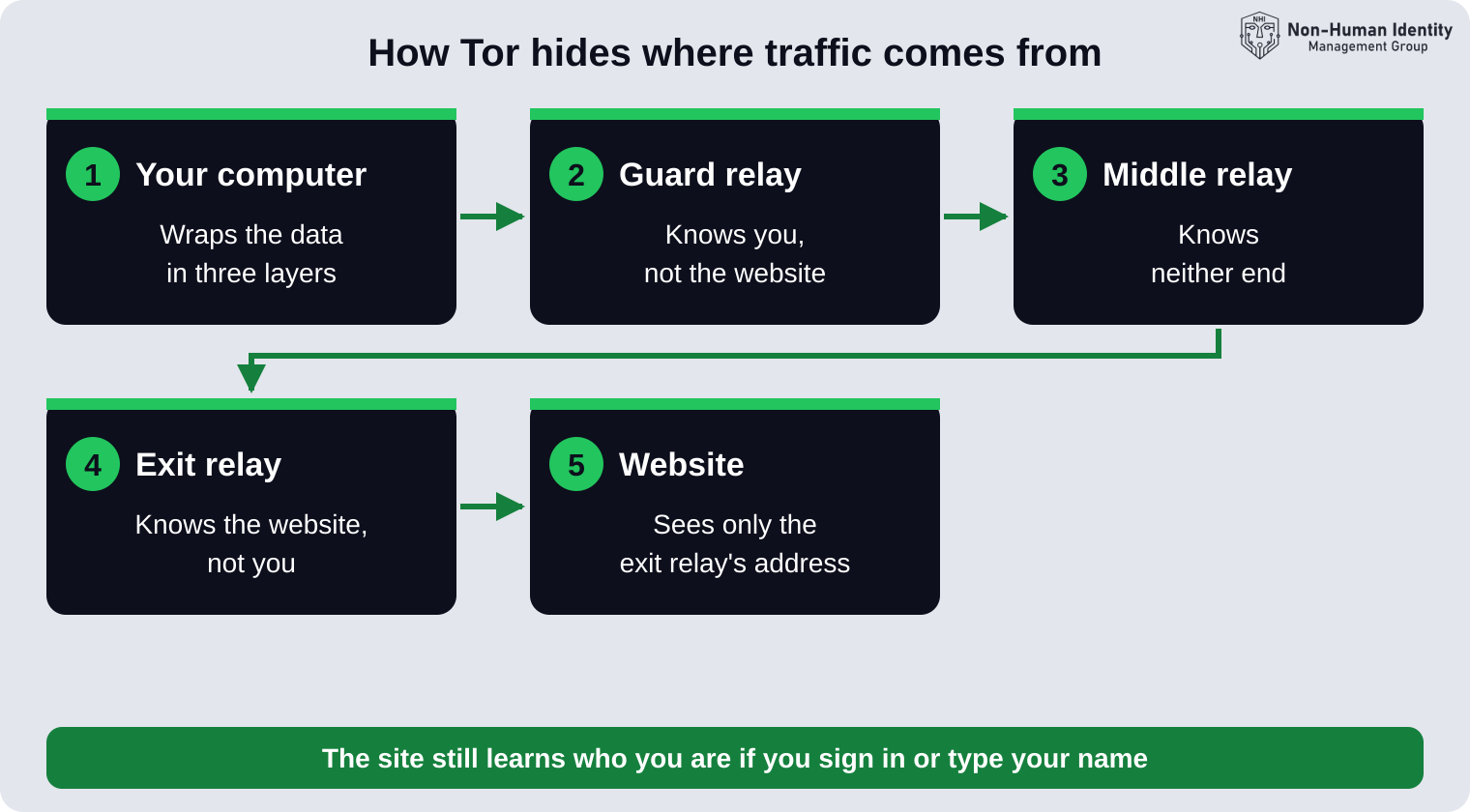
Tor works the same way for internet traffic. Normally, every website you visit can see your IP address, the number that shows where your connection comes from. Tor sends your traffic through three volunteer computers, called relays. Your data is wrapped in three layers of encryption (scrambling that only the right key can undo). Each relay removes one layer and learns only where to send the data next.[1]
This method is called onion routing, because of the layers. The name Tor comes from "The Onion Routing".[3]
Where the comparison stops working: pupils could compare notes later. On Tor, each layer is locked with a different key, so a relay can open only its own layer. And no single relay knows the whole path a piece of data has taken.[1]
Why does it matter?
Many people use Tor to keep their browsing private. Attackers also use it, because their traffic seems to come from a Tor exit, not their own computer. So security teams have to decide how to treat it.[6]
If you care about your privacy at home
What could happen: you use Tor, then sign in to your email, and the site knows exactly who you are.
Check this: decide what you need hidden before choosing Tor or a VPN.
Next: VPNs for Beginners
If you look after a business network
What could happen: attackers reach your systems through Tor, and nobody is watching for it.
Check this: agree whether Tor is blocked, watched or allowed, and why.
What does it look like?
Here is a made-up view of one Tor path, called a circuit, showing what each relay can see.
Example only. All values are made up.
You          address 192.0.2.10 (example)
  -> Guard relay   sees: your address      not: the website   (1)
  -> Middle relay  sees: guard and exit    not: you or site   (2)
  -> Exit relay    sees: example.com       not: your address  (3)
  -> example.com   sees: the exit relay's address only        (4)
- The first relay, called the guard, knows who you are but not where you are going.
- The middle relay knows neither end.
- The exit relay knows the website but not who you are.
- In a real file, this line would contain the exit relay's internet address, not yours.[2]
Why this is risky: if the site does not use HTTPS (the padlock in your browser), the exit relay can read what you send.[4]
The safer way: check for the padlock or a .onion address before sending anything private.
How does it work?
- Get the list. Tor software, usually Tor Browser, downloads a public list of relays.[2]
- Pick a path. Your computer picks three relays: a guard, a middle and an exit.[2]
- Wrap the data. Your data is locked three times, with a different key for each relay.[1]
- Peel one layer at each stop. Each relay removes its layer and knows only the stop before and the stop after.[1]
- Leave through the exit. The exit relay sends the traffic to the website, which sees the exit's address, not yours.[2]
Some websites can only be reached through Tor. They have addresses ending in .onion and are called onion services. The server's own address is hidden too. You and the service each pick three relays, and the two paths meet in the middle.[5]
A worked example
Zoltan Olsen is a reporter at a fictional local news website. A source wants to share papers about a council contract without being named.
The news site has set up a secure drop box that is reachable as an onion service. Zoltan tells the source to install Tor Browser from the Tor Project's own website, and to use it to reach the drop box.
Zoltan pictures the three envelopes. The source's internet provider can see that they are using Tor, but not which site they visit. The guard relay sees the source's address but not where the traffic goes. Because the drop box is an onion service, its own address stays hidden as well.[5]
Two things could still give the source away, so Zoltan's instructions cover both. First, the source must not type their real name or personal email into the upload form. Second, Zoltan opens the papers on a computer that is not connected to the internet. The Tor Project warns that some documents can fetch things from the internet outside Tor and reveal an address.[4]
Tor lowers the risk of the source being traced. It does not remove every risk, and Zoltan's careful habits do the rest.
Myths and mistakes
| What people think | What is true |
|---|---|
| Tor makes me completely anonymous. | If you sign in or fill in forms with your name, the site knows who you are. Be careful with web forms.[4] |
| Adding privacy add-ons to Tor Browser makes it safer. | The Tor Project advises against extra add-ons, because they may bypass Tor.[4] |
| File sharing over Tor is private. | The Tor Project says file-sharing apps can ignore the settings and reveal your real address.[4] |
| Tor encrypts everything all the way to the website. | Tor protects traffic inside its network. The last hop depends on the site using HTTPS or being an onion service.[4] |
| Blocking the public list of relays keeps Tor out. | Some entry points, called bridges, are not publicly listed. Pair any blocking with monitoring.[6] |
What can I do this week?
- Decide what you want to hide: where you browse from, or your traffic on public Wi-Fi.
- If you use Tor, get Tor Browser only from the Tor Project's own website and keep it updated.
- Open downloaded documents offline, not while Tor Browser is running.
- At work, ask whether your network blocks, watches or allows Tor, and why.
Checklist
- I can explain what the guard, middle and exit relays each see.
- I know that signing in or sharing my name removes privacy for that site.
- I do not add extensions to Tor Browser or share files over Tor.
- I check for HTTPS or a .onion address before sending anything private.
- I open downloaded documents offline.
- Our team has a written decision on Tor traffic and the reason for it.
Common questions
Is Tor the same as a VPN?
No. A VPN sends your traffic through one company's computer, so you have to trust that company. Tor sends it through three separate volunteer relays, so no single one knows both you and the website. A VPN is often faster. Tor spreads trust more widely. See VPNs for Beginners.
Can the website I visit see who I am?
Not from your address alone. The website sees the exit relay's address, not yours. But if you sign in, type your name or share personal details, the site knows who you are. Tor hides where you connect from, not what you choose to tell a site.
Can my internet provider see that I use Tor?
Usually yes. The addresses of Tor relays are public, so your provider can normally see that you are connecting to Tor.[2] It cannot see which websites you visit through it. The first relay, the guard, sees your address but not your destination. That split is the whole idea behind the three relays.
Why do some websites block Tor?
Because the list of relays is public, websites can spot traffic from Tor exits. Some block it to cut down on abuse, since attackers also use Tor to hide. A US government advisory sets out options for organisations, from blocking to watching to allowing Tor for chosen services.[6]
Where next?
Ready for the detail? Read the practitioner guide: Anonymity Networks for Defenders Guide. It goes further into spotting Tor traffic, using the official relay lists and choosing a block, watch or allow policy.
Also useful:
- VPNs for Beginners
- Data Privacy for Beginners
- Encryption for Beginners
- TLS and HTTPS for Beginners
- Privacy-Respecting Browsers and Search Guide
Related NHI Mgmt Group resources: Dark Web Monitoring Guide · Privacy Enhancing Technologies for Beginners · Networking Fundamentals for Beginners
Key terms
- Tor
- A network that routes traffic through several relays with layered encryption, so no single relay sees both the user and the destination.
- Onion routing
- Passing traffic through several relays, each removing one layer of encryption and learning only the stop before and after.
- Tor Browser
- A web browser that sends browsing through the Tor network.
- Tor exit node
- The last relay before traffic reaches a website. Its address is the one the website sees.
- Onion service
- A service reachable only through Tor with a .onion address, which hides where the server is.
- IP address
- The network number that shows where internet traffic comes from.
- Anonymity network
- A network that hides who is talking to whom by passing traffic through several relays. Tor is the best-known example.
Sources and further reading
- How Tor works: Overview. Tor Project Support, The Tor Project. https://support.torproject.org/about-tor/how-tor-works/overview/, accessed 28 Nov 2026.
- Types of relays on the Tor network. Tor Project Community, The Tor Project. https://community.torproject.org/relay/types-of-relays/, accessed 28 Nov 2026.
- History. The Tor Project. https://www.torproject.org/about/history/, accessed 28 Nov 2026.
- Staying anonymous. Tor Project Support, The Tor Project. https://support.torproject.org/faq/staying-anonymous/, accessed 28 Nov 2026.
- Onion services overview. Tor Project Community, The Tor Project. https://community.torproject.org/onion-services/overview/, accessed 28 Nov 2026.
- AA20-183A: Defending Against Malicious Cyber Activity Originating from Tor. Cybersecurity and Infrastructure Security Agency (CISA) with the FBI, 1 July 2020, revised 2 August 2021. https://www.cisa.gov/news-events/cybersecurity-advisories/aa20-183a, accessed 28 Nov 2026.