A site reliability engineer keeps online services running well, using software to fix problems before people notice them.
This guide is for students, career changers and people in IT support who are curious about the job. You do not need to know how to code to follow it. If your business relies on a website or app, someone is doing this work, even if their title is different.
In short
- Site reliability engineers, or SREs, keep websites and apps fast and available.
- They agree a reliability target with the business, measure it and act when it slips.
- They write software to replace repetitive manual work, and take turns being on call for emergencies.
- Because they can change live systems, they need careful, limited and recorded access.
What you will learn
- Explain what a site reliability engineer does in one sentence.
- Describe a typical day, including what being on call means.
- Spot the skills from your own work that fit the role.
- Explain why SREs need careful access to live systems.
- Reliability target (SLO)
- an agreed goal for how well a service should work, such as how many requests should succeed.
- On call
- taking a turn to be the person who responds when a service has a problem, even out of hours.
- Live system (production)
- the real service customers are using right now, as opposed to a test copy.
What is a site reliability engineer?
Think of the engineers who keep a busy railway running. They fix a broken signal fast. Then they redesign the signals so the same fault is less likely next time. SREs do this for websites and apps.
Google, a pioneer of the role, describes SRE as what happens when you ask a software engineer to design an operations team.[1] Operations means the day-to-day work of keeping services running. Instead of doing that work by hand, SREs write software to do it.
The job sits between building software and running it. SREs watch how a service behaves, respond when it breaks and plan for growth. They also check that changes go out safely.
Where the comparison stops working: a railway engineer can see the track. An SRE works with systems spread across many computers, so most of what they see comes from measurements and records.
Why does it matter?
When a website goes down, customers may leave and staff may be unable to work. SREs aim to make outages rarer, shorter and better understood.
If you work in IT support
What could happen: you fix the same problem by hand every week, and nobody has time to stop it at the source.
Check this: list the tasks you repeat most. These are the first things an SRE would automate.
If you are a student or career changer
What could happen: you see SRE job adverts full of tool names and assume the role is out of reach.
Check this: look past the tools at the basics: Linux, networks, scripting and calm problem-solving.
If you manage a team that runs a service
What could happen: engineers hold permanent admin access to live systems, so one stolen login could do serious harm.
Check this: ask how engineers get access to live systems in an emergency, and whether it is recorded.
What does it look like?
SREs often work from a short reliability report like this made-up one.
Example only. All values are made up.
Service:        example-shop checkout
Target (SLO):   99.9% of payments succeed each month   (1)
This month:     99.95% so far                          (2)
Error budget:   about half left                        (3)
Pages to on-call this week: 1                          (4)
Manual tasks this week: 6 hours restarting a job       (5)
- The reliability target the business agreed.
- The measured result so far this month.
- How much failure is still allowed before the team slows down risky changes.
- One alert that woke someone up. Few pages is a good sign.
- Repetitive manual work. This line points to the next thing to automate.
Why this is risky: without a target, people argue about whether a service is good enough. If nobody counts manual work, it can slowly take over the week.
The safer way: agree a target, measure it, and spend the allowed failure on new features. When it runs low, focus on stability.
How does it work?
Most SRE work follows a few ideas from Google's public books on the subject.
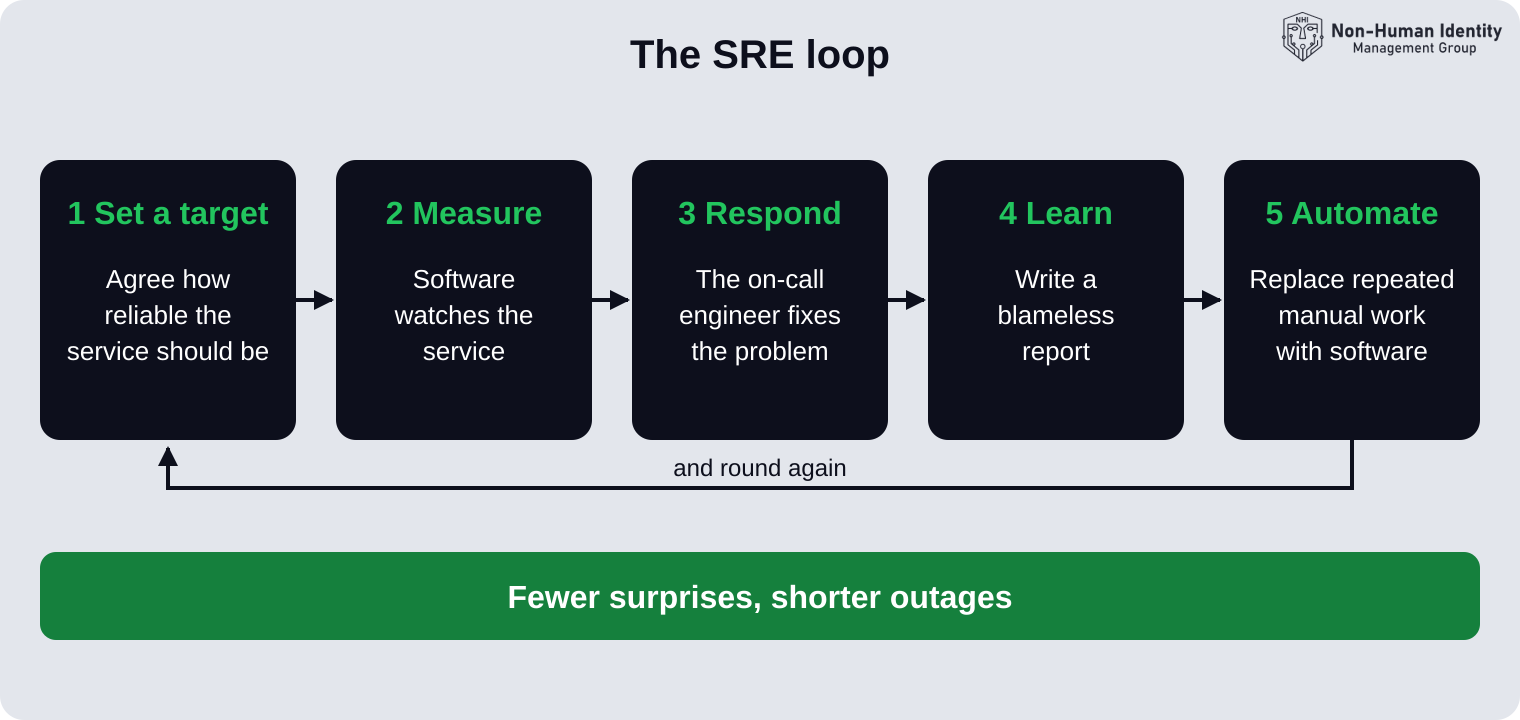
- Agree a target. The team picks a measure, such as the share of requests that succeed, and sets a goal for it. The goal is called a service level objective (SLO).[2]
- Allow some failure. Google argues that 100 per cent is the wrong target for most services. The gap between the target and perfect is an error budget, which the team can spend on launches and change.[1]
- Watch and alert. Software reads the measurements and alerts a person only when action is needed.[1]
- Respond and learn. The on-call engineer fixes the problem. Afterwards the team writes a blameless postmortem, a report that looks for causes without blaming people.[3]
- Cut the toil. Toil is manual, repetitive work that could be automated. Google aims to keep it under half of each SRE's time.[4]
Why access matters in this job
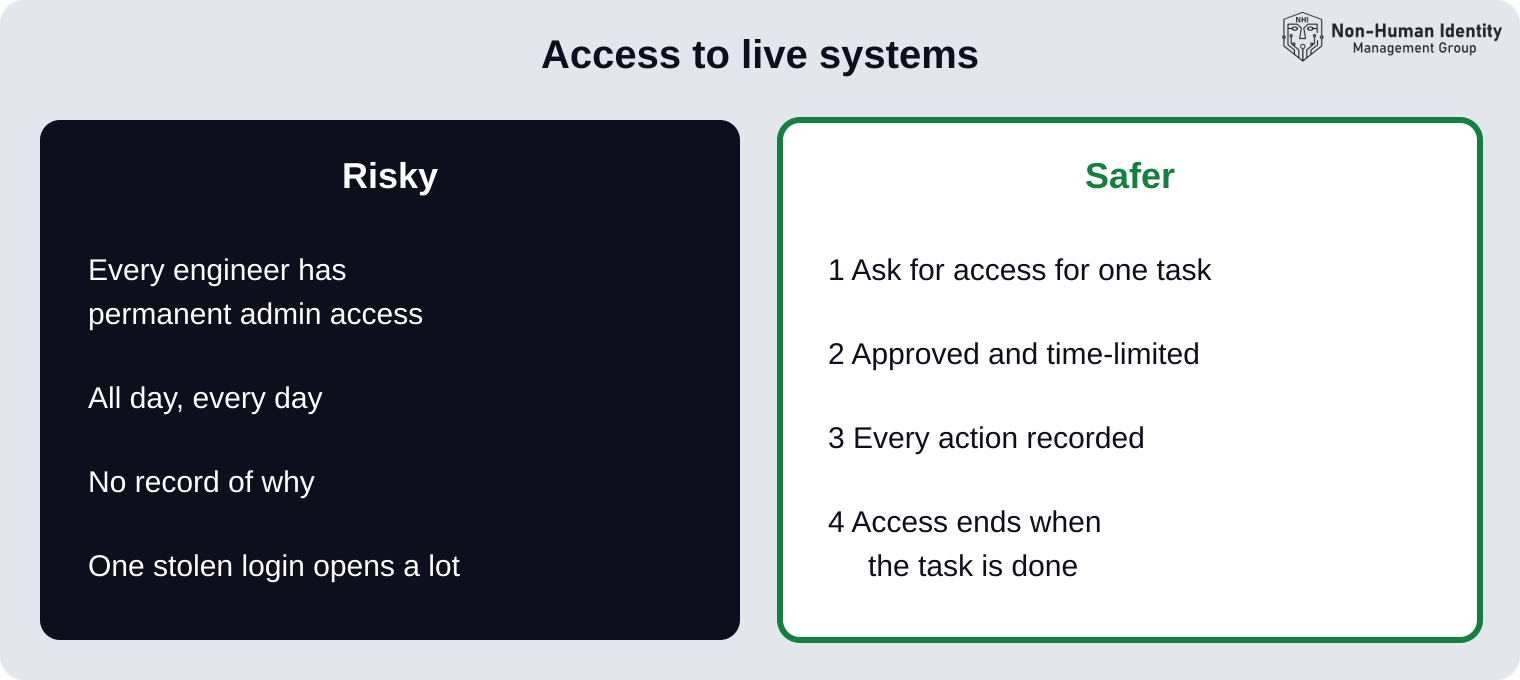
SREs can often change live systems. That access is powerful, so it is a target for attackers. A good principle is least privilege: give each person only the access their task needs.[5]
Many teams give engineers extra access only for a fixed time, with a reason and a record. This is called just-in-time access. Emergency "break-glass" access is kept for real emergencies, and each use is reviewed afterwards.
Skills and tools
Few people start with all of these. Most build them up from a nearby job.
- Linux and networks. How servers and connections work, and how to find out why something is slow.
- Coding and scripting. Enough to automate tasks and read other people's code.
- Cloud and containers. How services run on cloud platforms and in packaged units called containers.
- Monitoring tools. Dashboards, alerts and logs, which are records of what happened.
- Calm under pressure. Clear thinking and clear messages during an outage.
A worked example
Nadia Lomax is an SRE at Basalt Lettings, a fictional letting agency with an online booking site. She moved from IT support two years ago. This week she is on call.
At 7.40 her phone alerts her. Bookings are failing for about one in ten visitors. She asks for access to the live booking system. Her manager, Amara Kader, approves it for two hours. Every command Nadia runs is recorded.
Nadia sees that a change released last night is causing errors. She rolls it back, which means returning to the previous version. Bookings recover within a short time and the alerts stop. Her access ends when the two hours are up.
Later she writes a blameless postmortem. It does not ask who made the mistake. It asks why the test copy did not catch it. The team agrees to add a test and release changes to a few visitors first.
In the afternoon Nadia works on her project. Each week someone spends hours restarting a stuck report job by hand. She writes a script that spots the stuck job and restarts it safely. That should free up time for engineering work.
Before she logs off, she checks the reliability report. The month's target is still met, but the error budget has shrunk. The team agrees to hold one risky change until next week.
Myths and mistakes
| What people think | What is true |
|---|---|
| SREs aim for 100 per cent uptime. | Google argues 100 per cent is the wrong target for most services. Teams agree a realistic target instead.[1] |
| SRE is just a new name for the operations team. | SREs are expected to spend a large share of their time on engineering, not only manual work.[4] |
| Postmortems are for finding who to blame. | Blameless postmortems look for causes in systems and processes, so people report problems openly.[3] |
| SREs need permanent admin access to do their job. | Many teams grant access for a task, for a limited time, with a record. That fits the least privilege principle.[5] |
| Being on call means being woken up every night. | Google's guidance keeps pages rare and on-call time limited. Frequent pages are treated as a problem to fix.[6] |
What can I do this week?
- Read the introduction to Google's free online SRE book.[1]
- Pick a website you use and write down one reliability target you would set for it.
- Write a short script that automates one small task you repeat.
- Ask someone in IT how they get access to live systems in an emergency.
- Read a public postmortem from a tech company and note what they changed afterwards.
Checklist
- I can explain what an SRE does in plain words.
- I know what a reliability target and an error budget are.
- I can explain what being on call involves.
- I know what toil is and why SREs try to reduce it.
- I know why a postmortem should be blameless.
- I can explain why access to live systems should be limited and recorded.
- I have chosen one skill to practise first.
Common questions
Is SRE the same as DevOps?
They overlap. DevOps is a broad way of working. It brings the people who build software and the people who run it closer together. SRE is one way to do that, with clear targets, error budgets and limits on manual work. Many people move between the two jobs.
How do people get into SRE?
Usually from a nearby job. Common routes are IT support, running servers, network jobs and software work. Hands-on practice with Linux, scripts and a cloud platform helps. Some people start in a junior support or operations job and grow into SRE work over time.
Do I need to be a strong programmer?
You need to be comfortable writing and reading code, but not at the level of a specialist developer. Most SRE code automates tasks, glues tools together or checks how systems behave. Many people build this skill on the job, one task at a time.
Is SRE a security job?
Not mainly, but it touches security often. SREs hold powerful access and read logs when things go wrong. They also control how changes reach live systems. Good SREs treat access with care and work closely with the security team, most of all during an incident.
How much does the job pay?
Pay varies by country, sector and experience, so we do not quote figures here. To get a fair picture, check your national statistics office or your official careers service. They publish current pay data for tech jobs in your country.
Where next?
Ready for the detail? Read the practitioner guide: Observability, telemetry and SRE for security teams. It goes further into telemetry pipelines, applying SRE methods to security services and where identity fits.
Also useful:
- JIT Access Guide
- Production Access Record Template
- Break-Glass Accounts for Beginners
- Cloud Security Engineer for Beginners
- Cybersecurity Careers Guide
Related NHI Mgmt Group resources: AI Agents in DevOps and SRE · DevOps vs DevSecOps · Privileged Access Management Guide
Key terms
- Service level objective (SLO)
- An agreed target for how well a service should work, measured over time.
- Error budget
- The amount of failure allowed before a service misses its target.
- Toil
- Manual, repetitive work that could be automated and adds no lasting value.
- Blameless postmortem
- A written review of an incident that looks for causes without blaming people.
- Least privilege
- Giving each person or program only the access it needs, for only as long as needed.
- Just-in-time access
- Extra access granted for one task and a limited time, then removed.
- Break-glass access
- An emergency way in, kept for real emergencies, recorded and reviewed after use.
Sources and further reading
- Introduction, Site Reliability Engineering. Google. https://sre.google/sre-book/introduction/, accessed 28 Nov 2026.
- Service Level Objectives, Site Reliability Engineering. Google. https://sre.google/sre-book/service-level-objectives/, accessed 28 Nov 2026.
- Postmortem Culture: Learning from Failure, Site Reliability Engineering. Google. https://sre.google/sre-book/postmortem-culture/, accessed 28 Nov 2026.
- Eliminating Toil, Site Reliability Engineering. Google. https://sre.google/sre-book/eliminating-toil/, accessed 28 Nov 2026.
- Least privilege, Glossary. NIST Computer Security Resource Center. https://csrc.nist.gov/glossary/term/least_privilege, accessed 28 Nov 2026.
- Being On-Call, Site Reliability Engineering. Google. https://sre.google/sre-book/being-on-call/, accessed 28 Nov 2026.