A cloud security engineer protects the systems and data an organisation runs on rented cloud services.
This guide is for anyone curious about cloud security jobs, or anyone who works alongside a cloud security engineer. You do not need to run the cloud yourself to be affected: if your firm keeps files or apps in an online service, someone has to set it up safely.
In short
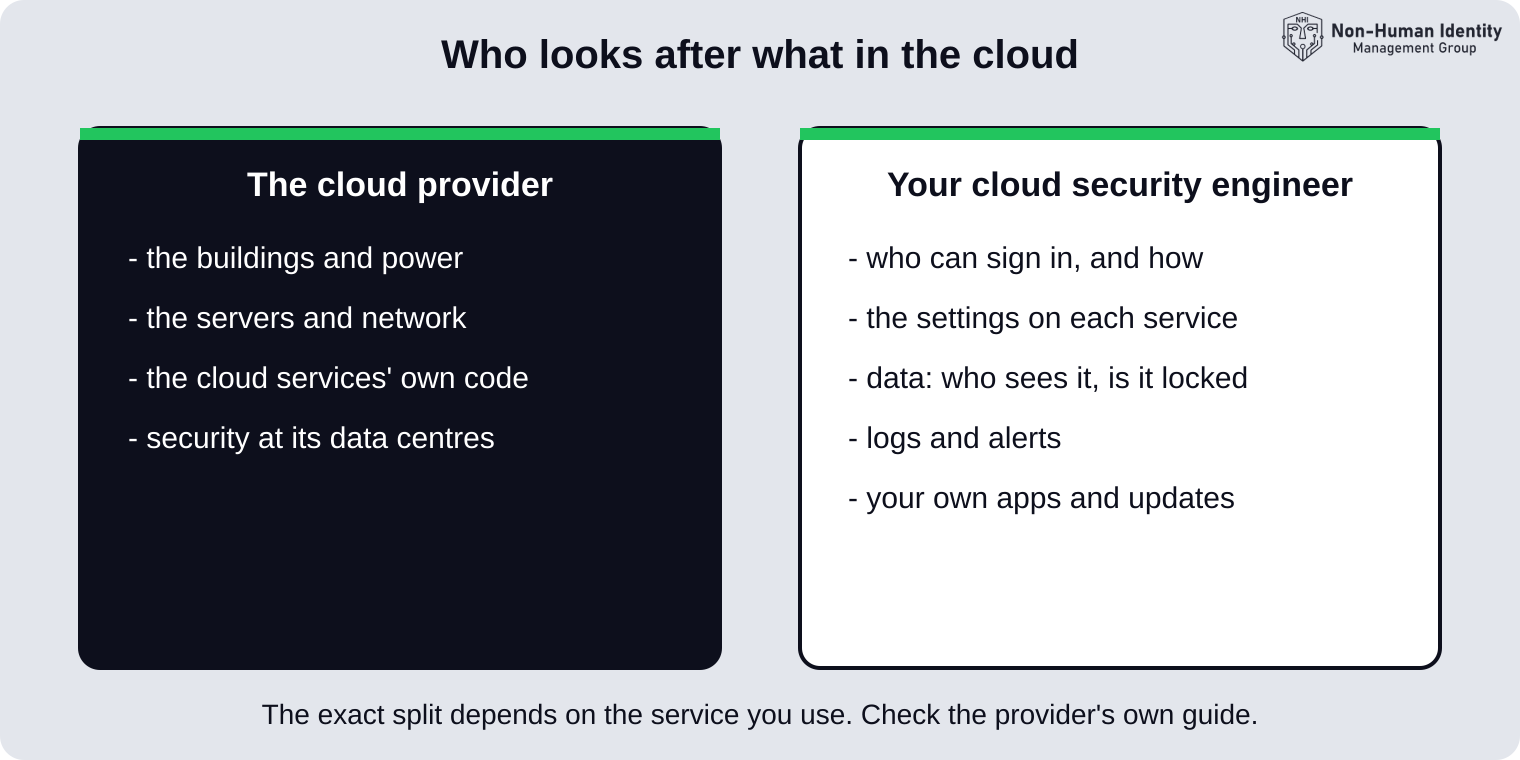
- Cloud providers look after their own buildings and servers. The customer looks after its own settings, access and data.
- A cloud security engineer handles the customer's side: who can sign in, how each service is set up, and what gets logged.
- Much of the work is checking settings, fixing risky ones and adding rules so the same mistake is less likely to happen again.
- Many people move in from IT, networking, cloud support or general security engineering jobs.
What you will learn
- Explain what a cloud security engineer does in one sentence.
- Describe which parts of cloud security the customer looks after.
- Spot the kind of risky settings the role finds and fixes.
- Choose a first step if you want to work towards the role.
- Rented computing (the cloud)
- computers, storage and software you use over the internet from a provider, instead of owning them.
- Risky setting (misconfiguration)
- a setting left in an unsafe state, such as files open to anyone online.
- Who-can-do-what rules (access management)
- the rules that decide which people and programs can use which cloud services.
What is a cloud security engineer?
Think of a firm that rents a floor in an office tower. The landlord looks after the walls, the lifts and the main entrance. The firm still needs someone to manage its own doors, keys and visitor list.
A cloud security engineer is that person for the cloud. Big providers run the buildings, servers and networks. The customer chooses how its own accounts, services and data are set up. Amazon Web Services puts it this way: it looks after security "of" the cloud, and the customer looks after security "in" the cloud.[1]
So the engineer sets who can sign in, what each person or program may do, and which files stay private. They also make sure there are activity records, called logs, so problems can be traced.
Where the comparison stops working: an office floor has a few doors. A cloud account can hold thousands of services, and teams can create new ones in a few clicks. So the engineer relies on tools that check the settings for them.
Why does it matter?
Many firms now run key systems in the cloud, and one wrong setting can expose a lot of data. Cloud skills also show up in job adverts. A 2026 UK government study found Microsoft Azure, a major cloud service, in 16% of core cyber job adverts in 2025.[3]
If you work in IT or cloud support
What could happen: you already create cloud accounts and set permissions, but do not see that as security work.
Check this: list the cloud tasks you do that limit access or lock down data. They count as experience.
If you are new to cyber security
What could happen: you try to learn every cloud provider at once and feel swamped.
Check this: pick one provider, open a free trial account and learn its basic access settings first.
If you run a small business that uses the cloud
What could happen: nobody owns the cloud settings, so a shared folder or old account stays open for months.
Check this: ask your IT supplier who reviews your cloud settings, and how often.
What does it look like?
Much of the work starts with a report from a settings check. Here is a made-up report a cloud security engineer might read on a Monday.
Example only. All values are made up.
CLOUD SETTINGS CHECK (EXAMPLE) - account FAKE-0000
HIGH   Storage folder "staff-photos" open to the internet   (1)
HIGH   Admin user "test-admin" has no second sign-in check  (2)
MED    Access key for "old-report-app" unused for 400 days  (3)
MED    Activity logs switched off in one region             (4)
LOW    Server allows remote login from any address          (5)
Report site: cloudcheck.example.invalid
- Files anyone online could view. In a real system, this line would name the storage and how many files it holds.
- A powerful account protected only by a password.
- A software password for a program nobody seems to use any more.
- A gap in the records, so activity there may go unseen.
- A door left open wider than it needs to be.
Why this is risky: each line is a small gap. Together they could let an outsider in, and let them move around unseen.
The safer way: the engineer fixes the high items first. Then they add rules so new accounts start with safe settings.
How does it work?
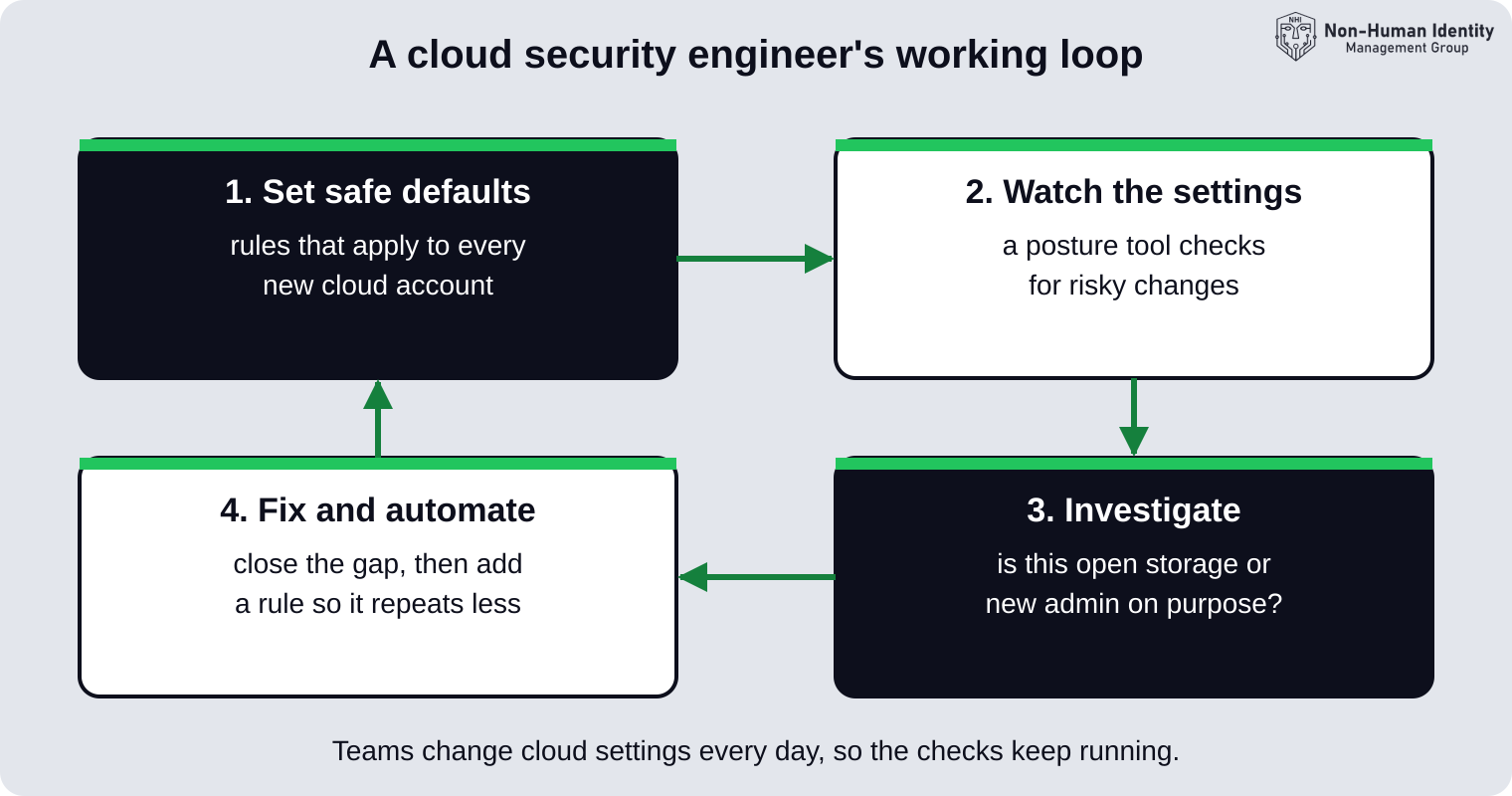
Most cloud security engineering follows a loop.
- Set safe defaults. Write rules that every new cloud account must follow, such as two-step sign-in for admins and private storage by default.
- Watch the settings. Use a posture tool to flag risky changes. This is software that keeps checking cloud settings against a list of safe ones.
- Investigate. Ask the team that made a change whether it was on purpose, and what it is for.
- Fix and automate. Close the gap, then add a rule or script so the same mistake is less likely next time.
Google describes its cloud security engineer certificate in similar terms. The role covers access, data protection, network defences, threat monitoring and security automation.[2]
A worked example
This is a made-up day in the life. Katarina Horvat is a cloud security engineer at Windmill Software, a small US software firm.
Katarina starts by reading the overnight settings report. One item is marked high. A storage folder called "demo-files" was made public yesterday afternoon. She messages the developer who made the change. He explains it was for a customer demo and should have been private, so together they switch it back. Katarina checks the logs for downloads from unknown addresses. In the records available to her, she sees only the developer's own test.
Mid-morning, she joins a planning call for a new feature. The team wants to store customer files. She suggests the files stay private and are shared through short-lived links instead.
After lunch, she writes a new rule. From now on, the cloud will refuse to make storage public unless a manager has approved it. She tests the rule in a practice account first.
Late afternoon, she reviews admin accounts. Two people have admin rights they no longer use. She asks their manager, then reduces their access.
Before logging off, she updates the team notes. Most of her day was spent talking to builders and adding small guard rails, not chasing attackers.
Myths and mistakes
| What people think | What is true |
|---|---|
| The cloud provider handles all the security. | The provider secures its own platform. The customer still sets access, data settings and logging. |
| You need to master every cloud provider. | Most people start with one provider and learn the shared ideas. Those carry over to others. |
| The job is mostly about firewalls. | Access rules, sign-in checks and settings reviews take up much of the day. |
| A settings tool does the job for you. | Tools flag issues. People still decide what matters, talk to teams and fix the cause. |
| Cloud security is a separate world from normal security. | It builds on the same basics: networks, sign-in, access and logs. |
What can I do this week?
- Open a free trial account with one cloud provider and turn on two-step sign-in for it.
- Read that provider's page on who is responsible for what.
- Read three cloud security engineer job adverts and list the skills they share.
- Ask someone in your IT team which cloud services your workplace uses.
- Learn what a storage folder is and how to check whether it is public.
Checklist
- I can explain what a cloud security engineer does in one sentence.
- I can explain the split between the provider's side and the customer's side.
- I can name three risky cloud settings the role looks for.
- I know the four parts of the working loop.
- I know the basics this role builds on: networks, sign-in, access and logs.
- I have picked one cloud provider to learn first.
- I know where to find the practitioner career guide for more detail.
Common questions
Is cloud security engineering a good first job?
It is usually a second or third step. Google suggests three or more years of industry experience before its cloud security engineer exam.[2] Many people first work in IT support, networking or cloud admin roles, then move across.
Which cloud provider should I learn first?
Start with the one most used by employers near you, or by your current workplace. The core ideas, such as access rules, private storage and logs, carry over. Once you know one provider well, learning a second one is much quicker.
How is this different from a general security engineer?
The cloud engineer focuses on rented cloud services. A general security engineer may cover laptops, office networks and in-house servers too. The skills overlap a lot, and many people move from one job to the other as their workplace moves more systems to the cloud.
Do cloud security engineers need to code?
Some coding helps a great deal. Many cloud setups are written as files of settings, and engineers often write short scripts to check them. You do not need to be a full developer. Being able to read and change simple scripts is a strong start.
Are there certificates for this role?
Yes. The big cloud providers each offer security certificates, and there are also provider-neutral ones. Most expect some hands-on time first. The practitioner career guide lists the main options and when each one tends to help.
Where next?
Ready for the detail? Read the practitioner guide: Cloud Security Engineer Career Guide. It goes further into core skills and tools, provider certifications and progression.
Also useful:
- Cloud Security Engineer vs DevSecOps Engineer
- Security Engineer for Beginners
- Cloud Security for Beginners
- CSPM for Beginners
- IAM Engineer for Beginners
Related NHI Mgmt Group resources: Cybersecurity Careers Guide · Shared Responsibility Models Guide · Cloud Workload Identities for Beginners
Key terms
- Cloud security engineer
- A person who protects the systems and data an organisation runs in cloud services.
- The split of security duties between the cloud provider and the customer.
- Security misconfiguration
- An unsafe setting, default or permission that leaves a system open to misuse.
- Cloud identity and access management
- The rules, processes and tools that control who and what can use cloud resources.
- Cloud security posture management
- Tools and processes that keep checking cloud settings and flag risky ones.
- Least privilege
- Giving each person or program only the access it needs, and no more.
Sources and further reading
- Shared Responsibility Model. Amazon Web Services. https://aws.amazon.com/compliance/shared-responsibility-model/, accessed 28 Nov 2026.
- Professional Cloud Security Engineer certification. Google Cloud. https://cloud.google.com/learn/certification/cloud-security-engineer, accessed 28 Nov 2026.
- Cyber security skills in the UK labour market 2026. Department for Science, Innovation and Technology, 29 September 2026. https://www.gov.uk/government/publications/cyber-security-skills-in-the-uk-labour-market-2026/cyber-security-skills-in-the-uk-labour-market-2026, accessed 28 Nov 2026.