The Model Context Protocol (MCP) is an open standard that lets AI applications, such as chat assistants and AI agents, connect to outside tools and data in one common way.
This guide is for newcomers, students, career changers and managers who keep hearing about "MCP servers" and "connecting AI to our systems" and want to understand what that means and why security teams care. You do not need to know how to code. It explains what an AI tool connection is, how one works step by step, a worked example, common misunderstandings, and why identity and permissions matter so much.
By the end of this guide you will be able to:
- Explain what MCP is and what problem it solves.
- Describe the roles of an MCP host, client and server.
- Understand why an MCP connection needs its own identity and limited permissions.
- Identify simple first steps to bring MCP use under control.
Key takeaways
- MCP is a common plug for AI. It gives AI applications one standard way to reach files, databases, business apps and other tools, instead of a custom connection for each one.[1]
- An MCP server gives the AI new abilities. Each server offers tools (actions), resources (data) and prompts (templates) that the AI can use.[2]
- Every connection is an identity question. An MCP server reaches real systems with real credentials, so who it acts as and what it is allowed to do matter as much as what the AI says.
- Keep permissions small. The MCP security guidance warns that broad permissions increase the damage a stolen token can do, and recommends starting with a minimal set.[4]
- Treat MCP servers like software you install. Know which ones are in use, where they came from, and who approved them.
What it is, in plain English
An AI application is a program built around a large language model (LLM), the kind of AI that reads and writes text. On its own, an LLM only knows what it learned in training and what you type into it. It cannot check your calendar, look up an order or update a ticket.
To do useful work, the AI needs connections to other systems. Before MCP, each AI product and each business system needed its own custom connection. MCP replaces that with one shared set of rules. The official MCP site describes it as an open-source standard for connecting AI applications to external systems, so they can reach data sources, tools and workflows.[1]
The MCP project compares it to a USB-C port for AI applications: just as USB-C gives devices one standard way to connect, MCP gives AI applications one standard way to connect to outside systems.[1] Where the analogy breaks down: a USB-C cable just carries power and data, while an MCP connection can let an AI take actions, such as sending messages or changing records, using someone's access. That is why security matters more than with a cable.
The three roles
| Role | What it is | Everyday example |
|---|---|---|
| MCP host | The AI application the person uses, which coordinates one or more connections[2] | A chat assistant or a code editor with AI features |
| MCP client | A component inside the host that keeps one connection to one server[2] | The part of the assistant that talks to the calendar connector |
| MCP server | A program that offers context and actions to clients; it can run on your own computer or remotely as an online service[2] | A connector for a ticketing system, a database or a file share |
What a server can offer
- Tools: actions the AI can ask to run, such as a database query or an API call.[2]
- Resources: data the AI can read for context, such as file contents or database records.[2]
- Prompts: reusable templates that help structure how the AI is asked to do a task.[2]
Why it matters to you
- If you run a small business: staff may already be connecting AI assistants to your email, files or customer system. Each connection can read or change your data, so you need to know which ones exist.
- If you are new to a security job: MCP is now a common way AI agents reach company systems. Questions about it come up in access reviews, risk assessments and incident response.
- If you are a manager: MCP can make AI tools much more useful, but every connection extends what the AI can reach. Deciding which connections are allowed, and with what access, is a business decision as well as a technical one.
The core issue is simple. When an AI uses an MCP server, the server does the real work with real credentials: passwords, API keys or access tokens that prove who is calling. That makes the MCP server a non-human identity (NHI): an identity with its own account and credentials that belongs to software rather than a person. AI agents are NHIs too. See Non-Human Identities for Beginners. If the AI is tricked, or the server is badly built, those credentials can be misused.
The OWASP Top 10 for LLM Applications (2025) names this risk Excessive Agency: damaging actions taken because an AI system was given too much functionality, too many permissions or too much autonomy.[5] The same list puts prompt injection first: inputs, including hidden text inside documents or web pages, that change what the AI does in ways nobody intended.[5] An AI with MCP connections can turn a successful prompt injection into real actions, which is why the access behind each connection needs to be limited.
How it works, step by step
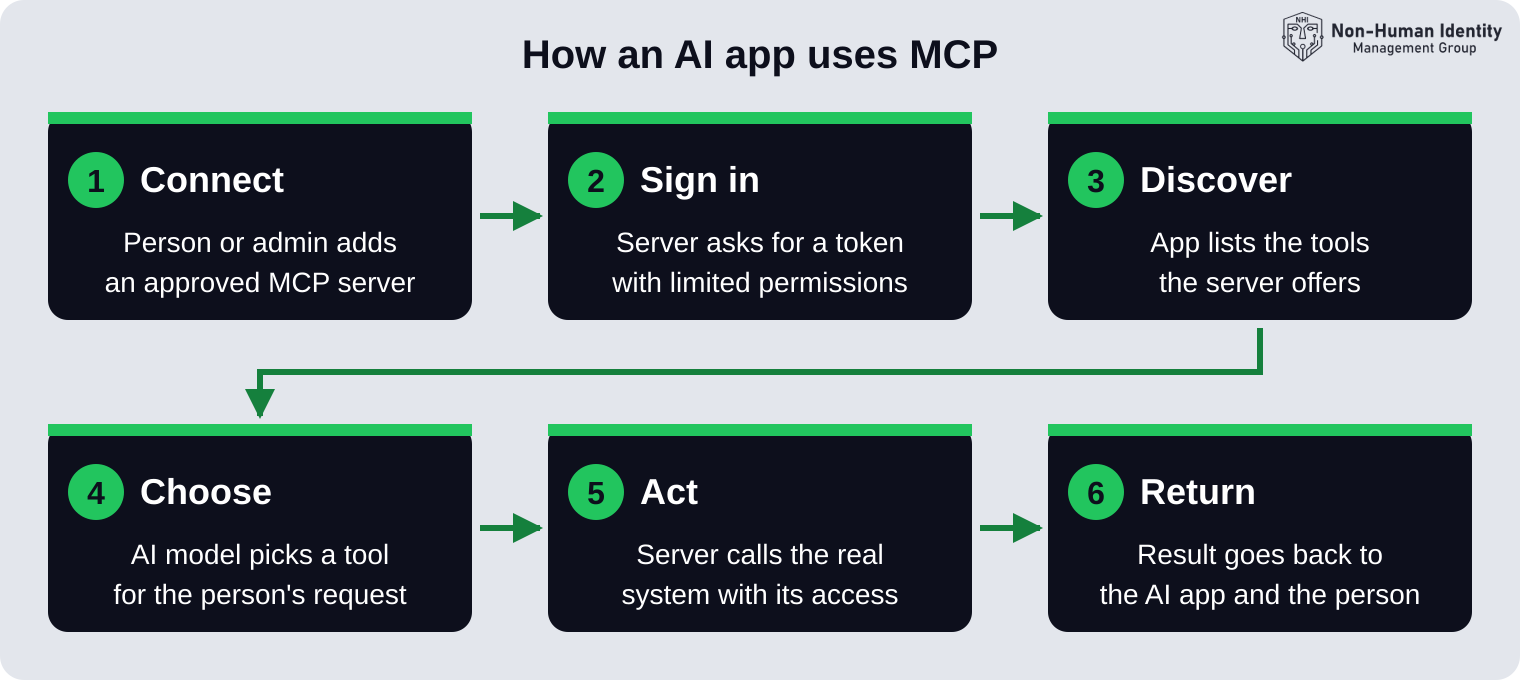
Different products show this in different ways, but the flow is similar.
- Connect. Someone adds an MCP server to an AI application. For a server that runs on the person's own computer, the MCP guidance says a client offering one-click set-up must show the exact command it will run and get explicit approval first.[4]
- Sign in. For a remote server, the person may be sent to sign in and approve access. MCP's authorisation rules for internet connections are based on OAuth 2.1, a widely used standard for granting limited access without sharing passwords; authorisation is optional in MCP, but recommended where servers protect data.[3] The result is an access token with limited permissions, called scopes.
- Discover. The application asks the server which tools, resources and prompts it offers. The list includes each tool's name and a description of what it does.[2]
- Choose. When the person asks for something, the AI model reads the tool descriptions and decides which tool to call and with what inputs.[2]
- Act. The server runs the tool against the real system, using its own access, and the action can be logged.
- Return. The result goes back to the AI application, which uses it in its answer to the person.[2]
Where identity and permissions come in
The table shows the main identity questions at each point, and what the MCP rules or guidance say. It is a beginner summary; the practitioner guides linked below go further.
| Question | Why it matters | What the MCP rules or guidance say |
|---|---|---|
| Who approved this server? | A local server runs with the same privileges as the AI app on that computer | Clients should warn that servers run with the client's privileges and should run them in a sandbox with minimal default privileges[4] |
| Is the token meant for this server? | A token made for one service should not be accepted by another | Servers must check that tokens were issued for them and must not accept or pass on any other tokens[3] |
| How much can the token do? | Broad permissions widen the damage if a token is stolen | Start with a minimal set of scopes and ask for more only when a higher-risk action is first needed[4] |
| Did the person really agree? | A server that sits in front of another service could be abused to skip consent | Proxy servers must get consent for each client before passing the person on to the other service[4] |
| Where are credentials kept? | Local servers usually read credentials from the computer's settings | For local connections, credentials come from the environment rather than the OAuth flow[3] |
A worked example
Harbour Health Supplies is a fictional distributor with 120 staff. Its support team wants an AI assistant to look up orders and draft replies to customers. Leo, the IT lead, is asked to "just plug it into the order system".
- Inventory first: Leo asks the support team which AI connections they already use. Two people have added an MCP server they found online that reads a shared drive, using their own logins. Leo removes it until it has been reviewed.
- A dedicated identity: instead of using a staff member's account, Leo sets up the order system's MCP server with its own account that can only read orders and customer contact details. It cannot issue refunds or change prices.
- Limited scopes: the server asks for an "orders read" permission only. Drafting the reply happens in the assistant; sending it stays a human action.
- Logging and review: every tool call is logged with the support agent's name and the server's account, and Leo reviews the log weekly for the first month.
Three weeks later a customer email contains hidden text telling the assistant to "export all customer records". The assistant tries to call a bulk export, but the server's account cannot do that, so the request fails and appears in the log. The setup did not stop the assistant being tricked, and the server could still read the records it was allowed to read. What it did was keep the damage small and make the attempt visible, so Leo could tighten the assistant's instructions and add an alert for unusual requests.
Myths and misunderstandings
| What people think | What is true |
|---|---|
| MCP is an AI model. | MCP is a protocol, a set of rules for connections. It does not decide how an AI application uses its model.[2] |
| MCP handles security for you. | MCP defines how authorisation should work for internet connections, but authorisation is optional and each server and client must be built and set up carefully.[3] |
| A server on my own laptop is safe because it is local. | A local server can run commands and read files with the same privileges as the AI app, so a malicious or careless one can do real harm.[4] |
| Tool descriptions are just labels. | The AI reads them to decide what to do. Hidden instructions in a description, known as tool poisoning, can steer the AI. |
| Giving the server all permissions saves time later. | It also gives any attacker who steals the token all those permissions. The MCP guidance lists wildcard or "full access" scopes as a common mistake.[4] |
Key terms
- Model Context Protocol (MCP)
- An open protocol that lets AI agents connect to tools and data sources. It expands what an agent can reach, so governance has to cover every connected system.
- MCP host
- The application that runs the AI and manages its connections to outside tools and data.
- MCP client
- The part of an AI application that connects to one MCP server to request tools, data or prompts.
- MCP server
- A program that connects an AI agent to outside systems and data through MCP. It is part of the identity and access surface and should be reviewed like any other.
- MCP tool
- An action an MCP server offers, with defined inputs and outputs, that an AI agent can ask to run.
- Large language model (LLM)
- An AI system trained on large amounts of text to generate and transform language.
- Access token
- A credential that lets a client call a service for a limited time and with specific permissions.
- OAuth scope
- A permission string that defines what an application may do on someone's behalf. Scopes set how much damage a stolen token can do.
- Least privilege
- The principle that each user, process and system has only the access it needs, for only as long as needed.
- Excessive agency
- When an AI system is given more authority than its task needs, so mistakes or manipulation can cause harmful actions.
- Tool poisoning
- An attack in which harmful instructions are hidden in tool descriptions or schemas that an AI agent reads when deciding what to do.
- Token passthrough
- Forwarding a token through a server without checking it was issued for that server. MCP's rules forbid it.
Common questions
Is MCP open source?
Yes. The MCP project publishes an open specification, software development kits for different programming languages, development tools and reference server implementations.[1][2] Many AI assistants and developer tools from different companies support it.[1]
Is MCP the same as an API?
No. An API is how one specific system lets programs talk to it. MCP is a common layer that lets AI applications discover and use many such systems in the same way. Many MCP servers call an API behind the scenes. See API Security vs MCP Security.
What is the difference between a local and a remote MCP server?
A local server runs on the same computer as the AI application and usually serves one client. A remote server runs as an online service and usually serves many clients.[2]
Can an AI agent use MCP without a person watching?
Yes, some agents run on their own. That makes limited permissions, logging and, for high-risk actions, a human approval step more important. See Human-in-the-Loop for AI Agents for Beginners.
How do companies control which MCP servers staff can use?
Common approaches include an approved list of servers, a central gateway that all connections pass through, and regular checks of developer laptops for unapproved servers. See the MCP Gateway and MCP Server Governance Guide.
Is MCP the only protocol for AI agents?
No. MCP connects an AI to tools and data. Other protocols focus on agents talking to each other. See Agent-to-Agent Protocols for Beginners.
First steps
Three things you can do this week:
- Ask who is using MCP. Ask teams, especially developers and support staff, which AI assistants they use and which MCP servers they have connected. Write the answers down.
- Check what each connection can reach. For each server, note which account or token it uses and what that account can do. Flag any that use a person's own login or a "full access" permission.
- Agree a simple rule. We suggest: new MCP servers need approval, come from a known source, and get their own identity with the smallest permissions that do the job.
Checklist
- We have a list of the MCP servers in use and who owns each one.
- Each server comes from a known, trusted source.
- Each server uses its own identity, not a person's shared login.
- Each server has only the permissions its task needs, with no wildcard or "full access" scopes.
- Credentials for local servers are stored securely, not in plain text files.
- High-risk actions, such as payments, deletions or sending external messages, need human approval.
- Tool calls are logged and someone reviews the logs.
- We review and remove unused MCP servers and their access regularly.
Check your understanding
1. What problem does MCP solve?
Answer: it gives AI applications one standard way to connect to outside tools and data, instead of a custom connection for each system.
2. What are the three roles in MCP?
Answer: the host (the AI application), the client (one connection inside the host) and the server (the program that offers tools, resources and prompts).
3. Why should an MCP server have its own limited identity?
Answer: because it acts on real systems with real credentials. If the AI is tricked or the token is stolen, limited permissions keep the damage small and its own identity makes its actions easy to trace.
4. Is a server running on your own laptop automatically safe?
Answer: no. It runs with the same privileges as the AI app, so it can read files or run commands if it is malicious or badly built.
Suggested learning pathway
- Start with AI Agents for Beginners.
- Then read AI Agent Identity for Beginners.
- For the risks agents face, read AI Agent Attacks for Beginners.
- For the full technical picture, see What Is MCP? The Model Context Protocol Explained (2026).
- For securing MCP in practice, see the MCP Security Guide.
- For how MCP sign-in works, see the MCP Authorisation Specification Guide.
- For company-managed access for agents, see Enterprise-Managed Authorisation for AI Agents (ID-JAG and Cross App Access).
- For one client-side risk in sign-in links, see MCP Authorisation URL Injection.
Standards and references
- What is the Model Context Protocol (MCP)? Model Context Protocol documentation. https://modelcontextprotocol.io/docs/getting-started/intro, accessed 27 Nov 2026.
- Architecture overview. Model Context Protocol documentation. https://modelcontextprotocol.io/docs/learn/architecture, accessed 27 Nov 2026.
- Authorization. Model Context Protocol specification (version 2026-07-28). https://modelcontextprotocol.io/specification/latest/basic/authorization, accessed 27 Nov 2026.
- Security Best Practices. Model Context Protocol documentation. https://modelcontextprotocol.io/docs/tutorials/security/security_best_practices, accessed 27 Nov 2026.
- OWASP Top 10 for LLM Applications 2025 (LLM01:2025 Prompt Injection; LLM06:2025 Excessive Agency). OWASP GenAI Security Project. https://genai.owasp.org/llm-top-10/, accessed 27 Nov 2026.
Related NHI Mgmt Group resources: Local MCP Server Security Guide · MCP Tool Poisoning Detection · API Keys vs OAuth for MCP Servers