WhatsApp security means keeping your chat account in your hands and spotting scams sent through it.
This guide is for anyone who uses WhatsApp to chat with family, friends or customers. You do not need any technical skill: the main protections are a few taps in the app's settings.
In short
- Your WhatsApp account is linked to your phone number, and a six-digit code sent by text proves you own it.
- Anyone who gets that code may be able to move your account to their phone, so never pass it on.
- Turn on two-step verification: a PIN you choose that a thief would also need.
- If a friend asks for a code or for money in a chat, call them first to check it is really them.
What you will learn
- Explain why the six-digit WhatsApp code works like a key to your account.
- Spot the "I sent you my code by mistake" scam.
- Check the three settings that protect your account.
- Know what to do if someone takes over your account.
This is an independent guide from NHI Mgmt Group, based on WhatsApp's public help pages as of November 2026. It is not sponsored or reviewed by WhatsApp. App settings change, so check WhatsApp's current help pages.
- Sign-up code (registration code)
- the six-digit code WhatsApp texts to your number when the app is set up on a phone.
- Your own PIN (two-step verification)
- a six-digit number you choose, which WhatsApp asks for as well as the code.
- Taking over a chat account (account takeover)
- when someone else gets into your account and uses it as you.
What is WhatsApp security?
Think of a parcel locker that opens with a one-time code sent to your phone. Whoever types in the code gets the parcel, and the locker does not ask who they are. WhatsApp sign-up works in a similar way.
Your WhatsApp account is tied to your phone number. When the app is set up on a phone, WhatsApp sends a six-digit code to that number by text. Typing in the code proves you control the number.[5]
So the code is the thing scammers want. If they can get it, they may be able to set up your account on their phone and lock you out. They can then message everyone in your chats as you.[5]
WhatsApp security is mostly about two things. First, keep the code and your PIN to yourself. Second, treat odd requests in chats with care, even from people you know.
Where the comparison stops working: a parcel locker opens once and is done. A stolen WhatsApp account stays open to the thief until you win it back.
Why does it matter?
A taken-over account is used to trick the people who trust you. Your contacts see your name and photo, so they are more likely to believe the message.
If you chat with family and friends
What could happen: a scammer takes your account and asks your relatives to send money "just for today".
Check this: turn on two-step verification and add an email address to it.
If you run a small business on WhatsApp
What could happen: a thief takes the shop's number and sends fake payment details to customers.
Check this: know who holds the PIN and which phones are linked to the account.
If you help an older relative with their phone
What could happen: they forward a code to a "friend" in a group chat and lose their account.
Check this: set up their PIN with them and explain the code rule in one line.
What does it look like?
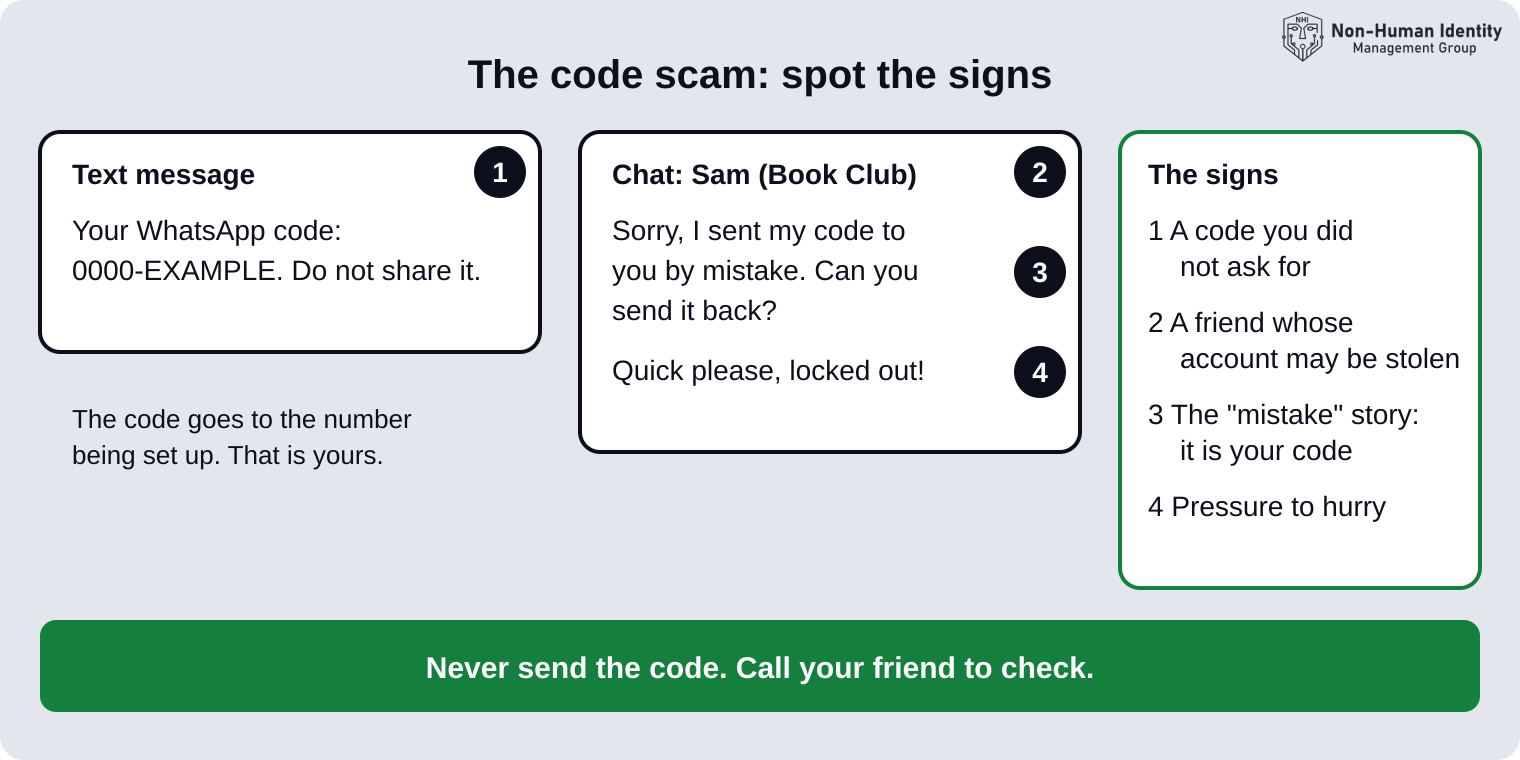
This is the most common trick. UK police warned about it in 2023.[5]
Example only. All values are made up.
Text message, 18:40
  Your WhatsApp code: 0000-EXAMPLE. Do not share (1)
WhatsApp chat, "Sam (Book Club)", 18:41          (2)
  Hiya! Sorry, I sent my code to your number
  by mistake. Can you send it back to me?        (3)
  Quick please, I'm locked out xx                (4)
- A code you did not ask for. In a real message, this would be the code for your own number.
- The message comes from a contact or group you know. Their account may already be stolen.
- The "mistake" story. Codes go to the number being set up, so this one is for your account.
- Hurry is a warning sign. It stops you from thinking.
Why this is risky: sending the code back may hand your account to the scammer, who then tries the same trick on your contacts.[5]
The safer way: do not send the code. Call the friend on a normal phone call, and turn on two-step verification if it is not on.
How does it work?
This is a simple view so you can spot it. It is not a guide to doing it.
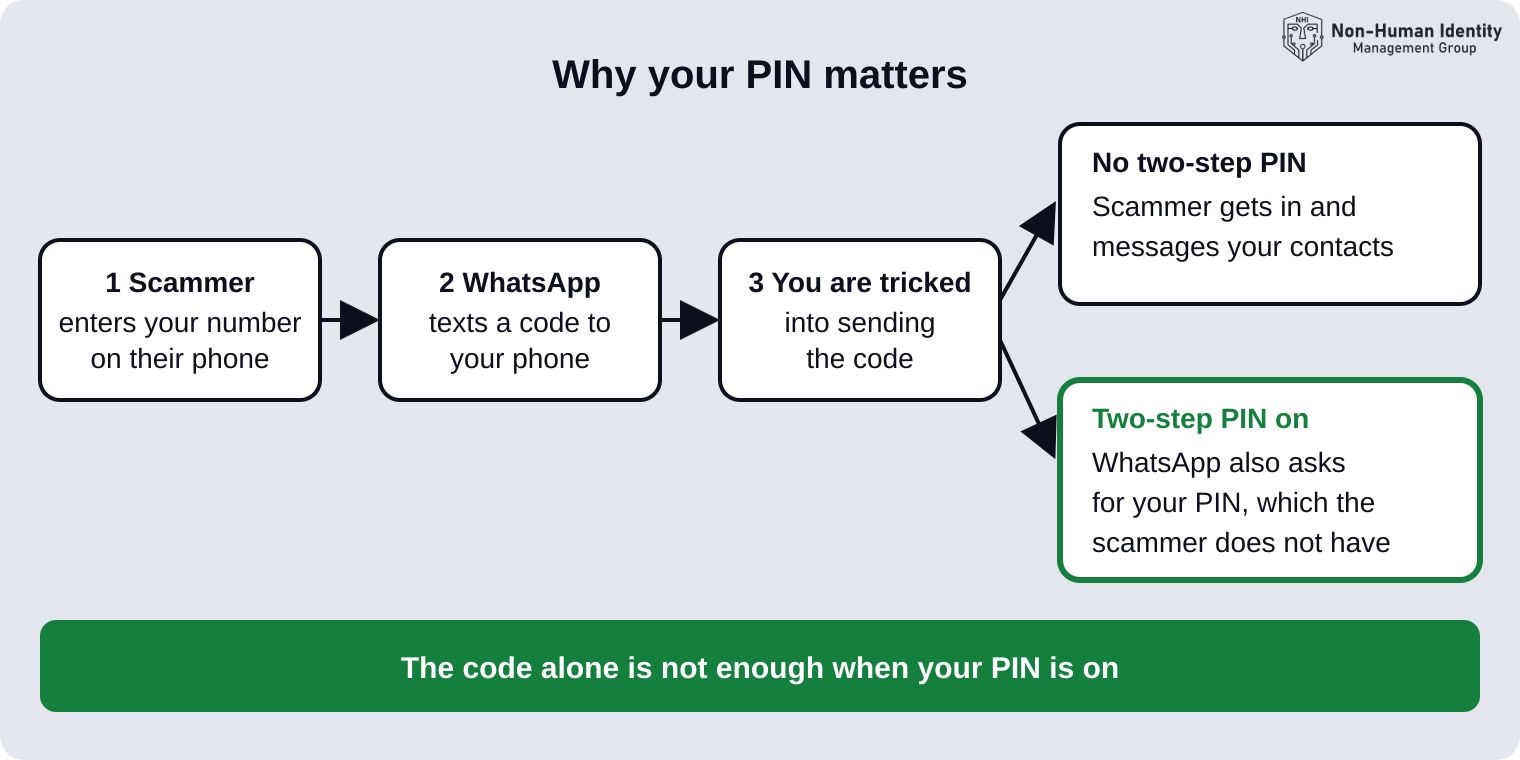
- They start on another phone. The scammer types your phone number into WhatsApp on their own phone.
- WhatsApp texts you a code. The code goes to your number, because WhatsApp thinks you are setting up a new phone.[5]
- They ask you for it. They message you from a friend's stolen account, or pretend to be WhatsApp or a delivery firm.[2]
- Your PIN is the second lock. With two-step verification on, the code alone is not enough. They also need the PIN you chose.[1][3]
- Without a PIN, they may get in. They can then chat as you and lock you out of your own account.[5]
WhatsApp also says it may ask you to prove who you are if it spots a suspicious attempt to take over an account.[3] Your chats are stored on your phone, and WhatsApp says past chats cannot be read by someone who gets into your account.[3] New messages are a different story, which is why speed matters.
A second route is a linked device: a computer or tablet that shows your chats alongside your phone. The UK's national cyber security agency advises checking the linked devices list in the app and removing any you do not know.[4]
A worked example
This story is made up to show how it can happen.
Yara Quist is a hairdresser in Bristol. She uses WhatsApp for her family chat and to book clients.
One evening her phone shows a text with a WhatsApp code. She has not asked for one. A minute later her friend from the running club messages: "So sorry, I sent my code to you by accident. Can you forward it?"
Yara nearly does it. The message looks normal, and it is from someone she trusts. But she has seen a warning poster at the GP surgery about this exact story.
She does not reply in the chat. Instead she rings her friend on a normal call. Her friend sounds confused. She says she lost her WhatsApp account an hour ago and has been trying to get it back.
Yara deletes the text and tells the running club group, on a call with the organiser, that the friend's account is not safe for now. Then she opens WhatsApp settings. She turns on two-step verification, picks a PIN that is not her birthday and adds her email address.[1] She also checks her linked devices. Only her own laptop is there.
Her friend reports the scam to Report Fraud, the reporting service for England, Wales and Northern Ireland.[6]
What made the difference: Yara checked by phone call, not in the chat the scammer controlled.
Myths and mistakes
| What people think | What is true |
|---|---|
| WhatsApp is encrypted, so my account cannot be stolen. | Encryption protects messages on the way. Most takeovers trick you into giving away the code instead. |
| A message from a friend is safe. | Their account may already be in a scammer's hands. Check unusual requests with a call.[2] |
| WhatsApp staff may ask for my code to fix a problem. | Providers do not ask for these codes, says the UK's national cyber security agency.[4] |
| I can skip the email when I set my PIN. | You can, but if you forget the PIN you will wait 7 days to reset it, and WhatsApp cannot speed that up.[1] |
| I have to pay to keep using WhatsApp. | WhatsApp is free. A request for payment to use it is a scam sign.[2] |
What can I do this week?
- Turn on two-step verification: Settings, then Account, then Two-step verification.[1]
- Add an email address you check, and type it carefully. WhatsApp does not verify it.[1]
- Open the linked devices list and remove any device you do not know.[4]
- Tell your family the one rule: never send a WhatsApp code to anyone.
- Agree a way to check odd requests, such as a quick voice call.
Checklist
- Two-step verification is on, with a PIN that is not my birthday or phone unlock code.
- An email address I can reach is added to two-step verification.
- I keep my PIN somewhere safe, such as a password manager.
- I have checked my linked devices recently.
- I never forward WhatsApp codes, even to friends.
- I check money or code requests with a voice or video call.
- I know how to report and block a suspicious chat.
Common questions
I got a WhatsApp code I did not ask for. What should I do?
Do not share it, and do not reply to anyone asking for it. It usually means someone typed your number into WhatsApp on another phone. If two-step verification is not on, turn it on now so the code alone is not enough.
What happens if I forget my two-step PIN?
If you added an email address, WhatsApp can send reset steps there. Without one, you have to wait 7 days before you can reset the PIN. WhatsApp says it cannot shorten that wait, so adding an email is worth the extra minute.[1]
Someone took over my account. What do I do first?
Try to set up WhatsApp again on your own phone with your number, which sends a fresh code to you. Warn your contacts by another route, such as a call or text. Report it to Report Fraud in England, Wales or Northern Ireland, or Police Scotland in Scotland.[6]
How can I tell if a message is a scam?
Look for pressure, requests for money, codes or personal details, links to tap and offers that seem too good. WhatsApp's own advice is not to tap, share or forward anything that looks suspicious, and to check with a voice or video call.[2]
Does a SIM swap affect WhatsApp?
It can. A SIM swap moves your phone number to a criminal's SIM card, so the WhatsApp code goes to them. Your two-step PIN is still a second lock they would need. A PIN on your mobile account helps too.
Where next?
Ready for the detail? Read the practitioner guide: WhatsApp Account Security Guide. It goes further into each takeover route, voicemail and SIM swap risks, and a first-hour recovery plan.
Also useful:
- Private Messaging Apps for Beginners
- SIM Swap Fraud for Beginners
- Hacked Account Recovery for Beginners
- WhatsApp Encryption, Backups and Metadata
Related NHI Mgmt Group resources: Securing Messaging Apps Guide · Two-Factor Authentication for Everyone Guide · Impersonation Scams Guide
Key terms
- Account takeover
- When someone else gets into your account and uses it as if they were you.
- Two-factor authentication
- Asking for a second proof, such as a PIN or code, as well as the first; WhatsApp calls its version two-step verification.
- One-time password
- A short code that works once, such as the WhatsApp sign-up code sent by text.
- Tricking people into handing over codes, money or access, often by pretending to be someone they trust.
- SIM swap
- When a criminal gets your phone number moved to their SIM card, so your texts and codes go to them.
- End-to-end encryption
- Scrambling messages so only the sender and the person they are sent to can read them.
Sources and further reading
- How to manage two-step verification settings. WhatsApp Help Center. https://faq.whatsapp.com/1920866721452534, accessed 28 Nov 2026.
- About suspicious messages and scams. WhatsApp Help Center. https://faq.whatsapp.com/2286952358121083, accessed 28 Nov 2026.
- WhatsApp Security. WhatsApp. https://www.whatsapp.com/security, accessed 28 Nov 2026.
- Using messaging applications (infographic for high-risk individuals). National Cyber Security Centre (NCSC), July 2026. https://www.ncsc.gov.uk/sites/default/files/2026-07/NCSC-using-messaging-applications-infographic.pdf, accessed 28 Nov 2026.
- Warning issued to WhatsApp users over account takeover scam. Action Fraud press release, 27 March 2023, as republished by Wired-Gov. https://www.wired-gov.net/wg/news.nsf/articles/warning+issued+to+whatsapp+users+over+account+takeover+scam+27032023122500, accessed 28 Nov 2026.
- Report Fraud service goes live. Report Fraud (City of London Police), 4 December 2025. https://www.reportfraud.police.uk/news/report-fraud-service-goes-live/, accessed 28 Nov 2026.