Zero trust network access (ZTNA) is a way of letting people reach specific work applications after checking who they are, what device they are using and whether policy allows it, instead of connecting them to the whole internal network as a traditional VPN does.
This guide is for newcomers, students, career changers and managers who keep hearing that "ZTNA replaces the VPN" and want to know what that means. It explains the technology in plain English, walks through what happens when someone opens an app, gives a worked example of a small company moving off its VPN and lists sensible first steps. If zero trust itself is new to you, read Zero Trust for Beginners first; for how a VPN works, see VPNs for Beginners.
By the end of this guide you will be able to:
- Explain what ZTNA is and how it differs from a VPN.
- Describe the checks that happen before a user reaches an app.
- Understand where ZTNA fits alongside SASE, SSE and multi-factor authentication.
- Identify practical first steps for moving away from a full-network VPN.
Key takeaways
- ZTNA connects you to an app, not a network. Each user reaches only the applications policy allows, which limits what a stolen account can see.
- Every request is checked. Identity, device and context are evaluated before access, and access can be re-checked during a session.
- Apps can be hidden from the internet. Small connector programs next to the apps make outbound connections, so the apps do not need to accept connections from the internet.
- ZTNA is an approach, not just a product. Good policies, a strong identity provider and managed devices matter as much as the tool you buy.
- Migration is gradual. Most organisations move app by app and then remove the old VPN routes, rather than switching overnight.
What it is, in plain English
For years, staff working from home used a virtual private network (VPN): an encrypted tunnel from the laptop into the office network. Once connected, the laptop was treated much like a computer in the office and could often reach many internal systems. That model trusts you because of where you are connected, not because of what you are doing.
Zero trust turns that around. NIST, the US standards body, describes zero trust as moving defences away from fixed network perimeters towards users, assets and resources, so that nothing is trusted just because of its network location.[1] ZTNA applies that idea to remote access. The UK National Cyber Security Centre (NCSC) describes ZTNA as an architectural approach in which network connectivity alone never grants access: each request must be explicitly authorised based on policy and context.[2]
Joint guidance from CISA, the FBI and partner agencies in New Zealand and Canada says ZTNA grants access to specific applications or services, not the whole network, based on strictly defined least-privilege policies. An access broker checks the user's identity, access needs and policy before granting access, and can also check device posture and location and enforce multi-factor authentication.[3]
A helpful comparison is an office building. A VPN is like a pass that opens the front door: once inside, you can wander the corridors and try every office door. ZTNA is like a receptionist who checks your ID for each visit and walks you to the one meeting room you are booked into. Where the analogy breaks down: ZTNA checks are automatic and take seconds, and they can be repeated during your visit without you noticing.
Why it matters to you
- If you run a small business: internet-facing VPN boxes are a frequent target, and one stolen password can open a lot of your network. ZTNA can narrow what that password reaches. Many ZTNA services are cloud-based, so there may be less hardware to patch.
- If you are new to a security job: ZTNA is one of the most common projects in remote access and zero trust programmes, and you will meet its terms in tickets, audits and buyer conversations.
- If you are a manager: ZTNA gives a clearer, logged answer to "who can reach which app?", which helps with audits and limits the damage from a compromised account.
The joint CISA guidance notes that VPN products have been involved in many high-profile incidents involving cybercriminals and nation-state actors. It explains that once a user connects, a VPN can expose a broad part of the internal network, which makes lateral movement easier after an attacker compromises a device or account. It cites exploited vulnerabilities in Ivanti Connect Secure and Citrix NetScaler as examples.[3] The NCSC lists reduced attack surface, restricted lateral movement and re-evaluation of access during sessions among the benefits of ZTNA.[2]
How it works, step by step
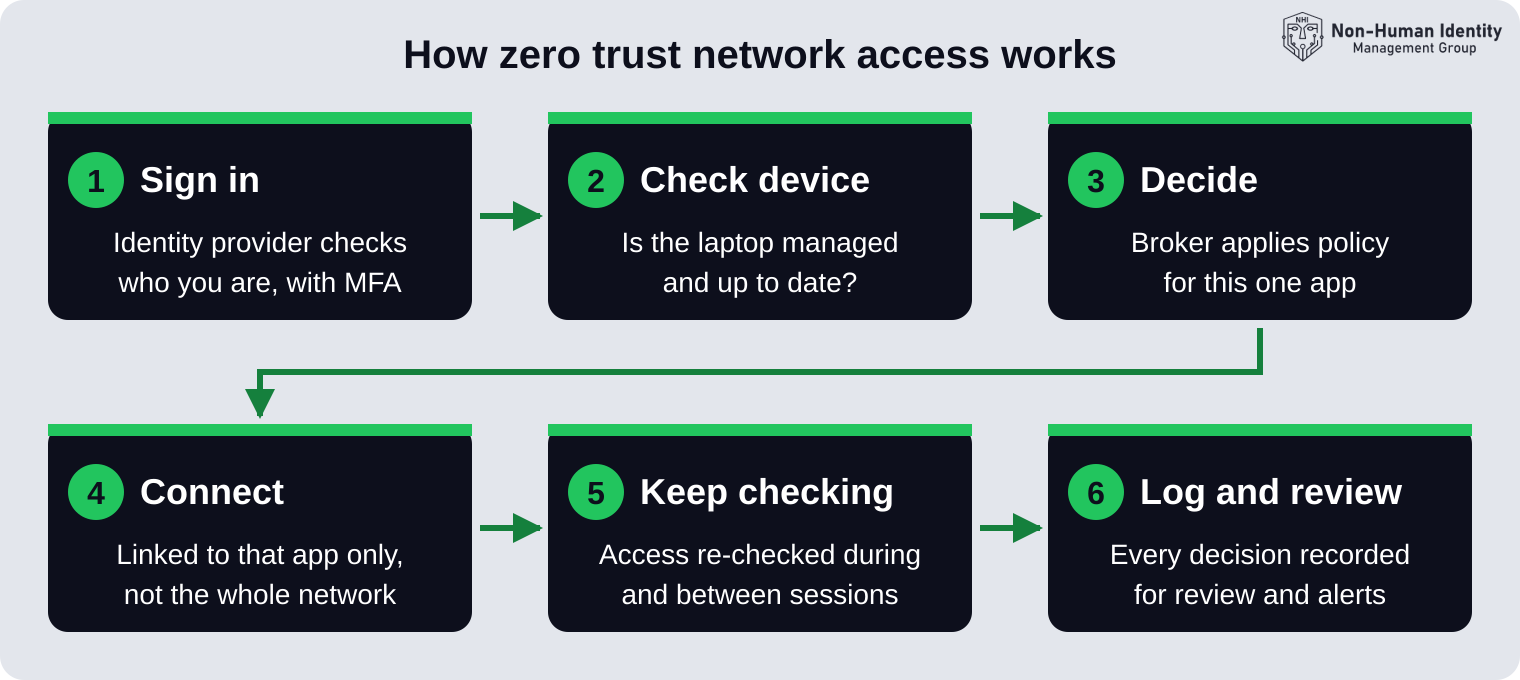
Products use different names, but a typical ZTNA connection follows these steps.
- Set up (once). Administrators publish each internal app through the ZTNA service, install connectors near the apps, and write policies saying which groups may reach which apps from which kinds of device.
- Sign in. The user opens an app. The ZTNA service sends them to the organisation's identity provider, the system that checks who they are, usually with multi-factor authentication (MFA).
- Check the device. The service looks at device posture: whether the laptop is company-managed, up to date and running its security tools. The NCSC advises combining signals such as user identity, device identity, device health and behaviour, with no single signal treated as enough.[2]
- Decide. A policy decision point, often called the broker or controller, compares the request with policy and allows or denies it. NIST's zero trust model describes verifying identity and permissions as distinct steps completed before a connection to a resource is set up.[1]
- Connect to that app only. A policy enforcement point, such as a proxy or connector, links the user to the one app allowed. Connectors open outbound-only tunnels to the service, so the app does not need to accept inbound connections from the internet.[2]
- Keep checking. Sessions can be re-verified through periodic reauthentication, and reaching another app needs a new authorisation.[3]
- Log and review. Access decisions are logged centrally, so the security team can review who reached what and spot unusual activity.[2]
VPN and ZTNA side by side
| Question | Traditional VPN | ZTNA |
|---|---|---|
| What do you connect to? | Usually a large part of the internal network | Only the specific apps policy allows |
| When is trust decided? | Mostly once, when the tunnel is set up | For each request, and again during sessions |
| Are device checks used? | Sometimes, depending on the product | Commonly part of the policy |
| What faces the internet? | A VPN gateway accepting inbound connections | The ZTNA service; connectors near apps dial out |
| Who looks after it? | Often an appliance you patch yourself | Often a cloud service, which adds a supplier dependency |
Useful distinctions
- Agent or browser. Some ZTNA designs use a small app (an agent) on managed laptops; others work through a web browser, which suits contractors and personal devices but usually covers fewer kinds of app. The ZTNA Guide explains the architectures in detail.
- ZTNA, SSE and SASE. The joint CISA guidance lists ZTNA as one part of Security Service Edge (SSE), alongside a secure web gateway, cloud access security broker and firewall as a service. Secure Access Service Edge (SASE) adds networking such as SD-WAN.[3] See SASE for Beginners.
- ZTNA is not all of zero trust. It covers how users reach apps. Zero trust also involves identity, data, devices and how systems talk to each other. The NCSC stresses that ZTNA is an architecture, not a product, and that buying a product alone does not deliver zero trust outcomes.[2]
- Software needs access too. Scripts, services and other non-human identities may also connect through ZTNA. They need their own identities and credentials, with the same least-privilege policies as people.
A worked example
Northgate Design is a fictional architecture practice with 60 staff. Everyone working from home uses a VPN that connects their laptop to the whole office network: file server, finance system, printers and an old project database.
Leila, the IT lead, plans a move to ZTNA:
- Inventory: she lists which groups use which internal apps over the VPN. Designers need the file server and project database; the finance team needs the finance system.
- Prerequisites: all staff already sign in through one identity provider. Leila makes sure MFA is on for everyone and that company laptops are enrolled in device management.
- Pilot: she publishes the file server through a ZTNA service, installs two connectors in the office and lets ten designers use it from managed laptops. The VPN stays available as a fallback.
- Policy: designers can reach the file server and project database; finance can reach the finance system; nobody can reach printers or other systems from home unless policy allows it.
After a month of fixing small problems, the rest of the staff move across group by group. Leila then switches off the VPN for most users. A small, approved group keeps VPN access for one old tool that does not yet work through ZTNA, with MFA required, monitoring on and a review date set so this exception does not become permanent.
Later, a designer's password is caught in a phishing email. Because the attacker's own laptop is not a managed device and MFA is required, the policy check makes access harder, and the sign-in attempt is logged for Leila to review. ZTNA does not make the account safe on its own: Leila still resets the password, ends the designer's sessions and checks what the account could reach.
Myths and misunderstandings
| What people think | What is true |
|---|---|
| ZTNA is just a newer VPN. | Both protect remote access, but ZTNA grants access to specific apps after policy checks, while a VPN usually places the user on the network. |
| Buying a ZTNA product means we have zero trust. | ZTNA is one part of zero trust. Policies, identity, devices and data protection still need work. |
| Once we have ZTNA we can delete all network controls. | The NCSC notes that ZTNA does not remove the need for local network segmentation.[2] |
| Keeping the old VPN running "just in case" is harmless. | Old access routes left open alongside ZTNA undermine it. Remove them, or restrict and monitor any that must stay for a while. |
| ZTNA is only for large companies. | Many ZTNA services are sold as cloud subscriptions that a small team can start with a single app. |
| Strict policy is always better. | Overly strict or wrong policies can block legitimate work. Test policies before enforcing them and keep a controlled recovery route.[2] |
Key terms
- Zero trust network access (ZTNA)
- A way to give users access to specific applications without placing them on the internal network, after identity, device and policy checks.
- Virtual private network (VPN)
- An encrypted tunnel between a device and a network, or between two networks, over an untrusted connection.
- Zero trust
- A security model in which no request is trusted because of its network location; every access request is checked.
- Identity provider
- The system that checks who a user or workload is and tells other applications the result.
- Multi-factor authentication (MFA)
- Signing in with two or more independent kinds of proof, such as a password plus an app prompt or security key.
- Device posture
- The security condition of a device at the moment it asks for access, such as patch level and whether it is managed.
- Policy decision point
- The component that evaluates the rules and returns an allow or deny decision.
- Policy enforcement point
- The component that applies the decision where access happens, such as a proxy or connector.
- Lateral movement
- An attacker moving from a first foothold to other systems, often reusing stolen credentials.
- Least privilege
- Giving each user, process or system only the access it needs, for only as long as needed.
- Secure Access Service Edge (SASE)
- A cloud-delivered architecture that combines networking with security services such as ZTNA and a secure web gateway.
Common questions
What is ZTNA in simple terms?
It is a way to reach work apps from anywhere where each request is checked against your identity, device and policy, and you are connected to that app only, not the whole network.
Does ZTNA replace a VPN completely?
Often for user access to apps, but not always straight away. Some old systems may need a restricted VPN for a while, and network-to-network links may still use VPN tunnels. The aim is to remove broad VPN access where you can and tightly restrict what remains.
Is ZTNA the same as SASE?
No. ZTNA is one component. SSE bundles ZTNA with other cloud security services, and SASE adds networking features such as SD-WAN.[3]
Do we need MFA for ZTNA?
We suggest it strongly. ZTNA decisions rely on knowing who the user is, so the sign-in should be hard to fake. The NCSC lists an authoritative identity provider with phishing-resistant authentication as a prerequisite.[2]
What about contractors on their own laptops?
Many ZTNA designs give unmanaged devices more limited, browser-based access to a few web apps, while managed laptops get wider access. Policy decides.
Does ZTNA create new risks?
Yes. The NCSC notes it adds a third-party dependency and moves part of the trust boundary outside your direct control.[2] The ZTNA service and its admin accounts need strong protection. See Securing the ZTNA broker and remote access VPN itself.
First steps
Three things you can do this week:
- List what the VPN is used for. Write down which groups reach which internal apps through it. This becomes your migration plan.
- Check the foundations. Confirm everyone signs in through one identity provider with MFA, and find out how many laptops are company-managed.
- Pick one pilot app. Choose a single, well-understood web app and a small group of users. We suggest testing policy in a pilot before enforcing it, keeping the old route as a controlled, time-limited fallback, and agreeing in advance how you will roll back if something breaks.
Checklist
- We know which users and groups need which internal apps.
- All remote access starts with a sign-in through our identity provider, with MFA.
- Access policies are written per app and per group, with default deny.
- Device checks distinguish company-managed laptops from personal devices.
- Connectors are deployed in pairs so one failure does not cut off access.
- Access decisions are logged and someone reviews unusual activity.
- Any remaining VPN access is restricted, uses MFA, is monitored and has a removal date.
- Admin accounts for the ZTNA service are few, protected with strong MFA and reviewed regularly.
Check your understanding
1. What is the main difference between a VPN and ZTNA?
Answer: a VPN usually connects you to a large part of the network once the tunnel is up; ZTNA connects you only to specific apps after checking identity, device and policy for each request.
2. Why do ZTNA connectors make outbound connections?
Answer: so the apps do not need to accept inbound connections from the internet, which reduces what attackers can find and reach.
3. Does buying a ZTNA product give you zero trust?
Answer: no. ZTNA is one part of zero trust, and its value depends on good policies, strong identity and managed devices.
4. What should happen to the old VPN after a move to ZTNA?
Answer: remove it where possible; any access that must remain should be restricted, monitored, protected with MFA and given a review or removal date.
Suggested learning pathway
- Start with the big idea in Zero Trust for Beginners.
- For the technology ZTNA replaces, read VPNs for Beginners.
- For the sign-in step, read Multi-Factor Authentication for Beginners.
- For the wider cloud security bundle, read SASE for Beginners.
- For architectures, connectors and phased VPN migration, see the ZTNA Guide.
- For a direct comparison, see ZTNA vs VPN.
- For how ZTNA relates to network segmentation, see Microsegmentation vs ZTNA.
- If you are choosing a product, use the ZTNA Buyer's Guide.
Standards and references
- SP 800-207, Zero Trust Architecture. National Institute of Standards and Technology (NIST), August 2020. https://csrc.nist.gov/pubs/sp/800/207/final.
- Zero Trust Network Access (ZTNA). National Cyber Security Centre (NCSC), 2026. https://www.ncsc.gov.uk/sites/default/files/2026-05/NCSC-Zero-Trust-Network-Access-(ZTNA)_0.pdf, accessed 27 Nov 2026.
- Modern Approaches to Network Access Security. CISA, FBI, New Zealand GCSB, CERT NZ and Canadian Centre for Cyber Security, 18 June 2024. https://www.ic3.gov/CSA/2024/240618.pdf, accessed 27 Nov 2026.
Related NHI Mgmt Group resources: Secure Remote Access Beyond VPN Guide · NIST SP 800-207 Zero Trust Architecture Guide · Conditional Access vs ZTNA