AAA stands for authentication, authorisation and accounting: who are you, what may you do, and what did you do?
This guide is for students, people starting out in IT and anyone who has met "AAA" in a course or exam. You do not need to manage a network to be affected: every time you join work Wi-Fi or a company VPN, these three checks are likely running in the background.
In short
- Authentication checks who you are. Authorisation decides what you may do. Accounting records what you actually did.
- Accounting is the A people forget. Without it, nobody can say later who changed what, or when.
- Two common systems run AAA for networks: RADIUS, mostly for Wi-Fi and VPN access, and TACACS+, mostly for staff who manage network devices.
- The same three checks apply to software and machines, not just people.
What you will learn
- Explain each of the three As in one sentence.
- Spot which A is missing when something goes wrong.
- Explain in plain words what RADIUS and TACACS+ are for.
- Check whether your own systems keep a record of who did what.
- Record of activity (accounting)
- a log of who used a system, when, for how long and what they did.
- Central checking server (AAA server)
- one server that many devices ask "should I let this person in?"
- Gatekeeper device (network access server)
- the Wi-Fi point, VPN box or switch that asks the AAA server before letting someone in.
What is AAA security?
Think of a gym. At the front desk, staff scan your card and check your photo. Your membership level decides whether you can use the pool. The turnstile records each visit and how long you stayed.
Those are the three As. Authentication is the photo check: proving who you are. Authorisation is the membership level: what you are allowed to use. Accounting is the turnstile log: a record of what you did and when.
The word accounting comes from the early days of dial-up internet, when the records were also used to bill people for time online. Today the main use is security. If something goes wrong, the records show who was connected and what changed.
A separate page covers the first two As in depth: Authentication vs Authorisation for Beginners. This page adds the third A, and shows how the three work together on a network.
Where the comparison stops working: at a gym the three checks happen at one desk. On a network they are often split. One device stands at the door, a central server makes the decisions, and the records may be kept somewhere else again.
Why does it matter?
Each A covers a gap the others leave. A strong sign-in does little if everyone can change everything. And good permissions do not help an investigation if nothing was recorded.
If you are studying for a security exam
What could happen: you mix up the three As, or forget that accounting means records, not money.
Check this: for any example, ask "who are you, what may you do, what did you do?"
If you are new to IT work
What could happen: the team shares one admin account on the office router, so a bad change cannot be traced to a person.
Check this: give each person their own account and make sure changes are recorded.
If you run a small business
What could happen: a former worker still knows the Wi-Fi password and can join the office network.
Check this: ask your IT supplier whether staff sign in to Wi-Fi with their own accounts, not one shared password.
If you look after software accounts
What could happen: a script with full rights and no records changes settings, and nobody can tell which script did it.
Check this: give each script its own account, only the rights it needs and a record of its actions.
What does it look like?
Here is a made-up accounting record from an office Wi-Fi network. Each session gets a "start" record and a "stop" record.
Example only. All values are made up.
Status:       Start                       (1)
User:         [email protected]     (2)
Session ID:   EXAMPLE-0000                (3)
Access point: WIFI-FLOOR-2-EXAMPLE
Time:         09:02

Status:       Stop
Session ID:   EXAMPLE-0000
Time online:  3 h 10 min                  (4)
Data used:    0000 MB
- Start and stop records mark the beginning and end of one session.
- In a real file, this line would contain the account that signed in.
- A session number that ties the start and stop records together.
- How long the session lasted, which appears only in the stop record.
These fields follow the RADIUS accounting design. It uses start and stop records, a session number, time online and data counts.[2]
Why this is risky: records like these only help if they are kept, kept safe and read. If the user line says "shared-admin", the record cannot say which person it was.
The safer way: each person and each program signs in with its own account. The records go to a central store that is hard for attackers to change.[4]
How does it work?
Here is what happens when you join a work network that uses central AAA.
- You knock. Your laptop tries to join the Wi-Fi or VPN. The device at the door is called a network access server.[1]
- The door asks. That device does not decide by itself. It passes your sign-in details to a central AAA server.[1]
- Authentication. The AAA server checks your details, often against the company's list of staff accounts.
- Authorisation. If you pass, the server tells the door what you may reach, for example the staff network but not the finance one.
- Accounting. The door sends a start record when you connect and a stop record when you leave.[2]
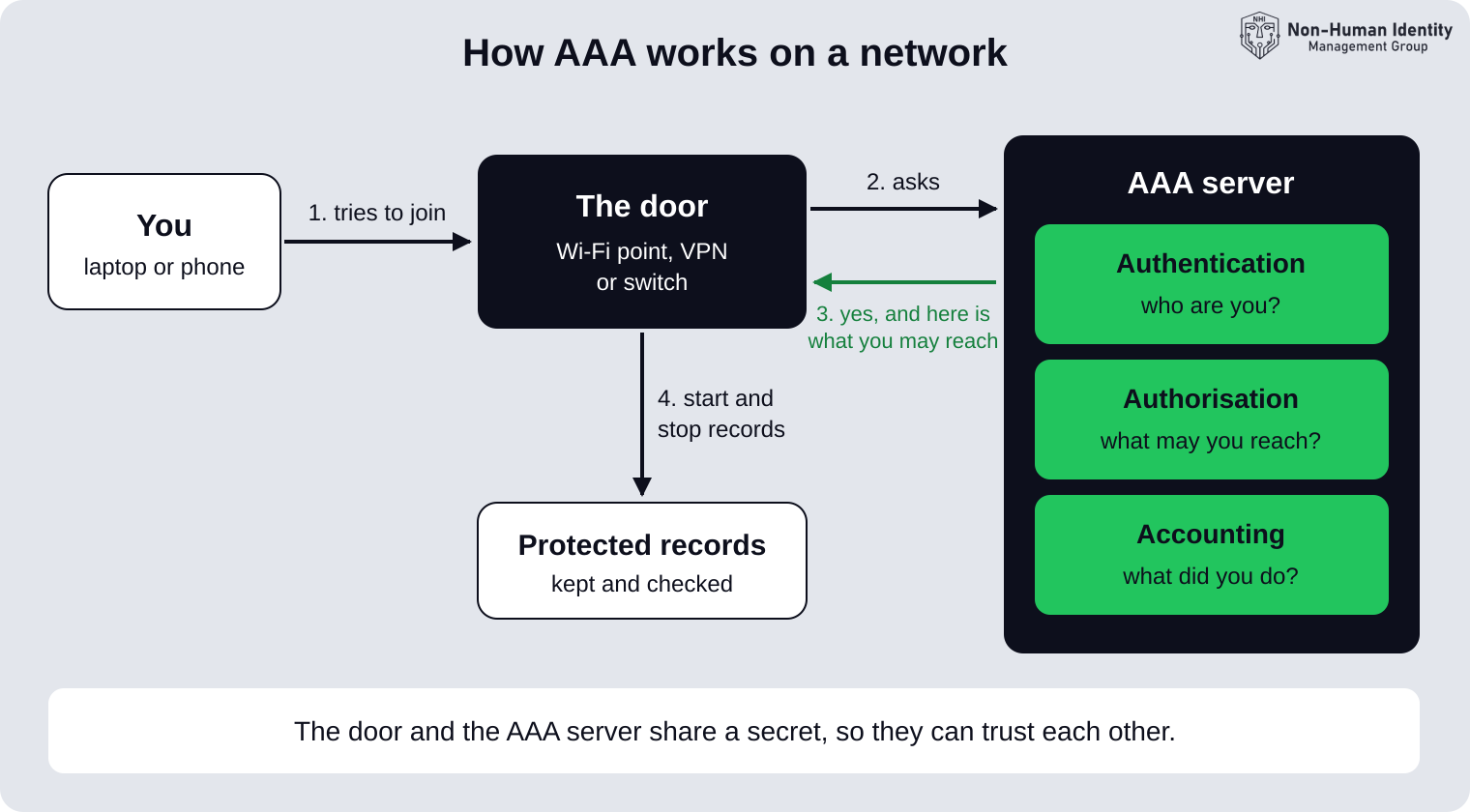
The door and the server trust each other through a shared secret, which in RADIUS is not sent over the network.[1]
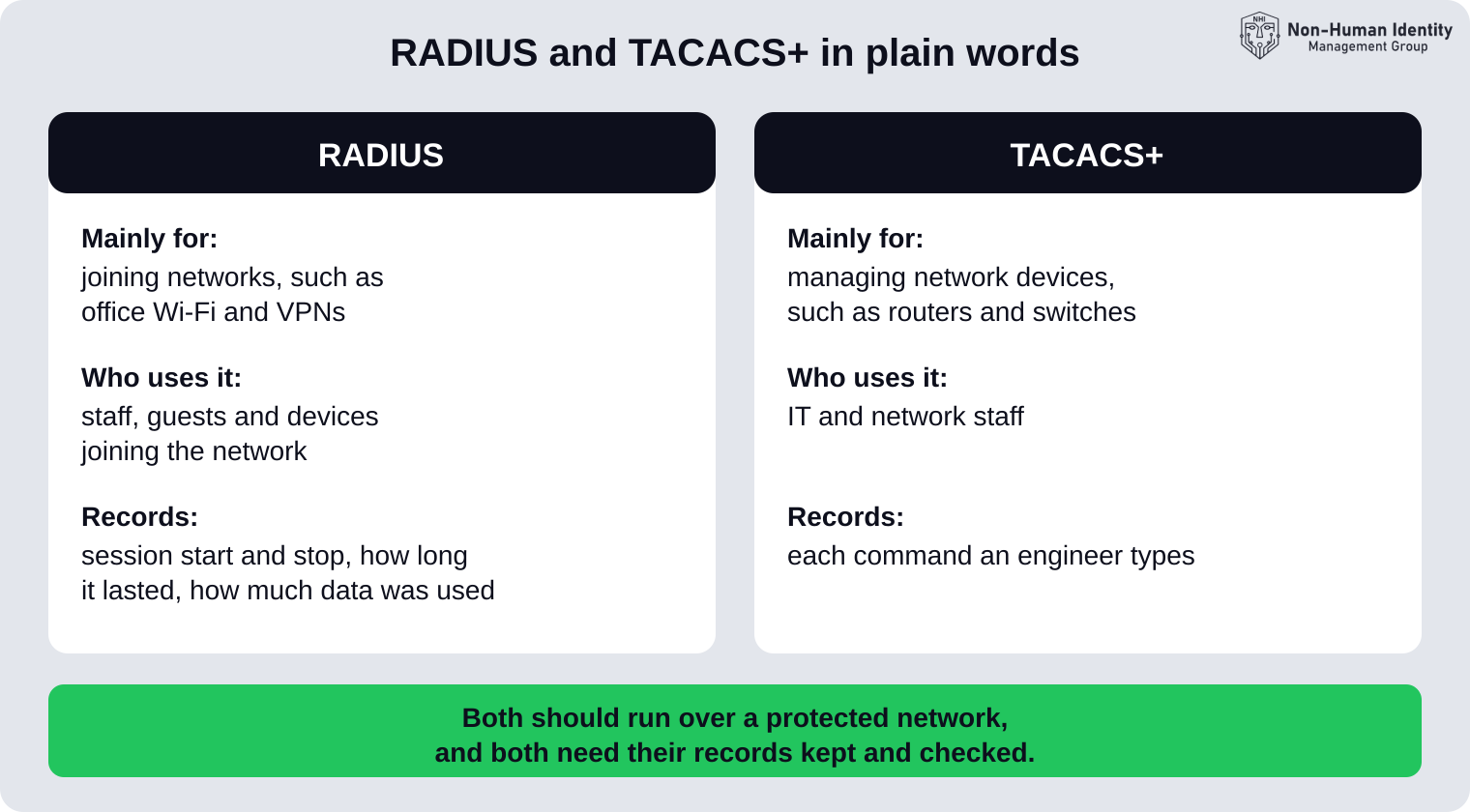
Two systems, or protocols (agreed rules for how devices talk), come up again and again. RADIUS is mostly used to let people and devices on to Wi-Fi and VPNs.[1] TACACS+ is mostly used for staff who log in to manage routers and switches.[3] TACACS+ keeps the three As separate, so it can check and record each command an engineer types.[3]
Both are older designs. The TACACS+ standard itself warns that its built-in scrambling is weak, so the traffic should travel over a protected network.[3]
A worked example
Imani Grover has just joined Moorfield Vets, a fictional group of three animal clinics, as its first IT support worker. On her second day, the Wi-Fi at one clinic goes down.
The cause is a changed setting on the clinic's router. Imani asks who changed it. Nobody knows. The router has one admin account, and five people know its password.
She thinks of the gym. The router has a desk check, of a sort. But everyone has the same card, every card opens every room, and there is no turnstile log.
Imani asks Kemal Pajari, the network contractor, for help. Together they plan the three As.
For authentication, each person now signs in to the routers with their own work account, through a central AAA server. The shared admin password is changed and kept sealed for emergencies.
For authorisation, only Kemal and Imani can change settings. Clinic managers can view status pages but not change them.
For accounting, every sign-in and every change is recorded and sent to a central store. Imani sets a reminder to check the records each week.
A month later, a setting changes again. This time the record shows which account made the change and when. It was a planned update by Kemal, and it is written up in the change notes.
Myths and mistakes
| What people think | What is true |
|---|---|
| Accounting in AAA is about money. | It started with billing, but today it mainly means records of who did what, for security and investigations. |
| If people sign in, that covers security. | Signing in is only the first A. People also need the right limits and a record of what they did. |
| A shared admin account is fine for a small team. | A shared account means the records cannot say which person acted. Give each person their own account. |
| Once logs exist, the job is done. | Logs need to be kept, protected from changes and checked. The NCSC suggests keeping key logs for at least six months.[4] |
| AAA is only for people. | Programs and devices sign in too. They need their own accounts, limits and records. |
What can I do this week?
- Pick one important system and write down how it handles each of the three As.
- Find any shared admin accounts and list who knows the password.
- Check that sign-ins and changes are recorded, and where the records go.
- Ask how long the records are kept and who looks at them.
- List the scripts and programs that sign in, and who owns each one.
Checklist
- Each person and program signs in with its own account.
- Network devices check sign-ins with a central AAA server where possible.
- Each account has only the access it needs.
- Sign-ins, changes and sessions are recorded.
- Records go to a central store that is protected from changes.
- Records are kept for an agreed time and checked regularly.
- Shared emergency passwords are sealed, and their use is recorded.
- AAA traffic travels over a protected network.
Common questions
What does AAA stand for in security?
Authentication, authorisation and accounting. Authentication checks who you are. Authorisation decides what you may do. Accounting records what you did. Together they ask three questions of every person or program: who are you, what may you do, and what did you do?
Is accounting the same as auditing?
They are close. Accounting is the recording: the trail of sign-ins, sessions and actions. Auditing is the reviewing: someone reads those records later to check that the rules were followed. Good accounting is what makes a useful audit possible, because there is something reliable to look at.
What is the difference between RADIUS and TACACS+?
Both are ways for network devices to ask a central server about access. RADIUS is mostly used to let people and devices join Wi-Fi and VPNs.[1] TACACS+ is mostly used for staff who manage routers and switches, and it can check and record each command.[3]
Do I need a special AAA server?
Not always. Many cloud services and identity systems carry out all three As for you. A dedicated AAA server is most common where an organisation runs its own Wi-Fi, VPNs and network devices. The three questions apply either way, so check each system handles all of them.
How does AAA apply to software?
The same way. A script or app proves who it is, often with a key or token. It should get only the rights it needs. Its actions should be recorded under its own name, so an investigation can tell which program did what.
Where next?
Ready for the detail? Read the practitioner guide: AAA Security Guide. It goes further into the RADIUS and TACACS+ protocols, protecting AAA traffic and servers, and AAA for service accounts and workloads.
Also useful:
- 802.1X, EAP and RADIUS Explained
- Authentication vs Authorisation for Beginners
- Logging and Log Management for Beginners
- Least Privilege for Beginners
Related NHI Mgmt Group resources: Non-Human Identities for Beginners · Privileged Access Management for Beginners · Authentication Guide
Key terms
- AAA
- Authentication, authorisation and accounting: checking who someone is, deciding what they may do and recording what they did.
- Authentication
- Proving that a person or program is who it claims to be.
- The decision about what a signed-in person or program is allowed to do.
- Accounting
- Recording sign-ins and activity so people can review later what happened and when.
- RADIUS
- A common way for network devices to ask a central server who may join Wi-Fi or a VPN.
- TACACS+
- A way to control and record which staff can manage network devices, down to single commands.
- Network access server
- The device at the edge of a network that asks the AAA server before letting someone in.
- Audit trail
- A record of activity in time order that lets a reviewer work out who did what and when.
Sources and further reading
- RFC 2865: Remote Authentication Dial In User Service (RADIUS). C. Rigney and others, IETF, June 2000. https://www.rfc-editor.org/rfc/rfc2865, accessed 28 Nov 2026.
- RFC 2866: RADIUS Accounting. C. Rigney, IETF, June 2000. https://www.rfc-editor.org/rfc/rfc2866, accessed 28 Nov 2026.
- RFC 8907: The Terminal Access Controller Access-Control System Plus (TACACS+) Protocol. T. Dahm and others, IETF, September 2020. https://www.rfc-editor.org/rfc/rfc8907, accessed 28 Nov 2026.
- 10 Steps to Cyber Security: Logging and monitoring. National Cyber Security Centre (NCSC). https://www.ncsc.gov.uk/collection/10-steps/logging-and-monitoring, accessed 28 Nov 2026.