Account lockout is a sign-in system pausing an account after too many wrong passwords.
This guide is for anyone who has seen "your account is locked" and wondered why, and for people who look after staff accounts. A lock can be a nuisance, a sign of an attack, or both, so it helps to know which.
In short
- A lockout slows down anyone guessing a password, by pausing the account after several wrong tries.
- The same lock can keep the real owner out, and attackers can trigger it on purpose.
- Many services now slow guessing down step by step instead of locking hard.
- If you are locked out, use the service's own reset page, not a link in a message.
What you will learn
- Explain why accounts lock and what the lock protects against.
- Spot when a lockout may be a sign of an attack.
- Check the safe way to get back into a locked account.
- Ask whether your sign-in system locks hard or slows down.
- Pause after wrong tries (account lockout)
- blocking sign-in for a while after too many wrong passwords.
- Slowing down guesses (throttling)
- making each new try wait longer than the last.
- Password guessing (brute force)
- trying password after password until one works.
What is account lockout?
Think of a mobile phone. Type the wrong passcode a few times and it makes you wait before you can try again. Keep getting it wrong and the wait gets longer.
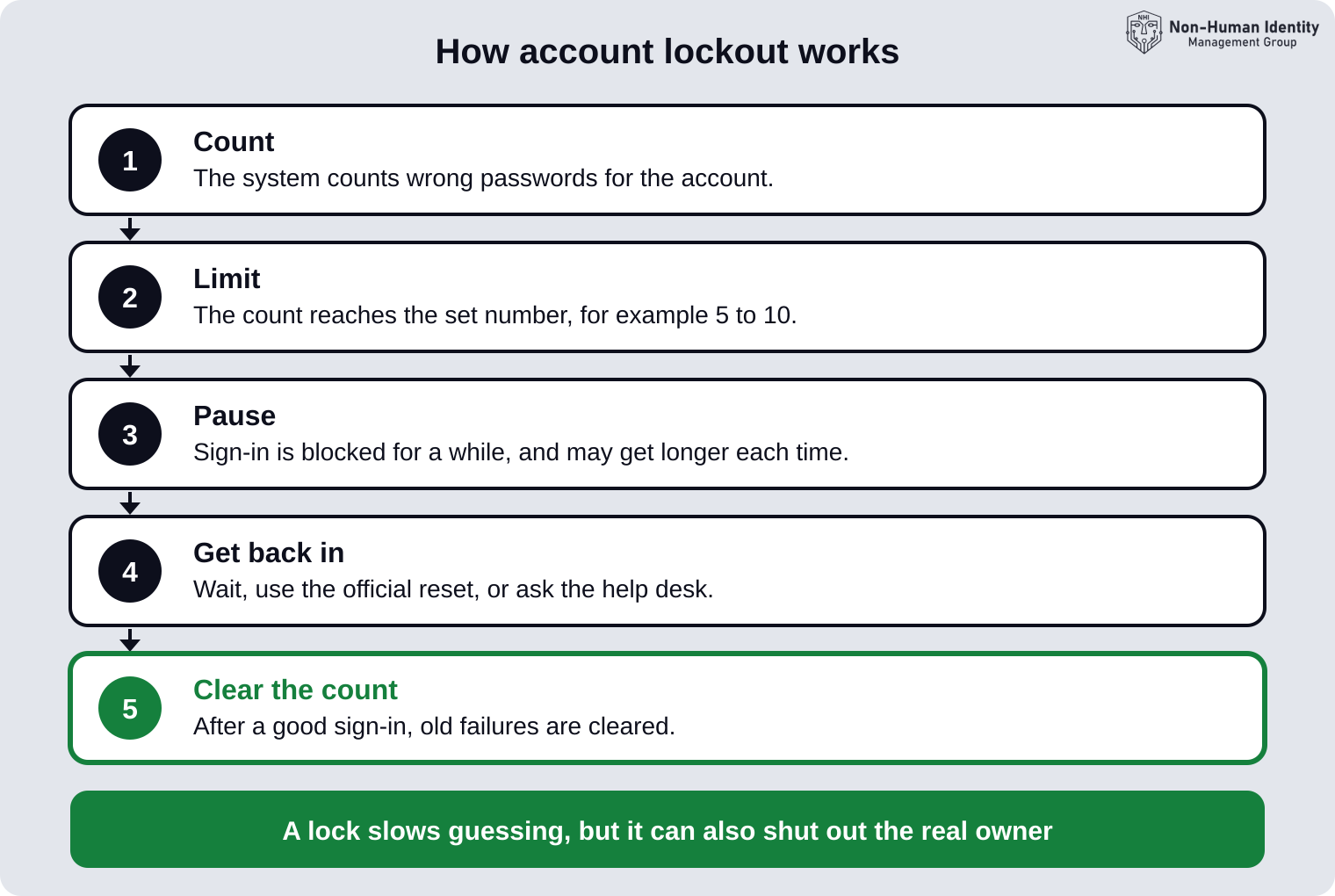
Account lockout does the same job for online accounts. The sign-in system counts wrong passwords. Once the count reaches a set limit, it stops accepting tries for that account for a while.
The point is to slow down a brute force attack, where someone guesses password after password. If each guess is blocked after a handful of tries, guessing a good password could take a very long time.
Where the comparison stops working: only someone holding your phone can type into it. Online, a stranger anywhere can type wrong passwords into your account, and can lock you out on purpose.
Why does it matter?
Lockout is a balance. Too loose and guessers get many tries. Too strict and real people are shut out, which the UK's national cyber security agency warns can be used as an easy attack in itself.[2]
If you are locked out of your own account
What could happen: a message says your account is locked and gives a link, but it is a fake designed to steal your password.
Check this: go to the service yourself, by typing its address or using its app, and use the official reset.
If you look after staff accounts
What could happen: you unlock the same account every morning, and miss that someone is guessing its password.
Check this: look at where the failed tries came from before you unlock.
If you run a small business
What could happen: a strict lock rule shuts out the whole office during a guessing attack, and work stops.
Check this: ask your IT supplier whether your sign-in locks hard or slows down, and how people get back in.
What does it look like?
Here is a made-up sign-in record for one account, followed by what the owner sees.
Example only. All values are made up.
Account: [email protected]
06:01  wrong password  try 1   from 198.51.100.7   (1)
06:01  wrong password  try 2   from 198.51.100.7
  ...
06:03  wrong password  try 10  from 198.51.100.7
06:03  ACCOUNT LOCKED for 60 seconds                (2)
06:05  wrong password  try 11  locked again, longer (3)
08:30  Idris signs in: "Your account is locked"     (4)
- Many wrong passwords in a short time, from one unfamiliar internet address.
- The limit is reached and the account pauses.
- Each new wrong try after a lock can make the next pause longer.
- In a real file, this line would show the owner being shut out by someone else's guessing.
Why this is risky: the lock slowed the guesser, but it also blocked the owner. Someone could keep an account locked just by sending wrong passwords.[2]
The safer way: slow guesses down step by step, add a second check at sign-in, and alert someone when failures pile up. Give people a safe way to get back in.[1][2]
How does it work?
Most lockout systems follow these steps, though the numbers vary by service.
- Count. The system counts wrong passwords for each account. Microsoft's cloud sign-in ignores the same wrong password typed again, so a person retyping one typo is not counted over and over.[3]
- Limit. When the count reaches the limit, the account pauses. The UK agency suggests allowing 5 to 10 tries if you use lockout.[2] Microsoft's default for most of its cloud customers is 10.[3]
- Pause. The pause may be short and grow longer each time. Microsoft's first pause is one minute, and later pauses get longer.[3] Some systems instead stay locked until someone unlocks them.
- Get back in. The owner waits, uses a self-service password reset, or asks the help desk.
- Clear the count. After a successful sign-in, earlier failures should be cleared, according to US government guidance.[1]
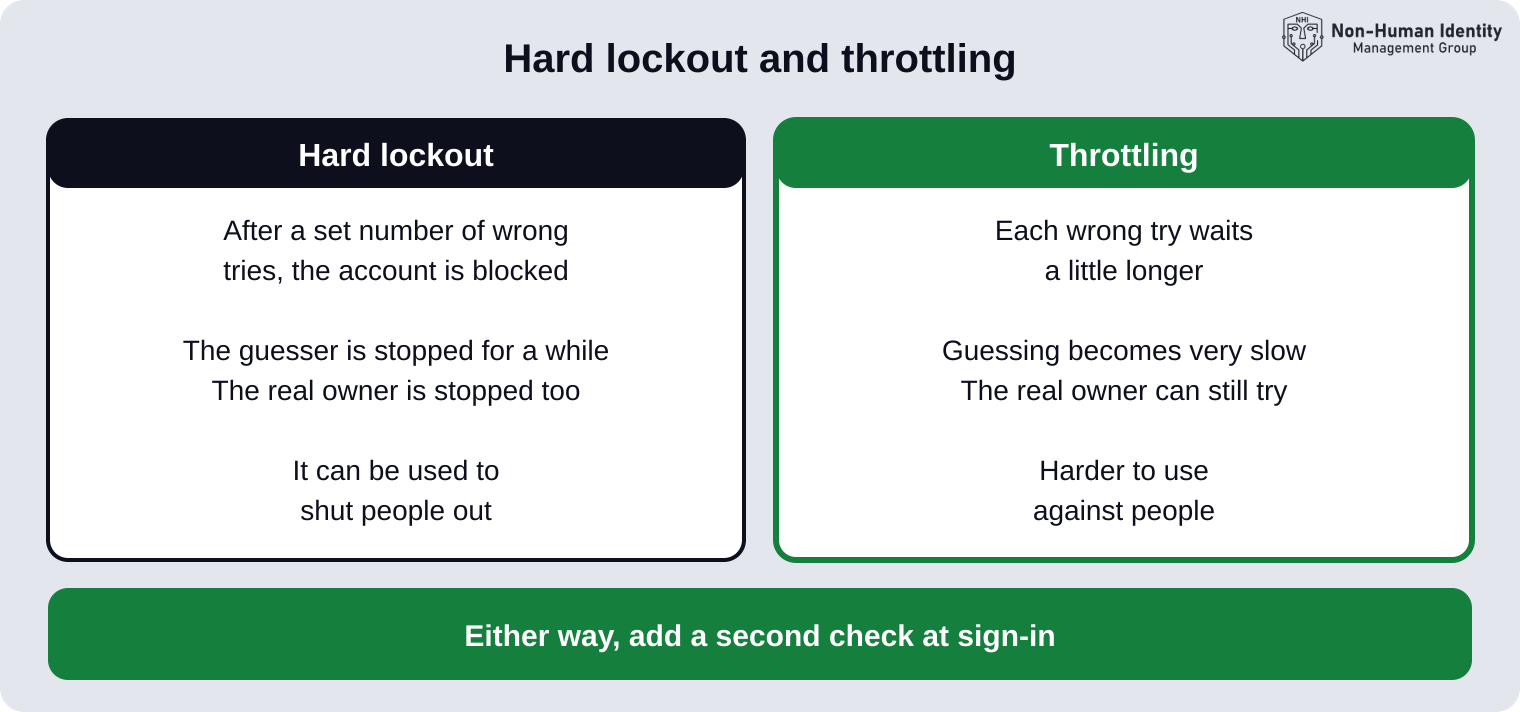
There is another approach, called throttling. Instead of a hard lock, each new try has to wait a little longer. The UK agency prefers this, because the real owner can keep trying.[2] US government guidance also suggests longer waits as the count rises, and bot checks before a sign-in.[1]
Some services go further. Microsoft calls its version smart lockout. It keeps separate counts for familiar and unfamiliar places, so a guesser abroad is less likely to lock out a worker at their usual desk.[3]
A worked example
Idris Delmar runs a fictional moving firm, Hazel Removals, with twelve staff. On Monday he arrives at 8:30 and cannot get into his email. The screen says his account is locked.
His first thought is to ring the IT helper and ask for a quick unlock. Then he remembers the phone that makes you wait. Someone had been typing into his account. It was not him.
He calls Kemal Marlow, who looks after IT for the firm part time. Kemal does not just press unlock. He checks the sign-in records first. There were dozens of wrong passwords from an unfamiliar country, starting at 6am.
Kemal checks for any successful sign-in from that address. In the records available to him, there is none. Even so, he has Idris set a new, long password from a password manager, and turns on a second check at sign-in for his account.
Later that day, an email arrives saying "Your mailbox is locked, click here to restore it". Idris now knows the real system never sent that. He deletes it and tells his staff to expect copies.
By Friday, Kemal has turned on the second check for all twelve staff. He sets up the service's own password reset, so people can get back in without waiting for him. He also asks the provider to alert him when many failed sign-ins pile up.
Myths and mistakes
| What people think | What is true |
|---|---|
| A lockout means I forgot my password. | Sometimes. It can also mean someone else has been guessing it. Check before you shrug it off. |
| Stricter is always safer, so lock after one or two tries. | Very strict limits shut out real people and help attackers cause disruption.[2] |
| Lockout stops all password attacks. | Attacks that try one password on many accounts can stay under the limit. A second check at sign-in helps more. |
| Unlocking the account fixes the problem. | It ends the symptom. Look at where the failures came from, and change the password if in doubt. |
| A "your account is locked" email is always genuine. | Scammers copy these messages. Go to the service yourself rather than clicking a link. |
What can I do this week?
- Set up the official password reset on your main accounts, so you can get back in on your own.
- Turn on a second check at sign-in, starting with email.
- If you manage accounts, find out whether your system locks hard or slows down.
- Agree a rule: check where failed tries came from before unlocking an account.
- Tell staff that lock warnings arriving by email may be fake.
Checklist
- We know how many wrong tries our sign-in allows, and what happens next.
- Our system slows guesses down, or locks only for a short time.
- Every account has a second check at sign-in.
- People can reset their own password through an official, safe route.
- The help desk checks who is calling before unlocking or resetting.
- Someone gets an alert when many failed sign-ins happen at once.
- Repeated lockouts on one account are looked into, not just cleared.
Common questions
Why does my account keep locking?
Often an old device is still trying a password you have changed, such as a phone or laptop with saved details. It can also be someone guessing. Update saved passwords on all your devices first. If it carries on, ask IT to check where the failed tries come from.
How long does an account lockout last?
From a minute to until someone unlocks it. Some services pause for a minute and grow longer with each new failure. Microsoft's cloud sign-in starts at one minute, for example.[3] Others stay locked until the help desk or a reset unlocks them.
Is lockout or throttling better?
The UK's national cyber security agency prefers throttling. It slows guessers but still lets real people keep trying.[2] Hard lockouts can shut people out and be used for disruption. Many services now mix both with smarter checks.
Does a lockout mean I have been hacked?
Not on its own. A lock usually means someone, possibly you, typed wrong passwords. It becomes a worry if the tries came from somewhere unfamiliar, or if you see a sign-in you did not make. If in doubt, change the password and turn on a second check.
Can lockout protect software accounts too?
Partly. Apps and scripts also sign in, and a wrong or old password in a script can lock an account used by software. That can stop a business process. These software accounts need owners and safe storage for their secrets, not just lock rules.
Where next?
Ready for the detail? Read the practitioner guide: Account Lockout and Brute-Force Protection Guide. It goes further into setting limits, platform settings, code and PIN guessing, and safe recovery and emergency access.
Also useful:
- Brute-Force Attacks for Beginners
- Password Spraying for Beginners
- MFA Lockout and Recovery Troubleshooting Guide
- Password Managers for Beginners
Related NHI Mgmt Group resources: Password Spraying and Credential Stuffing Defence Guide · Credential Stuffing for Beginners · Account Takeover for Beginners
Key terms
- Account lockout
- Blocking sign-in to an account for a while after too many wrong passwords.
- Throttling
- Making each new sign-in try wait longer than the last.
- Smart lockout
- A lockout that treats sign-ins from familiar and unfamiliar places differently.
- Brute force attack
- Guessing passwords over and over until one works.
- Self-service password reset
- A safe way to reset your own password without calling the help desk.
- Multi-factor authentication
- Signing in with two or more kinds of proof, such as a password and a code.
- Denial of service
- Making a system or account unusable for the people who should be able to use it.
Sources and further reading
- SP 800-63B-4, Digital Identity Guidelines: Authentication and Authenticator Management, section 3.2.2 Rate Limiting (Throttling). National Institute of Standards and Technology (NIST). https://pages.nist.gov/800-63-4/sp800-63b.html, accessed 28 Nov 2026.
- Password administration for system owners: updating your approach. National Cyber Security Centre (NCSC). https://www.ncsc.gov.uk/collection/passwords/updating-your-approach, accessed 28 Nov 2026.
- Protect user accounts from attacks with Microsoft Entra smart lockout. Microsoft Learn, Microsoft. https://learn.microsoft.com/en-us/entra/identity/authentication/howto-password-smart-lockout, accessed 28 Nov 2026.