Accounting software security means controlling who and what can see and change your business's money records.
This guide is for small business owners, bookkeepers and finance staff who use online accounting software. You do not need to be technical: whoever can get into your accounts may be able to see your customers, change supplier bank details or send money.
In short
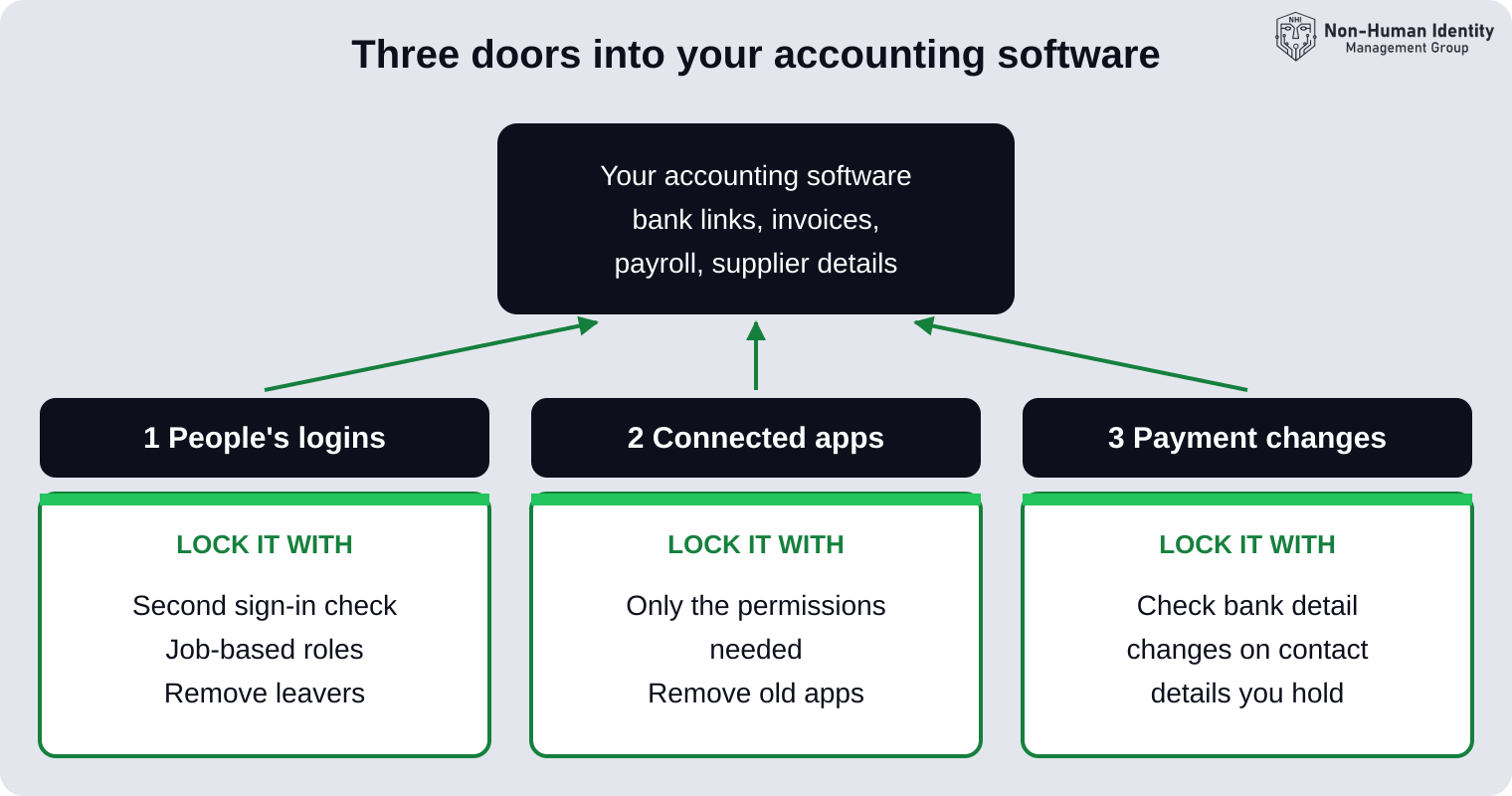
- Your accounting software holds your bank links, invoices, payroll and supplier details, so a stolen login is valuable to criminals.
- Turn on a second sign-in check for every person who logs in.
- Give each person and each connected app only the access they need, and remove old ones.
- Check any change to a supplier's bank details using contact details you already hold.
What you will learn
- Explain the three ways into your accounting software: people, connected apps and payment changes.
- Spot risky users and apps on your access list.
- Check a bank detail change safely before you pay.
- Ask your bookkeeper or adviser the right questions about access.
- Second sign-in check (two-step verification)
- a code or app prompt needed as well as your password.
- Linked app (connected app)
- another online tool you have allowed to read or change your accounts data.
- Job-based access (user role)
- a set of permissions that matches what a person's job needs.
What is accounting software security?
Think of the office where a business keeps its books and its chequebook. Anyone who gets into that room can read the books. Depending on what is left out, they might also change who gets paid.
Online accounting software, such as QuickBooks, Sage or Xero, is that office today. It often links to your bank, sends your invoices, runs payroll and stores supplier bank details. Many people and tools can have a key: you, your bookkeeper, your accountant, staff and any apps you have connected.
Accounting software security is about three doors. The first is people's logins. The second is connected apps, such as a receipt scanner or a payments tool, that you have allowed in. The third is payment changes, such as a new bank account for a supplier.
The provider keeps its own systems safe. You control who has a login, what each one can do and which apps can connect.
Where the comparison stops working: a real office has one door you can see. Online, people can try to log in from anywhere, at any hour, and connected apps get in without anyone walking past you.
Why does it matter?
Criminals aim for the moment money moves. In the US, the FBI's crime reporting centre logged about 2.77 billion US dollars in reported losses to business email scams in 2024. In these scams, criminals use taken-over email accounts and other channels to get payments sent to them.[4]
If you own a small business
What could happen: a former staff member's login still works and can see every customer and supplier.
Check this: open the user list and remove anyone who no longer needs access.
If you are a bookkeeper
What could happen: you get a convincing email asking you to update a supplier's bank details before a payment run.
Check this: confirm every bank detail change using contact details you already hold.
If you run a finance team
What could happen: an old app you connected years ago still has wide access to your records.
Check this: list every connected app and what it is allowed to do.
What does it look like?
Here is a made-up access screen for a small company's accounting software. It shows who and what can get in.
Example only. All values are made up.
EXAMPLE LEDGER - Users and connected apps
USERS
  [email protected]       Admin    2-step: on
  [email protected]  Admin    2-step: off    (1)
  [email protected] Admin    last login 2024 (2)
CONNECTED APPS
  Receipt scanner (FAKE)  read and write all data  (3)
  Payroll tool (FAKE)     payroll only
RECENT CHANGES
  Supplier 0000 bank details changed by email request (4)
- In a real screen, this line would show a person with full access and no second sign-in check.
- A login for someone who has left, still with full access.
- A connected app that can read and change everything, though it only needs to add receipts.
- A bank detail change made because of an email, with no note that anyone checked it.
Why this is risky: each line is a way in. A guessed or stolen password, a forgotten login, an over-powered app or one unchecked email could each lead to lost money or data.
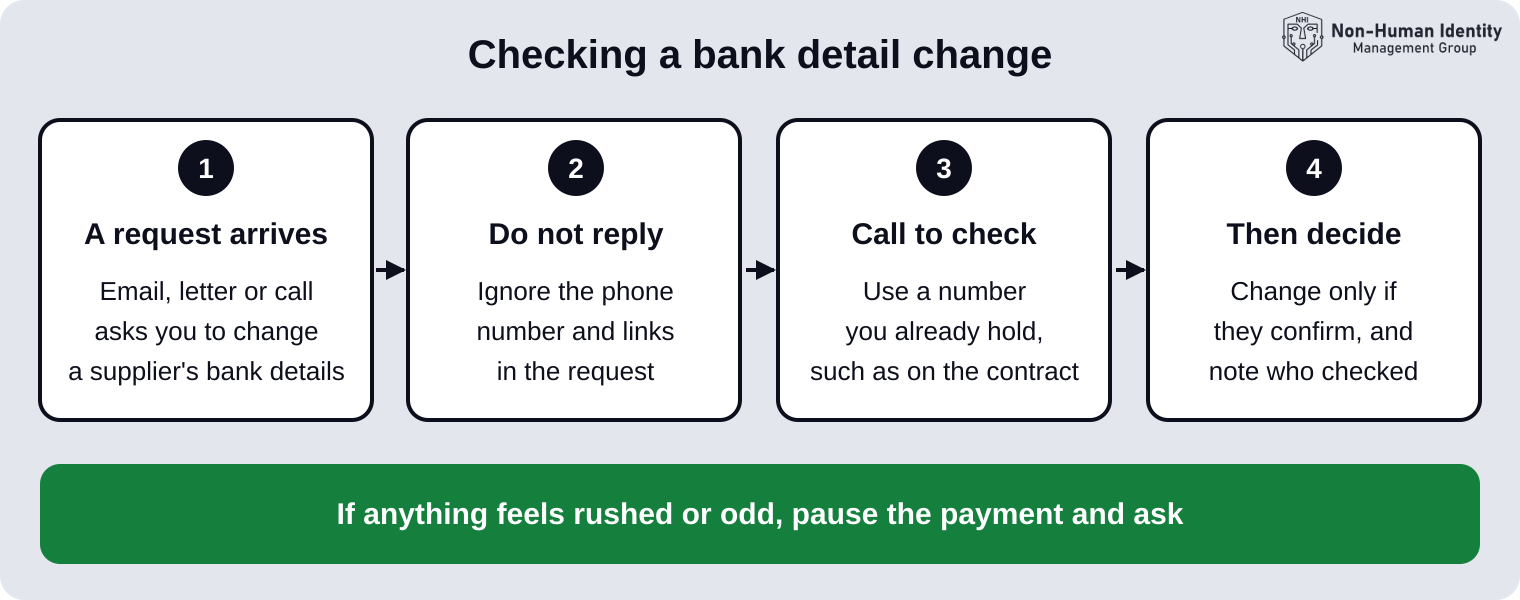
The safer way: everyone uses a second sign-in check. People get the role their job needs, and leavers are removed. Apps get only the access they need. Every bank detail change is confirmed by phone using a number you already hold, and the check is written down.
How does it work?
Here is how the three doors usually get locked, step by step, starting with the people who log in.
- Lock the logins. The UK's National Cyber Security Centre (NCSC) says to use passkeys where they are offered, or a strong password plus two-step verification. It calls two-step verification one of the most effective ways to protect online accounts.[1]
- Match access to jobs. Give each person a role that fits their work. Keep full admin access for the few people who need it. The NCSC also suggests a separate everyday account for admins.[1]
- Review who is in. Remove leavers, old suppliers and contractors. The NCSC suggests reviewing who has access to important accounts every few months.[1]
- Trim connected apps. When an app connects, it asks for scopes, which are the permissions it wants to use. Some providers now let apps ask for narrower permissions, such as invoices only.[5] Disconnect apps you no longer use.
- Check money changes. Report Fraud, the UK's fraud reporting service (formerly Action Fraud), advises checking invoices and bank detail changes. Contact the supplier using details you already have on file.[3]
Many providers support these controls, but names and settings differ. Check your own provider's help pages, and see the practitioner guides below for product detail.
A worked example
Yusuf Abara runs Basalt Brewery, a fictional craft brewery with nine staff. Gideon Jovanovic is his part-time bookkeeper and runs the weekly supplier payments.
On a Tuesday, Gideon gets an email that looks like it is from the brewery's hop supplier. It says the supplier has changed banks and asks him to update the account before Friday's payment.
Gideon remembers the office with the chequebook. A change to who gets paid is exactly what a thief would want. So he does not reply or use the phone number in the email. He calls the supplier on the number saved from last year's contract. They have not changed banks. Gideon leaves the details as they are and forwards the email to Yusuf.
Yusuf uses the scare to check the other doors. In the user list he finds a login for a manager who left last year, still with full access. He removes it. He also sees that Gideon's login has no second sign-in check, so they turn it on together.
Then they look at connected apps. A receipt scanner they stopped using in 2023 can still read and change all data. Yusuf disconnects it.
Last, they add a rule to the payments checklist. "We confirm every bank detail change by phone, on a number we already hold. We note each check." Yusuf reports the email to Report Fraud and sets a reminder to review access every three months.
Myths and mistakes
| What people think | What is true |
|---|---|
| The provider keeps my accounts safe, so I do not need to do anything. | The provider protects its systems. You control logins, roles and connected apps. |
| We are too small to be a target. | The NCSC says small businesses are just as likely to experience online crime as larger ones.[2] |
| Everyone should be an admin, it is easier. | More admins means more ways to change payments. Give full access to as few people as possible. |
| An email from a known supplier's address is safe. | Email accounts can be taken over. Check bank changes on details you already hold.[3] |
| Old connected apps do no harm. | An unused app may still have access to your data. Disconnect what you do not use. |
What can I do this week?
- Turn on two-step verification, or a passkey, for every login to your accounting software.
- Open the user list and remove anyone who no longer needs access.
- Reduce full admin access to the fewest people possible.
- List connected apps and disconnect the ones you no longer use.
- Write down your rule for checking supplier bank detail changes.
Checklist
- Every person who logs in uses two-step verification or a passkey.
- Each person has a role that matches their job.
- Only a few trusted people have full admin access.
- Leavers, old suppliers and contractors are removed promptly.
- Connected apps are listed, needed and limited to the access they use.
- Bank detail changes are checked by phone on a known number and recorded.
- Access is reviewed every few months.
Common questions
Is online accounting software safe to use?
It can be, if you play your part. Providers protect their own systems, and many add features like two-step verification. Your part is to switch those on, give people and apps only the access they need, and check payment changes carefully.
Should my bookkeeper share my login?
No. Give your bookkeeper and accountant their own logins with the access their work needs. Shared logins hide who did what, and are hard to remove when someone leaves. Check your provider's help pages for how to invite extra users or advisers.
What is a connected app and why does it matter?
A connected app is another tool you have allowed to use your accounts data, such as a receipt scanner. It keeps that access until you disconnect it. If the app is misused or taken over, your records could be at risk. See Hacked App Integrations for Beginners.
What should I do if I think someone got into our accounts?
Call your bank first if money may have moved. Then change the password, check the second sign-in setting and look for changes to bank details and users. In the UK, report it to Report Fraud, the national fraud reporting service. See Small Business Incident Response Plans for Beginners.
How often should I review who has access?
The NCSC suggests reviewing who has access to important accounts every few months.[1] Also review straight away when someone leaves, or when you change bookkeeper, accountant or a connected app.
Where next?
Ready for the detail? Read the practitioner guide: Xero Security. It goes further into user roles, connected app permissions and the settings an organisation owner controls.
Also useful:
- QuickBooks Online Security
- Payment Verification Policy Template
- Invoice Redirection and Supplier Bank Detail Fraud Guide
- Business Email Compromise for Beginners
- SaaS Security for Beginners
Related NHI Mgmt Group resources: BILL Security · Payment Fraud for Beginners
Key terms
- Two-step verification
- A second proof of identity after the password, such as an app code.
- Connected app
- Another tool given access to an online service through its connection settings.
- Scope
- A named permission that sets what a connected app can do with your data.
- Role-based access
- Giving people permissions through set roles that match their jobs.
- Separation of duties
- Splitting important tasks, like adding a supplier and paying them, between different people.
- Invoice fraud
- Tricking a business into paying a fake invoice or paying a real one into the wrong account.
- Business email compromise
- A scam where a criminal poses as a trusted person or supplier by email to get money sent to them.
Sources and further reading
- Secure your important online accounts. Small organisations guide to cyber security, National Cyber Security Centre (UK). https://www.ncsc.gov.uk/collection/small-organisations-guide-to-cyber-security/secure-your-important-online-accounts, accessed 28 Nov 2026.
- Small Business Guide. National Cyber Security Centre (UK), reviewed 21 July 2026. https://www.ncsc.gov.uk/collection/small-business-guide, accessed 28 Nov 2026.
- Mandate fraud. Action Fraud (UK). https://www.actionfraud.police.uk/a-z-of-fraud/mandate-fraud, accessed 28 Nov 2026.
- Internet Crime Report 2024. Federal Bureau of Investigation, Internet Crime Complaint Center (IC3), 2025. https://www.ic3.gov/AnnualReport/Reports/2024_IC3Report.pdf, accessed 28 Nov 2026.
- Granular scopes FAQ. Xero Developer, Xero. https://developer.xero.com/faq/granular-scopes, accessed 28 Nov 2026.