Ad account security means keeping strangers out of the accounts you use to buy online adverts.
This guide is for small business owners, marketers and anyone who runs adverts on Google, Facebook or Instagram. You do not need to be technical to be affected: if your card pays for adverts, a stolen login can spend your money.
In short
- An ad account holds your card details, your adverts and your good name with the ad platform.
- Criminals who get in may add themselves as admins, raise budgets and run their own adverts on your card.
- Turn on two-step login for every user, keep at least two admins and remove people who have left.
- If you spot strange changes, report them to the platform quickly and follow its recovery steps.
What you will learn
- Explain what an ad account is and why criminals want one.
- Spot the signs that someone else is using your account.
- Check who has access and what level of access they hold.
- Ask your agency or freelancer how they protect your account.
- Advert buying account (ad account)
- the online account you use to create adverts and pay for them.
- Boss level (Admin access)
- the access level that can add people, remove people and change their access.
- Second check at login (two-step verification)
- an extra step after your password, such as a code or a tap on your phone.
What is ad account security?
Think of renting a big poster site on a busy high street, paid for with your shop's card. If a stranger gets the booking login, they can put up their own posters and send you the bill.
An ad account works the same way. Google Ads and Meta's ad tools let a business write adverts, pick who sees them and set a daily budget. The account stores a payment method, so the platform charges it as the adverts run.
Ad account security is the set of habits and settings that keep that account in the right hands. It covers who can sign in, what each person can change, and how you notice and fix a break-in.
Where the comparison stops working: a poster on the high street is easy to spot. Fake adverts can be shown to strangers in other towns or countries, so you might not see them yourself.
Why does it matter?
A taken-over ad account can cost money and trust. Criminals may raise budgets, set up new campaigns (groups of adverts) and add their own users.[1] They may also run adverts that point people to scam or harmful sites, and your account can be suspended for adverts you did not make.[1]
If you run a small business
What could happen: a stranger spends your monthly ad budget in a day, on adverts you never wrote.
Check this: look at who has access to your ad account today, and remove anyone you do not know.
If you work in marketing
What could happen: a fake login page steals your password, and the attacker signs in as you.
Check this: turn on two-step verification, or a passkey, for your own login today.
Next: Passkeys for Beginners
If you pay an agency or freelancer
What could happen: their account is broken into, and the attacker reaches yours through it.
Check this: ask how they protect logins, and keep your own admin on the account.
What does it look like?
Most ad platforms keep a change history. It is a list of each change and who made it. Here is a made-up one that shows a break-in.
Example only. All values are made up.
Change history: Birch Dental ads (account 000-000-0000)
Mon 09:12  [email protected]      Paused campaign "Spring check-ups"
Tue 02:47  [email protected]      Added user [email protected] as Admin   (1)
Tue 02:51  [email protected] Removed user [email protected]              (2)
Tue 02:55  [email protected] Daily budget 20.00 changed to 900.00       (3)
Tue 03:02  [email protected] Created campaign "FAKE-Gift-Card-Offer"    (4)
- In a real file, this line would contain a new admin added at night with the owner's login.
- The new user removes another admin, so fewer people can undo the damage.
- The daily budget jumps far above normal.
- A campaign appears that nobody in the business created.
Why this is risky: Google lists unknown users, budget increases and campaigns you did not create as signs of a compromised account.[1] Each change gives the attacker more control. Each one costs the shop more.
The safer way: every user signs in with two-step verification. The business keeps more than one trusted admin. Someone checks the change history each week.
How does it work?
Here is how an ad account is often taken over, and where each lock fits.
- The bait. Someone with access gets a fake email or login page and types in their password. This trick is called phishing. Malware (harmful software) on a work computer can also steal passwords.[1]
- The way in. The attacker signs in with the stolen details. Two-step verification adds a second check, so a password alone is often not enough.[5]
- The grab. Once inside with Admin access, the attacker can add their own users and change access levels. Only Admin users can give access or change access levels.[2]
- The spend. The attacker raises budgets and runs their own adverts, which your payment method pays for.[1]
- The recovery. You report it, the platform secures the account and you help decide which changes to undo.[1]
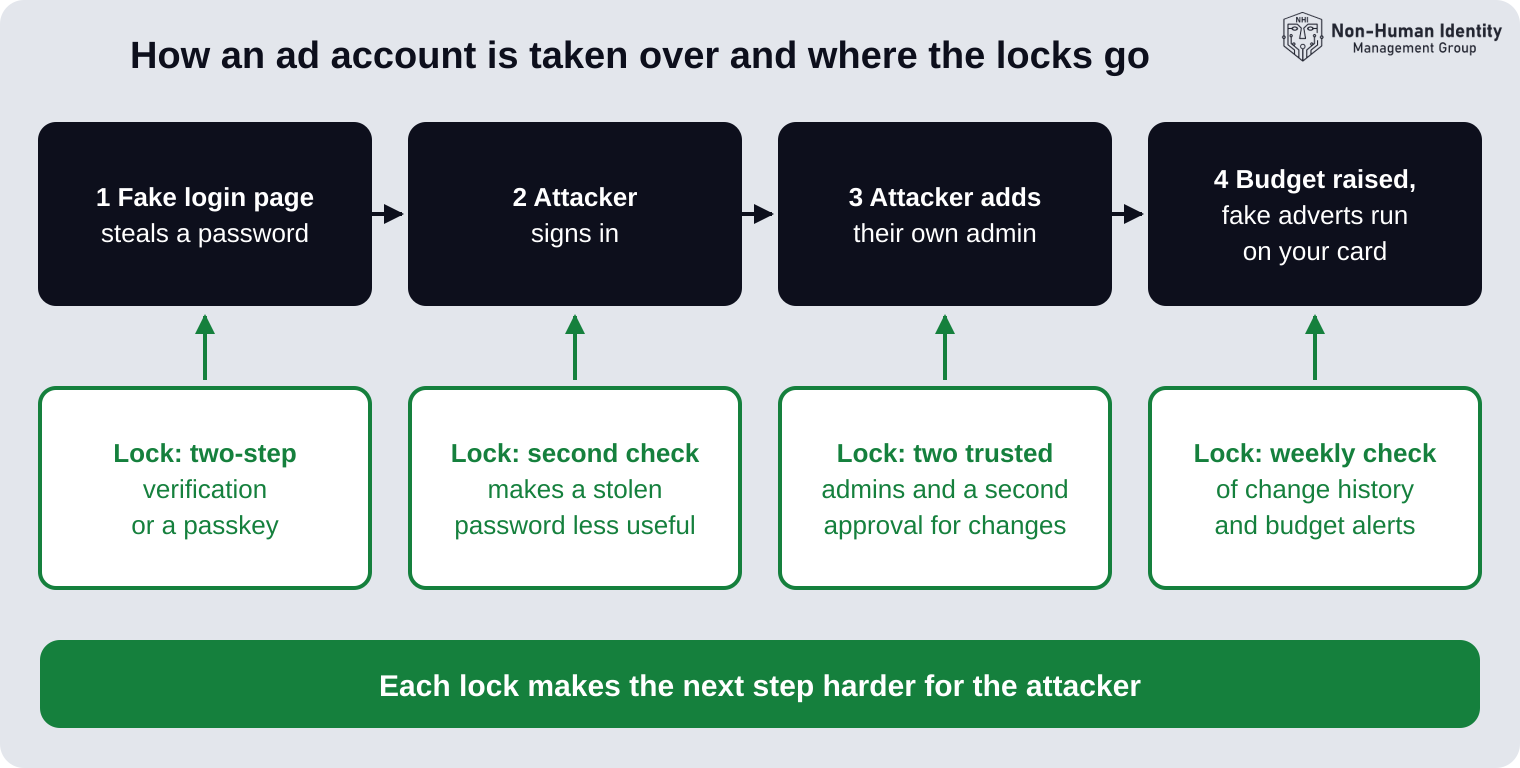
Google Ads has some extra safety nets. On accounts with more than three admins, adding or removing a user or changing a role needs a second admin to approve it. Google calls this multi-party approval.[3] Agencies that run many accounts can also require two-step verification for every account they own.[4] Other platforms have their own settings, so check each one's help pages.
A worked example
Zola Jovanovic runs Birch Dental, a fictional family dentist with two clinics. A freelancer, Milo Gallardo, runs her Google Ads. Both are admins on the account.
On Tuesday morning Milo cannot sign in. He rings Zola. She opens the account and sees a stranger listed as an admin, a budget of 900 a day and an advert for gift cards.
Zola remembers the poster site. Someone has the booking login, so the first job is to stop the spending and take the login back. She pauses the strange campaign and reports the break-in to Google, with the times and the unknown user's details.[1]
Last week she typed her password into a page that looked like a Google sign-in. Before she changes her password, she runs a malware scan on her laptop. Google advises this, because malware could steal the new password too.[1]
Google secures the account and emails the change history to the admins who held their roles before the break-in. Only one admin can send the decision, and it cannot be changed later.[1] Zola and Milo agree first. Every flagged change was the attacker's, so they choose to clean up the account.
Then Zola turns on two-step verification and asks Milo to do the same. They add a third trusted admin from the practice. Google says you must turn on two-step verification before asking for a refund, so Zola does that before she sends her request.[1]
Now Zola checks the change history every Monday. It takes her five minutes.
Myths and mistakes
| What people think | What is true |
|---|---|
| We are too small for anyone to bother with our ad account. | Any account with a working card and a good history is useful to a criminal, whatever its size. |
| A strong password is enough. | Strong passwords can still be stolen by fake login pages or data leaks. A second check at login helps.[5] |
| One admin is safer than several. | If the only admin loses access, nobody can fix things. Google suggests adding at least one more admin.[2] |
| Our agency handles all of that. | Keep your own admin access and ask your agency how its logins are protected. Your card still pays. |
| If I keep all the changes, the refund still comes. | On Google Ads, choosing to keep the account as it is means the event is not eligible for a refund.[1] |
What can I do this week?
- Open the access page of your ad account. List each user and their level.
- Remove anyone who has left, and lower the access of people who only need to look.
- Turn on two-step login, or a passkey, for your own account. Ask each user to do the same.
- Make sure at least two trusted people in your business are admins.
- Write down how to report a break-in to each ad platform you use.
Checklist
- Every user signs in with two-step verification or a passkey.
- At least two trusted people in the business are admins.
- People who leave lose access on their last day.
- Each user has the lowest access level that lets them do their job.
- Someone checks the change history and budgets every week.
- Agencies and freelancers agree in writing how they protect your account.
- Computers used for ad work have up-to-date security software.
- You know how to report a break-in to each platform you use.
Common questions
How do I know if my ad account has been hacked?
Look for changes you did not make. Google lists users you did not add, budget increases, unknown campaigns, links to unknown manager accounts and policy suspensions for adverts you did not create.[1] Check the change history first, because it shows who changed what and when.
What should I do first if it has been hacked?
Report it to the platform straight away, with the times and any unknown users. Scan your computers for malware, then change your password and turn on two-step verification.[1] For broader help, see Social Media Account Takeover Playbook.
Will I get my money back?
Sometimes. Google Ads reviews refund requests after a confirmed break-in, but you must finish recovery and turn on two-step verification first. Choosing to keep the account as it is makes the event ineligible.[1] Other platforms have their own rules, so read their help pages.
Should my agency have admin access?
Only if they need it. Admin users can add people, remove people and change access levels.[2] We suggest giving an agency the lowest level that lets it do the work, and keeping your own admin so you are never locked out.
Is a passkey better than a code by text message?
Usually, yes. A passkey is a login that uses your phone or computer instead of a typed code. Google suggests passkeys because they are more resistant to phishing.[1] A text code is still much better than a password alone. See Passkeys for Beginners.
Where next?
Ready for the detail? Read the practitioner guide: Google Ads Account Security. It goes further into manager account controls, allowed email domains, API access and the full recovery process.
Also useful:
- Social Media Account Security for Small Businesses Guide
- Malvertising and SEO Poisoning Guide
- Account Takeover for Beginners
- Phishing for Beginners
Related NHI Mgmt Group resources: Account Takeover Prevention Guide · 2FA vs Two-Step Verification vs MFA · Small Business Cyber Security Checklist
Key terms
- Ad account
- The online account a business uses to create adverts and pay for them.
- Account takeover
- When someone else gets into your account and uses it as if they were you.
- Admin access
- The access level that can add and remove users and change what they can do.
- Two-step verification
- A second check after your password, which makes a stolen password less useful on its own.
- Passkey
- A login that uses a key stored on your device instead of a password you type.
- Phishing
- A fake message or website that tricks people into giving away passwords or money.
- Change history
- A list of every change made in an account, with who made it and when.
- Multi-party approval
- A Google Ads setting where a second admin must approve changes to users and roles.
Sources and further reading
- What to do if your account is compromised. Google Ads Help, Google. https://support.google.com/google-ads/answer/9355975, accessed 28 Nov 2026.
- About access levels in your Google Ads account. Google Ads Help, Google. https://support.google.com/google-ads/answer/9978556, accessed 28 Nov 2026.
- About Multi-party approval for Google Ads. Google Ads Help, Google. https://support.google.com/google-ads/answer/16891189, accessed 28 Nov 2026.
- Secure your Google Ads account: Manager Account Security Mandates. Google Ads Help, Google. https://support.google.com/google-ads/answer/12865295, accessed 28 Nov 2026.
- Turn on 2-step verification (2SV). National Cyber Security Centre (UK). https://www.ncsc.gov.uk/collection/top-tips-for-staying-secure-online/activate-2-step-verification-on-your-email, accessed 28 Nov 2026.