AI in incident response means using AI tools to help people spot, understand and handle cyber attacks faster.
This guide is for students, managers and newcomers who hear that AI is changing how attacks are investigated. You do not need to be technical to be affected: if your business gets help from a security team or supplier, AI may already be part of how they handle your alerts.
In short
- AI tools can read huge piles of alerts and records, then write a short summary of what seems to have happened.
- They can suggest next steps and help staff search records using plain questions instead of special code.
- AI can guess wrong and sound sure, so a person should check the facts and approve big actions.
- Attackers use AI too, which is one reason defenders are adopting it to keep up.
What you will learn
- Explain what AI does during an incident, and what it does not do.
- Spot an AI suggestion that needs a human check.
- Check who can approve actions an AI tool suggests.
- Ask your security supplier how they use AI on your alerts.
- Handling an attack (incident response)
- the planned way a team notices an attack, limits the damage and gets things working again.
- Sorting alerts (triage)
- deciding which warnings matter most and need a person to look first.
- Person approves (human in the loop)
- a rule that a person must say yes before an important action goes ahead.
What is AI in incident response?
Think of a police sniffer dog working with its handler. The dog can search a whole station in minutes and point at the bag that smells wrong. The handler decides what happens next.
AI plays the dog's part in incident response, the planned way a team handles a cyber attack. During an attack, computers produce thousands of warnings and records. AI tools sort them, link related ones together and write a plain summary. They can also suggest what to do next.
The handler's part stays with people. They check what the AI found and decide how serious it is. They also approve actions, such as locking an account or cutting a laptop off the network.
Where the comparison stops working: a trained dog rarely invents a smell. An AI tool can produce a confident answer that is simply wrong, and it can be fed false information by an attacker.
Why does it matter?
Attacks can move fast, and small teams struggle to read every warning. The UK's National Cyber Security Centre expects AI to make attacks more frequent and more intense over the next few years.[4] AI helpers are one way defenders try to keep pace.
If you manage a team or a small business
What could happen: your supplier's AI tool locks a key account by mistake, and work stops for the day.
Check this: ask which actions the tool may take alone, and which need a person to approve.
If you are studying or new to security work
What could happen: you trust an AI summary that missed the first thing the attacker did.
Check this: open the original alert and records before you write up what happened.
If you choose or buy security services
What could happen: you pay for "AI response" without knowing what it really does with your data.
Check this: ask what data the tool reads, where it goes and who reviews its answers.
What does it look like?
Here is a made-up summary from an AI tool used by a small firm's security supplier.
Example only. All values are made up.
AI INCIDENT SUMMARY (EXAMPLE) - case 0000-DEMO
Linked alerts: 14 grouped into 1 incident          (1)
Story: user "[email protected]" signed in from
  a new country, then set up email forwarding.      (2)
Confidence: medium                                  (3)
Suggested steps: reset password, remove forwarding,
  sign the user out everywhere.                     (4)
Status: waiting for analyst approval                (5)
- The AI has put many warnings into one story. That saves a lot of reading.
- In a real screen, this line would name the account and what it did, taken from the system's records.
- The AI is not sure. A person should check.
- Good first steps. They still need checking.
- A person decides before anything changes.
Why this is risky: the summary may miss something, such as a second account the attacker used. Acting only on it could leave the attacker inside.
The safer way: use the summary as a start. Check the source records, look for gaps, then approve the steps that fit.
How does it work?
Incident response is a normal part of managing cyber risk. A US government guide describes it as getting ready, spotting attacks, responding and recovering.[1] AI can help at several points.
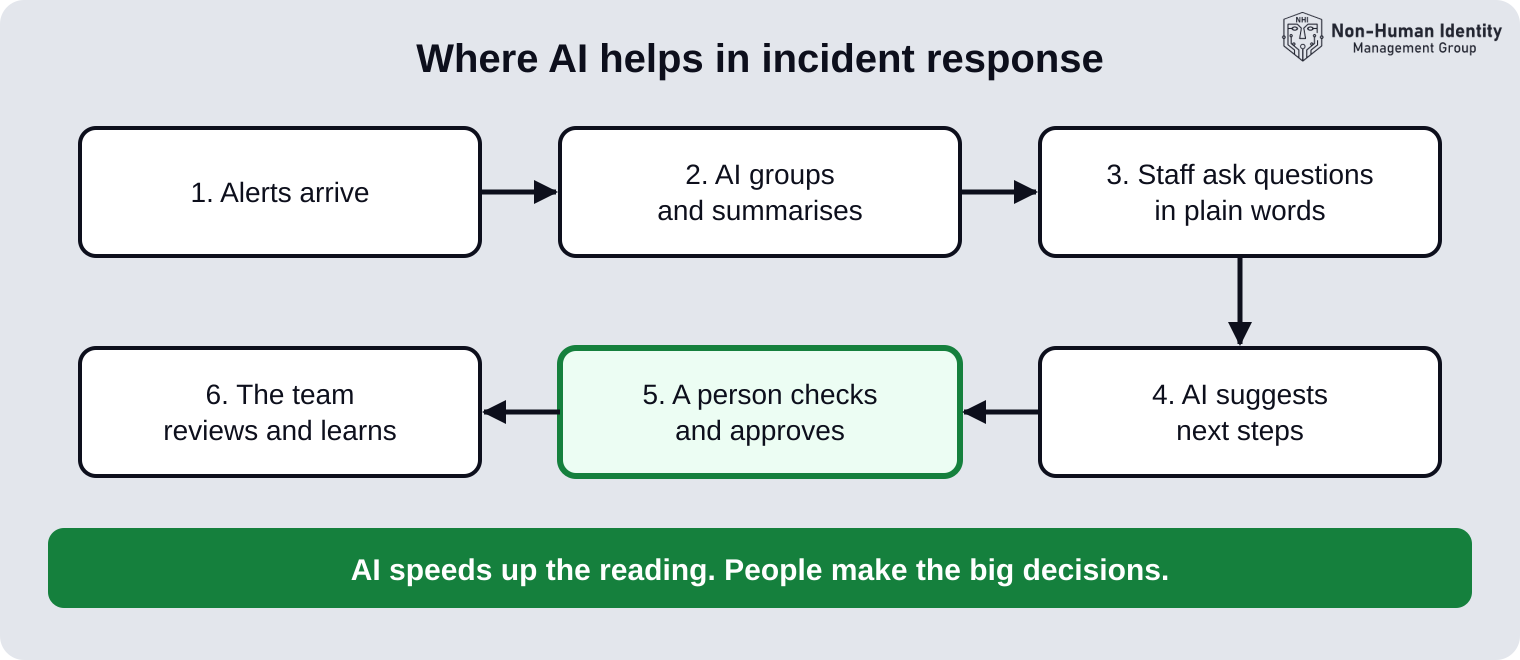
- Systems raise alerts. Security tools record sign-ins, file changes and network traffic, and raise warnings when something looks wrong.
- AI groups and summarises. AI tools pull related alerts together and write a short story of what seems to have happened. Microsoft, for example, says its Security Copilot can turn complex alerts into summaries using logs, alerts and incidents from connected tools.[2]
- Staff ask questions in plain words. Instead of writing a search in a special query language, an analyst can type a question. The AI writes the search for them.[2]
- AI suggests steps. Some tools give step-by-step response guidance.[2] The user then reviews and assesses the answer.
- A person approves. The team checks the facts and approves any action with real impact, such as locking an account.
- Everyone learns. After the incident, the team reviews what happened, including where the AI helped and where it was wrong.
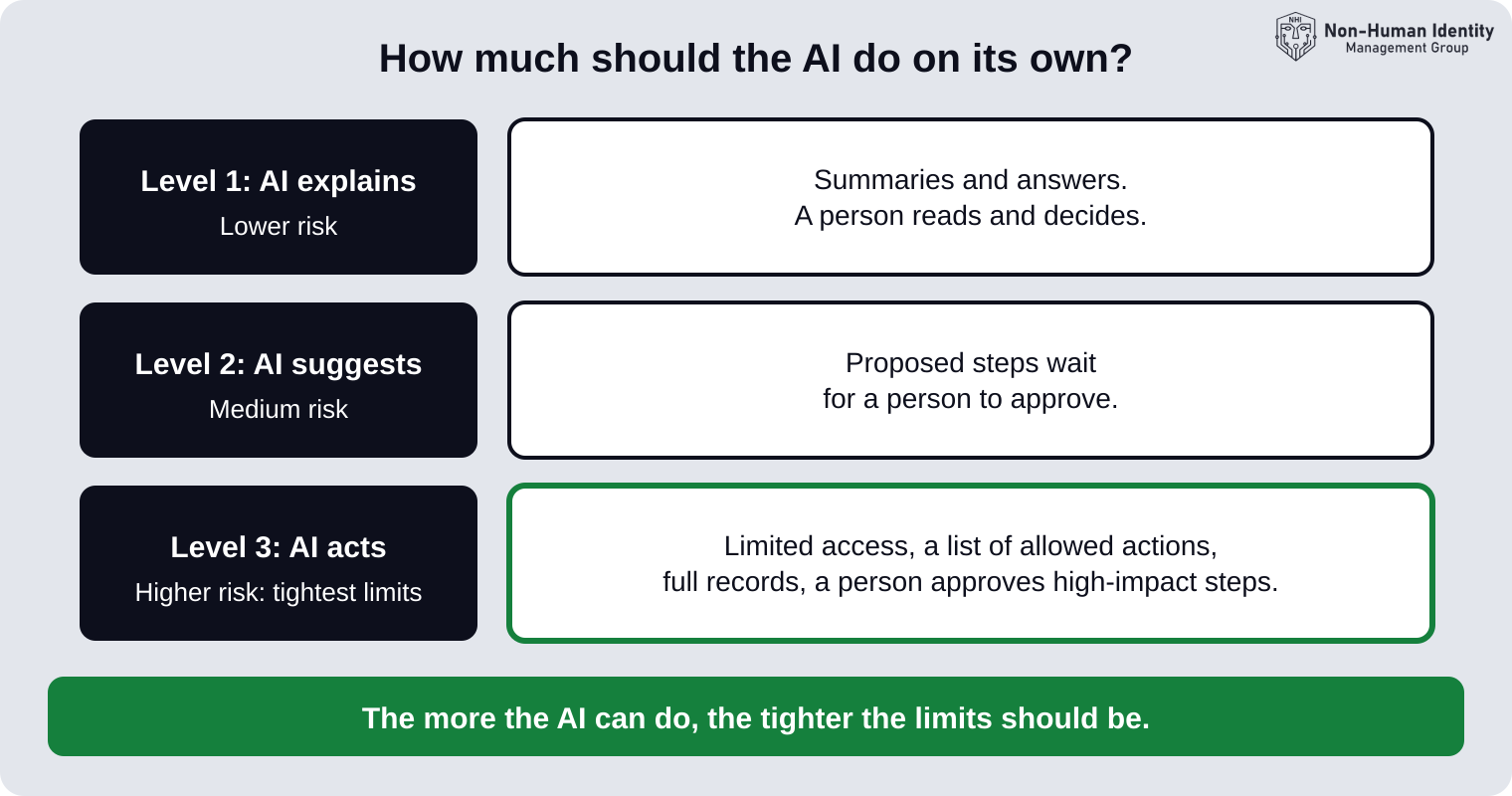
Some newer tools, often called AI agents (AI that can take actions, not just answer), can do more than suggest. They might reset a password or block an address on their own. That is where care matters most.
OWASP, a respected security community, warns about AI tools that have too much power. It suggests giving them only the access they need, offering only the actions the task requires, and having a person approve high-impact actions.[3] It also says logging what the tool does helps teams catch and contain mistakes.[3]
An AI tool that logs in to take action is a non-human identity (NHI): a digital identity used by software, not a person. It needs an owner, limited access and records of what it does, like any other account.
A worked example
Wren Ilic is practice manager at Marigold Vets, a fictional group of three animal clinics. An outside supplier watches the clinics' computers for attacks. Umar Thorne is her contact there.
One Tuesday morning, Umar calls. Their AI assistant has grouped twenty alerts into one incident. Its summary says the reception email account signed in from abroad overnight and set up a rule to forward every email to an outside address.
The AI suggests three steps: reset the password, delete the forwarding rule and sign the account out everywhere. Wren thinks of the sniffer dog. It has pointed at the right bag, but someone still needs to open it.
Umar checks the original records before approving. He confirms the forwarding rule and the foreign sign-in. He also spots something the summary left out. The same night, someone tried to sign in to the clinic manager's account too, but was blocked by its second login check.
Umar approves the three steps and adds a fourth: a password reset for the manager as a precaution. Wren tells staff not to reply to any odd emails that seem to come from reception.
At the review the next week, Wren asks Umar a question. Could the AI have reset passwords on its own? Umar says the tool can only suggest. A person approves any change to an account. Wren writes that rule into the clinics' incident plan.
The AI saved hours of reading. A person's check found the second target.
Myths and mistakes
| What people think | What is true |
|---|---|
| AI now handles attacks by itself. | Most tools summarise and suggest. People still check, decide and own the outcome. |
| If the AI summary says it, it happened. | Summaries can miss steps or guess wrong. Check the original records. |
| Giving the AI more power makes response faster and safer. | More power means bigger mistakes. Limit its access and keep a person approving high-impact actions.[3] |
| Small firms do not need to think about this. | Many small firms use suppliers whose tools include AI. Ask how it is used on your alerts. |
| Buying an AI tool replaces an incident plan. | A tool helps follow a plan. You still need one that says who decides and who to call. |
What can I do this week?
- Ask your IT team or security supplier whether they use AI on your alerts, and for what.
- Find out which actions their tools may take without a person approving.
- Check that your incident plan names who approves actions such as locking accounts.
- Ask what data the AI tool reads and where that data is processed.
- If you are learning, compare one AI summary with the original records and note any gaps.
Checklist
- We know whether AI tools are used in handling our security alerts.
- We know which actions those tools may take on their own.
- A named person approves high-impact actions such as locking accounts.
- Staff check AI summaries against the original records.
- Each AI tool that can take action has its own identity with limited access.
- Records are kept of what AI tools did during an incident.
- Our incident plan says how AI tools fit in.
- Our reviews after incidents look at where the AI helped and where it was wrong.
Common questions
Is AI already used in incident response?
Yes. Large security vendors offer AI assistants that summarise incidents, write searches from plain questions and suggest response steps. Many security suppliers use such tools behind the scenes, so you may benefit from them without seeing them directly.
Will AI replace incident responders?
Not on current evidence. AI takes on much of the reading and sorting, which frees people for judgement. Someone still needs to check facts, weigh business impact, talk to staff and customers, and take responsibility for decisions.
What is the biggest risk of using AI here?
Trusting it too much. A wrong summary can send the team after the wrong problem, and a tool with too much power can break working systems. Keep a person checking, and limit what the tool can do alone.
Can attackers trick an incident response AI?
They may try. An attacker could plant misleading text in emails, files or logs that the AI reads, hoping to change its summary. This is one reason to check original records and to stop the AI taking big actions alone.
What should I ask a supplier that offers AI response?
Ask what the AI does, which actions it may take alone, who reviews its answers, what data it reads and where that data goes. Also ask how they spot and fix the AI's mistakes, and whether you can see its records.
Where next?
Ready for the detail? Read the practitioner guide: Incident Response Guide. It goes further into building an incident plan, team roles, severity levels and how to contain and recover from an attack.
Also useful:
- Incident Response for Beginners
- AI SOC Guide
- AI Hallucinations for Beginners
- AI-Powered Cyber Attacks for Beginners
Related NHI Mgmt Group resources: Agentic AI in the SOC Guide · AI Agent Incident Response Playbook · Incident Response Plan Template
Key terms
- Incident response
- The planned way a team detects, limits, investigates and recovers from a security incident.
- Triage
- Sorting alerts so the most important ones get a person's attention first.
- AI-assisted triage
- Using AI to sort and rank alerts so people review the most likely problems first.
- AI security assistant
- An AI tool that explains alerts and records in plain words and suggests next steps.
- Containment
- Stopping an incident from spreading while keeping the evidence needed to investigate it.
- Playbook
- A written, repeatable set of steps for handling one type of alert or incident.
- Non-human identity (NHI)
- A digital identity used by software, such as an AI tool or a service, rather than a person.
Sources and further reading
- NIST SP 800-61 Rev. 3, Incident Response Recommendations and Considerations for Cybersecurity Risk Management: A CSF 2.0 Community Profile. National Institute of Standards and Technology, April 2025. https://csrc.nist.gov/pubs/sp/800/61/r3/final, accessed 28 Nov 2026.
- What is Microsoft Security Copilot? Microsoft Learn, Microsoft. https://learn.microsoft.com/en-us/copilot/security/microsoft-security-copilot, accessed 28 Nov 2026.
- LLM06:2025 Excessive Agency. OWASP Top 10 for LLM Applications, OWASP GenAI Security Project. https://genai.owasp.org/llmrisk/llm062025-excessive-agency/, accessed 28 Nov 2026.
- Impact of AI on cyber threat from now to 2027. National Cyber Security Centre (UK), 7 May 2025. https://www.ncsc.gov.uk/report/impact-ai-cyber-threat-now-2027, accessed 28 Nov 2026.