AI in network security means software that learns normal network traffic and flags what looks different.
This guide is for managers, students and anyone new to security who keeps hearing that AI watches the network. You do not need to run a network to be affected: if your office has Wi-Fi and internet, tools like these may already be checking its traffic.
In short
- The software first watches the network for a while to learn what normal looks like, then flags what is unusual.
- Unusual is not the same as bad, so these tools raise false alarms and a person needs to check them.
- If an attacker is already inside while the tool is learning, their activity can be learned as normal.
- AI helps people sort alerts faster. It works best with good records, clear owners and a person making the big calls.
What you will learn
- Explain how AI learns what normal traffic looks like.
- Spot why an unusual alert is not always an attack.
- Check what your network tools watch and who reads their alerts.
- Ask the right questions before trusting an AI alert.
- Network traffic
- the messages devices send to each other, such as a laptop loading a web page.
- Normal pattern (baseline)
- a picture of which devices usually talk to which, when and how much.
- Odd-one-out spotting (anomaly detection)
- finding activity that does not fit the normal pattern.
What is AI in network security?
Think of a school caretaker who has worked there for years. They know the delivery van comes at eight and the cleaners leave at six. So when a van turns up at midnight, they notice at once.
AI in network security works in a similar way. Every device on a network sends network traffic, the messages devices send to each other. Software watches this traffic for a while and learns what is normal. This is called a baseline. Then it flags anything that does not fit, such as a printer suddenly sending lots of data to a far-off server.
Most of this is a kind of AI called machine learning: software that learns patterns from examples instead of following fixed rules. Newer tools add AI assistants that explain alerts in plain words.
Where the comparison stops working: a caretaker can walk over and ask the van driver what they are doing. The software only sees patterns. It cannot tell a midnight delivery that was booked from one that was not, unless someone tells it.
Why does it matter?
A busy network makes far more traffic than people could ever read. AI can point people to the few things worth a look. But it can also cry wolf, or miss an attacker it has learned to see as normal.
If you manage a team or a budget
What could happen: you buy an AI tool that raises hundreds of alerts a day, and nobody has time to read them.
Check this: who reads the alerts, and how many a week they can really handle.
Next: SIEM for Beginners
If you are new to security work
What could happen: you close an alert as "just AI noise" and miss a real attack.
Check this: what changed on the network around the time of the alert before you close it.
If you are a student
What could happen: you think AI has solved network defence, and skip learning how networks really work.
Check this: that you can explain what a device on a network normally does before you study the AI.
What does it look like?
Here is a made-up alert from a network tool that uses machine learning, at a small print firm.
Example only. All values are made up.
ALERT (EXAMPLE) - Unusual outbound traffic
Device:    office-printer-02 (10.0.0.99)            (1)
Normal:    about 5 MB a day, office hours only      (2)
Seen:      2 GB to upload.example.invalid at 02:14  (3)
Score:     high (unusual for this device)           (4)
AI note:   "Possible data theft. Check the device." (5)
- In a real screen, this line would name the device and its network address.
- The baseline: what the tool has learned this printer usually does.
- What it saw this time. Far more data, at night, to a place it has not used before.
- The score says how unusual this is. It does not say whether it is harmful.
- An AI summary. It is a guess about the cause, not a fact.
Why this is risky: it could be an attacker sending stolen files out. It could also be a new scan-to-cloud setting that someone switched on yesterday. The alert alone cannot tell you which.
The safer way: check recent changes, ask the device's owner, and look at the original traffic records before you act.
How does it work?
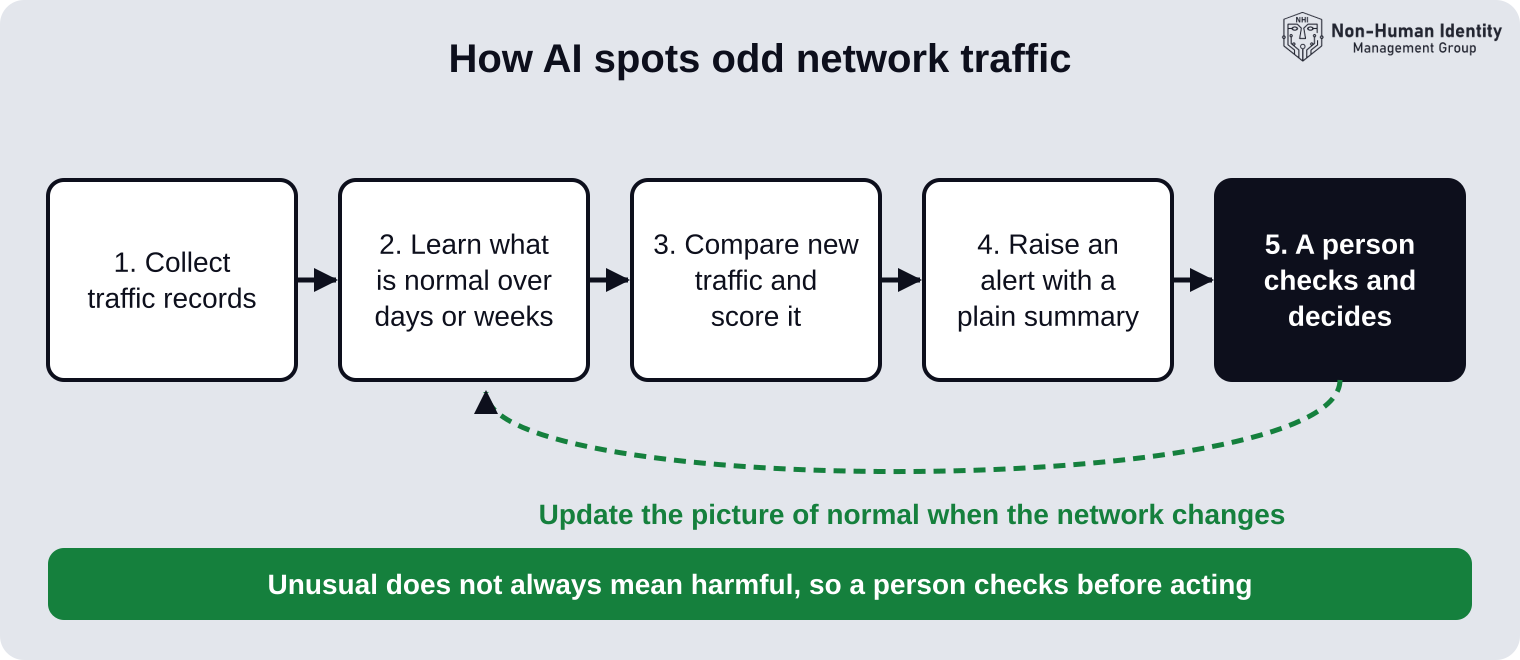
Here is how most AI network tools work, step by step.
- Collect the traffic. The tool gathers copies of traffic, or short summaries of each connection. Many cloud tools read summary records, such as flow logs and lists of website lookups.[2]
- Learn what is normal. The tool watches for a training period, often days and sometimes weeks. It builds a picture of normal for each user, device or connection.[1]
- Compare and score. New traffic is compared with that picture. Anything far from normal gets a higher score.
- Raise an alert. The tool sends the alert to people, sometimes with an AI summary in plain words.
- A person decides. An analyst checks the facts and decides what to do, such as cutting a device off the network.
- Update the picture. Networks change, so the picture of normal must be refreshed from time to time.
Where it can go wrong
A US government guide on intrusion detection, from NIST, describes the weak spots of this approach clearly.[1]
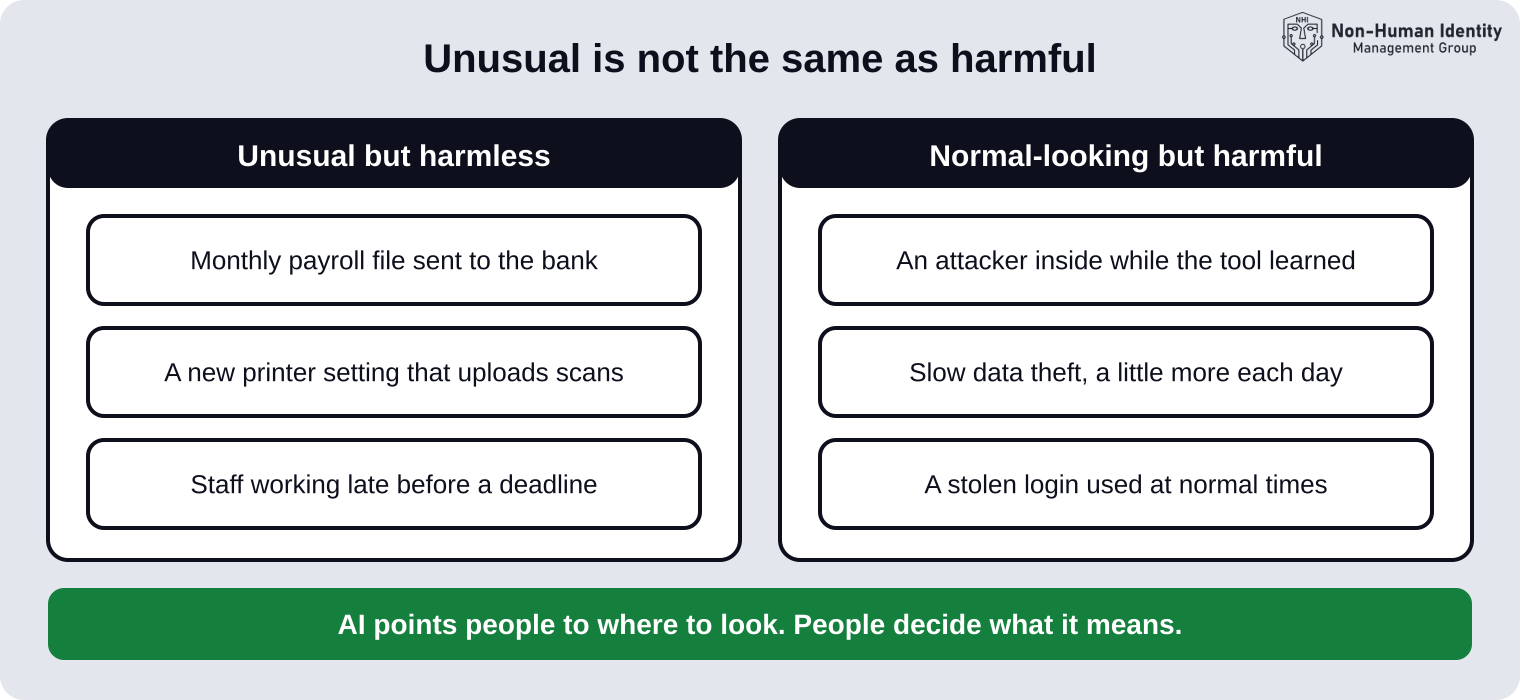
- False alarms. Harmless activity that was not seen during training can look unusual. NIST gives the example of a large file transfer that only happens once a month.[1] These harmless alerts are called false positives.
- Learning the attacker. If an attacker is active while the tool is learning, their traffic can end up in the picture of normal. NIST calls this a common problem.[1]
- Being fooled on purpose. Attackers can try to trick AI systems, for example by feeding them bad training data. This is called data poisoning.[3]
- Confident mistakes. AI assistants that write summaries can state wrong things as fact.[4]
Many of the devices and programs on a network are not people. Servers, printers, backup jobs and AI tools all log in and talk to each other. Each one that logs in to other systems is a non-human identity (NHI): a digital identity used by software, not a person. Their traffic is often very regular, so a sudden change can be a strong clue.
A worked example
Quinn Brandt looks after IT for Quarry Printers, a fictional print shop with twenty staff. Last month the firm switched on a network tool that uses machine learning.
For the first two weeks, the tool watches and learns. Then the alerts start. On Monday it flags the accounts PC sending a large file to the bank. Quinn checks with the office manager. It is the monthly payroll run, which the tool had not seen yet. Quinn marks it as expected.
On Thursday at 2am, the tool flags a print server sending far more data than usual to an unknown address. The AI summary says "possible data theft".
Quinn remembers the caretaker. A midnight van is worth a look, but it might be a booked delivery. So Quinn checks recent changes first. Nothing was changed on that server.
Next, Quinn calls the firm's IT supplier, Fen Vance. Fen looks at the server's records and finds a login from a stolen password used two days earlier. The data going out is customer artwork.
Fen cuts the server off the network and resets the passwords. Quinn reports the incident to the owner, who gets advice on whether customers must be told.
Afterwards, Quinn asks one more question. Could the attacker have been inside during the two weeks of learning? Fen checks the older records and finds no sign of it in the records available. Quinn sets a reminder to review the picture of normal every three months.
The tool found the clue. People made the calls.
Myths and mistakes
| What people think | What is true |
|---|---|
| An AI alert means we are under attack. | It means something is unusual. Many unusual things are harmless, so a person checks first. |
| AI catches attackers that rules miss, so it catches everything. | It can miss attackers whose traffic looks normal, or who were there while it was learning.[1] |
| Once it has learned, the tool is set and forget. | Networks change. The picture of normal needs refreshing, or false alarms grow. |
| AI replaces the need to understand the network. | People still need to know what each device should do, to judge the alerts. |
| Turning off noisy alerts is a safe fix. | It may hide real attacks. Tune the tool and record why each change was made. |
What can I do this week?
- Ask whether any tool watches your network traffic, and who reads its alerts.
- Make a short list of regular events that look odd, such as payroll runs, backups or month-end reports.
- Agree who decides whether to cut a device off the network.
- Check that network records are kept long enough to look back at past weeks.
- Ask your supplier how often the tool's picture of normal is refreshed.
Checklist
- We know which tools watch our network traffic.
- A named person reads and acts on the alerts.
- We keep a list of regular events that can look unusual.
- A person checks AI summaries against the original records before big actions.
- We review the picture of normal after big network changes.
- We keep traffic records long enough to look back over past weeks.
- Servers, printers and service accounts each have a named owner.
Common questions
Is AI in network security new?
Not really. Tools that learn normal behaviour and flag odd activity have been around for many years. NIST described them in a guide in 2007.[1] What is newer is AI assistants that explain alerts in plain words and answer questions about them.
Can AI see inside encrypted traffic?
Usually not without extra setup. Much traffic is scrambled for privacy. Many tools look at the outside details instead, such as who talked to whom, when and how much. That is often enough to spot odd patterns.
Why does the tool raise so many false alarms?
Because unusual and harmful are not the same. Anything new, such as a new app or a one-off big upload, can look odd. Alerts usually drop as the team tunes the tool and records which regular events are expected.
Can attackers fool AI security tools?
Yes, they can try. They may move slowly so their traffic blends in, or try to feed the tool bad data. NIST has published a guide to these attacks on AI systems.[3] This is one reason people still check the results.
Do small businesses need AI network tools?
Not always. Many small firms get more value first from basics, such as updates, strong logins and backups. Some cloud and security services already include pattern-spotting. If you do buy one, make sure someone has time to read its alerts.
Where next?
Ready for the detail? Read the practitioner guide: Network Traffic Baselining. It goes further into which data sources to use, what to measure for each group of devices, and how to keep a baseline up to date.
Also useful:
- Network Detection and Response for Beginners
- Machine Learning for Beginners
- Alert Fatigue for Beginners
- Adversarial Examples for Beginners
- AI in Cloud Security for Beginners
Related NHI Mgmt Group resources: NDR Guide · NetFlow and IPFIX Flow Telemetry Guide · Adversarial ML Taxonomy Guide
Key terms
- Machine learning
- Software that learns patterns from examples instead of following fixed rules.
- Baseline
- A record of normal activity that later activity is compared against.
- Anomaly detection
- Finding activity that does not fit the normal pattern.
- False positive
- An alert about something that turns out to be harmless.
- Network traffic analysis
- Studying the messages devices send to each other to find problems.
- Data poisoning
- Tampering with the data an AI learns from, so it learns the wrong things.
Sources and further reading
- Guide to Intrusion Detection and Prevention Systems (IDPS), NIST Special Publication 800-94, National Institute of Standards and Technology, February 2007, section 2.3.2. https://csrc.nist.gov/pubs/sp/800/94/final, accessed 28 Nov 2026.
- GuardDuty foundational data sources. Amazon GuardDuty User Guide, Amazon Web Services. https://docs.aws.amazon.com/guardduty/latest/ug/guardduty_data-sources.html, accessed 28 Nov 2026.
- Adversarial Machine Learning: A Taxonomy and Terminology of Attacks and Mitigations, NIST AI 100-2 E2025, National Institute of Standards and Technology, March 2025. https://csrc.nist.gov/pubs/ai/100/2/e2025/final, accessed 28 Nov 2026.
- AI and cyber security: what you need to know. National Cyber Security Centre (UK), 13 February 2024. https://www.ncsc.gov.uk/guidance/ai-and-cyber-security-what-you-need-to-know, accessed 28 Nov 2026.