App backend keys are codes an app uses to reach its online database, and some are meant to be public.
This guide is for people building apps with Firebase or Supabase, including students and people using AI tools to write code. You do not need to be an expert: if your app has a login or saves data online, it uses these keys. Platforms are listed alphabetically.
In short
- Firebase and Supabase both give you a public key that is meant to sit inside your app, where anyone can see it.
- The public key only says which project to talk to. Your data is protected by rules you write: Security Rules in Firebase, Row Level Security in Supabase.
- Secret keys, such as a Supabase secret key, can skip those rules. They belong only on a server you control.
- If a secret key leaks, replace it at the platform first, then fix how it leaked.
What you will learn
- Explain the difference between a public key and a secret key.
- Spot which keys in your app's settings are safe to show and which are not.
- Check that your database rules are switched on before you launch.
- Know what to do first if a secret key leaks.
- Back end (backend)
- the online part of an app that stores data and handles logins, out of sight of the user.
- Public app key (publishable key)
- a key meant to be inside the app, which tells the service which project you are using.
- Server-only key (secret key)
- a powerful key that must stay on a server you control and never go into the app.
What are app backend keys?
Think of a shop. Its street address is printed on every leaflet, and that is fine. The master key to the back office is different: it stays with the manager. Who may walk through each door is decided by the staff at the door, not by the address.
Firebase and Supabase are services that give an app a ready-made back end. That means an online database, file storage and logins, without running your own server. Your app connects to the back end using keys.
Some keys are like the address. Firebase says its API keys, used for Firebase services, only identify your project and app, and are safe to include in your code.[1] Supabase says its publishable key is safe to expose in web pages, mobile apps and source code.[2]
Other keys are like the master key. A Supabase secret key has full access to the project's data and skips the database rules.[2] Keys like these are credentials for non-human identities (NHIs): digital identities that let software connect to other systems without a person.
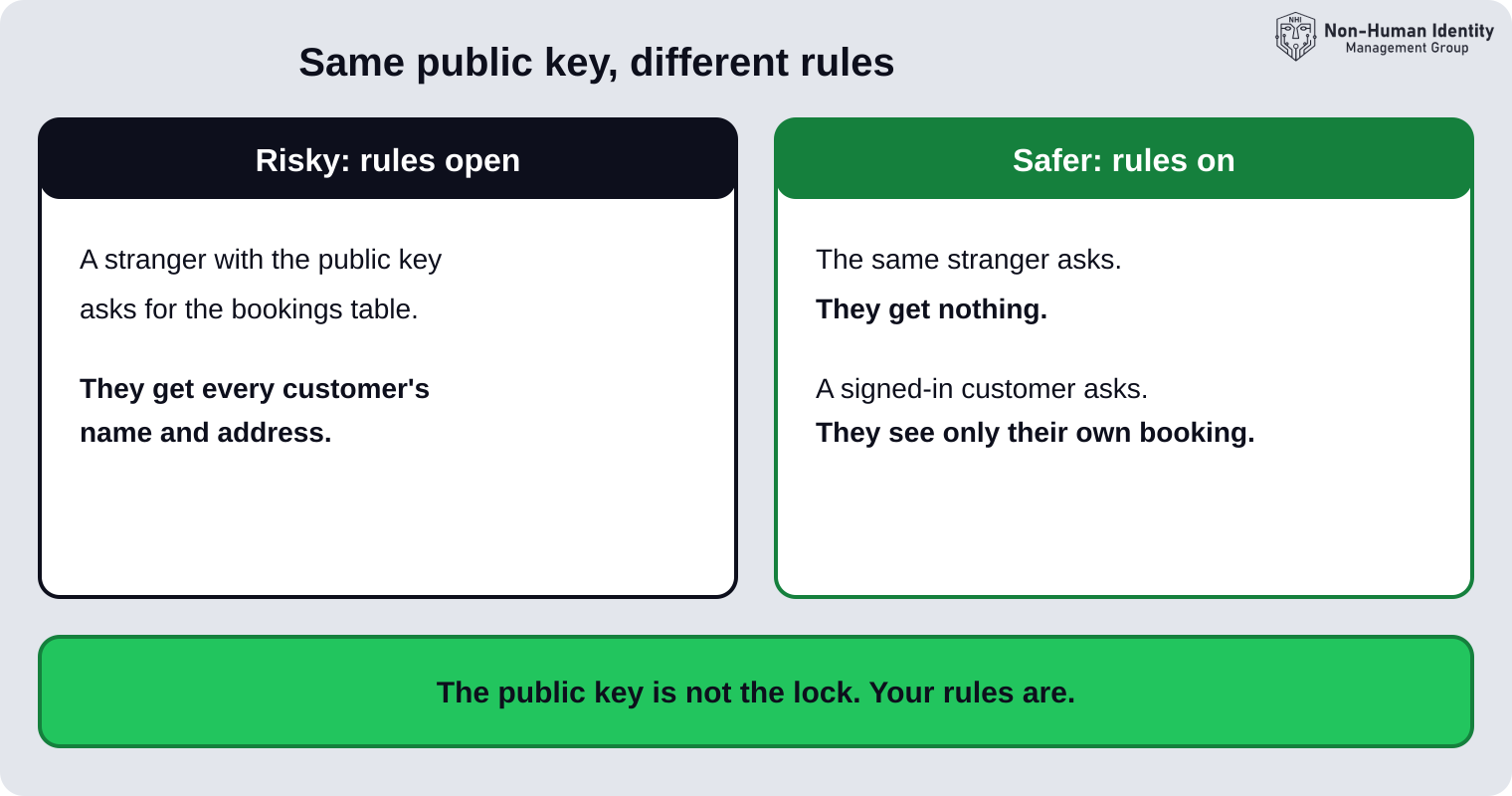
Where the comparison stops working: a shop address does not let anyone take stock. A public key does let anyone talk to your back end. If your rules are open, the public key is enough to read or change your data.
Why does it matter?
Two mistakes cause most of the trouble. One is putting a secret key in the app. The other is leaving the database rules open, so the public key reaches everything. In early 2026, researchers looked at a social network for AI agents. Its Supabase database had no Row Level Security set up. So the public key in its website gave read and write access to all its tables.[5] Read our Moltbook database exposure page for the full story.
If you build apps with AI tools
What could happen: the AI tool pastes a secret key into the app code to make an error go away.
Check this: search your app's code for any key with "secret" or "service_role" in its name.
If you paid someone to build your app
What could happen: the app works, but anyone can read your customers' details through the public key.
Check this: ask your developer to show you the database rules, and how they tested them.
If you are learning to code
What could happen: you see a key in a tutorial's code and copy every key the same way, including a secret one.
Check this: for each key, read the platform's docs to see if it is public or secret.
Next: API Keys for Beginners
What does it look like?
Here is a made-up settings file for a small booking app that uses both platforms.
Example only. All values are made up.
# settings for the booking app (front end, sent to every user)
FIREBASE_API_KEY=EXAMPLE-firebase-key-0000          (1)
FIREBASE_PROJECT_ID=example-booking-app
SUPABASE_URL=https://example.invalid
SUPABASE_PUBLISHABLE_KEY=EXAMPLE-publishable-0000   (2)
SUPABASE_SECRET_KEY=FAKE-secret-0000                (3)
GEMINI_API_KEY=FAKE-ai-key-0000                     (4)
- A Firebase key for Firebase services. Firebase says this kind of key can be in your code. Security Rules protect the data.[1]
- A Supabase publishable key. It is meant to be public. Row Level Security protects the data.[2]
- In a real file, this line would contain a Supabase secret key. It does not belong in an app that users download.
- In a real file, this line would contain a key for a paid AI service. Firebase says this kind of key should not be in your code or settings files.[1]
Why this is risky: lines 1 and 2 are expected. Lines 3 and 4 are not. Anyone who downloads the app can pull them out and use them.
The safer way: keep only public keys in the app. Put secret keys on a server or in your hosting service's secure settings, and let the server make the powerful calls. Then switch on and test your database rules.
How does it work?
Here is what happens when someone opens your app.
- The app says hello. It sends the public key, so the back end knows which project to use.
- The user logs in. If they sign in, the back end now knows who they are.
- The rules decide. Firebase Security Rules or Supabase Row Level Security check what this user may read or change.[1][3]
- The answer comes back. The user gets only the data the rules allow.
- Server jobs use the secret key. Code on your server can use a secret key for admin tasks. In Supabase, a secret key skips every Row Level Security rule, which is why it must stay on the server.[2]
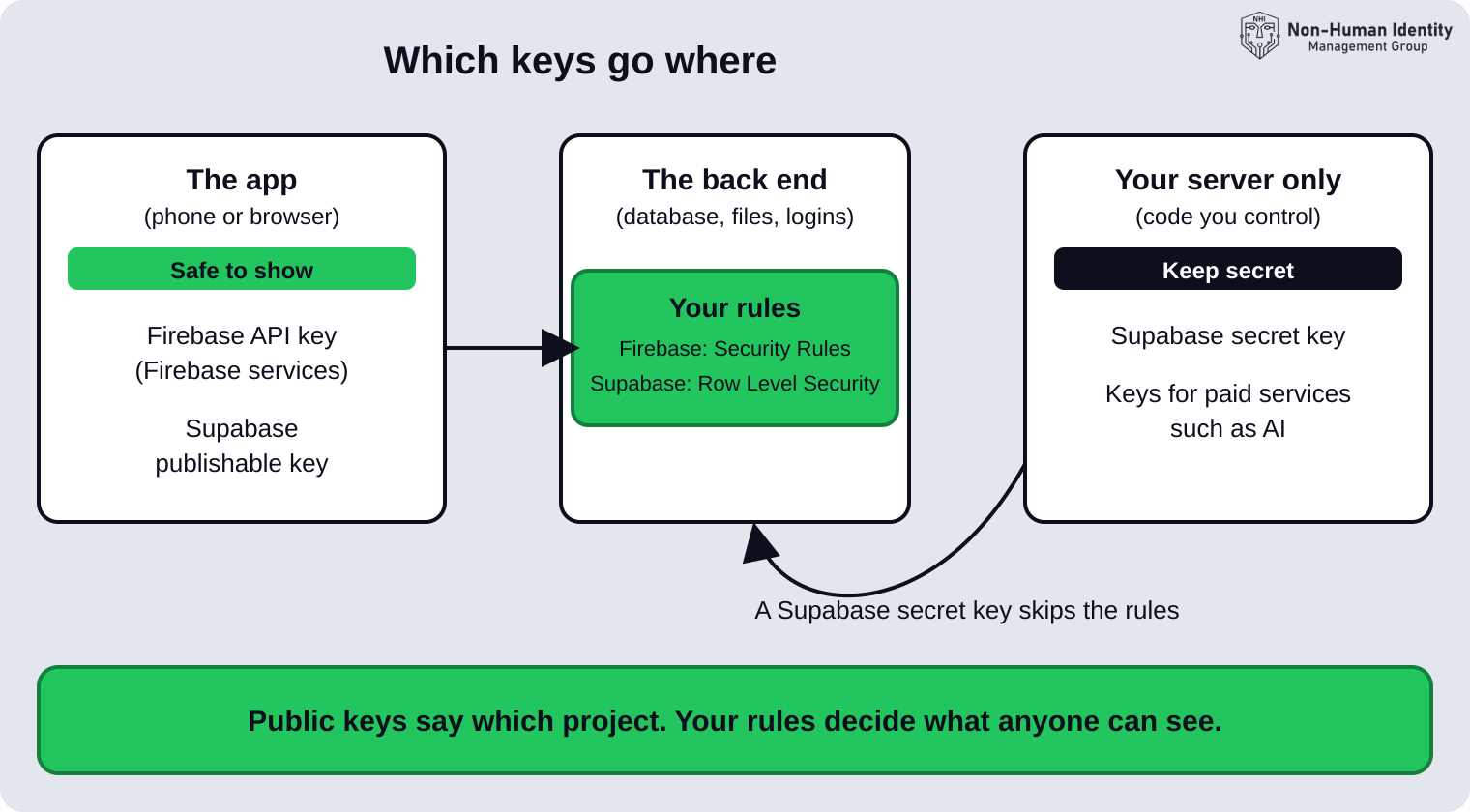
The rules are the real lock. In Firebase, rules that let anyone in are meant for development only. Firebase warns that with open rules, anyone who guesses your project ID can steal, change or delete the data.[4] In Supabase, a table without Row Level Security can be read and changed by any role that has been given access to it. Once Row Level Security is on, the publishable key reaches nothing until you write rules that allow it.[3]
A worked example
Nils Pajari is a student who builds a booking app for Teal Nursery, a fictional plant nursery. Customers book delivery slots, and the app saves their names and addresses in Supabase. He also uses Firebase to send reminder messages.
An AI coding tool helps him build it fast. When an admin page will not load, the tool suggests putting the Supabase secret key in the app. The page works.
Before launch, Nils asks his friend Gita Mbeki to look over it. She opens the website in her browser and finds two Supabase keys in the code. "This one is fine," she says, pointing at the publishable key. "This one is the master key to the back office."
Nils remembers the shop. The address can be on the leaflet. The master key cannot.
He goes to the Supabase dashboard and creates a new secret key. He moves it to a small server function and deletes the old one, so the copy in the app should no longer give access.[2] The admin page now asks the server function to do the admin work.
Gita then asks about the rules. Nils finds that one table, the delivery list, has Row Level Security switched off. He switches it on and writes a rule so each customer sees only their own bookings. He signs in as a test customer and checks that he cannot see anyone else's.
For Firebase, he checks that the database rules are no longer in the open test setting. He launches a week later than planned, but with the master key back where it belongs.
Myths and mistakes
| What people think | What is true |
|---|---|
| Any key I can see in the app is a leak. | Firebase API keys for Firebase services and Supabase publishable keys are meant to be public.[1][2] |
| A public key means my data is safe. | The public key protects nothing. Your Security Rules or Row Level Security do. |
| Hiding the secret key in the app's code is good enough. | Anyone who downloads the app can dig it out. Secret keys belong on a server. |
| Test mode rules are fine because nobody knows my app yet. | Firebase warns that open rules let anyone who guesses the project ID reach the data.[4] |
| Deleting the leaked line fixes it. | Copies may remain. Replace the key at the platform first. |
What can I do this week?
- List every key your app uses and mark each one public or secret, using the platform's docs.
- Search your app's code for secret keys and move any you find to a server.
- In Supabase, check that Row Level Security is on for every table your app uses.
- In Firebase, check that your database and storage rules are not still in the open test setting.
- Sign in as a test user and try to read someone else's data.
Checklist
- Only public keys are in the app or website code.
- Secret keys live on a server or in the hosting service's secure settings.
- Keys for paid services, such as AI, are kept off the app and are limited to the services they need.
- Supabase Row Level Security is on for every table, with tested rules.
- Firebase Security Rules are set for your data, not left in test mode.
- You have tested the rules as a signed-out user and as a different signed-in user.
- You know how to replace a key quickly if one leaks.
Common questions
Is it safe to put my Firebase config in my app?
Yes, for the Firebase API key used with Firebase services. Firebase says it only identifies your project and is safe to include. Your data is protected by Security Rules. Keys for other paid Google services should be separate and kept off the app.
What is the difference between the Supabase anon key and the publishable key?
They do the same job. Supabase calls the anon key the older, legacy form of the publishable key, and the service_role key the older form of the secret key. Both public kinds are meant for apps. Both secret kinds must stay on a server.
What should I do if my secret key leaked?
Replace it at the platform straight away, then fix the cause. Supabase says a leaked secret key exposes all of your project's data, and it can be used from tools outside a browser. Then check your logs and remove the key from your code.
Can an AI coding tool set my rules for me?
It can write a first draft, but you should read and test the rules yourself. Sign in as different test users and check what each one can see. A rule that makes an error disappear may also open your data.
Do I still need rules if my app has a login?
Yes. A login tells the back end who someone is. The rules decide what that person may read or change. Without rules, a signed-in user, or anyone with the public key, may reach other people's data.
Where next?
Ready for the detail? Read the practitioner guide: Supabase Keys Security Guide. It goes further into how Supabase roles work, writing Row Level Security rules well, and handling secret keys and service accounts.
Also useful:
- Firebase Credentials Security Guide
- Firebase Security Rules Guide
- Supabase Security
- Secrets in Code for Beginners
- Non-Human Identities for Beginners
Related NHI Mgmt Group resources: Leaked Secret Response for Beginners · Environment Variables and .env Files · Google API Keys Security Guide
Key terms
- API key
- A code an app uses to identify itself when it calls another service.
- Publishable key
- A public key meant to be inside a website or app, which identifies the project.
- Service role key
- A powerful server-only key that can skip normal rules such as Row Level Security.
- Firebase Security Rules
- Rules that decide who can read and write data in Firebase.
- Supabase Row Level Security
- Rules inside the database that decide which rows each user can see or change.
- Client-side credential exposure
- A secret placed in code sent to the browser or app, where users can recover it.
Sources and further reading
- Learn about using and managing API keys for Firebase. Firebase Documentation, Google. https://firebase.google.com/docs/projects/api-keys, accessed 28 Nov 2026.
- Understanding API keys. Supabase Docs, Supabase. https://supabase.com/docs/guides/api/api-keys, accessed 28 Nov 2026.
- Row Level Security. Supabase Docs, Supabase. https://supabase.com/docs/guides/database/postgres/row-level-security, accessed 28 Nov 2026.
- Avoid insecure rules. Firebase Documentation, Google. https://firebase.google.com/docs/rules/insecure-rules, accessed 28 Nov 2026.
- Hacking Moltbook: AI Social Network Reveals 1.5M API Keys. Wiz Research, 2 February 2026. https://www.wiz.io/blog/exposed-moltbook-database-reveals-millions-of-api-keys, accessed 28 Nov 2026.