Vibe coding is building software by describing what you want to an AI tool, which writes the code.
This guide is for anyone who has built, or wants to build, an app this way, and for anyone who pays someone who does. You do not need to read code to be responsible for it: if your app holds customer details, you need to know how they are protected.
In short
- Vibe coding can turn an idea into a working app quickly, without you reading the code.
- An app can look finished on screen and still let strangers read its data.
- The common gaps are open database settings, keys left in the app and add-ons that are not what they seem.
- Before real people's data goes in, lock the database, move keys out of the app and get a second pair of eyes on it.
What you will learn
- Explain what vibe coding is in one sentence.
- Spot the three most common security gaps in an AI-built app.
- Check an app before you let real data into it.
- Ask the right questions of a tool or a freelancer.
- Instruction to the AI (prompt)
- the plain-language request you type, such as "build me a booking page".
- Behind-the-scenes store (database)
- where an app keeps its records, such as names, bookings and messages.
- Software password (API key)
- a secret code one program shows another to prove it may connect.
What is vibe coding?
Think of asking a very fast builder to put up a garden office from a quick description. By the afternoon it is standing, painted and the lights work. But you did not watch the work, so you do not know whether the locks fit or the wiring is safe.
Vibe coding works the same way. You type a prompt, which is a plain request to an AI tool. The tool writes the code, shows you a preview and can often publish the app to the internet with one click.
The name took off in 2025. Collins Dictionary chose "vibe coding" as its Word of the Year for 2025, news reports said.[1] What makes it "vibe" coding is not the tool. It is that the person accepts the code without reading it line by line, and often could not.
Some tools are app builders on a website, made for people who have never coded. Others sit inside a programmer's editor and write large chunks of code at a time. Either way, the AI writes most of it.
Where the comparison stops working: a garden office sits in your garden. A published app sits on the internet, where anyone in the world can try its doors, often with automatic tools.
Why does it matter?
AI tools write code that works, but working is not the same as safe. In one study by a code security company, AI-written code contained a security flaw in 45% of its tests.[2] That is one company's own testing, but it shows why a quick check is worth the time.
If you are building your first app with AI
What could happen: your sign-up list is readable by anyone who knows where to look.
Check this: sign out, then try to open someone else's record. You should be refused.
If you run a small business
What could happen: a quick internal tool built by a member of staff ends up holding customer details with no one in charge of it.
Check this: keep a list of every AI-built app, who owns it and what data it holds.
Next: Shadow AI for Beginners
If you are a developer using AI in your editor
What could happen: you accept a long change you only skimmed, and it adds a password to the code.
Check this: keep secret scanning and code review on, even for "small" AI changes.
What does it look like?
Here is a made-up chat with an AI app builder. Below it are the settings the tool made.
Example only. All values are made up.
You:   Build a booking page for my yoga studio. Save
       each person's name, email and class.
AI:    Done! Your app is live at
       studio-example.example.com                    (1)

# settings the tool created
DATABASE_RULES=off                                    (2)
PAYMENT_KEY=EXAMPLE-SECRET-0000-FAKE   # in app code  (3)
install: calendar-helper-pro-FAKE                     (4)
- The app went public straight away, before anyone checked it.
- In a real system, a setting like this would mean the database has no rules on who may read or change records.
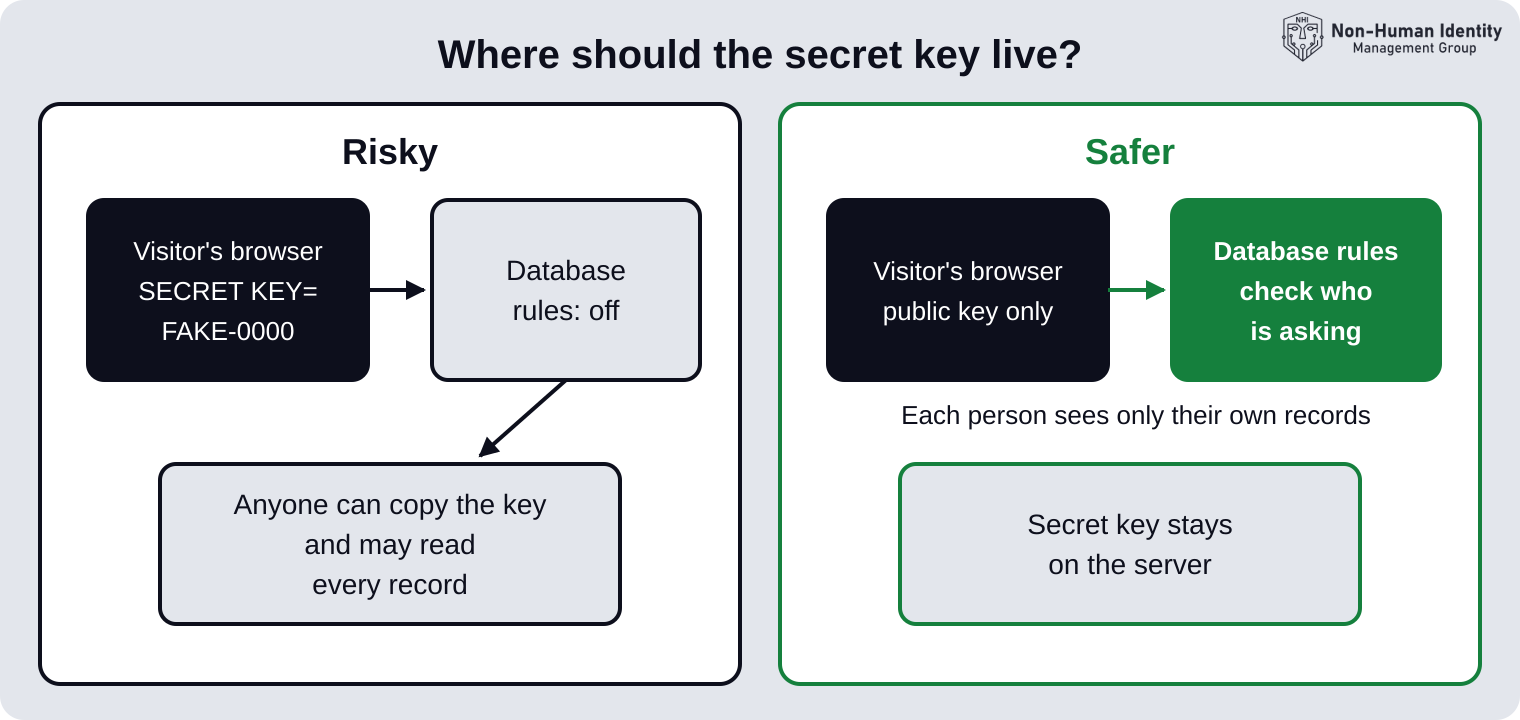
- In a real file, this line would contain a secret payment key, sent to every visitor's browser.
- An add-on the AI chose. Check that any add-on exists and comes from a trusted source.
Why this is risky: the page works, so nothing looks wrong. But any visitor could copy the key. With no database rules, a stranger could read every booking.
The safer way: turn on the database rules so each person sees only their own records. Keep secret keys on the server, never in the app's pages. Check every add-on before it is installed, and publish only after a check.
How does it work?
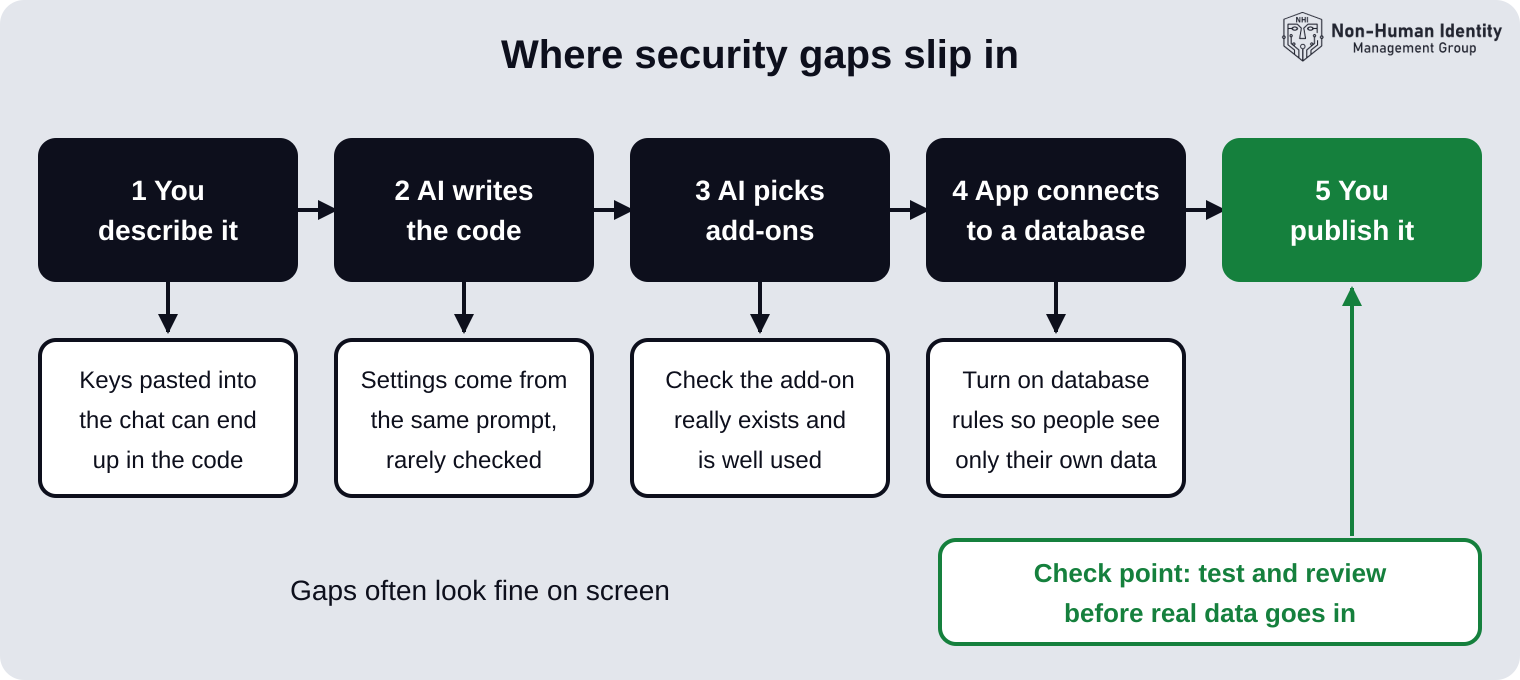
Most vibe-coded apps follow the same path. Security gaps tend to slip in at the same few points.
- You describe it. You type what you want. Anything you paste in, such as a key or a customer list, may be stored in the chat and the code.
- The AI writes it. The tool writes the screens, the logic and the database settings in one go. Settings come from the same prompt and are rarely checked.
- It picks add-ons. Apps are built from ready-made pieces of code called packages (shared building blocks other people wrote). AI tools sometimes suggest package names that do not exist. In one study, commercial models did this for at least 5.2% of the packages they suggested.[3] A criminal can register that made-up name and fill it with harmful code. This trick is called slopsquatting.
- It connects to a database. Many app builders let the app's pages talk straight to the database with a key that sits in the browser. That is only safe when the database has rules that check who is asking. One popular database service says a table without these rules can be read and changed by any role that has been given access to it.[4]
- You publish it. One click puts it on the internet. Some builders run a quick security scan first. One builder says its checks do not replace a full security review, and suggests a professional review for apps with sensitive data.[5]
A worked example
Fatima Begum runs a small yoga studio. She has never written code. One evening she asks an AI app builder for a booking page, and an hour later it is live.
Bookings start coming in. Her friend Kwame Mensah, who works in IT, offers to take a look before she shares the link more widely.
Kwame signs out and opens the app in a private browser window. Using only what the page sends to his browser, he can see every booking, including names and emails. The database rules were never turned on. He also finds a payment key inside the page's code.
Fatima remembers the garden office. It looked finished, but nobody had checked the locks. So they work through the fixes in order.
First, Fatima cancels the payment key at the payment service and creates a new one. Once that change has gone through, the old key should no longer work. The new key goes into the builder's secure settings, so it stays on the server.
Next, they turn on the database rules and ask the AI to add rules so each person sees only their own booking. Kwame tests it again, signed out and as a second user. This time he is refused.
Then they check the add-ons the AI installed. One calendar package has very few downloads and no clear owner, so they swap it for a well-known one.
Last, Fatima runs the builder's security scan and fixes what it flags. She decides she will ask Kwame, or someone like him, to look again before she adds online payments.
It costs her one evening. She also learns that "it works" and "it is safe" are two different checks.
Myths and mistakes
| What people think | What is true |
|---|---|
| If the app works, it is safe. | An app can look perfect and still let strangers read its data. Test it signed out and as a second user. |
| The AI tool takes care of security for me. | Some tools run checks, but at least one builder says its checks do not replace a full review and that you stay responsible for your app.[5] |
| Nobody will find my little app. | Anything on the internet can be found and probed by automatic tools. Size is no protection. |
| It is fine to paste my keys into the chat to make it work. | Keys in the chat can end up in the code. Use the tool's secure settings, and change any key you have pasted. |
| Every add-on the AI suggests is real. | AI tools sometimes invent package names. Check that each one exists and is well used before it goes in.[3] |
What can I do this week?
- List every app you or your team have built with AI, and what data each one holds.
- Sign out and try to open another person's record in each app. You should be refused.
- Search each app's pages for keys, and move any you find into the tool's secure settings.
- Change any key or password you have ever pasted into an AI chat.
- Run the builder's security check, if it has one, and fix anything marked critical.
Checklist
- Each app has a named owner and a note of what data it holds.
- Database rules are on, so each person sees only their own records.
- No secret keys sit in the app's pages or in the chat history.
- Secret keys live in the tool's secure settings or a secrets store, on the server.
- Every add-on has been checked to exist and come from a trusted source.
- The app has been tested signed out and as a second user before going public.
- Someone with security knowledge reviews any app that handles payments or sensitive data.
- You keep a saved version you can go back to if a change breaks something.
Common questions
Is vibe coding safe?
It can be, with checks. Vibe coding is fine for trying out ideas. The risk grows when the app goes public or holds real people's data. Before that point, turn on database rules, move keys to the server, check add-ons and get someone to review it.
Do I need to learn to code to vibe code safely?
No, but you need to learn a few checks. You can test whether a signed-out visitor can see data, look for keys in the app and use the tool's security scan. For apps with payments or sensitive data, we suggest asking a professional to review it.
Is vibe coding the same as using an AI coding assistant?
Not quite. An AI coding assistant is a tool. Vibe coding describes how much you trust it: accepting the code without reading it closely. A developer who reviews every AI change is using an assistant, but is not really vibe coding. See Vibe Coding Explained.
Which key is safe to have in the browser?
Some database services issue a public key that is designed to sit in the browser. It is safe only when database rules check every request. Secret or admin keys skip those rules, so the service says to keep them out of the browser and only on trusted servers.[4]
What should I do if I think my app has leaked data?
Act quickly and calmly. Take the app offline or lock the database, change any exposed keys and check who has accessed the records, if the tool keeps logs. If personal data was exposed, you may have legal duties to report it, so check your data protection regulator's guidance.
Where next?
Ready for the detail? Read the practitioner guide: Vibe Coding Security Guide. It goes further into the risk map, guardrails for each type of builder and how to measure whether they work.
Also useful:
- Top 10 Vibe Coding Security Risks
- Slopsquatting and Package Hallucination Guide
- AI Coding Assistants for Beginners
- Secrets Management for Beginners
- Software Supply Chain Security for Beginners
Related NHI Mgmt Group resources: Vibe Coding Policy Template · AI Coding Agents Security Guide · Secure Coding Guide
Key terms
- Vibe coding
- Building software by describing it to an AI tool and accepting the code it writes, often without reading it line by line.
- Prompt-to-app platform
- A website tool that turns a plain-language request into a working app.
- API key
- A secret code one program uses to prove it may use another.
- Hard-coded secret
- A password or key typed straight into an app's code, where others may read it.
- Database rules
- Settings that decide which person may read or change which records.
- Package
- A ready-made piece of code, written by someone else, that an app uses as a building block.
- Slopsquatting
- A trick where a criminal registers a package name that AI tools make up, so people install harmful code.
- AI-generated code risk
- The chance that code written by an AI tool brings in security flaws.
Sources and further reading
- 'Vibe coding' named word of the year by Collins dictionary. Euronews (news report), 6 November 2025. https://euronews.com/culture/2025/11/06/vibe-coding-named-word-of-the-year-by-collins-dictionary, accessed 28 Nov 2026.
- GenAI Code Security Report (October 2025 update). Veracode. https://www.veracode.com/resources/analyst-reports/2025-genai-code-security-report/, accessed 28 Nov 2026.
- Spracklen J. et al. We Have a Package for You! A Comprehensive Analysis of Package Hallucinations by Code Generating LLMs. USENIX Security Symposium 2025 (arXiv:2406.10279). https://arxiv.org/abs/2406.10279, accessed 28 Nov 2026.
- Row Level Security. Supabase Docs, Supabase. https://supabase.com/docs/guides/database/postgres/row-level-security, accessed 28 Nov 2026.
- Security. Lovable Documentation, Lovable. https://docs.lovable.dev/features/security, accessed 28 Nov 2026.