Student cyber safety means protecting your accounts, money and devices while you study at college or university.
This guide is for adult students starting college or university, and for anyone helping them get ready. You do not need to be good with computers: most of the risks come through messages and money, not technology.
In short
- Scammers time their messages for when student loans and rent are due.
- The student loan body says it will not ask for your personal or bank details by email or text.
- A strong, separate password and a second sign-in step on your email protect your other accounts too.
- "Easy money" job offers that use your bank account can make you part of a crime.
What you will learn
- Spot a fake student loan or university message.
- Explain why your email account is the one to protect first.
- Check a job offer before you share your bank details.
- Know where to report a scam message.
- Fake message (phishing)
- an email, text or post that pretends to be from someone you trust, to trick you.
- Second sign-in step (two-step verification)
- an extra check, such as a code, after your password.
- Money mule
- someone who lets criminals move money through their bank account.
What is student cyber safety?
Think of moving into halls. You get a room key, a building key and a post box, and you learn which doors to lock. Starting university online is much the same.
You get a new university email, new apps and often your first student loan. Each one is a new door. Student cyber safety is knowing which doors matter most and how to lock them.
Most risks come from phishing, which means fake messages that try to get your password or money. Others come from weak passwords and offers that sound too good to be true.
Where the comparison stops working: in halls you can see who knocks. Online, a stranger can look exactly like your university, your bank or a friend.
Why does it matter?
Students handle large sums at set times, often for the first time. Criminals know the calendar too.
If you are starting your first term
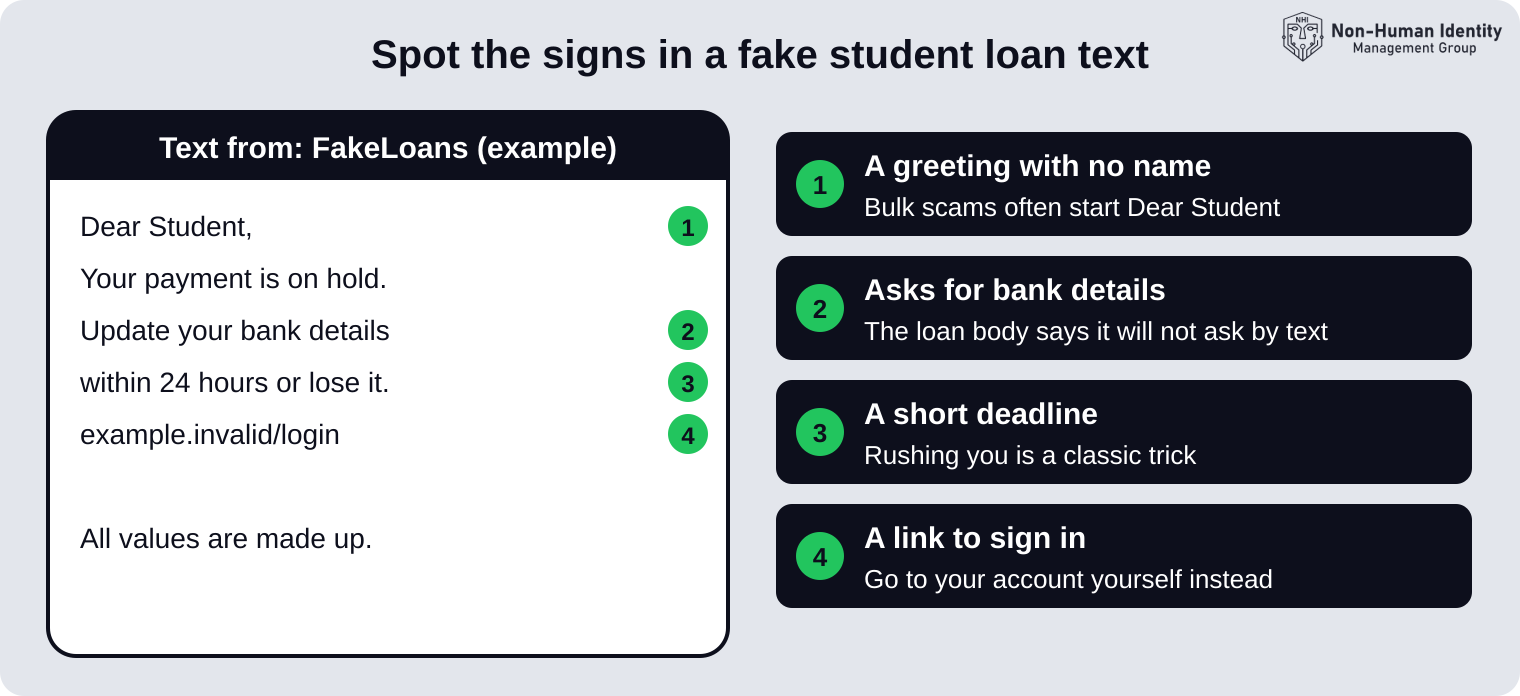
What could happen: a fake "Dear Student" text asks you to update your bank details, and your loan goes to a criminal.
Check this: sign in to your loan account yourself, never through a link in a message.
If you are looking for part-time work
What could happen: an "easy money" job asks to use your bank account, and you end up helping move stolen money.
Check this: never let anyone else use your account or card, however good the pay sounds.
If you are a parent or supporter
What could happen: a student hides a scam out of embarrassment, and the loss grows.
Check this: say early that anyone can be fooled, and agree they can always call you first.
What does it look like?
Example only. All values are made up.
Message from: @EasyCash_Jobs_EXAMPLE              (1)
"Hey! Want to earn £0000 a week from your room?"  (2)
"No interview needed. Just receive a payment      (3)
 into your account and send it on to us."
"Keep £00 for yourself. Reply YES to start."       (4)
- A stranger gets in touch on social media, out of the blue.
- A large amount of pay for very little work.
- They want money to pass through your bank account. In a real message, this is the part that makes you a money mule.
- A small reward to make it feel harmless.
Why this is risky: criminals post fake job adverts to recruit students to move stolen money. Students who do it can lose their bank account and their place at university.[6]
The safer way: do not reply. Block the account, and tell your bank or your university's student support if you have already shared details.
How does it work?
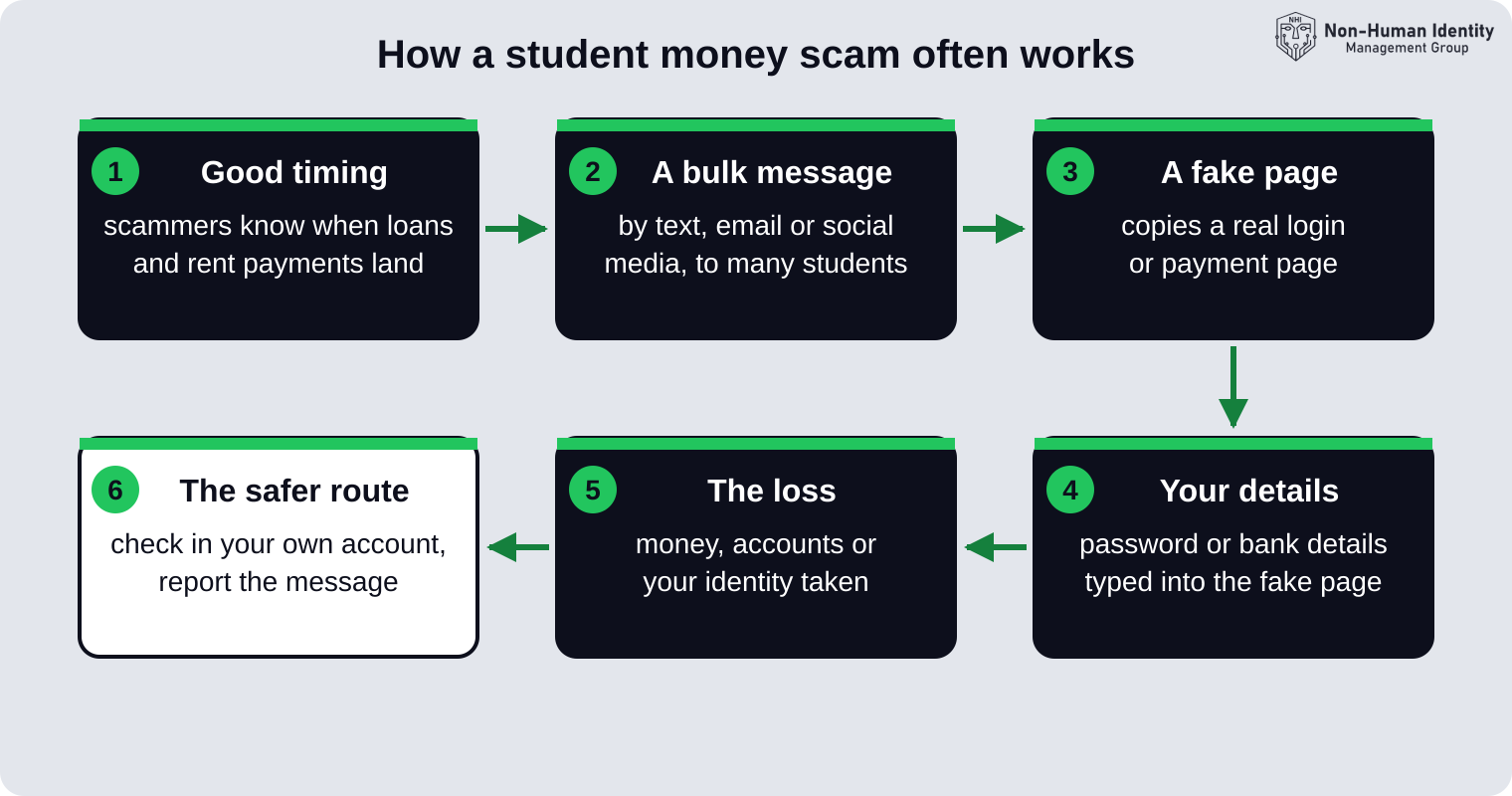
This is a simple view so you can spot it. Many student scams follow the same pattern.
- Good timing. Scammers send messages when loan payments are due, because students expect to hear about money then.[1]
- A bulk message. The same text or email goes to many students. It often starts "Dear Student" and has a short deadline.[1]
- A fake page. The link opens a page that copies a real sign-in or payment page.
- Your details. If you type in your password or bank details, the criminal now has them.
- The loss. They may change where your loan is paid, take over your email, or use your details to pretend to be you.
Your email matters most, because it can be used to reset the passwords on your other accounts. The UK's national cyber agency advises a strong, separate password for it, plus a second sign-in step.[2][3]
The scale is real. In September 2025 the Student Loans Company said it had stopped £45.5 million being stolen from students in the year before.[1]
A worked example
This story is made up to show how it can happen.
Sofia Marin has just moved from Romania to study nursing in Cardiff. In her second week, her student loan is due. She is short of money after paying her rent deposit.
On Monday morning a text arrives. It says "Dear Student, your loan payment is on hold. Update your bank details within 24 hours." There is a link.
Sofia almost taps it. Then she remembers a talk from welcome week: the loan body will not ask for bank details by text. She closes the message and opens her loan account through the official app instead. There is no problem on her account.
She forwards the text to 7726, the free scam text number, and deletes it.[5]
That week, someone in a student group chat posts a job. It says "Earn fast from home, just use your bank account." A friend from her course is keen. Sofia shows her a warning from her bank about money mules. Her friend decides not to reply.
On Sunday, Sofia spends twenty minutes on her accounts. She makes a new email password from three random words, as the UK cyber agency suggests.[4] She turns on the second sign-in step for her email and her bank. She also saves her passwords in a password manager.
What made the difference: Sofia checked her loan in her own account instead of using the link. She also spoke up when a friend was being drawn in.
Myths and mistakes
| What people think | What is true |
|---|---|
| A message about my loan must be real if it knows I am a student. | Scam messages go out in bulk to many students at once. Check in your own account, not through the link.[1] |
| Letting someone use my bank account is not a crime if I keep only a little. | Moving money for others can be money laundering. You could lose your bank account and your university place.[6] |
| My university email is not worth protecting. | It holds your coursework and can reset other accounts. Give it a strong, separate password and a second sign-in step. |
| Only people who are bad with computers get scammed. | Scams aim at timing and pressure, not skill. Anyone in a rush can be caught out. |
| If I get caught out, I should keep quiet. | Act fast instead. Tell your bank, your university and the police. Quick action can limit the loss. |
What can I do this week?
- Give your email a strong, separate password made from three random words.
- Turn on the second sign-in step for your email, bank and student loan account.
- Save the official loan and bank apps, and use them to check any message about money.
- Back up your coursework to your university's cloud storage or another safe place.
- Turn on automatic updates for your phone and laptop.
Checklist
- My email has a password I use nowhere else.
- My email, bank and loan accounts use a second sign-in step.
- I check money messages in the official app or website, not through links.
- I never give my bank details or card to someone I do not know and trust.
- I treat "easy money" job offers on social media as a warning sign.
- My coursework is backed up in more than one place.
- My phone and laptop install updates.
- I know how to report a scam email, text or loss.
Common questions
How do I know if a student loan message is real?
Do not use the link or number in the message. Sign in to your loan account through the official app or website instead. The Student Loans Company says it will not ask for personal or bank details by email or text. Any such request is a warning sign.[1]
Where do I report a scam email or text in the UK?
Forward scam emails to the address on the GOV.UK reporting page, which passes them to the UK's national cyber agency. Forward scam texts to 7726, a free number run by phone networks. If you have lost money, tell your bank and report it to Report Fraud, or Police Scotland in Scotland.[5][7]
Is university or halls Wi-Fi safe to use?
Mostly, yes, for everyday use. Your university's own network is usually the better choice over open public Wi-Fi. Websites that show a padlock encrypt what you send. Keep your devices updated and be wary of networks with names that only look official.
What should I do if I already shared my bank details?
Call your bank straight away, using the number on your card or its app. Change any passwords you typed into the fake page, starting with email. Tell your student loan body if your loan details may have changed. Then report it.
Where next?
Ready for the detail? Read the practitioner guide: Student and University Cyber Safety. It goes further into Wi-Fi in halls and shared houses, protecting laptops and coursework, and advice for parents and student support staff.
Also useful:
- Phishing for Beginners
- Money Mules for Beginners
- Password Managers for Beginners
- Multi-Factor Authentication for Beginners
- Wi-Fi Security for Beginners
Related NHI Mgmt Group resources: Job and Task Scams Guide · Text Message Scams for Beginners · Social Media Security for Beginners
Key terms
- Phishing
- Fake messages or websites that trick you into giving away passwords, money or access.
- Smishing
- Phishing sent by text message.
- Two-step verification
- A second proof after your password, such as an app code, so a stolen password alone is less likely to get in.
- Password manager
- An app that creates, stores and fills in your passwords, so you can use a different one everywhere.
- Money mule
- A person whose bank account is used to receive and pass on stolen money for criminals.
- Public Wi-Fi
- A wireless internet connection in a shared place, used by many people at once.
Sources and further reading
- Students reminded to be vigilant of scams as 25/26 academic year begins. Student Loans Company, GOV.UK, 10 September 2025. https://www.gov.uk/government/news/students-reminded-to-be-vigilant-of-scams-as-2526-academic-year-begins, accessed 28 Nov 2026.
- Top tips for staying secure online. National Cyber Security Centre (NCSC). https://www.ncsc.gov.uk/collection/top-tips-for-staying-secure-online, accessed 28 Nov 2026.
- Turn on 2-step verification (2SV). National Cyber Security Centre (NCSC). https://www.ncsc.gov.uk/collection/top-tips-for-staying-secure-online/activate-2-step-verification-on-your-email, accessed 28 Nov 2026.
- Three random words. National Cyber Security Centre (NCSC). https://www.ncsc.gov.uk/collection/top-tips-for-staying-secure-online/three-random-words, accessed 28 Nov 2026.
- Avoid and report internet scams and phishing: Report internet scams and phishing. GOV.UK. https://www.gov.uk/report-suspicious-emails-websites-phishing, accessed 28 Nov 2026. See also: Phishing scams: how to spot and report them, National Cyber Security Centre (NCSC). https://www.ncsc.gov.uk/collection/phishing-scams/report-scam-email, accessed 28 Nov 2026.
- Criminals are targeting students with fake job opportunities online. Cifas, 26 September 2024. https://www.cifas.org.uk/newsroom/criminals-target-students-fake-job-ads, accessed 28 Nov 2026.
- Report Fraud service goes live. Report Fraud (City of London Police), 4 December 2025. https://www.reportfraud.police.uk/news/report-fraud-service-goes-live/, accessed 28 Nov 2026.