Breach and attack simulation is software that safely copies attacker moves to check your defences work.
This guide is for managers, new security analysts and anyone curious about how firms test their protection. You do not need a technical background. If your business pays for security tools, this is one way to find out whether they do their job.
In short
- Breach and attack simulation (BAS) runs harmless copies of real attacker steps on your own systems.
- It shows which steps your tools blocked, which they spotted and which got through unseen.
- It can run again and again, so you notice when a setting changes or a tool fails.
- It adds to human testing, such as penetration tests, and does not replace it.
What you will learn
- Explain what breach and attack simulation is in one sentence.
- Read a simple BAS result and spot the gaps that matter.
- Explain how BAS differs from a penetration test.
- Ask good questions before your team buys or runs a BAS tool.
- Safe practice attack (simulation)
- a harmless copy of something an attacker does, run to see how your defences react.
- Defence (security control)
- any tool, setting or process that blocks, spots or limits an attack.
- Attacker playbook (MITRE ATT&CK)
- a free public list of the steps real attackers have been seen to use.
What is breach and attack simulation?
Think of the test button on a smoke alarm. You press it to check the alarm works, without starting a fire. Pressing it every week tells you if the battery has died.
Breach and attack simulation, or BAS, does the same for computer defences. It is software that acts out the steps an attacker might take, but in a safe way. For example, it may try to run a harmless test file that looks like malware, or send fake data out of the network.
Then it checks what happened. Did a defence block the step? Did an alert reach the security team? Or did nothing notice at all?
Where the comparison stops working: a smoke alarm test checks one device. A BAS test can check many defences at once, and a badly planned test can disturb real systems, so it needs care.
Why does it matter?
Security tools can be switched off, set up wrongly or miss new tricks, and nobody may notice. US security agencies advise firms to keep testing their defences against known attacker methods, at scale and in their live systems.[1]
If you manage a security budget
What could happen: you pay for a tool that has been switched off for months on half your laptops.
Check this: ask for evidence that your main tools blocked or spotted a test in the last quarter.
If you are a new SOC analyst
What could happen: an attack step that should raise an alert in your screens never shows up.
Check this: after each test, confirm the alerts you expected actually arrived.
If you are new to IT work
What could happen: a change you make to a setting quietly turns off a defence.
Check this: ask whether a test is rerun after big changes.
What does it look like?
Here is a made-up BAS report summary, the kind a small team might see after one run.
Example only. All values are made up.
BAS run summary, example.com (made-up firm)  run: EXAMPLE-0000
test                                 blocked  alerted  result
harmless test file on laptop         yes      yes      PASS   (1)
fake password-stealing step          no       yes      PARTIAL (2)
fake data sent to example.invalid    no       no       GAP    (3)
test email with fake bad link        yes      no       PARTIAL (4)
laptops with no tool reporting: 7 of 40                       (5)
- The defence stopped the step and told the team. This is the result you want.
- The step was not stopped, but an alert went out. The team needs to act on alerts like this.
- Nothing stopped or noticed the fake data leaving. In a real file, this line would name the address used.
- The email was blocked, but nobody was told. That can hide a wider attack.
- Some laptops are not reporting at all, so their results are unknown.
Why this is risky: the gaps show where a real attacker could move without being seen.
The safer way: fix the biggest gaps first, then rerun the same tests to check the fix worked.
How does it work?
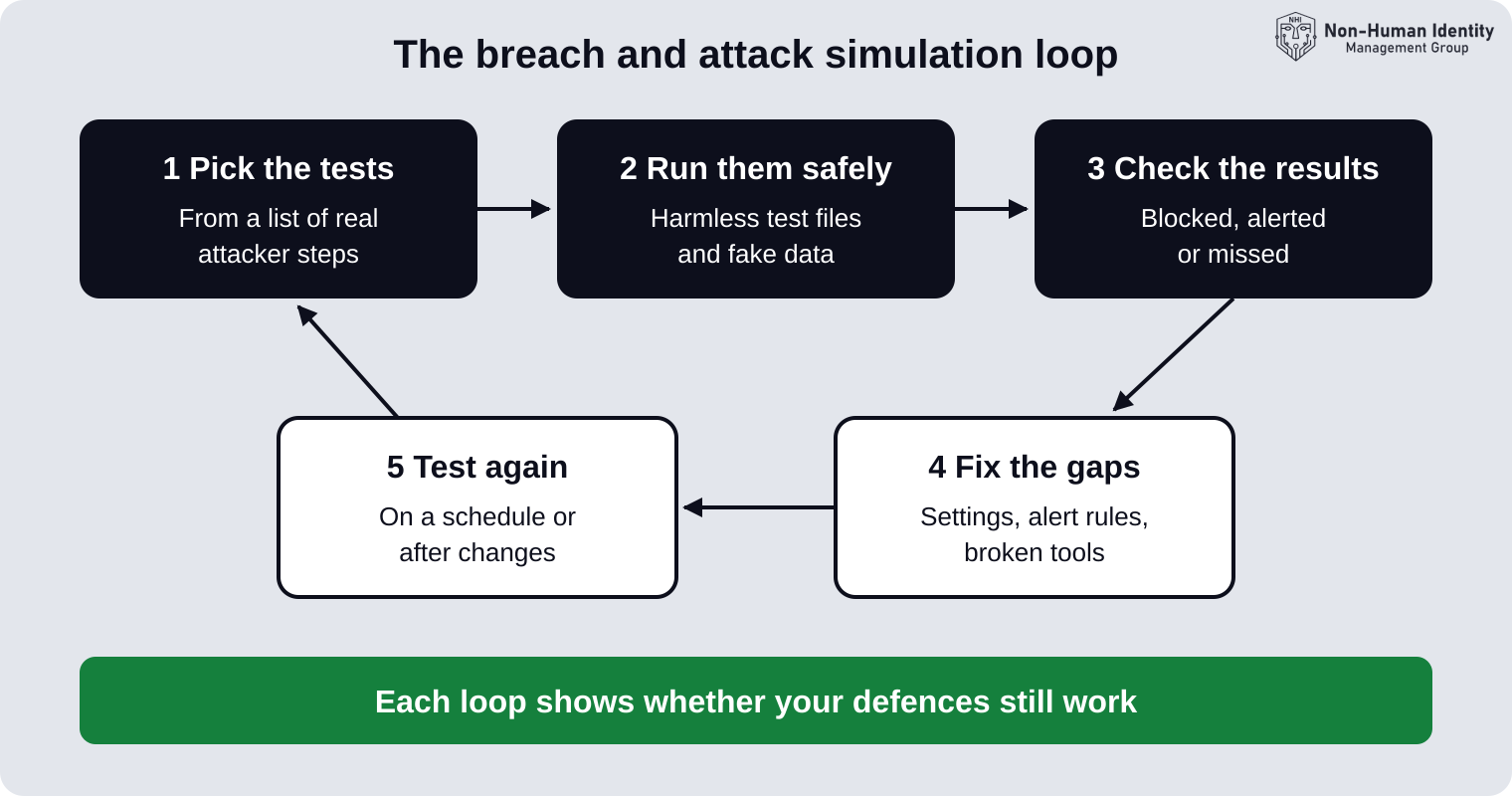
A BAS tool usually works in a loop, like this.
- Pick the tests. The team chooses attacker steps that matter to them. Many tools take these from MITRE ATT&CK, a public knowledge base of attacker methods seen in real attacks.[2]
- Run them safely. Small helper programs on chosen computers act out the steps, using harmless test files and fake data.
- Check the results. The tool records whether each step was blocked, sent an alert or got through.
- Fix the gaps. The team changes settings, adds alert rules or fixes broken tools.
- Test again. The same tests run again, on a schedule or after changes, to confirm the fix and catch new gaps.
US security agencies describe a similar cycle. Choose an attacker method and test your defences against it. Then look at how they did, and tune people, processes and technology.[1]
BAS, penetration tests and automated red teaming
A penetration test is a hired, allowed attack by skilled people. They look for new weak spots and think creatively. It usually happens once or twice a year.
BAS is narrower but runs far more often. It repeats known attacker steps to check that your defences still work.
Some tools go one step further. They chain steps together and adjust as they go, like a real intruder. This is often called continuous automated red teaming (CART). Free tools exist too. MITRE, the group behind ATT&CK, makes Caldera, an open-source platform for automated attack copying.[3]
A worked example
Gideon Kowal is the IT manager at Ochre Lettings, a fictional letting agency with 60 staff. The firm pays for a security tool on every laptop. It also pays an outside team to watch for alerts.
Gideon's board asks a simple question. "How do we know the tools work?" He has no clear answer, so he starts a BAS trial.
Kemal Mbeki, a junior analyst on the outside team, helps him set it up. They agree a short list of tests and a quiet time to run them. They also agree a way to stop the tests at once if anything looks wrong.
The first run brings two surprises. Nine laptops are not reporting to the security tool at all. They were set up from an old image (a saved copy of a laptop's software) after a busy summer of new starters.
The second surprise is a fake file upload to an outside address. Nothing blocked it, and no alert reached Kemal's screen.
Gideon fixes the nine laptops. Kemal adds an alert rule for large uploads to unknown addresses. A week later they rerun the same tests. The laptops now report, and the upload test raises an alert.
Gideon shows the board both runs side by side. He sets the tests to run every month and after any big change. He also books a human penetration test for the spring, because BAS only checks the steps it knows.
Myths and mistakes
| What people think | What is true |
|---|---|
| BAS replaces penetration testing. | BAS repeats known steps. Human testers find new weak spots and creative paths. Most firms need both. |
| A good score means we are safe. | A score covers only the tests you ran. Untested steps are still unknown. |
| BAS uses real malware. | BAS tools are designed to use harmless test files and fake data. Check what your tool does before you run it. |
| Running it once is enough. | Settings and tools change all the time. The value comes from testing again and again. |
| Finding gaps is the goal. | Fixing them is the goal. Rerun the tests to show the fix worked. |
What can I do this week?
- List your main defences and ask how you know each one is working today.
- Ask your security team or supplier when they last tested your alerts.
- Pick three attacker steps that worry you most and ask whether they are tested.
- Agree who must approve a test, and how to stop one quickly.
Checklist
- We know which defences we want to test, and why.
- Tests use harmless files and fake data only.
- Someone approves each test plan, with a clear way to stop it.
- Results show what was blocked, what raised an alert and what was missed.
- Each gap has an owner and a date to fix it.
- Tests run again after fixes and after big changes.
- Human penetration tests still happen on a regular schedule.
Common questions
Is breach and attack simulation safe to run on live systems?
Usually, if it is planned well. BAS tools are designed to use harmless files and fake data. Still, agree what will run, where and when, and how to stop it. Start small on a few computers before you widen the tests.
How is BAS different from a vulnerability scan?
A vulnerability scan looks for known weak spots, such as missing updates. BAS checks whether your defences notice and stop attacker behaviour. One finds holes in the wall. The other checks whether the alarms and guards respond when someone tries to get in.
Do small businesses need BAS?
Not always. A small firm may get more from basic steps first, such as updates and a second sign-in check. If you already pay for several security tools or an outside monitoring service, a simple BAS check can show whether they work.
What is continuous automated red teaming?
It is a more advanced kind of automated testing. Instead of single steps, it chains steps together and adapts, much like a real intruder would. It aims to show whole attack paths, not just whether one defence fired.
Where do BAS tests come from?
Most come from records of how real attackers behave. Many tools use MITRE ATT&CK, a free public list of attacker methods. Some also add tests for new threats in the news, such as steps from a recent security warning.
Where next?
Ready for the detail? Read the practitioner guide: Breach and Attack Simulation (BAS) Guide. It goes further into test libraries mapped to attacker methods, measuring detection coverage and running simulations safely in production.
Also useful:
- Breach and Attack Simulation vs Penetration Testing
- Continuous Automated Red Teaming (CART) Guide
- Penetration Testing for Beginners
- Red Teaming for Beginners
- MITRE ATT&CK for Beginners
Related NHI Mgmt Group resources: BAS vs Purple Teaming · CTEM vs Penetration Testing · SIEM for Beginners
Key terms
- Breach and attack simulation
- Software that runs safe copies of attacker steps, again and again, to check defences block or spot them.
- Security control
- A tool, setting or process that lowers the chance or harm of an attack.
- MITRE ATT&CK
- A free public knowledge base of how real attackers behave.
- Penetration testing
- An allowed attack by skilled people to find weak spots before criminals do.
- Continuous automated red teaming
- Ongoing automated testing that chains attacker steps together to show whole attack paths.
- Purple teaming
- Attackers and defenders working together to test and improve alerts and responses.
Sources and further reading
- NSA and CISA Red and Blue Teams Share Top Ten Cybersecurity Misconfigurations (Advisory AA23-278A), section Validate Security Controls. National Security Agency and Cybersecurity and Infrastructure Security Agency, October 2023. https://www.cisa.gov/news-events/cybersecurity-advisories/aa23-278a, accessed 28 Nov 2026.
- MITRE ATT&CK. The MITRE Corporation. https://attack.mitre.org/, accessed 28 Nov 2026.
- Caldera. The MITRE Corporation. https://caldera.mitre.org/, accessed 28 Nov 2026.