A CAPTCHA is a small test a website uses to guess whether a visitor is a person or a program.
This guide is for anyone who has clicked "I am not a robot" and wondered why, and for people who run a website with forms. If your business has a contact or booking form, you may already have a CAPTCHA, and some of your customers may struggle with it.
In short
- A CAPTCHA asks a visitor to do something that should be easy for people and harder for programs.
- It slows down simple bots, but determined attackers can often get past it with software or paid human solvers.
- Many CAPTCHAs are hard for some disabled people to use, and some block them altogether.
- Newer checks often work in the background, and a CAPTCHA works best as one layer among several.
What you will learn
- Explain what a CAPTCHA is and what it is for.
- Spot the main kinds of CAPTCHA you meet online.
- Explain what CAPTCHAs miss and who they can shut out.
- Ask better questions about the check on your own forms.
- Robot (bot)
- a program that visits websites and fills in forms on its own, with no person clicking.
- Person-or-program test (CAPTCHA)
- a challenge a website shows to guess whether a visitor is human.
- Background check (risk score)
- a hidden check that rates how likely a visit is to come from a bot, without a puzzle.
What is a CAPTCHA?
Think of a bouncer at a club door who asks a quick question before letting people in. Most guests answer easily. Someone who has been sent in bulk, with no idea where they are, may trip up.
A CAPTCHA is that door question for a website. The name stands for a "Completely Automated Public Turing test to tell Computers and Humans Apart". It might ask you to read wobbly letters, click every picture with a bus, or simply tick a box.
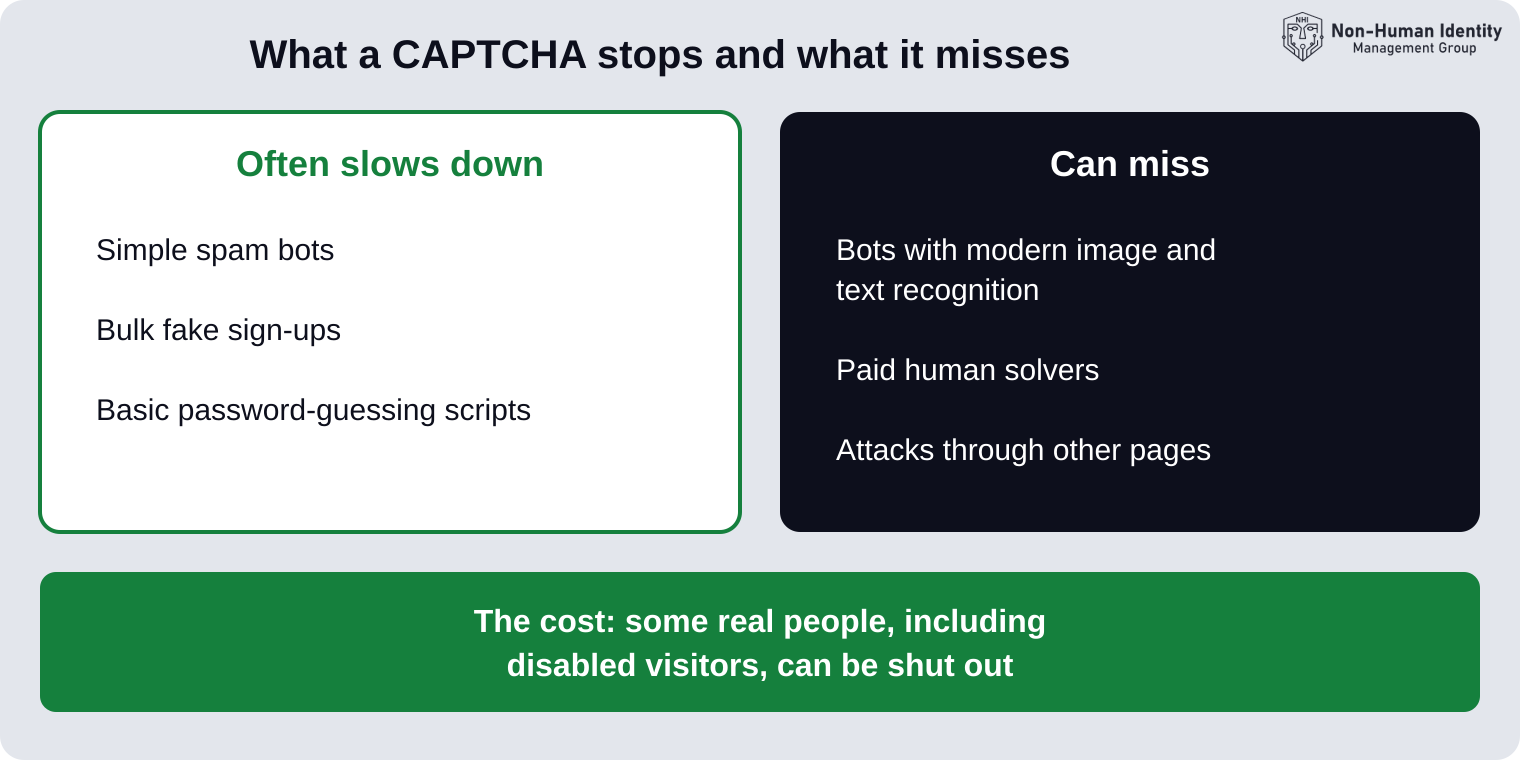
Websites use CAPTCHAs on sign-up pages, logins, contact forms and ticket sales. The aim is to slow down bots that send spam, create fake accounts or guess passwords.
Where the comparison stops working: a bouncer can look you in the eye. A CAPTCHA only sees the answer, so a bot that answers well, or a paid person answering for it, can walk straight in.
Why does it matter?
A CAPTCHA is a trade-off. It adds a hurdle for bots, but every real visitor has to jump it too. If it is too hard, real customers give up. A 2023 study of 1,400 people found that solving times differed a lot between common CAPTCHA types.[5]
If you run a small business website
What could happen: a hard puzzle on your booking form turns away real customers, while spam still gets through.
Check this: try your own form with a screen reader or on a phone, and count how often spam still arrives.
If you use assistive technology
What could happen: a picture or sound puzzle blocks you from a service you are entitled to use.
Check this: look for an accessible option on the challenge, and contact the organisation another way if there is none.
If you are new to web work
What could happen: you add a CAPTCHA and think the form is now safe from bots.
Check this: pair it with other checks, such as limits on how often one visitor can submit.
Next: Bot Management Guide
What does it look like?
Here are three made-up challenges, in the order a visitor might meet them on different sites.
Example only. All values are made up.
[ ] I am not a robot                         (1)

Select all squares with a bus.               (2)
[ img ][ img ][ img ]
[ img ][ img ][ img ]      [ Verify ]

Type the letters you see:  x7Fq-EXAMPLE      (3)
[ Play audio ]   [ New challenge ]
- A tick box. Often the main check happens in the background, and the box is only the visible part.
- A picture task. It asks you to recognise everyday objects, which some people find hard.
- Wobbly letters with an audio option. Distorted text and sound can be hard for many people to read or hear.
Why this is risky: each step up in difficulty shuts out more real people. Text and sound puzzles cause problems for people with low vision, hearing loss or learning difficulties.[1]
The safer way: use the lightest check that does the job. Prefer background checks or a simple tick box, and offer another way through for anyone who gets stuck.[1]
How does it work?
Most modern CAPTCHA services follow a similar pattern.
- The page loads the check. A small piece of code from the CAPTCHA service runs in your browser.
- It gathers clues. It looks at signals from your browser and how the page is used. Some services also set the browser a small task to solve in the background.[2]
- It decides whether to ask. If the visit looks normal, you may see nothing or just a tick box. If it looks odd, you get a puzzle.[2]
- It gives a pass or a score. Some services return a score from 0.0 to 1.0. A score near 1.0 suggests a person, and near 0.0 a bot.[3]
- The website checks the result. The site's own server must confirm the result with the service. Google's guidance says to verify the token on the server and check that it matches the expected action.[3]
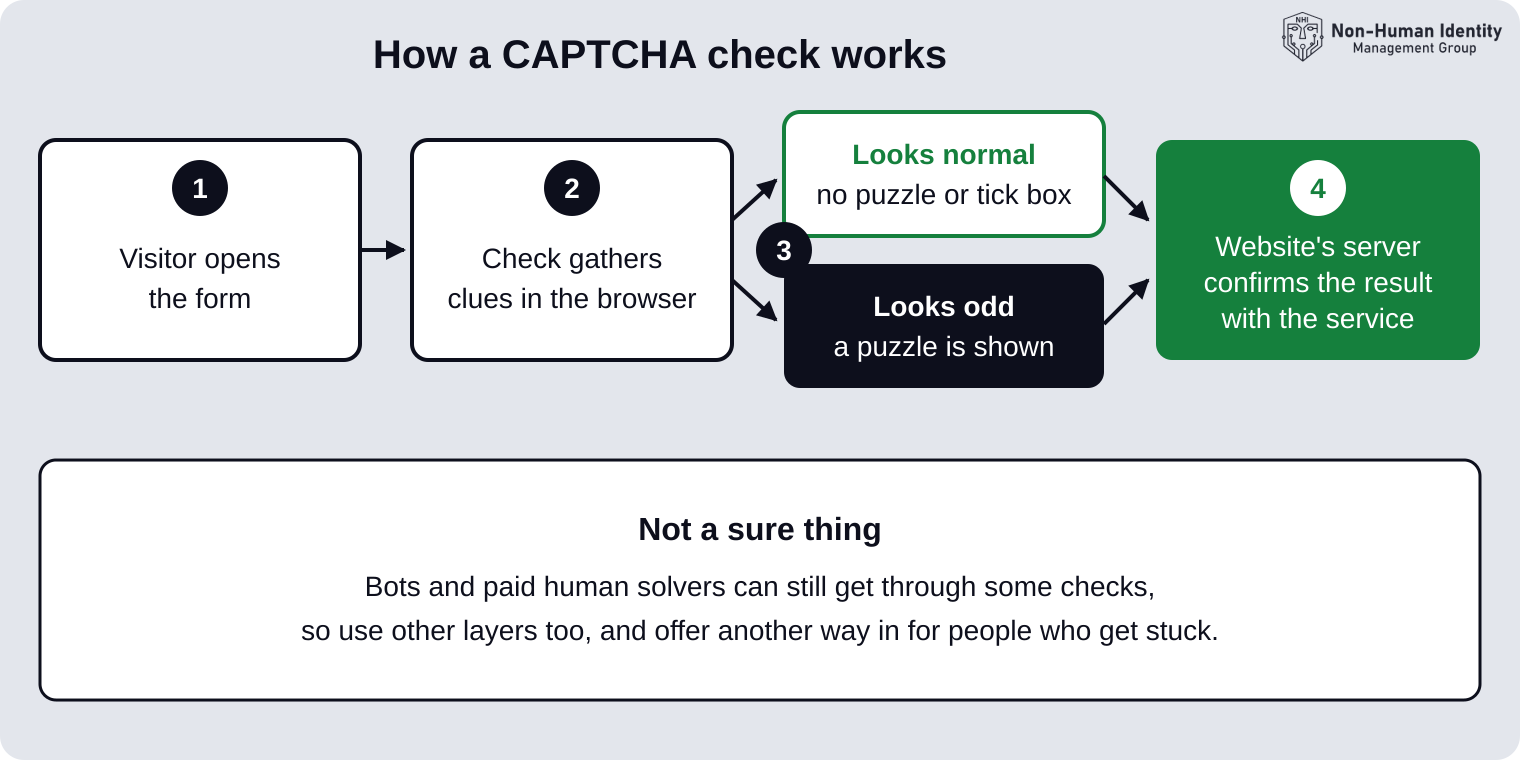
CAPTCHAs are not a sure thing. A W3C report on CAPTCHA accessibility notes that computers can read many distorted-text puzzles. It also cites a study where software solved most audio challenges, and says people can be paid to solve puzzles for attackers.[1]
A worked example
Farah Osei manages Larch Dental, a fictional practice with an online booking form. Each week the form fills with spam messages full of links.
Her web developer, Ivo Engel, adds a picture CAPTCHA. The spam drops, but within a fortnight two patients phone to complain. One uses a screen reader and could not get past the pictures. The other gave up after three rounds of buses and traffic lights.
Farah thinks of the bouncer. The door question is meant to stop gate-crashers, not regular guests. She asks Ivo to find a check that keeps the spam down without turning patients away.
Ivo swaps the picture puzzle for a background check that only shows a tick box when a visit looks odd. He also adds a hidden form field that people do not see but simple bots fill in, called a honeypot. Finally, he limits how many bookings one connection can send in an hour.
He makes sure the website's server confirms each check result, rather than trusting the browser alone. He then tests the form himself with a screen reader and on an old phone.
A month later, spam is low and no patient has complained. Farah adds a line to the form: "Having trouble? Call or email the practice instead." Ivo agrees to review the spam count every quarter.
Myths and mistakes
| What people think | What is true |
|---|---|
| A CAPTCHA stops all bots. | It slows simple bots. Software and paid human solvers can often get past.[1] |
| Harder puzzles mean better security. | Harder puzzles shut out more real people, while determined attackers still find a way. |
| An audio option makes it accessible. | Distorted audio is hard for many people, including deaf-blind users and people in noisy places.[1] |
| The browser check is enough. | The website's own server needs to confirm the result with the service.[3] |
| Any "verify you are human" page is safe. | Fake CAPTCHA pages are used to trick people into running harmful commands. A real one never asks you to paste anything into your computer. |
What can I do this week?
- Fill in your own website's forms on a phone and with a screen reader, and note any hurdles.
- Ask your web developer which CAPTCHA service you use and whether the server confirms each result.
- Check whether the service offers a background or low-friction mode.
- Add another way to contact you for anyone who cannot pass the check.
- Count spam before and after any change, so you know whether it helped.
Checklist
- The lightest check that does the job is in use.
- The website's server confirms every CAPTCHA result.
- Disabled visitors have a way through, such as an accessible option or another contact route.
- Other layers are in place, such as limits on repeat submissions and hidden honeypot fields.
- Spam and failed checks are counted and reviewed.
- Staff know that a real CAPTCHA never asks visitors to paste commands.
Common questions
Why do I sometimes get a puzzle and sometimes not?
Because many services decide based on risk. If your visit looks normal, you may see nothing or just a tick box. A new device, a shared network, a privacy tool or unusual clicking can make the visit look odd, so you get a puzzle.
Can AI solve CAPTCHAs?
Often, yes. Computers can read many distorted-text puzzles, and software has solved many audio challenges in research. This is one reason services now lean on background checks, and why a CAPTCHA works best as one layer among several.
Are CAPTCHAs bad for accessibility?
Many are. Text, sound and logic puzzles can block people with sight, hearing or learning difficulties. Web accessibility guidance asks for another way through when a puzzle is used to log in.[4] A W3C report recommends the least intrusive check.[1]
Do background checks collect my data?
They use some data about your browser and visit to make their guess. How much varies by service, so read the provider's privacy notice. Some services say they limit what they collect to what the security check needs.[2]
What is a fake CAPTCHA?
A fake CAPTCHA is a scam page dressed up as a "verify you are human" check. It asks you to copy and paste a command into your computer, which installs harmful software. Real CAPTCHAs do not ask you to do this.
Where next?
Ready for the detail? Read the practitioner guide: CAPTCHA and bot challenges. It goes further into why challenges fail, privacy-preserving alternatives and where challenges fit in a layered defence.
Also useful:
- Bots and Bot Traffic for Beginners
- Fake CAPTCHA and ClickFix Attacks for Beginners
- Credential Stuffing for Beginners
- Bot Management Guide
Related NHI Mgmt Group resources: Bot Management vs WAF · ClickFix and Fake CAPTCHA Paste-and-Run Attacks Guide · Bot vs AI Agent Traffic Management Guide
Key terms
- CAPTCHA
- A challenge a website uses to guess whether a visitor is a person or a program.
- Bot
- A program that visits websites and fills in forms on its own.
- Honeypot field
- A hidden form field that people do not see, but simple bots fill in, so the form can reject them.
- Rate limiting
- Capping how many requests one visitor or connection can send in a set time.
- Bot management
- Tools and rules that sort good bots from bad ones and decide what each may do.
- Risk score
- A number a background check gives a visit to show how likely it is to be a bot.
Sources and further reading
- Inaccessibility of CAPTCHA: Alternatives to Visual Turing Tests on the Web. W3C Accessible Platform Architectures Working Group, Group Draft Note, 16 December 2021. https://www.w3.org/TR/turingtest/, accessed 28 Nov 2026.
- Cloudflare Turnstile. Cloudflare Developers documentation, Cloudflare. https://developers.cloudflare.com/turnstile/, accessed 28 Nov 2026.
- reCAPTCHA v3. Google for Developers, Google. https://developers.google.com/recaptcha/docs/v3, accessed 28 Nov 2026.
- Understanding Success Criterion 3.3.8: Accessible Authentication (Minimum). W3C Web Accessibility Initiative, WCAG 2.2. https://www.w3.org/WAI/WCAG22/Understanding/accessible-authentication-minimum.html, accessed 28 Nov 2026.
- An Empirical Study and Evaluation of Modern CAPTCHAs. Searles A., Nakatsuka Y., Ozturk E., Paverd A., Tsudik G., Enkoji A. 32nd USENIX Security Symposium, 2023. https://www.usenix.org/conference/usenixsecurity23/presentation/searles, accessed 28 Nov 2026.