A CI/CD pipeline identity is the account and passes an automated build system uses to reach other services.
This guide is for anyone who has heard that build pipelines hold powerful keys and wants to know why. You do not need to write code. If your business has a website or app that updates itself automatically, a pipeline like this is probably doing the work.
In short
- A pipeline is software that builds and releases other software. To do that, it signs in to other systems with its own passes.
- Keys copied into the pipeline's settings keep working until someone changes or removes them, so a leak can be costly.
- Many pipelines can swap a short-lived, checked pass for cloud access instead of storing a key.
- Who can start a job matters as much as the pass, because whoever starts it can use its access.
What you will learn
- Explain why a build pipeline needs an identity of its own.
- Spot a stored key that has more power than the job needs.
- Check who can start the jobs that reach your live systems.
- Ask your team whether stored keys can be replaced with short-lived passes.
- Build and release robot (CI/CD pipeline)
- the automated system that tests and releases software after each change.
- Stored key (pipeline secret)
- a password or key someone saved in the pipeline's settings.
- Short-lived pass (federated credential)
- access the pipeline gets for one job, after the cloud checks who is asking.
What is a CI/CD pipeline identity?
Think of a day visitor sticker that is only good until the evening. The visitor gets it at the front desk, after a check, and it is only good for that visit. The safest pipelines get their cloud access in the same way.
CI/CD stands for continuous integration and continuous delivery. In plain words, it is a robot that takes each change to the code, tests it and releases it. Each run is split into tasks called jobs.
To release software, a job has to sign in to other places. These include the code store, the package store and the cloud account. The passes it uses are its identity. No person types them in, so this is a non-human identity: an identity that belongs to software.
Pipelines usually hold three kinds of pass. There is a built-in pass the pipeline service creates for each job. There are stored keys that someone copied into the settings. And there are short-lived passes the job gets from a cloud service while it runs.
Where the comparison stops working: a guard looks at a visitor's face. Here, software reads facts written into a signed pass. If the rules are too loose, such as "any visitor from any company", the wrong job still gets in.
Why does it matter?
One pipeline often reaches many systems, so its passes are valuable to attackers. In March 2025, a popular add-on for GitHub's pipeline service was changed. An attacker had stolen a token for the project's bot account. The changed code printed stored secrets into build logs. The firm that spotted it said the add-on was used in over 23,000 code projects.[7] You can read more in our write-up of the tj-actions/changed-files Compromise 2025.[7]
If you own a small business website
What could happen: a key with full rights to your cloud account sits in the pipeline, and a leak lets a stranger use it.
Check this: ask your developer or agency which keys the pipeline stores and what each one can do.
If you are a developer
What could happen: a change on any branch can start the release job and use the live cloud key.
Check this: limit release jobs to the main branch and add an approval step before live releases.
If you manage a technical team
What could happen: nobody owns the pipeline's keys, so they stay unchanged for years.
Check this: give each pipeline identity a named owner and a regular review.
What does it look like?
Here is a made-up list of the keys stored in one pipeline's settings.
Example only. All values are made up.
Pipeline settings: shop-website (example.com)
CLOUD_ADMIN_KEY      = EXAMPLE-KEY-0000-FAKE    added 2 years ago   (1)
PACKAGE_STORE_PASS   = FAKE-password-0000       added 2 years ago   (2)
Release job runs on: any branch                                    (3)
Approval before live release: none                                 (4)
- In a real file, this line would contain a cloud key with full administrator rights.
- A password for the package store, unchanged for two years.
- Any change on any branch can start the release job and use the keys.
- Nobody has to agree before the job changes the public website.
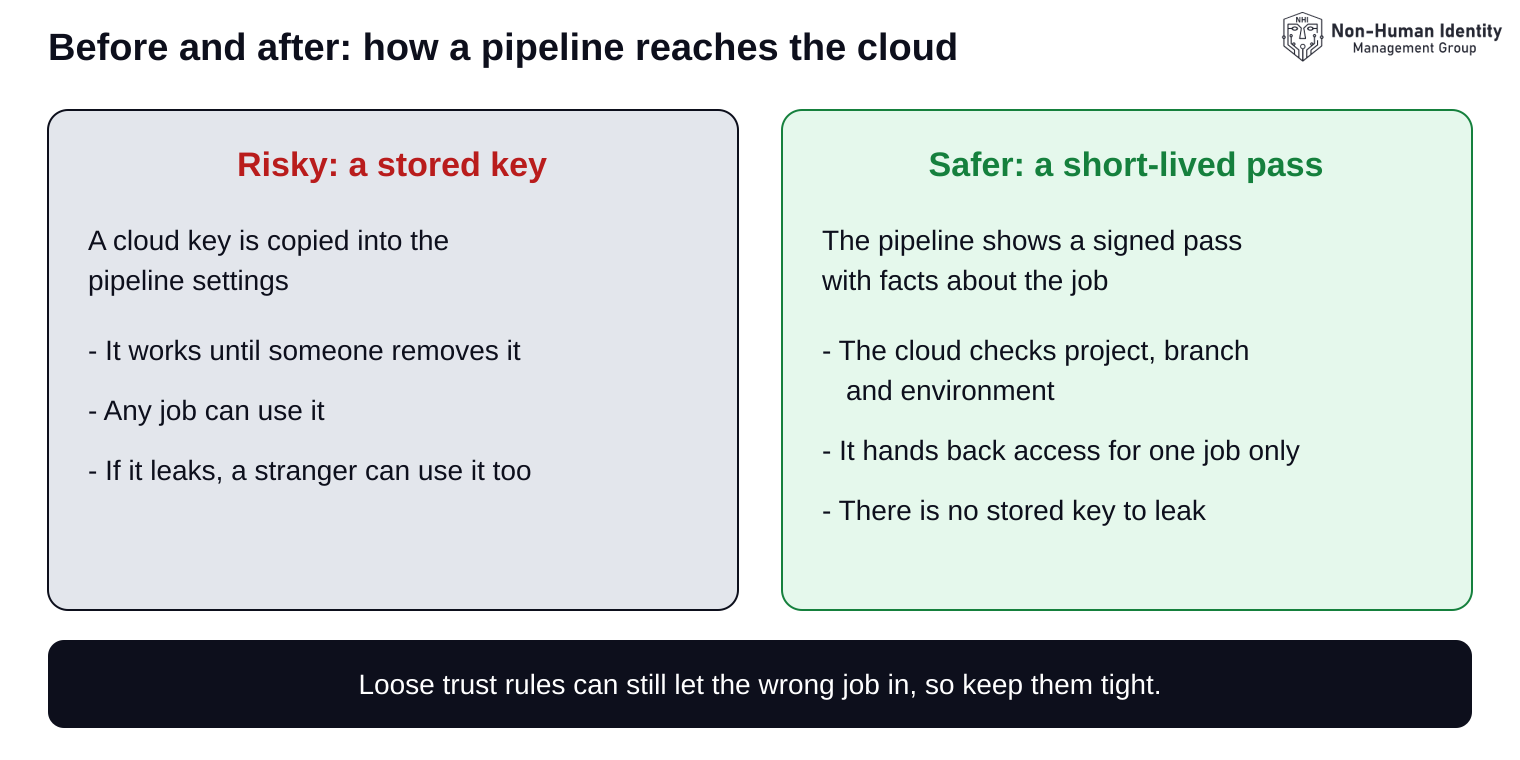
Why this is risky: the keys work until someone removes them. Any job, from any branch, can use them.
The safer way: the release job gets a short-lived pass for one job. Only the main branch can ask for it, after an approval.
How does it work?
Here is how a job can get cloud access without a stored key. This uses OpenID Connect (OIDC), a standard way for one service to vouch for another. The words differ between pipeline services, but the steps are similar.
- Set up trust once. An administrator tells the cloud to trust the pipeline service. They write rules, such as "only this project, only the main branch".[1]
- A job starts. If it targets a protected live environment, its rules, such as an approval, must pass first.[4]
- The pipeline issues a signed pass. It holds facts about the job, called claims, such as the project and the branch.[1][2]
- The cloud checks the facts. It compares the claims with the trust rules it was given.[1]
- A short-lived pass comes back. GitHub describes it as valid only for a single job.[1] In GitLab, the signed pass lasts as long as the job's time limit, or five minutes if none is set.[2]
Each job also gets a built-in pass for the pipeline service itself. The two services named here are listed alphabetically. On GitHub, the pass is called GITHUB_TOKEN, and GitHub advises giving it the least access it needs.[3] On GitLab, it is called CI_JOB_TOKEN, and it is valid only while the job is running.[5]
Not every service supports short-lived passes. US government advice is to avoid long-term software keys as much as possible, and to use temporary ones where the cloud offers them.[6]
A worked example
Anders Jovanovic and Beatriz Brennan are the two developers at a small made-up firm that sells craft kits online. A pipeline releases their website to a cloud account.
Beatriz reviews the setup. She finds a cloud key with full administrator rights, stored two years ago. Any branch can run the release job. And the built-in pass has the default rights in every job.
They agree a plan and test each step on a practice site first. They set up trust between the pipeline service and the cloud. The rules accept only their project, the main branch and a "production" environment.
The new cloud role can only upload website files, nothing else. Live releases now need an approval from the other developer. They also set the built-in pass to read-only, and give extra rights only to the job that needs them.
After two good releases, Anders switches off the old administrator key. They wait a week to check nothing else used it, then delete it.
They agree a careful fallback. If a release breaks, they switch the old key back on only if both agree. They write down why and set an end date.
This does not make the pipeline perfectly safe. Someone who can approve a release can still ship harmful code. But no long-lived administrator key is waiting to leak. A change on a random branch is also much less likely to reach the public site.
Myths and mistakes
| What people think | What is true |
|---|---|
| Stored secrets are safe because the pipeline hides them. | Hiding them in the screen output does not stop code in the job from reading them. In the March 2025 case, changed code printed secrets into build logs.[7] |
| Short-lived passes mean we can stop thinking about access. | They remove the stored key. But loose trust rules, such as "any branch", can still let the wrong jobs in. |
| The built-in job pass is harmless. | It can act on your code project. GitHub advises giving it the least access it needs.[3] |
| Only developers need to care. | A pipeline that releases to the live site is as powerful as an administrator. Owners, reviews and approvals are a management question too. |
What can I do this week?
- List the stored keys in each pipeline, what each one can reach and when it was last changed.
- Mark any key with administrator rights and ask whether the job really needs that much.
- Check who can start release jobs, and add an approval for live releases.
- Ask whether one release job could use short-lived passes instead of a stored key, as a small trial.
Checklist
- We have a list of every stored key in our pipelines, with an owner for each.
- No stored cloud key has administrator rights without a recorded, approved reason.
- Releases to the cloud use short-lived passes where the services support them.
- Each cloud trust rule names a specific project and branch or environment, not "any".
- Each release role has only the rights the release needs.
- Built-in job passes start with the least access, with extra rights given per job.
- Live releases need an approval or a protected branch before the job gets its access.[4]
- Remaining stored keys are changed on a schedule and removed when unused.
Common questions
Is a pipeline really an identity?
Yes. It signs in to code stores, package stores and clouds with its own passes, and no person types them in. That makes it a non-human identity. Like any account, it needs an owner, small rights and regular reviews, or old access tends to pile up unnoticed.
What does OpenID Connect do in a pipeline?
It lets a job prove who it is with a signed pass from the pipeline service, then swap it for cloud access. GitHub notes this means you do not need to copy cloud keys into the pipeline as long-lived secrets.[1] The trust rules decide which jobs qualify.
Do we still need stored keys at all?
Sometimes, because not every service supports short-lived passes. Where you must store a key, we suggest giving it small rights, limiting which jobs can read it and changing it on a schedule. Our Secrets Management for Beginners guide explains where keys should live.
Why does "who can start a job" matter?
Whoever can start a job that gets live access can, in effect, use that access. Approvals and branch limits narrow that group. On GitHub, a job's protection rules must pass before it is sent to run, and only then can it read that environment's secrets.[4]
Who should own a pipeline identity?
We suggest the team that owns the app owns its release identity, with the platform or security team reviewing the trust rules. An owner can explain why each key exists and can safely remove it when the app or pipeline changes.
Where next?
Ready for the detail? Read the practitioner guide: CI/CD Pipeline Identity Security Guide. It goes further into how pipelines are attacked, how to write tight trust rules and how to watch pipeline identities for misuse.
Also useful:
- CI/CD Pipeline Security for Beginners
- Workload Identity Federation for Beginners
- Secrets in Code for Beginners
- How to Scope CI OIDC Trust to Branch and Environment
- NHI Foundation Level Training
Related NHI Mgmt Group resources: CI/CD Pipeline Compromise Playbook · CI/CD Security Guide · Non-Human Identities for Beginners
Key terms
- CI/CD Pipeline
- The automated system that builds, tests and releases software, often holding powerful passes.
- Pipeline identity
- The software identity a pipeline uses to sign in to cloud, code and package services.
- Non-Human Identity (NHI)
- An identity used by software, machines or AI agents rather than by a person.
- OIDC
- A standard that lets one service vouch for who is asking, used here to swap a signed pass for cloud access.
- Workload Identity Federation
- A way for software in one place to reach another with short-lived passes instead of stored keys.
- GITHUB_TOKEN
- The temporary pass GitHub creates for each pipeline run, whose rights depend on its settings.
- Short-lived Credentials
- Passes that expire quickly, which shortens the time a stolen copy can be used.
- Least Privilege
- Giving each person or program only the access it needs, for only as long as it needs it.
Sources and further reading
- OpenID Connect. GitHub Docs, GitHub. https://docs.github.com/en/actions/concepts/security/openid-connect, accessed 28 Nov 2026.
- OpenID Connect (OIDC) Authentication Using ID Tokens. GitLab Docs, GitLab. https://docs.gitlab.com/ci/secrets/id_token_authentication/, accessed 28 Nov 2026.
- Automatic token authentication. GitHub Docs, GitHub. https://docs.github.com/en/actions/security-for-github-actions/security-guides/automatic-token-authentication, accessed 28 Nov 2026.
- Deployment environments. GitHub Docs, GitHub. https://docs.github.com/en/actions/concepts/workflows-and-actions/deployment-environments, accessed 28 Nov 2026.
- CI/CD job token. GitLab Docs, GitLab. https://docs.gitlab.com/ci/jobs/ci_job_token/, accessed 28 Nov 2026.
- Defending Continuous Integration/Continuous Delivery (CI/CD) Environments, version 1.0. National Security Agency (NSA) and Cybersecurity and Infrastructure Security Agency (CISA), June 2023. https://media.defense.gov/2023/Jun/28/2003249466/-1/-1/0/CSI_DEFENDING_CI_CD_ENVIRONMENTS.PDF, accessed 28 Nov 2026.
- Harden-Runner detection: tj-actions/changed-files action is compromised. StepSecurity, 14 March 2025. https://www.stepsecurity.io/blog/harden-runner-detection-tj-actions-changed-files-action-is-compromised, accessed 28 Nov 2026. News and analysis by the firm that detected the change.