Serverless computing lets you run small pieces of code in the cloud without looking after the computers.
This guide is for anyone who has heard the word and wants to know what it means and whether it is safe. You do not need to write code to be affected: many websites and apps your business uses quietly rely on serverless code.
In short
- There are still servers. The cloud provider runs them, so you do not have to.
- Your code runs only when something happens, such as a new order or an upload, and you pay for what you use.
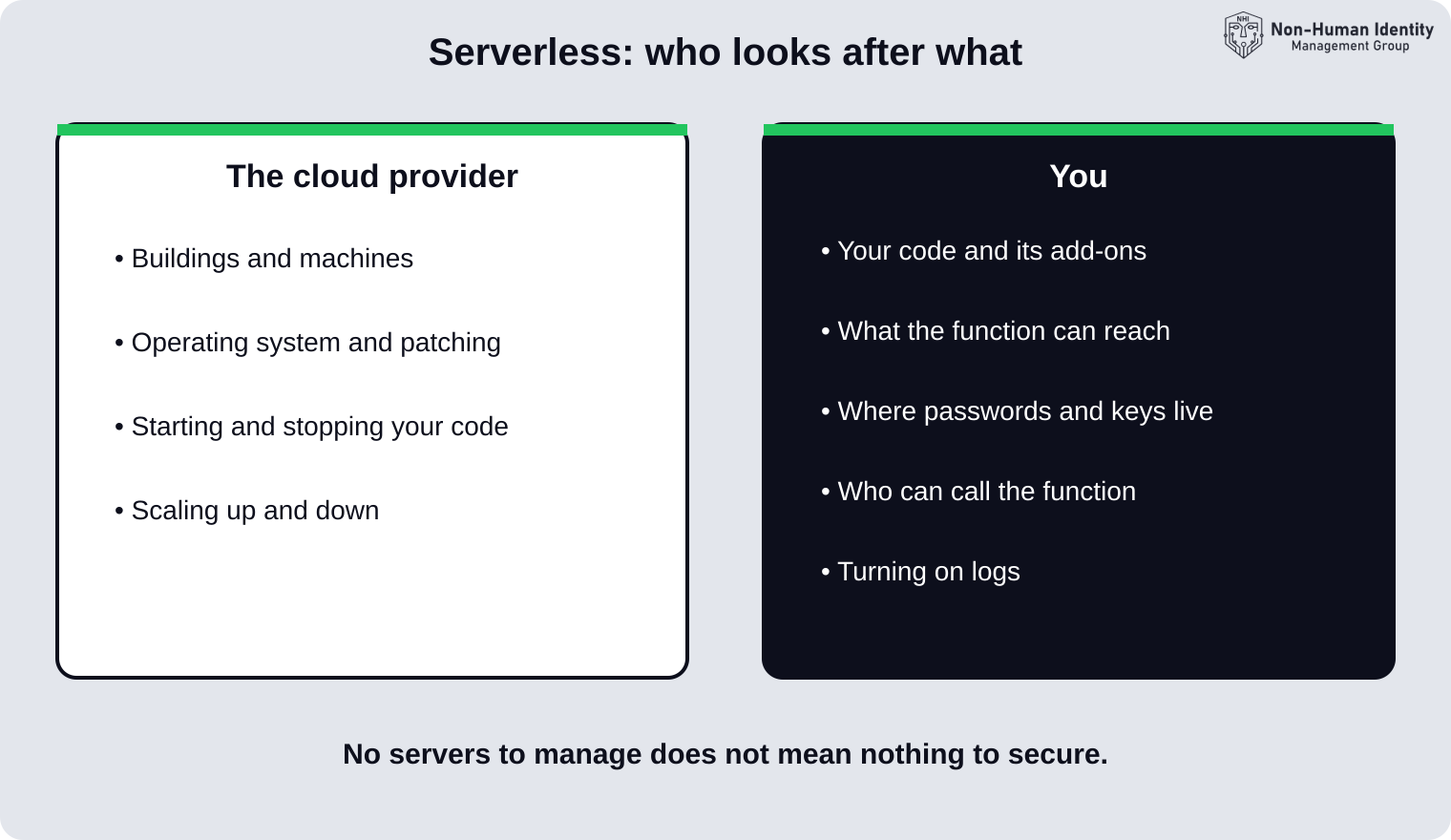
- The provider patches and runs the machines. You still own the code, its permissions, its secrets and who can call it.
- Give each function only the access it needs, and keep passwords and keys out of its code and settings.
What you will learn
- Explain what serverless means in one sentence.
- Spot a function that has more access than it needs.
- Explain which jobs the provider does and which stay with you.
- Ask your team or supplier how your functions are protected.
- Small job in the cloud (function)
- a short piece of code that the cloud runs when something happens.
- Starting event (trigger)
- the thing that makes a function run, such as a file upload or a web request.
- Identity for the code (execution role or service account)
- the account a function uses to reach other cloud services.
What is serverless computing?
Think of taking a taxi instead of owning a car. You do not buy the car, fix it or park it. You call it when you need a trip, and you pay for that trip. Serverless computing works the same way for code.
In plain words, you hand the cloud provider a small piece of code, called a function. You say what should start it, called a trigger. The provider runs the code when the trigger happens, then stops it. The name is a little misleading: there are still servers, but the provider looks after them.
The three big providers all offer this. Listed alphabetically, they are AWS Lambda, Azure Functions and Google Cloud Run functions.[1][2][3]
Where the comparison stops working: in a taxi, the driver decides the safe route. In serverless, you still decide what the code may touch, what secrets it carries and who may call it. The provider drives, but you choose the passengers and the luggage.
Why does it matter?
Handing over the servers removes some work, but not all of it. The provider runs the machines underneath. You stay responsible for setting up the services you use safely, and for the data you put in them.[4]
If you run a small business
What could happen: a supplier builds a booking tool with serverless code that can read far more data than it needs.
Check this: ask your supplier what each function can reach, and who reviews it.
If you are learning to code
What could happen: you paste an API key into your function's settings to get it working, and it is copied with every change.
Check this: keep keys in your provider's secret store and let the function fetch them.
If you look after cloud accounts
What could happen: dozens of small functions appear over time, each with its own identity and nobody tracking them.
Check this: keep a list of functions with an owner, a purpose and the access each one has.
What does it look like?
Here is a made-up summary of one function for a vet practice. It sends appointment reminders.
Example only. All values are made up.
FUNCTION   send-reminders-EXAMPLE
Trigger:   new booking saved                  (1)
Runs as:   FAKE-ROLE  access: full admin       (2)
Setting:   SMS_KEY=EXAMPLE-KEY-0000-FAKE       (3)
Web link:  https://fn.example.invalid/remind
           sign-in needed: none                (4)
Logs:      off                                 (5)
- The event that starts the function. This part is fine.
- The function's identity can do anything in the account. It only needs to read bookings and send texts.
- A key for the text message service, typed straight into the settings. In a real file, this line would contain the actual key.
- Anyone who finds the link can run the function.
- With logs off, nobody can easily see what the function did or who called it.
Why this is risky: if anyone misuses this function, they get full control of the account and a working text key.
The safer way: the function gets only the access it needs. The key sits in a secret store, the link needs a sign-in, and logs are on.
How does it work?
- Something happens. A customer books an appointment, uploads a file or visits a web link. That is the trigger.
- The provider starts the function. It finds a machine, loads your code and runs it. You do not see or manage that machine.
- The function uses its identity. It signs in to other services, such as a database, with the identity you gave it.
- It does its job and stops. When no one is using it, it can shrink to nothing, so you pay little or nothing.
- The provider keeps the machines patched. You keep your code, its add-ons, its access and its secrets up to date.
Each provider's own documentation makes the same points about the parts you control. Listed alphabetically:
- AWS Lambda. Each function has an execution role, the identity it uses to reach other services. AWS advises trimming that role to only the permissions the function needs before it goes live.[5]
- Azure Functions. Microsoft advises running each function app with the lowest possible permissions and not storing secrets in function code. It suggests managed identities, which the platform looks after, so there is no secret to store.[6]
- Google Cloud Run functions. Each service runs as a service account. Google recommends a service account you create yourself, with the smallest set of permissions it needs, in place of the default account.[7]
A worked example
This story is made up to show how it can happen.
Moira Fletcher manages the office at Riverbend Vets, a UK practice with three branches. A freelance developer built them an appointment reminder that sends text messages. It runs as a serverless function.
The practice is moving to a new IT supplier. As part of the handover, the supplier reviews everything in the cloud account. They show Moira a short report on the reminder function.
The report says three things. The function's identity has full admin access to the whole account. The text message key is typed into its settings. And its web link can be run by anyone who has it.
Moira asks what the function really needs. The answer is small: read new bookings and send texts. The supplier creates a new identity that can do only that, and moves the text key into the provider's secret store.
They also add a sign-in check to the web link and turn on logs. Then they ask the text message company for a new key, and switch off the old one. Moira checks that reminders still arrive. They do.
Finally, the supplier adds the function to a simple list. It records the owner, the purpose and the date of the next review.
What made the difference: Moira asked what the function needed, not just whether it worked.
Myths and mistakes
| What people think | What is true |
|---|---|
| Serverless means there are no servers. | There are servers. The provider runs them for you. |
| Serverless is secure by default, so there is nothing to do. | The provider looks after the machines. You still own the code, access, secrets and who can call each function. |
| Small functions only need small checks. | A tiny function with broad access can do as much harm as a big app. Check what each one can reach. |
| Putting a key in the function's settings is the same as a vault. | Settings are often visible to more people and copied with each change. Use the provider's secret store or a managed identity. |
| Functions that only run for seconds do not need logs. | Logs are how you see what a function did and who called it. Keep them on. |
What can I do this week?
- Ask your team or supplier for a list of the serverless functions you use.
- For each one, ask what it can reach and whether that is more than it needs.
- Check that no passwords or keys are typed into function code or settings.
- Check that web links to functions need a sign-in unless they are meant to be public.
- Make sure logs are turned on and someone knows where to find them.
Checklist
- I can explain what serverless means in one sentence.
- I know the provider runs the machines and I own the settings around my code.
- Every function has a named owner and a purpose.
- Each function's identity has only the access it needs.
- Secrets are kept in a secret store, not in code or settings.
- Public web links to functions are deliberate and need a sign-in where they should.
- Logs are on for every function.
Common questions
Is serverless more secure than running my own servers?
It can be, because the provider patches and runs the machines for you. But it moves the risk rather than removing it. The code, permissions, secrets and public links are still yours, and many small functions can be harder to track than one server.
What is the difference between serverless and containers?
Both package code to run in the cloud. With containers, you usually choose how they run and for how long. With serverless functions, the provider starts and stops your code for you, often only when a trigger fires. You also see less of what sits underneath.
Why does a function need its own identity?
A function often has to reach other services, such as a database or a storage bucket. Its identity proves who it is and decides what it may do. Giving each function its own narrow identity limits the harm if one is misused.
Does serverless cost less?
Often, for work that comes and goes. You usually pay per request or for the time your code runs, so quiet periods cost little. Busy, steady work can cost more than other options, so it is worth checking your provider's pricing for your own use.
Do I need to update serverless code?
Yes. The provider updates the machines, but your code and the add-on libraries it uses are yours to keep current. Providers also retire old language versions over time, so functions need checking and updating on a schedule.
Where next?
Ready for the detail? Read the practitioner guide: Serverless Security Guide. It goes further into function permissions, event input checks, dependency risks and monitoring across providers.
Also useful:
- AWS Lambda Security Guide
- Azure Functions Security Guide
- Cloud Run and Cloud Functions Security Guide
- Cloud Workload Identities for Beginners
- Cloud Networking for Beginners
Related NHI Mgmt Group resources: Containers vs Serverless Security · Serverless Function Compromise Playbook · Shared Responsibility Model for Beginners
Key terms
- Serverless computing
- A cloud model where you run code without managing servers yourself; the provider runs the machines and scaling, and you usually pay per use.
- Function as a service
- A serverless pattern where small pieces of code run on demand when an event or request arrives.
- Managed identity
- An identity the cloud provider looks after for a resource, so it can sign in to other services without stored passwords.
- Service account
- An account used by software rather than a person to reach systems and services.
- Least privilege
- Giving each person or program only the access it needs, and no more.
- Secrets management
- Storing, sharing, changing and checking passwords and keys safely, usually in a central secret store.
- The split of security duties between the cloud provider and the customer.
Sources and further reading
- What is AWS Lambda? AWS Lambda Developer Guide. Amazon Web Services. https://docs.aws.amazon.com/lambda/latest/dg/welcome.html, accessed 28 Nov 2026.
- Azure Functions overview. Microsoft Learn. Microsoft. https://learn.microsoft.com/en-us/azure/azure-functions/functions-overview, accessed 28 Nov 2026.
- What is Cloud Run (including Cloud Run functions). Google Cloud documentation. Google. https://docs.cloud.google.com/run/docs/overview/what-is-cloud-run, accessed 28 Nov 2026.
- Cloud security shared responsibility model. National Cyber Security Centre, published 10 May 2022, reviewed 7 June 2023. https://www.ncsc.gov.uk/collection/cloud/understanding-cloud-services/cloud-security-shared-responsibility-model, accessed 28 Nov 2026.
- Defining Lambda function permissions with an execution role. AWS Lambda Developer Guide. Amazon Web Services. https://docs.aws.amazon.com/lambda/latest/dg/lambda-intro-execution-role.html, accessed 28 Nov 2026.
- Securing Azure Functions. Microsoft Learn. Microsoft. https://learn.microsoft.com/en-us/azure/azure-functions/security-concepts, accessed 28 Nov 2026.
- Introduction to service identity (Cloud Run). Google Cloud documentation. Google. https://docs.cloud.google.com/run/docs/securing/service-identity, accessed 28 Nov 2026.