Cloudflare is a service that sits in front of a website and handles visitors before they reach it.
This guide is for small business owners, students and people new to IT work who keep hearing the name. You do not need to be technical to be affected: if your website uses Cloudflare, a few account settings decide how much it really protects you.
In short
- Cloudflare stands between visitors and your web server, so visitors see Cloudflare's address, not your server's.
- It can absorb floods of fake traffic, filter some attacks and keep copies of pages to speed things up.
- It only protects the parts of your site that are routed through it, and only as well as it is set up.
- The key checks are the orange cloud, the encryption mode, two-step sign-in and careful use of API tokens.
What you will learn
- Explain what Cloudflare does in one sentence.
- Spot a website record that skips Cloudflare's protection.
- Check the four settings that matter most for a small site.
- Ask your web supplier who controls your Cloudflare account.
- Your own web server (origin)
- the computer where your website really lives.
- Middle service (reverse proxy)
- a service that takes visitors' requests first and passes them on to your server.
- Address book of the internet (DNS)
- the system that turns a name like example.com into a computer's address.
What is Cloudflare?
Think of a mail forwarding service. People send letters to the service's address, not your home. The service checks the post, bins the junk and forwards the rest, so strangers never learn where you live.
Cloudflare does this for websites. It is a reverse proxy, which means a middle service that takes requests first and passes them on to your real server.[1] Your real server is called the origin.
To make this happen, you move your domain's DNS to Cloudflare. DNS is the internet's address book. When someone looks up your site, Cloudflare answers with one of its own addresses instead of your server's.[1]
Many companies offer similar services. We use Cloudflare here because it is widely used, and its free plan is common on small business sites.
Where the comparison stops working: a forwarding service only knows your home address if you tell it. A website can give its real address away in other ways. Old address book entries and email settings are two examples, so hiding it takes extra care.[4]
Why does it matter?
Cloudflare is often switched on in an afternoon and then forgotten. The protection depends on choices made that afternoon, and on who can still sign in to the account.
Keys and tokens need care too. Cloudflare said that in 2023 it failed to change one service token and three service accounts after a supplier was breached. An attacker used them to reach its internal systems.[9] Read our Cloudflare Thanksgiving Breach 2023 page for the full story.
If you own a small business website
What could happen: a supplier set up Cloudflare in their own account, and you cannot get in when something breaks.
Check this: ask whose account your site sits in, and make sure you have your own login.
If you are new to IT work
What could happen: one record left unprotected shows your server's real address to attackers.
Check this: review which records show an orange cloud and which show grey.
If you build sites or scripts
What could happen: a powerful API token pasted into a script leaks, and a stranger changes your settings.
Check this: give each token only the access it needs, and set an end date.
Next: API Keys for Beginners
What does it look like?
Here is a made-up summary of the settings for a small joinery firm's website, written out as a list.
Example only. All values are made up.
# Cloudflare settings summary: quarryjoinery.example.com
www      A     192.0.2.10    Proxied (orange)      (1)
shop     A     192.0.2.10    DNS only (grey)       (2)
mail     MX    mail.example.invalid  DNS only      (3)
SSL/TLS mode:  Flexible                            (4)
Two-step sign-in on account: off                   (5)
API token "website-plugin": all permissions, no end date  (6)
- This record goes through Cloudflare, so visitors see Cloudflare's address.
- This record skips Cloudflare. Anyone who looks it up sees the server's real address.
- Email records always skip Cloudflare. That is normal, but they can give clues.
- Flexible means the last stretch, from Cloudflare to the server, is not encrypted.
- Anyone with the password could sign in and change it all.
- In a real file, this line would contain a key that gives a plugin full control, with no end date.
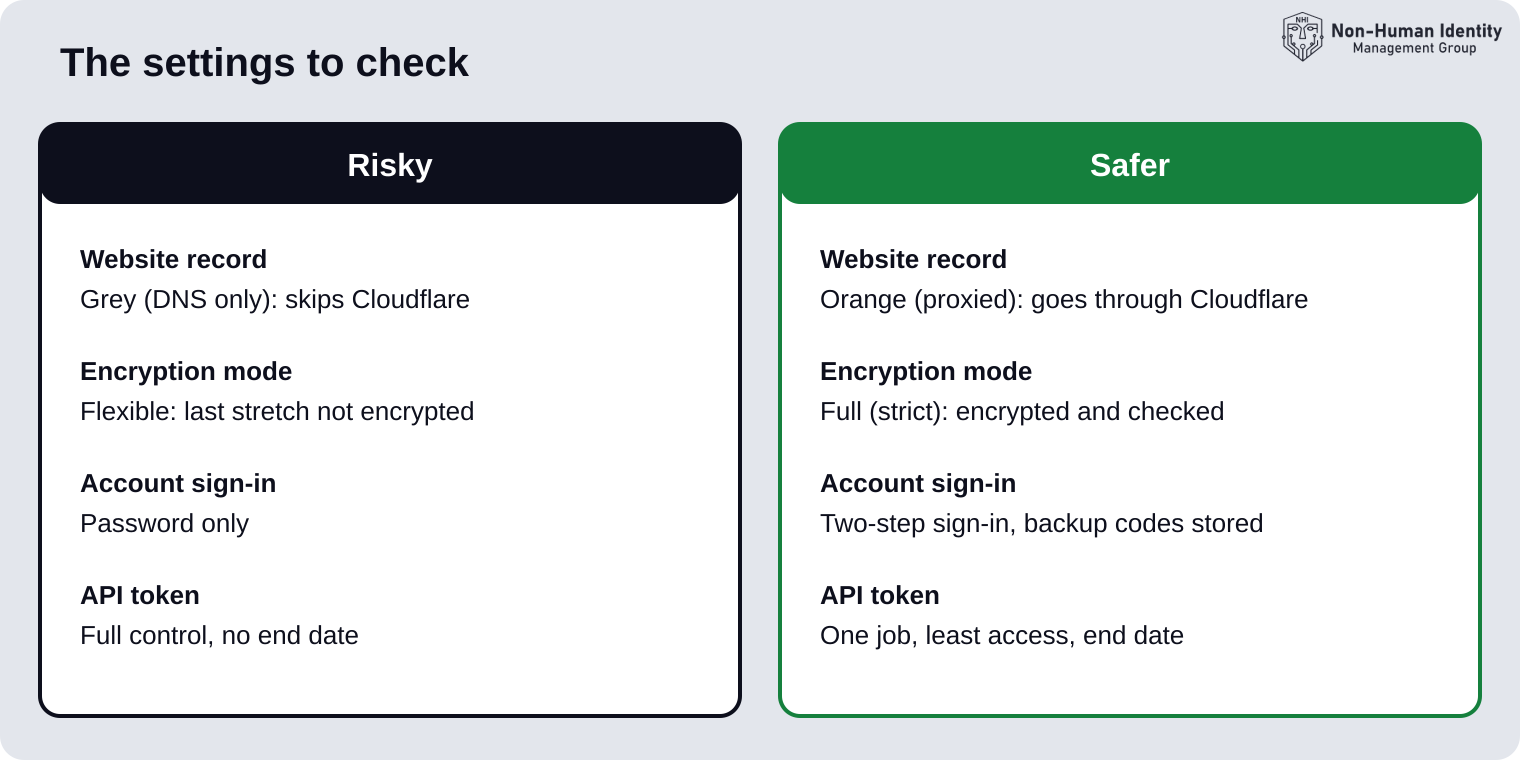
Why this is risky: the grey record shows the real address. Attackers could use it to go round Cloudflare.[2] The weak mode and the powerful token add more ways in.
The safer way: web records are orange and the mode is Full (strict). Two-step sign-in is on. Each token does one job and has an end date.
How does it work?
- The lookup. A visitor types your web address. DNS answers with a Cloudflare address, not your server's.[1]
- The front door. The visitor's browser connects to a Cloudflare server close to where they are.
- The checks. Cloudflare looks for floods of fake traffic and, if you have turned them on, filtering rules. Its basic flood protection is included on every plan.[5]
- The shortcut. If Cloudflare holds a saved copy of the page, it can send that straight back. This is called caching.[1]
- The hand-over. Otherwise it passes the request to your origin server and returns the answer to the visitor.
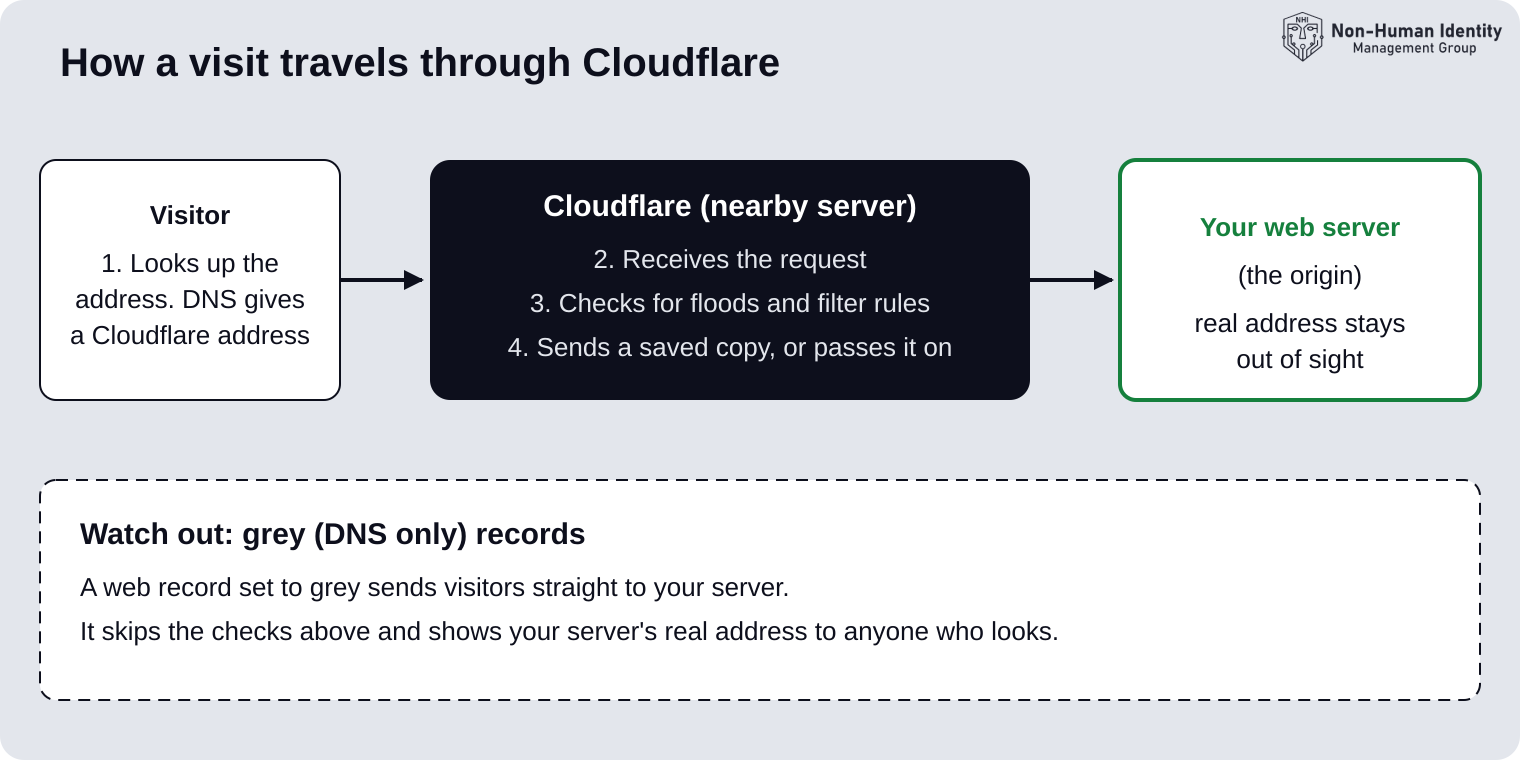
Two settings shape how strong this is. The first is the proxy status. Each web record shows an orange cloud (traffic goes through Cloudflare) or a grey cloud (DNS only, traffic goes straight to your server).[2]
The second is the encryption mode, which covers the link from Cloudflare to your server. Encryption scrambles data so others on the way cannot read it. Cloudflare strongly recommends the Full or Full (strict) modes where possible. Full (strict) also checks that your server's certificate, its digital ID card, is valid.[3]
A worked example
Mira Zamora runs Quarry Joinery, a fictional firm that makes kitchens. A freelancer, Fen Ulrich, built the website and put it behind Cloudflare two years ago.
A new office manager, Yara Haddad, reads about Cloudflare and asks a simple question. "Who can sign in to our account?"
Nobody at the firm knows. Mira remembers the mail forwarding picture. A forwarding service is no use if a stranger can change where your post goes.
Fen joins a call and shares his screen. The site sits in an account under the firm's email address, which is good. But two-step sign-in is off. Yara turns it on with an authenticator app and stores the backup codes in the firm's password manager.[6]
Next they look at the records. The main site is orange. The online shop, added later, is grey. Fen switches it to orange and checks that the shop still works.
The encryption mode says Flexible. Fen confirms the server has a valid certificate, then changes the mode to Full (strict). The site still loads, with the padlock showing.
Last, they find an old API token with full control, made for a plugin they no longer use. Fen deletes it. He makes a new one for the backup tool that can only read settings, with an end date.[7]
It takes an hour. Mira adds "check Cloudflare settings" to the firm's yearly list of jobs.
Myths and mistakes
| What people think | What is true |
|---|---|
| Once Cloudflare is on, the whole site is protected. | Only records set to proxied (orange) go through it. Grey records go straight to your server.[2] |
| The padlock in the browser means everything is encrypted. | With Flexible mode, the link from Cloudflare to your server is not encrypted.[3] |
| Cloudflare hides my server, so nobody can find it. | Old address records, email settings and grey records can reveal it. Cloudflare suggests changing the server's address after you join.[4] |
| The free plan has no protection worth having. | Basic flood protection and a free set of filter rules come with the free plan.[5][8] |
| Cloudflare replaces keeping the website up to date. | It filters some attacks, but flaws in your site, plugins and passwords still need fixing. |
What can I do this week?
- Find out whose Cloudflare account your site sits in, and make sure your business has its own login.
- Turn on two-step sign-in and store the backup codes somewhere safe.
- Check that every website record shows an orange cloud.
- Ask your supplier to move from Flexible to Full (strict), if the server has a valid certificate.
- Delete API tokens nobody uses, and limit the rest.
Checklist
- The Cloudflare account belongs to the business, not a single supplier.
- Every person with access uses two-step sign-in.
- Each person has their own login. Nobody shares one.
- Website records are proxied (orange). Grey records are only for email and similar uses.
- The encryption mode is Full (strict), or there is a written reason why not.
- Each API token has one named job, only the permissions it needs and an end date.
- Someone reviews the account settings at least once a year.
Common questions
Is Cloudflare a firewall?
Partly. Cloudflare offers a web application firewall, a filter that checks requests to a website, among other features. Its free plan includes a basic set of filter rules, and paid plans add more. It is not a firewall for your office network. See Web Application Firewalls for Beginners.
What does the orange cloud mean?
The orange cloud means traffic for that record goes through Cloudflare. Visitors see a Cloudflare address, and Cloudflare's protection and caching apply. A grey cloud means DNS only: visitors go straight to your server, and that server's real address is visible to anyone who looks.
Which encryption mode should I choose?
Full (strict) is the safer choice for most sites. It encrypts the link from Cloudflare to your server and checks your server's certificate. It needs a valid certificate on the server, which your host can usually provide. Avoid Flexible where you can, because the last stretch is not encrypted.
Does Cloudflare stop DDoS attacks?
It helps a lot, but only for traffic routed through it. Cloudflare says its basic protection against floods of fake traffic is automatic and included on every plan. If attackers learn your server's real address, they may be able to go round it. See DDoS Attacks for Beginners.
What is a Cloudflare API token?
An API token is a secret code that lets a script or plugin change your Cloudflare settings without a person signing in. Cloudflare shows it only once. Limit each token to one job and the sites it needs, and set an end date. A leaked token can be used by whoever holds it.
Where next?
Ready for the detail? Read the practitioner guide: Cloudflare Security Configuration Guide. It goes further into admin roles, API tokens and service accounts, logging and a hardening baseline for the account.
Also useful:
- Cloudflare API tokens security guide
- Web Application Firewalls for Beginners
- DDoS Attacks for Beginners
- CDN Security Guide
- DNS Security for Beginners
Related NHI Mgmt Group resources: Secrets Rotation for Beginners · Cloudflare Zero Trust Configuration Guide · Website Security for Beginners
Key terms
- Reverse proxy
- A service that receives visitors' requests and passes them on to the real web server.
- Origin server
- The computer where a website really lives, behind a service like Cloudflare.
- DNS
- The internet's address book, which turns names into computer addresses.
- Content delivery network
- A network of servers in many places that keeps copies of web content close to visitors.
- DDoS attack
- A flood of fake traffic from many computers, meant to knock a service offline.
- Web application firewall
- A filter that checks requests to a website and blocks ones that look like attacks.
- TLS
- The encryption behind the padlock in a browser, which scrambles data in transit.
- API token
- A secret code that lets software act on an account without a person signing in.
Sources and further reading
- How Cloudflare works. Cloudflare Docs, Cloudflare. https://developers.cloudflare.com/fundamentals/concepts/how-cloudflare-works/, accessed 28 Nov 2026.
- Proxy status. Cloudflare DNS Docs, Cloudflare. https://developers.cloudflare.com/dns/proxy-status/, accessed 28 Nov 2026.
- Encryption modes. Cloudflare SSL/TLS Docs, Cloudflare. https://developers.cloudflare.com/ssl/origin-configuration/ssl-modes/, accessed 28 Nov 2026.
- Protect your origin server. Cloudflare Docs, Cloudflare. https://developers.cloudflare.com/fundamentals/security/protect-your-origin-server/, accessed 28 Nov 2026.
- Cloudflare DDoS Protection. Cloudflare Docs, Cloudflare. https://developers.cloudflare.com/ddos-protection/, accessed 28 Nov 2026.
- Secure your account with two-factor authentication. Cloudflare Docs, Cloudflare. https://developers.cloudflare.com/fundamentals/user-profiles/2fa/, accessed 28 Nov 2026.
- Create API token. Cloudflare Docs, Cloudflare. https://developers.cloudflare.com/fundamentals/api/get-started/create-token/, accessed 28 Nov 2026.
- Managed Rules. Cloudflare WAF Docs, Cloudflare. https://developers.cloudflare.com/waf/managed-rules/, accessed 28 Nov 2026.
- Thanksgiving 2023 security incident. The Cloudflare Blog, Cloudflare. https://blog.cloudflare.com/thanksgiving-2023-security-incident/, accessed 28 Nov 2026.