Confidential computing keeps data protected even while a computer is working on it.
This guide is for new IT staff, managers and anyone weighing up whether to put sensitive data in the cloud. You do not need to know how chips work: if your organisation sends private data to a cloud service, this is one way to limit who could see it.
In short
- Data is often scrambled (encrypted) when stored and when sent, but it usually has to be unscrambled in memory while a program uses it.
- Confidential computing runs the work inside a sealed area of the chip, called a trusted execution environment, so other software on the same machine cannot read it.
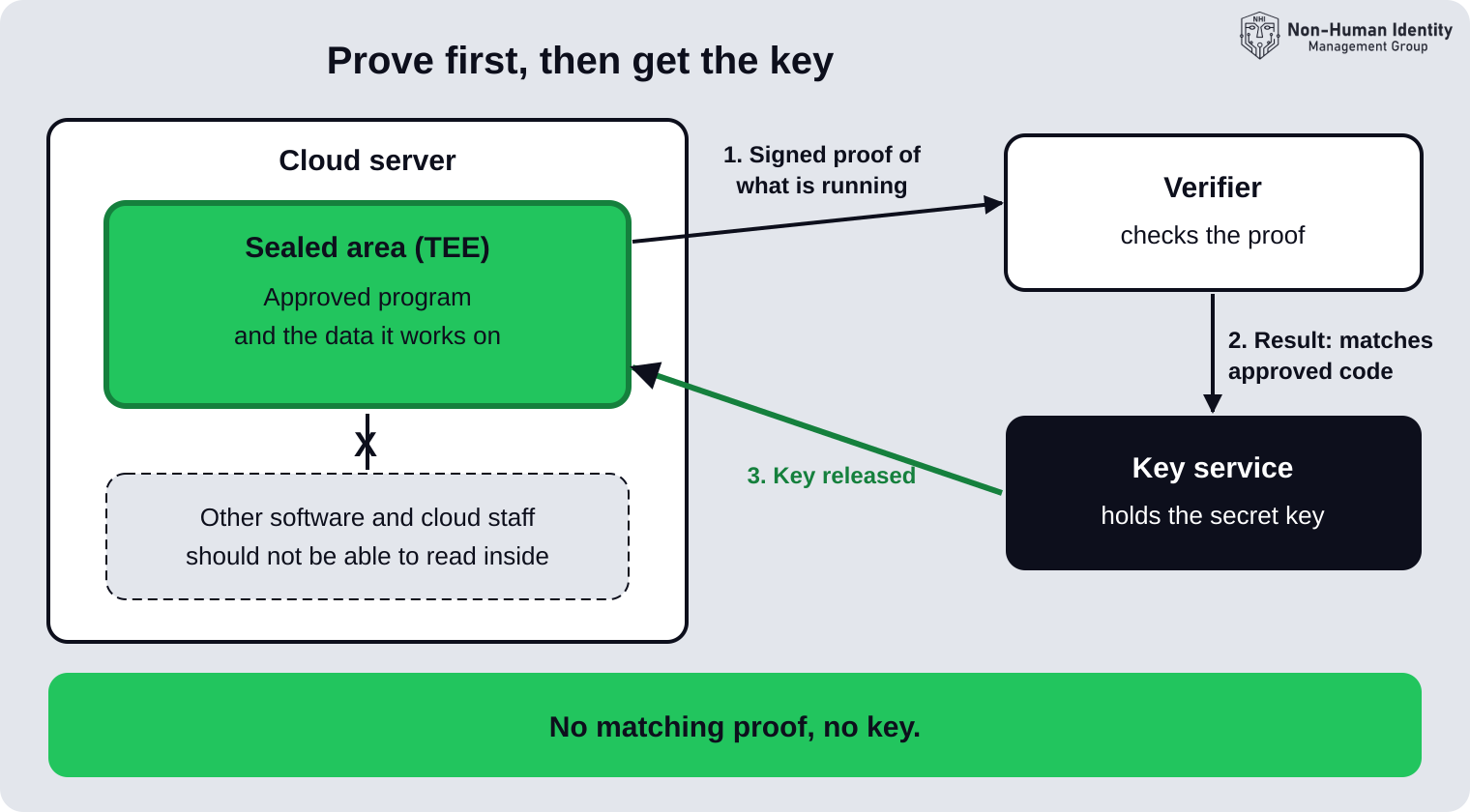
- Before secret keys are handed over, the sealed area can prove what code it is running. This proof is called attestation.
- It narrows who you have to trust, including cloud staff, but it does not fix bugs in your own program.
What you will learn
- Explain the three states of data: stored, moving and in use.
- Explain what a trusted execution environment does in one sentence.
- Check whether a cloud service asks for proof before it releases keys.
- Ask what confidential computing does not protect against.
- Sealed work area (trusted execution environment)
- a protected part of a computer chip where code and data are kept apart from the rest of the machine.
- Proof of what is running (attestation)
- a signed report that shows which code is inside the sealed area, so others can decide whether to trust it.
What is confidential computing?
Think of a sealed glovebox in a laboratory. A scientist works on a delicate sample with their hands through the gloves. Everyone else in the room can see the box, but nobody can reach in.
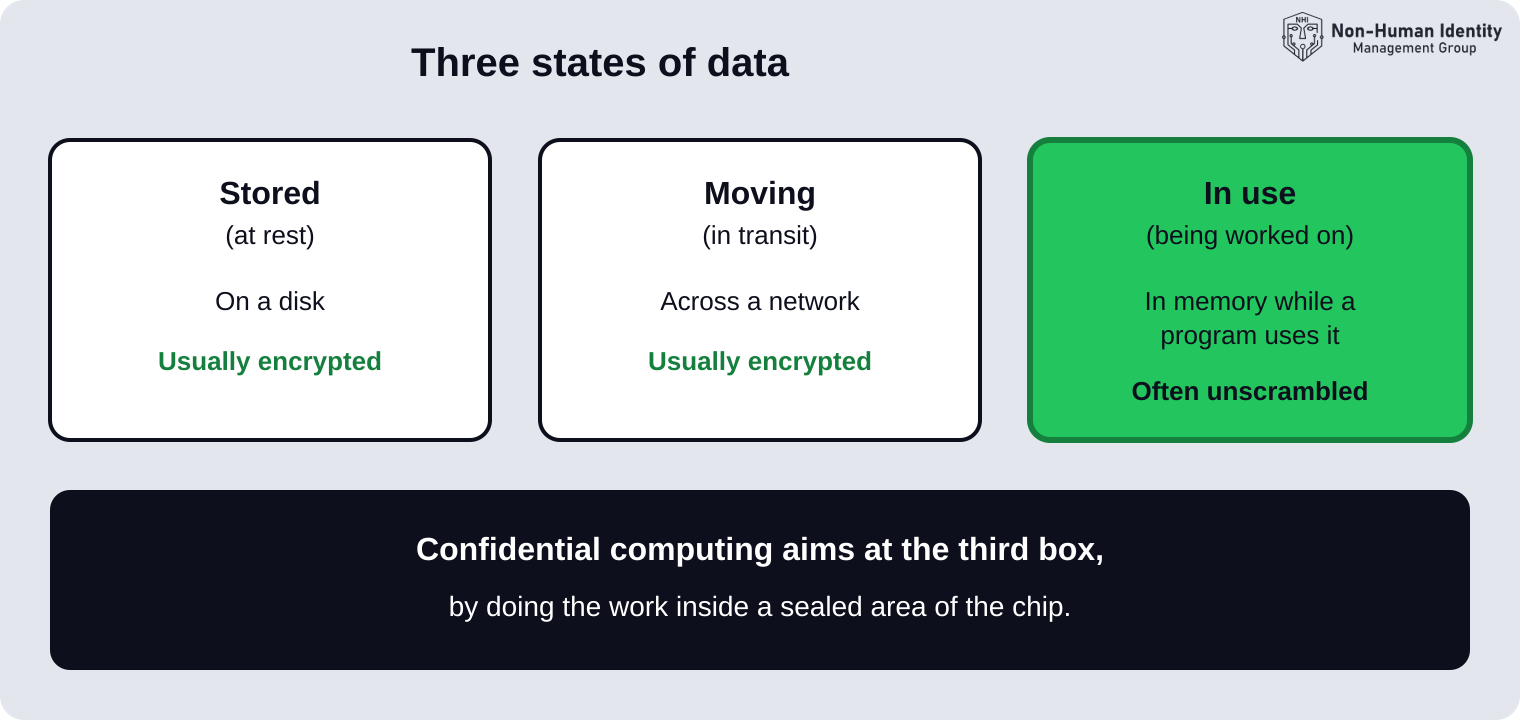
Data can be in three states. It can be stored on a disk (at rest), moving across a network (in transit) or being worked on by a program (in use). Data is often encrypted at rest and in transit, but usually not while it sits in memory being used.[1]
Confidential computing protects that third state. The work runs inside a trusted execution environment, or TEE: a sealed area built into the computer's hardware. The hardware keeps the data and code inside it apart from the rest of the machine.[1]
In the cloud, this means the provider's systems and staff should not be able to read the data while it is used. That depends on correct setup.[2]
Where the comparison stops working: you can see what is inside a glovebox. With confidential computing, you cannot see inside. Instead, the sealed area hands you a signed report of what it is running, and you decide whether to trust it.
Why does it matter?
Many organisations hold data they cannot afford to expose, such as health records, payment details or the secret keys that protect other systems. When that data is processed in the cloud, someone else's hardware and staff are involved. Confidential computing aims to reduce how much you have to trust them.[2] A US government report makes a related point. Security software on a machine can only be trusted if the hardware under it is protected.[5]
If you are new to IT or cloud work
What could happen: a project says data is "encrypted", but nobody asks whether it is exposed while being processed.
Check this: ask which of the three states (stored, moving, in use) are protected, and how.
Next: Encryption for Beginners
If you manage sensitive data
What could happen: you share data with a partner for joint analysis and lose sight of who can see the raw records.
Check this: ask whether the work could run in a sealed area that only releases results, not the raw data.
If you look after secret keys
What could happen: a key is handed to any program that asks, including one that has been changed.
Check this: ask whether keys are released only after the sealed area proves which code it is running.
What does it look like?
Here is a made-up "Do we need it?" card that a team might fill in before choosing a cloud setup.
Example only. All values are made up.
Project: EXAMPLE tenant risk scoring
Data:            tenant names, income, rent history    (1)
Stored:          encrypted                yes
Moving:          encrypted                yes
In use:          plain in memory          (2)
Who runs the servers?   cloud provider               (3)
Keys released to:       any app in the account       (4)
- Personal and financial data. A full card would list every type of data the project uses.
- While the program works on the data, it sits unscrambled in the computer's memory.
- Another company's hardware and staff are part of the picture.
- Any program with the right account access can get the key, whether or not its code has changed.
Why this is risky: lines 2 and 4 are the gaps. Anyone who gains deep access to the machine might read data from memory. A changed program could still get the key.
The safer way: run the scoring in a trusted execution environment. Set the key service to release the key only to a sealed area that proves it is running the approved code. Some cloud services support exactly this kind of rule.[3]
How does it work?
Here is the usual flow, in plain steps.
- Create the sealed area. The program is started inside a trusted execution environment on a chip that supports it. The hardware keeps its memory apart from other software, including the system that runs the machine.[3]
- Produce the proof. The hardware creates a signed report, called evidence, that describes the code and settings inside the sealed area.[4]
- Check the proof. A separate checking service, called a verifier, compares the evidence with what is expected and gives a result.[4]
- Release the key. The service holding the secret key looks at that result. If it matches the rules, the key is sent into the sealed area.[3]
- Do the work. The program unscrambles and processes the data inside the sealed area, then sends out only the results it is meant to share.
A worked example
Kemal Wojcik has just joined the IT team at Bracken Lettings, a fictional group of letting agencies. The firm wants to work with a partner to score which tenancies are at risk of missed rent, so it can offer help early.
The partner suggests running the scoring on a cloud service. The managing director asks Kemal one question. "Who could see our tenants' details while it runs?"
Kemal fills in a "Do we need it?" card. Stored data is encrypted. Data moving to the cloud is encrypted. But while the scoring runs, the data sits in plain form in memory, on servers run by someone else.
He thinks of the glovebox. The work should happen where others can see the box but cannot reach in.
Kemal finds that the cloud provider offers machines with trusted execution environments. He asks the partner to run the scoring inside one. He also asks for the key to be released only after the sealed area proves it is running the agreed code.
He writes down what this does not cover. If the scoring program itself has a bug, or sends out too much data, the sealed area will not stop it. So the team agrees to review what the program sends back, and to share only the scores, not the raw records.
The managing director now has a clear answer, and a clear list of what still needs checking.
Myths and mistakes
| What people think | What is true |
|---|---|
| Our data is encrypted, so it is protected all the time. | Data is usually unscrambled in memory while it is used. That is the gap confidential computing aims at.[1] |
| Confidential computing makes a program safe. | It protects the program from the outside. Bugs or data leaks in the program itself are still possible. |
| Turning it on is enough. | The benefit depends on checking the proof and tying key release to it. Without that, a changed program might still get the key.[3] |
| It means you trust nobody at all. | You still trust the chip maker and the parts that check the proof. You trust fewer people, not no one. |
| It is the same as homomorphic encryption. | Homomorphic encryption works on data that stays scrambled. Confidential computing unscrambles data, but only inside a sealed area of hardware. |
What can I do this week?
- Pick one sensitive project and write down how its data is protected when stored, moving and in use.
- Ask your cloud provider whether it offers machines with trusted execution environments.
- Ask who could read data in memory today: cloud staff, admins, other software.
- Check whether secret keys are released only after a proof of what is running.
- List what the sealed area would not protect, such as bugs in your own code.
Checklist
- We know which data is most sensitive and where it is processed.
- Stored and moving data are encrypted.
- We have decided whether data in use needs extra protection.
- Where we use trusted execution environments, the proof is checked every time.
- Keys are released only to sealed areas running approved code.
- Someone owns the list of approved code and updates it when the program changes.
- The program inside is still tested and reviewed like any other.
Common questions
Who needs confidential computing?
Mainly groups that handle very private data on someone else's computers, such as in a public cloud. Health, finance and shared data projects are common examples. For many everyday systems, good encryption and tight control of who can log in may be enough.
Does confidential computing stop the cloud provider seeing my data?
That is its aim. Microsoft says that when its service is set up correctly, it cannot access unencrypted customer data.[2] You still rely on the chip maker's design and on a correct setup. Read each provider's own notes.
What is attestation, in simple words?
Attestation is a signed report from the hardware. It says what code is running inside the sealed area. A separate checker compares it with what is expected. Other systems then use that result to decide whether to send secrets.[4]
Is a secure enclave the same as a trusted execution environment?
Mostly, yes. "Enclave" is a common name for one kind of sealed area, and some products use it in their names. The protection differs between chips and services, so check what each one covers. See HSM vs TPM vs Secure Enclave.
How does this relate to non-human identities?
Attestation lets a running program prove what it is before it gets secrets. Programs that log in to other systems use non-human identities (NHIs): digital identities that stand for software, not a person. Attestation can make that proof stronger.
Where next?
Ready for the detail? Read the practitioner guide: Confidential Computing Guide. It goes further into the chip technologies compared, how attestation is checked and how to tie key release to it.
Also useful:
- Encryption at Rest vs In Transit vs In Use
- Homomorphic Encryption for Beginners
- Key Management for Beginners
- Confidential AI and GPU Enclaves Guide
- Cloud Workload Identities for Beginners
Related NHI Mgmt Group resources: Encryption for Beginners · HSM vs TPM vs Secure Enclave · Non-Human Identities for Beginners
Key terms
- Confidential computing
- Protecting data while it is being used, by doing the work inside a sealed area of hardware.
- Trusted execution environment
- A protected part of a chip that keeps code and data apart from the rest of the machine.
- Data in use
- Data that a program is working on in memory, as opposed to stored or moving data.
- Attestation
- A signed report that shows what code is running, so others can decide whether to trust it.
- Encryption
- Scrambling data so only someone with the right key can read it.
- Key release
- Handing a secret key to a program only when set conditions, such as a valid proof, are met.
Sources and further reading
- About the Confidential Computing Consortium. Confidential Computing Consortium, Linux Foundation. https://confidentialcomputing.io/about/, accessed 28 Nov 2026.
- Azure confidential computing overview. Microsoft Learn, Microsoft. https://learn.microsoft.com/en-us/azure/confidential-computing/overview, accessed 28 Nov 2026.
- What is Nitro Enclaves? AWS Nitro Enclaves User Guide, Amazon Web Services. https://docs.aws.amazon.com/enclaves/latest/user/nitro-enclave.html, accessed 28 Nov 2026.
- RFC 9334, Remote ATtestation procedureS (RATS) Architecture. H. Birkholz, D. Thaler, M. Richardson, N. Smith and W. Pan, IETF, January 2023 (Informational). https://www.rfc-editor.org/rfc/rfc9334.html, accessed 28 Nov 2026.
- NIST IR 8320, Hardware-Enabled Security: Enabling a Layered Approach to Platform Security for Cloud and Edge Computing Use Cases. M. Bartock and others, National Institute of Standards and Technology, May 2022. https://csrc.nist.gov/pubs/ir/8320/final, accessed 28 Nov 2026.