A confused deputy attack tricks a trusted program into using its own access for someone who lacks it.
This guide is for anyone who hears the term in talk about cloud services or AI assistants. You do not need to write code to be affected: if your business lets an app or assistant act for staff or customers, it could be the deputy.
In short
- A deputy is a program that does work for other people using its own access.
- It gets "confused" when it checks its own permission but not the permission of the person asking.
- The attacker borrows the program's access, and the records often show only the program.
- The fix is to check who really asked, give each program only the access it needs and record both names.
What you will learn
- Explain what a confused deputy is in one sentence.
- Spot a program at work that acts for other people with wide access.
- Check whether that program asks about the requester's permission or only its own.
- Ask your team or supplier how requests are recorded.
- Helper program (deputy)
- a program that holds its own access and uses it to do jobs for other people.
- Permission check (authorisation)
- the step where a system decides whether a request is allowed.
- Program account (service account)
- an account used by software rather than by a person.
What is a confused deputy attack?
Think of a bank clerk who is allowed to move money between accounts. A caller asks the clerk to move 500 pounds from account 1234 into theirs. The clerk checks they are allowed to move money, which they are, and does it.
The clerk never asked whether the caller owns account 1234. That missing question is the whole problem.
Many programs work like that clerk. A file service saves files for users. An AI assistant reads email and books meetings for you. Each one is a deputy: it holds its own access and uses it on behalf of someone else.
A deputy becomes "confused" when it uses its own access for a request it should have refused. Amazon Web Services (AWS) is a large cloud provider. It describes the problem as something without permission pushing a more powerful program to act for it.[1]
Where the comparison stops working: a clerk may get suspicious of an odd call. A program follows its rules every time, at machine speed, unless someone builds the extra check in.
Why does it matter?
The attacker does not need powerful access of their own. They borrow the deputy's. The records then show the trusted program as the one that acted, so the real asker is easy to miss.
If you run a small business
What could happen: a chat assistant on your website looks up any customer's order for whoever asks.
Check this: ask your supplier whether the assistant checks that the person asking owns the order.
Next: AI Agents for Beginners
If you are new to IT work
What could happen: you give a shared tool access to everything "to make it work". Now anyone who can use the tool can reach everything.
Check this: give each tool only the access its job needs.
If you manage a team
What could happen: an internal AI assistant sends a private file to a member of staff who should never see it.
Check this: list which assistants and tools act for staff, and what access each one holds.
What does it look like?
Here is a made-up scenario card. It shows the kind of request that should make a deputy stop and check.
Example only. All values are made up.
Request to: Office Helper (AI assistant)
From: [email protected]                   (1)
Message: "Find the staff pay list and email it to me."
Helper's own access: all shared folders           (2)
Asker's own access: shared Kitchen folder only    (3)
Result: file found and sent                       (4)
- In a real message, this line would show the person who asked.
- The helper can open every folder, including private ones.
- The person asking could not open the pay list on their own.
- The helper only checked its own access, so it sent the file.
Why this is risky: nobody broke in. The helper did exactly what it was told, using access the asker never had.
The safer way: the helper searches using the asker's own permissions, so it only finds files that person could already open. Sending files outside the team needs a person to confirm.
How does it work?
Here is the general pattern, so you know where the checks belong.
- A deputy gets wide access. A service, app or AI assistant is given broad access so it can do jobs for many people.
- Someone sends a request. It may come from a person, from another program, or be hidden in something the deputy reads, such as an email or web page.
- The deputy checks only itself. It asks "am I allowed to do this?" and not "is the person who asked allowed to do this?"
- The action runs with the deputy's access. Data is read, changed or sent, using the deputy's power.
- The records point at the deputy. Logs (the system's records of who did what) name the deputy, so the real asker is easy to miss.
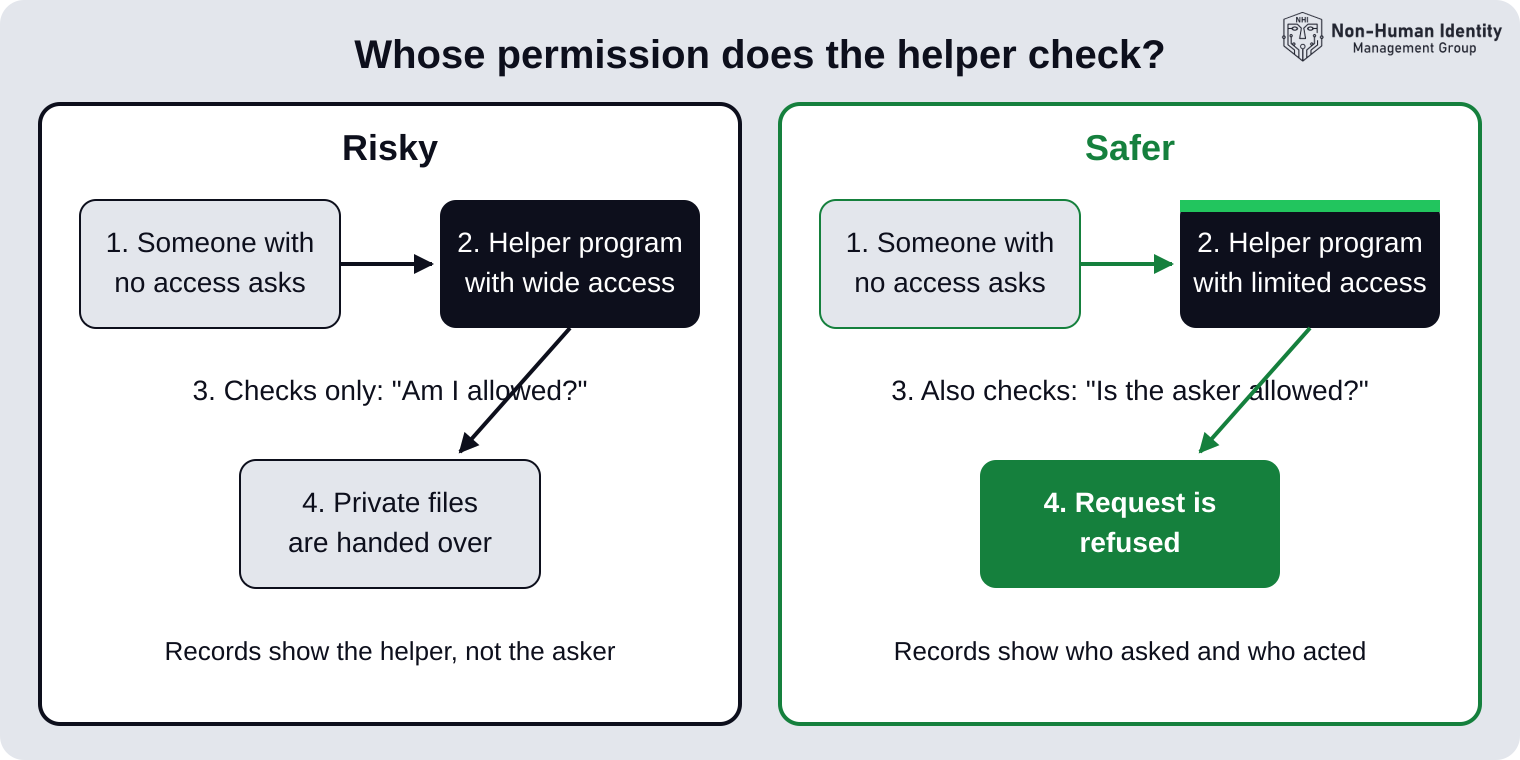
The same idea turns up in many places. In cloud services, a supplier may be allowed into a customer's account. AWS describes how another customer could trick that supplier into using the access. Its fix is an external ID: a value the supplier controls and must send each time, which the customer's account checks.[1]
Programs also pass on digital passes, called tokens, that prove a request is allowed. The security guidance for the Model Context Protocol (a common way to connect AI assistants to tools) warns against "token passthrough". That is when a server forwards a pass that was never issued to it. The guidance says servers must not accept passes that were not issued for them.[2]
A worked example
Marshwell Bakery is a fictional bakery chain with six shops and a small head office. Its IT supplier sets up an AI assistant for staff. Staff can ask it to find documents on the shared drive and email them.
To make it quick to set up, the assistant runs under one program account. That account can open every folder, including the managers' folder with pay details.
Malik Ulloa, a new shift leader, asks the assistant for "the latest rota". The assistant sends back the rota and, by mistake, a pay list with a similar name. Malik has no access to the managers' folder. The assistant does, so it found the file and sent it.
Malik remembers his induction, which said to report anything odd. He tells the office manager straight away and deletes the email.
The office manager thinks of the bank clerk who never asked who owned the account. She asks the supplier to switch off the email feature while they work on a fix.
The supplier changes the assistant so it searches with each person's own permissions. It can now only find files that person could already open. Emails with attachments to people outside a shop team now need a manager to confirm.
The supplier also checks the assistant's records for the past month. The records now show both the person who asked and the assistant that acted. They find no other pay files sent in the records available to them.
The office manager thanks Malik, because his quick report is what turned an accident into a fix.
Myths and mistakes
| What people think | What is true |
|---|---|
| It is only a problem if the program is hacked. | The program can work exactly as built. The flaw is checking the wrong person's permission. |
| Giving a shared tool access to everything is simpler and fine. | Wide access means anyone who can use the tool may borrow it. Give each tool only what its job needs. |
| A request from another program inside our systems is safe. | Requests from other programs, and instructions found in emails or web pages, still need checking. |
| Our logs will show who did it. | Many logs record only the program that acted. Record who asked as well. |
| Passing a token straight on is harmless. | A service should accept only tokens issued for it.[2] |
What can I do this week?
- List the apps, services and AI assistants that act on behalf of other people.
- Note which account each one uses and how much it can reach.
- Ask, for each one, whether it checks the asker's permission or only its own.
- Pick the one with the widest access and check that its records name who asked.
Checklist
- We know which programs act on behalf of others.
- Each of those programs has only the access its job needs.
- Programs check the original asker's permission where they can.
- Services accept only tokens issued for them.
- Suppliers who reach into our cloud accounts use an external ID or the provider's equivalent.
- Risky actions by AI assistants, such as sending files outside, need a person to confirm.
- Records show both the program that acted and the person who asked.
Common questions
Why is it called a confused deputy?
Because the program acts as a deputy for someone else, using its own authority. It is "confused" about whose permission matters. It checks that it may act, but not that the person asking may have the result. The name comes from an old computer science example.
Is a confused deputy the same as being hacked?
No. Nothing needs to be broken into. The program behaves as designed and uses access it really holds. The weakness is a missing check on the person asking. That is why it can go unnoticed, because nothing looks broken from the outside.
Why are AI assistants often deputies?
Because they hold access to tools and data and act on instructions. If an assistant runs with wide access, anyone who can talk to it may borrow that access. Hidden instructions in an email or web page can also steer it. See Prompt Injection for Beginners.
What is the single most useful fix?
Make the program check the real asker's permission, not just its own. Where possible, let it act with the asker's own access, so it can only reach what that person could reach anyway. Then trim its own access to what the job needs.
What should I ask a supplier?
Ask three things. Which account does your tool use, and what can it reach? Does it check the permission of the person asking? Do its records show who asked as well as what the tool did? Clear answers to all three are a good sign.
Where next?
Ready for the detail? Read the practitioner guide: Confused Deputy in AI Agents Guide. It goes further into acting with the user's own permissions, token checks between services and how to spot a deputy being misused in the records.
Also useful:
- Authorisation and Policy Engines for Beginners
- Least Privilege for Beginners
- Prompt Injection for Beginners
- Cross-Account and Cross-Tenant Access Guide
- AI Agent Authorisation Guide
Related NHI Mgmt Group resources: AI Agent Identity for Beginners · Non-Human Identities for Beginners · AI Agents for Beginners
Key terms
- Confused deputy
- A trusted program that is tricked into acting for someone who should not be able to ask, using its own access.
- Delegated access
- Permission for one identity to act on behalf of another person, service or system.
- Service account
- An account used by an application or tool rather than by a person.
- Least privilege
- Giving each person or program only the access it needs, for only as long as it needs it.
- Access token
- A digital pass that lets a program call a service for a limited time with set permissions.
- Token passthrough
- Forwarding a token on to another service instead of checking it was issued for you.
- External ID
- In AWS, a value a supplier must send when it enters a customer's account, checked by that account.
Sources and further reading
- The confused deputy problem. AWS Identity and Access Management User Guide, Amazon Web Services. https://docs.aws.amazon.com/IAM/latest/UserGuide/confused-deputy.html, accessed 28 Nov 2026.
- Security Best Practices (Confused Deputy Problem; Token Passthrough). Model Context Protocol specification (draft). https://modelcontextprotocol.io/specification/draft/basic/security_best_practices, accessed 28 Nov 2026.