CORS is a way for a website to tell browsers which other websites may read its replies.
This guide is for new developers, students and anyone who has met a "blocked by CORS policy" error and wants to know what it means. If your business has a website that talks to another service, a wrong CORS setting can leave your customers' data open to other sites.
In short
- Browsers stop one website's code reading replies from another website, unless that other site agrees.
- CORS is how a site agrees: its replies name the other sites that may read them.
- A CORS error usually means the reply did not name your site, so the browser kept it from your code.
- Fix it on the server with a short list of exact sites. Never fix it by allowing everyone.
What you will learn
- Explain what CORS does in one sentence.
- Read a CORS error and find the reason in it.
- Spot a risky CORS setting.
- Check who owns the CORS settings for your site.
- Site address (origin)
- the scheme, name and port of a website, such as https://shop.example.com.
- Sharing permission (CORS)
- a note in a website's reply that says which other sites may read it.
- Advance check (preflight)
- a short question the browser sends first, to ask whether a request is allowed.
What is CORS?
Think of a shared office reception. A parcel arrives for a visitor from another company. Reception hands it over only if the sender wrote that visitor's company on the label as allowed.
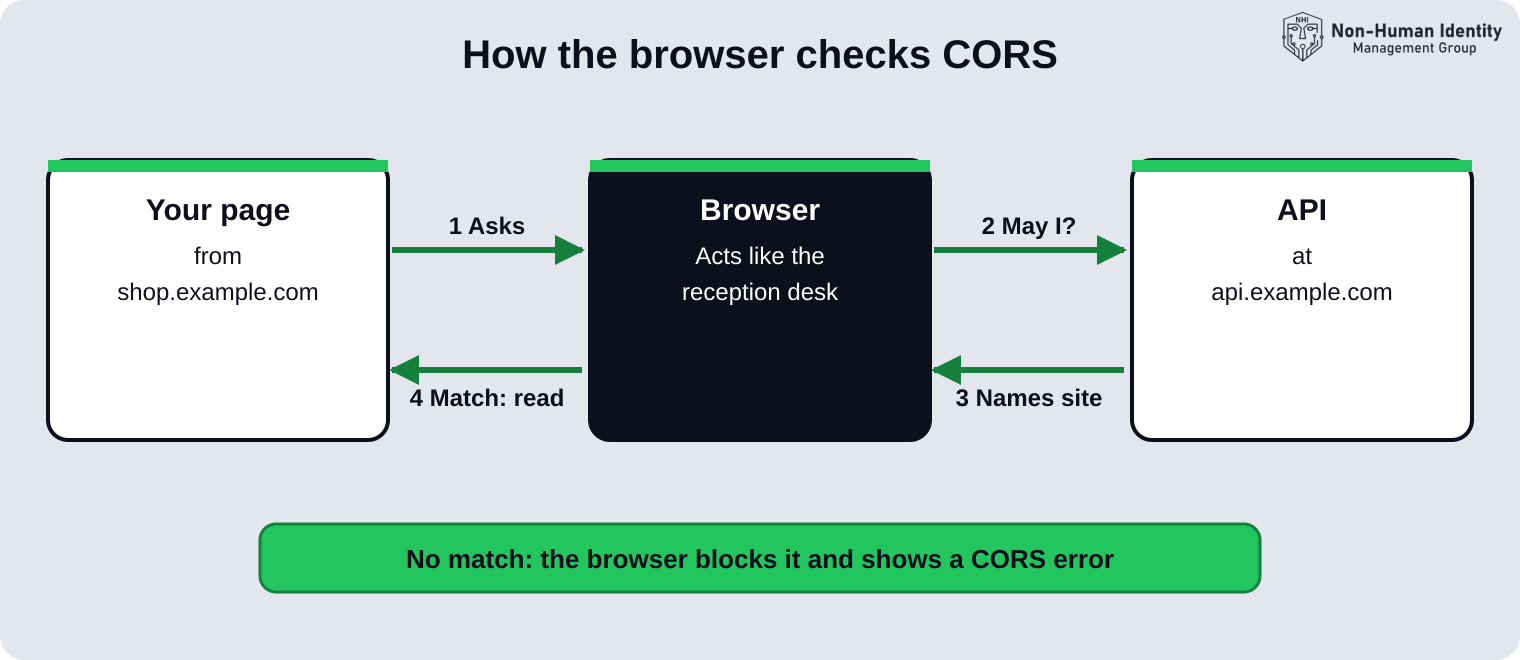
Your browser is the reception desk. Each website has an origin, its own address. By default, browsers stop code on one origin reading replies from another. This rule is called the same origin policy.[1]
CORS stands for Cross-Origin Resource Sharing. It lets a server say which other origins a browser should allow to read its replies. It does this with headers, short labels added to each reply.[1]
Where the comparison stops working: reception checks the label, but it does not check who the visitor is. In the same way, CORS does not log anyone in. The server still has to check who is asking and what they may see.[3]
Why does it matter?
CORS errors are one of the most common puzzles for new web developers. The risk comes when a rushed fix opens the door to every website, including ones that want your users' data.
If you are new to web development
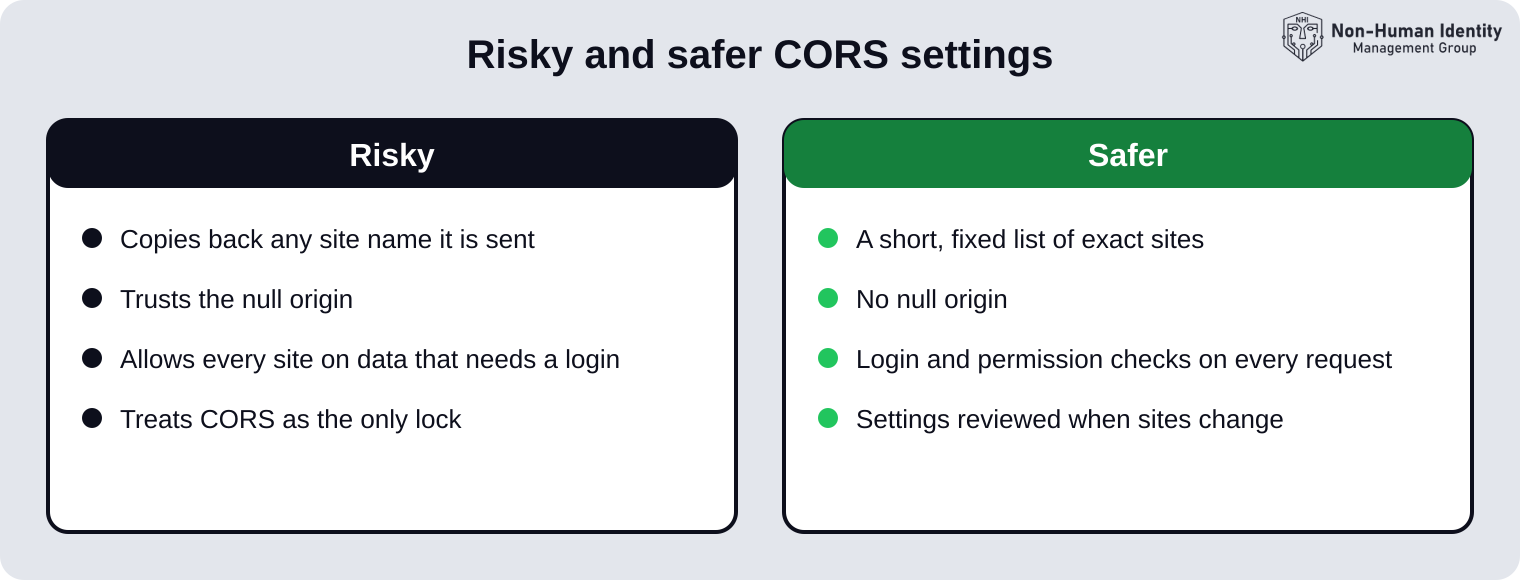
What could happen: you copy a fix from a forum that tells the server to trust any site.
Check this: name only the exact sites that need access.
If you own a business website
What could happen: a loose setting lets a stranger's page read a logged-in customer's details.
Check this: ask your developer which sites your services trust, and why.
If you are learning about APIs
What could happen: you think CORS protects your API, so you skip login checks.
Check this: keep login and permission checks on the server for every request.
What does it look like?
Here is a made-up error from a browser's developer tools, followed by the reply that caused it.
Example only. All values are made up.
Console:
Cross-Origin Request Blocked: reading the reply from
https://api.example.com/stock is not allowed.              (1)
(Reason: CORS header 'Access-Control-Allow-Origin' missing) (2)

Reply headers from api.example.com:
Content-Type: application/json
(no Access-Control-Allow-Origin line)                      (3)
- The browser blocked your page's code from reading the reply.
- The reason. In a real message, this part names the exact problem. Read it first.
- The reply did not name any site as allowed, so the browser kept it from your code.
Why this is risky: the error itself is not a danger. The danger is a rushed fix, such as telling the server to copy back any site name it is sent.[3]
The safer way: add one line on the server that names the exact site that needs access, and nothing else.
Example only. All values are made up.
Reply headers from api.example.com (fixed):
Content-Type: application/json
Access-Control-Allow-Origin: https://shop.example.com
How does it work?
- Your page asks. Code on https://shop.example.com asks https://api.example.com for some data.
- The browser may check first. For some requests, such as ones that change data, the browser first sends a short preflight question. It asks the other site which kinds of request it allows.[1]
- The server answers. Its reply carries headers. The main one, Access-Control-Allow-Origin, names the site allowed to read the reply.[1]
- The browser decides. If the name matches your page's site, your code can read the reply. If not, the browser blocks it and shows a CORS error.
- Details go to the console. For security reasons, your code is only told that an error happened. The reason appears in the browser's console.[2]
Logins add one more rule. When a request carries a login, such as a cookie, the server must name the exact site. If the reply says "any site" with a star (*), the browser blocks the reply.[1]
A worked example
Tomas Ilic has just started as a junior developer at Cobble Brewery, a fictional brewery with an online shop. The shop page lives at one address. A small stock service lives at another.
He adds a "bottles left" counter to the shop page, but it stays empty. The browser console shows a CORS error. The reason says the Access-Control-Allow-Origin header is missing.
Tomas searches online and finds a quick fix. It tells the stock service to copy back whatever site name the browser sends. The counter works at once.
Before he ships it, he asks his colleague Marek Yeboah to look. Marek reminds him of the reception desk. "That fix writes every visitor's company on the label. Any website could read our replies."
For a public stock count, that might not matter much. But the same service also returns order details for logged-in customers. A loose rule there could let a stranger's page read them.
So Tomas changes the fix. The stock service now names one exact site, the shop's own address. The order details also check the customer's login on every request.
He tests from the shop page, and the counter works. He then tests from a practice page on another address, and the browser blocks it, as it should.
Myths and mistakes
| What people think | What is true |
|---|---|
| CORS is a security feature that protects my server. | CORS loosens the browser's default rule on purpose. The server still has to check logins and permissions.[3] |
| A CORS error means my code is broken. | Often the code is fine. The other server's reply did not name your site. |
| I can fix CORS in my page's code. | The fix belongs on the server you are calling, in the headers it sends back. |
| Copying back any site name is a neat fix. | It lets any website read the replies. Name exact sites instead.[3] |
| CORS stops cross-site request forgery. | It does not. That attack tricks a browser into sending a request, and needs its own protections.[3] |
What can I do this week?
- Open your browser's developer tools and find the console and network tabs.
- Next time you see a CORS error, copy the reason in brackets and look it up.
- List the sites your services allow, and why each one is there.
- Remove any rule that allows every site or copies back any site name.
- Check that each service still checks logins on every request.
Checklist
- Each service names a short, fixed list of exact sites it trusts.
- No service copies back any site name without checking it against that list.
- No service trusts the "null" origin.
- Data that needs a login is never shared with "any site".
- Login and permission checks run on the server for every request.
- Someone owns the CORS settings and reviews them when sites change.
Common questions
Why does my request work in a testing tool but fail in the browser?
Because CORS is a browser rule. The browser checks the server's reply before letting a web page's code read it. Many testing tools are not web pages, so they do not apply the same check. The fix is still on the server.
Is it safe to use the star (*) setting?
Only for public data that anyone may read and that needs no login. The star means any website may read the reply. Browsers do not allow it on requests that carry a login, such as a cookie. For anything private, name exact sites.
What is a preflight request?
It is a short question the browser sends before some requests. It asks the other server which kinds of request it allows. If the answer allows it, the browser sends the real request. If not, you see a CORS error and the real request is not sent.
Should I turn off CORS in my browser to make it work?
No. Turning off browser safety rules hides the problem on your computer only. Your users' browsers will still block the reply. It also leaves you less safe while browsing. Fix the server's headers instead.
Is CORS the same as the same origin policy?
No, they work together. The same origin policy is the browser's default rule that blocks reading across sites. CORS is how a server makes a planned exception for named sites.
Where next?
Ready for the detail? Read the practitioner guide: CORS Misconfiguration Guide. It goes further into how loose CORS settings are misused, how to detect them and how to harden each header.
Also useful:
- Same Origin Policy for Beginners
- HTTP and Web Requests for Beginners
- CORS vs CSRF Protection
- CSP vs CORS
Related NHI Mgmt Group resources: APIs for Beginners · How Web Browsers Work for Beginners · Application Security for Beginners
Key terms
- Cross-Origin Resource Sharing (CORS)
- A way for a server to say which other origins may read its replies. It does not log users in by itself.
- Origin
- The scheme, host name and port that together identify where a web page or resource comes from.
- Same origin policy
- A browser rule that stops one website's code reading data from another website unless it is allowed.
- Preflight request
- A short check the browser sends first, to ask whether a cross-origin request is allowed.
- Access-Control-Allow-Origin
- The reply header that names which origin may read the reply.
- HTTP header
- A short labelled line of extra information sent with a web request or reply.
Sources and further reading
- Cross-Origin Resource Sharing (CORS). MDN Web Docs, Mozilla. https://developer.mozilla.org/en-US/docs/Web/HTTP/Guides/CORS, accessed 28 Nov 2026.
- CORS errors. MDN Web Docs, Mozilla. https://developer.mozilla.org/en-US/docs/Web/HTTP/Guides/CORS/Errors, accessed 28 Nov 2026.
- Cross-origin resource sharing (CORS). Web Security Academy, PortSwigger. https://portswigger.net/web-security/cors, accessed 28 Nov 2026.