A self-spreading package worm is hidden code that steals publishing keys and uses them to infect more software.
This guide is for students, new developers and anyone who manages people who build software. You do not need to write code to be affected: if your business runs apps built from shared code, a worm in one small part can reach you.
In short
- Developers share ready-made pieces of code, called packages, through public stores.
- A worm hides in one package, steals the keys that let its victim publish updates, then adds itself to that person's other packages.
- In September 2025 a worm called Shai-Hulud used this loop on the npm store, and GitHub removed more than 500 packages.
- Publishing keys that expire quickly, strong sign-in checks and fast key changes after a bad install all help break the loop.
What you will learn
- Explain how a package worm spreads, in one sentence.
- Spot the publishing keys a worm looks for.
- Check how your team publishes its own packages.
- Know what to do first if you installed an infected package.
- Shared code piece (package)
- a ready-made bit of code that developers download and add to their own projects.
- Publishing key (token)
- a secret code that lets a person or a build system release new versions of a package.
- Self-copying malware (worm)
- harmful code that spreads to new places on its own, without a person passing it on.
What is a self-spreading package worm?
Think of a chain letter that posts itself. It reads your address book, signs your name and sends copies to everyone who trusts you.
A package worm works in a similar way. Developers rarely write everything from scratch. They download packages (shared pieces of code) from public stores called registries. The biggest registry for the JavaScript language is called npm.
The people who look after a package are its maintainers. To release a new version, a maintainer uses a token (a secret publishing key). The token is one kind of non-human identity (NHI): an identity or credential that lets software act without a person.
A worm hides inside one package. When someone installs it, the worm searches their computer for tokens. If it finds a publishing token, it copies itself into the other packages that token can update. Everyone who installs those updates becomes the next victim.
Where the comparison stops working: a chain letter needs a person to post it. A package worm needs nobody. Computers install updates automatically, so the loop can run very fast.
Why does it matter?
One stolen token can turn a trusted name into a delivery route for harmful code. The victims are often other developers and build servers, which hold yet more keys.
In September 2025, the US government cyber security agency warned that a self-copying worm called Shai-Hulud had affected more than 500 npm packages.[1]
If you are learning to code
What could happen: you install a popular package for a class project, and it copies the keys saved on your laptop.
Check this: keep keys out of your project folders and turn on two-step sign-in for your developer accounts.
If you publish packages, even small ones
What could happen: a worm finds your publishing token and releases harmful versions of your work under your name.
Check this: list every publishing token you hold, delete the ones you do not use and set short expiry dates.
If you manage a software team
What could happen: one infected install on a build server leaks cloud keys that open far more than code.
Check this: ask who would change every developer key, and how fast, after a bad install.
What does it look like?
A worm looks for files like this one. Here is a made-up settings file on a developer's laptop.
Example only. All values are made up.
# settings file on a developer laptop (EXAMPLE)
registry=https://registry.example.invalid/
publish_token=FAKE-PUBLISH-TOKEN-0000     (1)
code_host_token=EXAMPLE-CODE-TOKEN-0000   (2)
cloud_key=FAKE-CLOUD-KEY-0000             (3)
# token created 2 years ago, no expiry    (4)
- In a real file, this line would contain a token that can publish new versions of every package the owner looks after.
- In a real file, this line would contain a token for the site that stores the developer's code.
- In a real file, this line would contain a key to a cloud account.
- A token with no end date keeps working until someone cancels it.
Why this is risky: any code that runs on this laptop can read the file. A worm only needs one install to copy all three keys and use the publishing token to spread.[1]
The safer way: releases happen from a trusted build system that gets a short-lived key for each release, a set-up npm calls trusted publishing. The npm documentation says these keys are short-lived and tied to one build workflow. So there is no lasting publishing token on the laptop to steal.[3]
How does it work?
Here is the loop in plain steps. It shows what defenders look for, not how to build one.
- Install. A developer or an automatic build server installs an infected version of a package.
- Search. Hidden code runs during the install and looks for tokens and cloud keys on that machine.[1]
- Steal. It sends the keys it finds to the attacker. Shai-Hulud also posted stolen data to public code pages.[1]
- Republish. If it finds a valid publishing token, it signs in to the registry as that developer and releases infected versions of their other packages.[1]
- Spread. Anyone who installs those new versions starts the loop again, on their own machine.
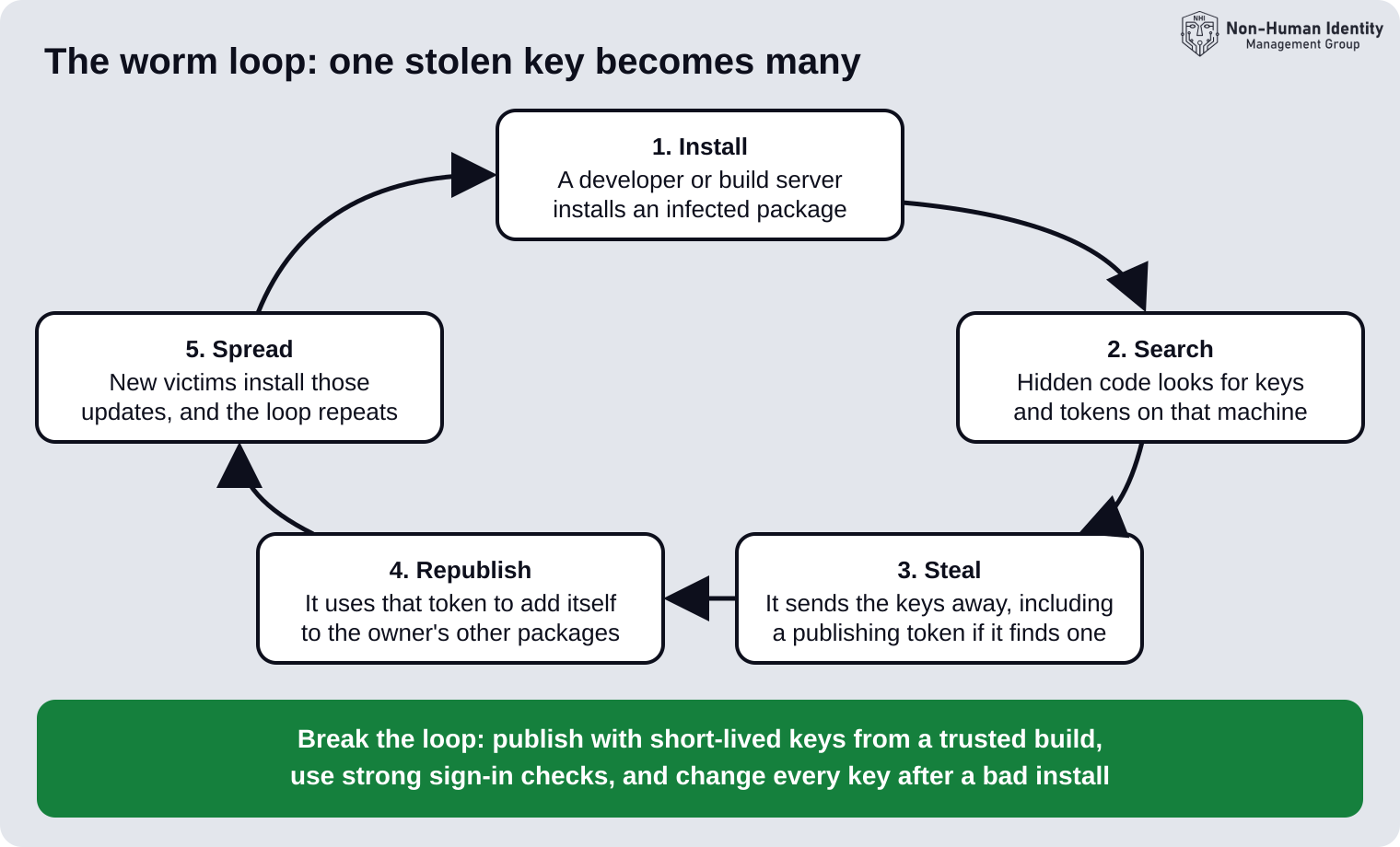
The weak point is step 4. A worm can only spread if it finds a publishing key that still works. After Shai-Hulud, GitHub said npm would limit publishing to three routes. These were local publishing with two-step sign-in, short-lived tokens and trusted publishing.[2] The npm docs now say only granular tokens are supported, which have permission limits and an expiry date, and that older tokens have been removed.[4]
A worked example
Imani Zamora is a student who looks after a small open-source package. About a thousand projects use it. She also does part-time work for Celia Dube, who runs Dube Web Studio, a fictional web studio.
One morning, a friend from her coding club, Kofi Jovanovic, messages her. "Did you release a new version last night? It has odd code in it."
Imani did not release anything. She thinks of the chain letter. Someone has been sending copies in her name.
She does not start by deleting files. First, she cancels every publishing token on her registry account. Once that has taken effect, the stolen copy should no longer let anyone release in her name. She then changes her code site token and her cloud key, because the worm may have copied those too.
Next, she reports the bad version to the registry, so it can be taken down. She posts a short notice telling users which version to avoid and which earlier one is safe.
Then she tells Celia. Celia asks her team to check which projects installed the bad version, using the record of exact package versions each project keeps. Two projects did. They change the keys on both build servers.
Last, Imani sets up trusted publishing, so releases come only from her build system with short-lived keys. She turns on two-step sign-in with a security key for her account.
Imani found no further bad releases in her registry history. Celia adds "change keys after a bad install" to the studio's checklist.
Myths and mistakes
| What people think | What is true |
|---|---|
| I removed the bad package, so I am safe. | The worm may already have copied your keys. Change every key the machine could reach.[1] |
| Only big, popular packages get hit. | A worm uses whatever tokens it finds, so small maintainers' packages can be infected too. |
| It only affects my laptop. | Build servers install packages too, and they often hold cloud keys and more publishing tokens. |
| A password and a token are the same thing. | A token can publish without your password. Cancelling it at the registry is what stops it. |
| Long-lived tokens are easier, so they are fine. | A token with no end date stays useful to a thief. Prefer short expiry or trusted publishing.[3] |
What can I do this week?
- List every publishing token on your registry accounts and delete the ones you do not use.
- Turn on two-step sign-in for your registry and code site accounts, ideally with a security key.
- If you publish packages, read how trusted publishing works for your build system.
- Agree who changes which keys after a bad install, and write it down.
Checklist
- No publishing tokens sit in project folders or settings files on laptops.
- Any remaining tokens have tight permissions and a short expiry date.
- Packages are published from a trusted build system where possible.
- Two-step sign-in is on for every developer account, with no bypass.
- Each project keeps a lockfile, a record of exact package versions, so you can check what was installed.
- There is a written plan to change all developer and build keys after a bad install.
- Someone watches for security alerts about the packages you use.
Common questions
How is a worm different from a single bad package?
A worm spreads on its own. A single bad package is one harmful upload that stays where it was put. A worm steals publishing keys from each victim and uses them to infect more packages, so one install can lead to many more. See Malicious Packages for Beginners.
What was Shai-Hulud?
Shai-Hulud was a self-copying worm found on the npm registry in September 2025. It stole developer tokens and cloud keys, then used npm tokens to release infected versions of other packages. GitHub removed more than 500 packages.[2] Read our Shai-Hulud first wave page.
What should I do first if I installed an infected package?
Change your keys first. Cancel publishing tokens and change code site, cloud and other keys the machine could reach. CISA advised rotating all developer credentials after Shai-Hulud.[1] Then remove the bad version, install a known safe one and tell your team.
What is trusted publishing?
Trusted publishing is a way to release packages without keeping a lasting token. Your build system proves who it is to the registry. It then gets a short-lived key for each release. The npm registry supports it for some hosted build services. It recommends then blocking token publishing for the package.[3]
Does this only happen on npm?
No, it can affect any package store that uses publishing keys. The npm registry has seen the best-known cases, but Python and other stores also use tokens, and several now offer trusted publishing. See PyPI API Tokens and Trusted Publishing Security Guide.
Where next?
Ready for the detail? Read the practitioner guide: npm Tokens Security Guide. It goes further into token types and settings, choosing a publishing pattern and how to spot token misuse in logs.
Also useful:
- Shai-Hulud npm Worm Guide
- Malicious Packages for Beginners
- Supply Chain Attacks for Beginners
- Non-Human Identities for Beginners
- NHI Foundation Level Training
Related NHI Mgmt Group resources: Package Maintainer Account Compromise Playbook · npm Token Changes and Trusted Publishing · npm Install-Time Security Guide
Key terms
- Package worm
- Harmful code in a package that steals publishing keys and uses them to infect more packages.
- Credential worm
- Malware that steals working keys from one system and uses them to spread to others.
- Access token
- A credential a program uses to prove it may take an action, such as publishing a package.
- Non-human identity (NHI)
- A digital identity, or the credential behind it, that lets a machine, app, service or AI agent connect to other systems without a person.
- Trusted publishing
- Releasing packages from a build system that gets a short-lived key for each release, with no lasting token.
- Lockfile
- A file that records the exact version of every package a project installs.
- Two-factor authentication
- Signing in with two different kinds of proof, such as a password and a security key.
Sources and further reading
- Widespread Supply Chain Compromise Impacting npm Ecosystem. Cybersecurity and Infrastructure Security Agency (CISA), September 2025. https://www.cisa.gov/news-events/alerts/2025/09/23/widespread-supply-chain-compromise-impacting-npm-ecosystem, accessed 28 Nov 2026.
- Our plan for a more secure npm supply chain. The GitHub Blog, GitHub, 22 September 2025. https://github.blog/security/supply-chain-security/our-plan-for-a-more-secure-npm-supply-chain/, accessed 28 Nov 2026.
- Trusted publishing for npm packages. npm Docs, GitHub. https://docs.npmjs.com/trusted-publishers, accessed 28 Nov 2026.
- About access tokens. npm Docs, GitHub. https://docs.npmjs.com/about-access-tokens, accessed 28 Nov 2026.