Cyber insurance is a business policy that helps pay for the costs of a cyber attack or data breach.
This guide is for small business owners, managers and newcomers who want to know what a cyber policy does before talking to a broker. You do not need a technical background. If your business relies on email, a booking system or customer records, an attack could stop work, and insurance is one way to share that cost.
In short
- Cyber insurance helps pay for clean-up, lost income and claims from others after an attack. It does not stop attacks.
- Insurers may ask about your security, such as a second sign-in step and software updates, before offering cover.
- Read what is not covered. Upgrades, some fraud and the first days of downtime are common gaps.
- In an incident, call the insurer early, using details you have kept on paper.
What you will learn
- Explain the two main halves of a cyber policy.
- Spot the exclusions and limits worth asking about.
- Check the security basics insurers commonly ask about.
- Ask the right questions when you talk to a broker.
- Your own losses (first-party cover)
- money the policy pays you, such as lost income while systems are down.
- Claims against you (third-party cover)
- money the policy pays when others hold you responsible, such as customers after a data leak.
- What is left out (exclusion)
- an event or cost the policy does not pay for, even when it is active.
What is cyber insurance?
Think of home insurance after a burst pipe. It pays for repairs and maybe a hotel while the work is done. But it only pays if you told the truth about your house and took sensible care.
Cyber insurance works in a similar way for your computers and data. If an attack stops your business, it can help pay to get systems running again, cover some lost income and pay for expert help.
It can also help if others make a claim against you. For example, customers whose details leaked might ask for compensation, and the policy may help pay.
A few insurance words come up straight away. The premium is what you pay each year. The excess (called a deductible in the US) is the part of each loss you pay yourself. Underwriting is the insurer's process of judging your risk before it offers cover.
Where the comparison stops working: a burst pipe does not think. An attacker can come back, steal data as well as break things, and hit many businesses at once through the same weakness.
Why does it matter?
Your normal business policy may leave a gap. US insurance regulators say most property and liability policies do not cover cyber risks.[6] In a 2025 UK survey, 45% of businesses said they had some cyber cover. Only a small share had a policy just for cyber.[5]
If you run a small business
What could happen: an attack locks your booking system for a week, and you have no expert to call.
Check this: ask your broker whether any of your current policies cover cyber incidents, and what they leave out.
Next: Ransomware for Beginners
If you look after IT
What could happen: you tick "yes" on an insurance form for a control that is only half switched on, and a claim is questioned later.
Check this: check each answer on the form against what is really set up today.
Next: Identity Controls for Cyber Insurance Questionnaires Guide
If you manage a team or budget
What could happen: the business treats the policy as its security plan and spends less on the basics.
Check this: see insurance as sharing part of a risk, alongside, not instead of, good security.
What does it look like?
Here is a made-up policy summary. A broker might send you a page like this.
Example only. All values are made up.
Policy summary: Example Cyber Cover, policy EX-0000-FAKE
Limit: 000,000 (made-up amount)                    (1)
Excess: 0,000 per claim                            (2)
Business interruption: pays after 12-hour wait     (3)
Incident hotline: details on paper copy            (4)
Not covered: security upgrades after an attack     (5)
Not covered: fake invoice fraud (add-on needed)    (5)
- The limit: the most the insurer will pay.
- The part of each loss you pay yourself.
- The waiting period. Losses in the first hours of an outage are usually yours.
- Who to call first. Keep this somewhere you can reach if computers are down.
- Exclusions. These are the lines most worth reading slowly.
Why this is risky: many people read only the price and the limit. They find the gaps later, during a claim.
The safer way: read the "not covered" lines and the wait first. Ask your broker about each one.
How does it work?
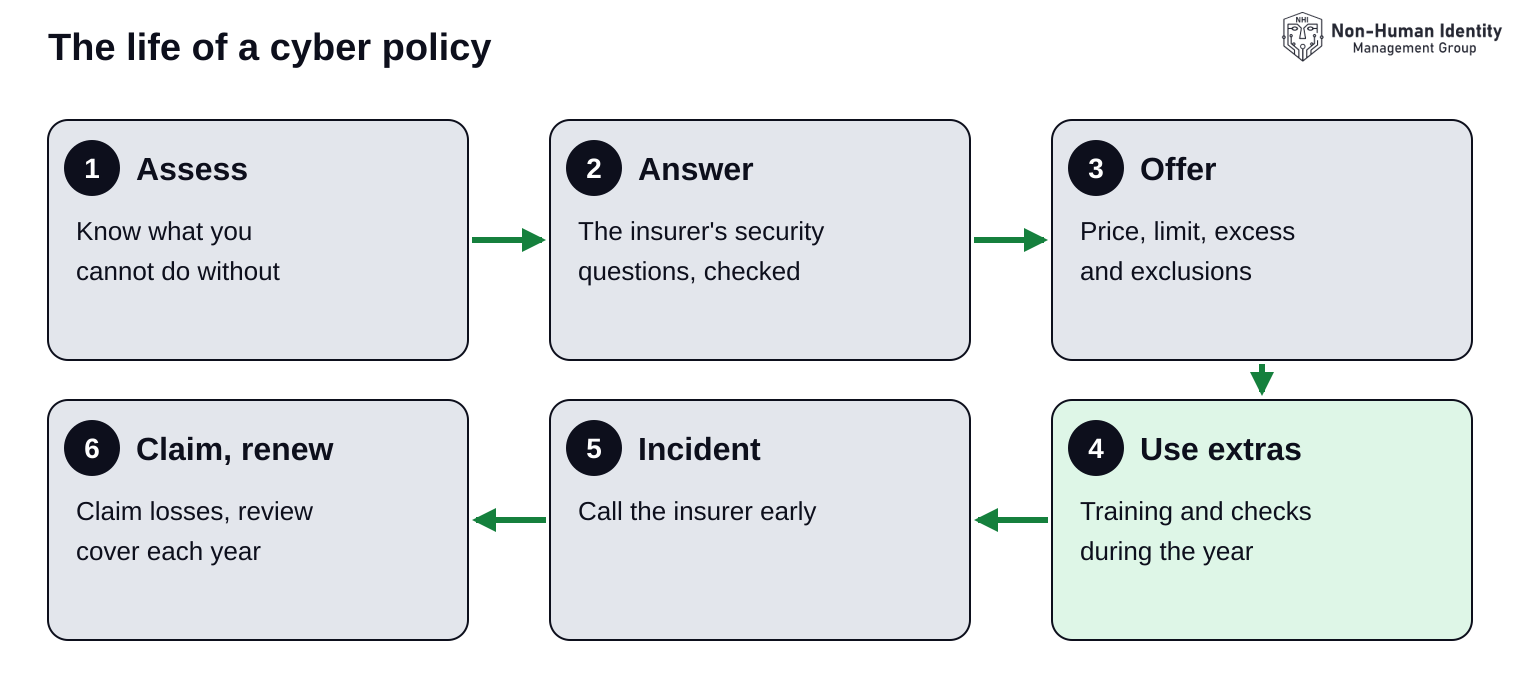
Policies differ between insurers and countries, but the life of a cyber policy usually follows these steps.
- Work out what matters. List the systems and data you cannot do without, and what a week of downtime would cost.
- Answer the security questions. The UK National Cyber Security Centre (NCSC) lists what some insurers expect. Examples include a second sign-in step, software updates, staff training and security software on devices.[2]
- Get an offer. The insurer weighs the risk and offers a price, a limit, an excess and exclusions. The NCSC says some insurers offer discounts for recognised schemes such as Cyber Essentials.[2]
- Use the extras. Many insurers offer staff training, and some offer checks for weak spots during the year.[1]
- Call early in an incident. The NCSC advises contacting your insurer as soon as an incident is discovered. A technical expert then helps bring in the right specialists.[3]
- Claim and renew. Losses are claimed under the policy terms. Policies are usually renewed every year, which is a good time to check you are still covered for new kinds of attack.[1]
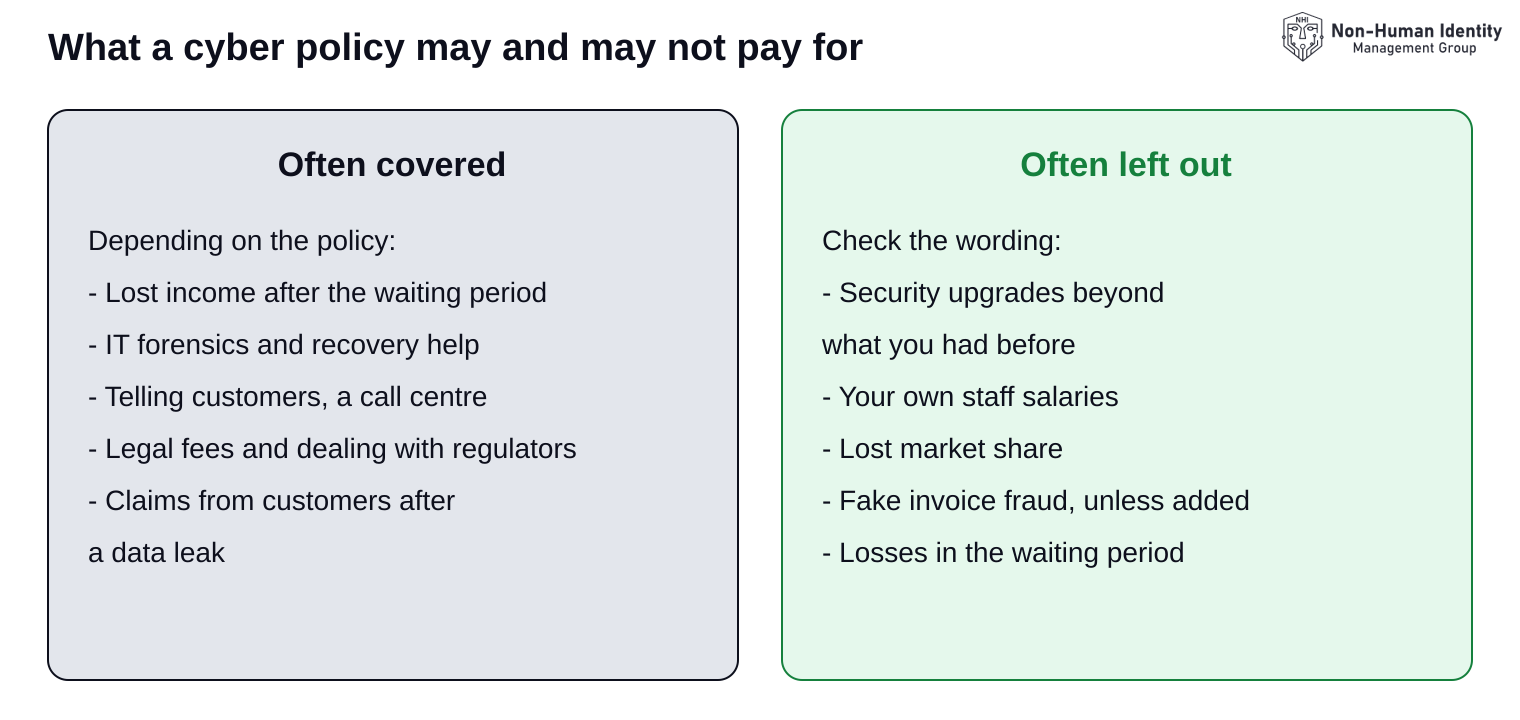
The NCSC lists common exclusions such as upgrading systems beyond where they were before the attack, your own staff salaries and lost market share. It also suggests checking whether fraud, such as a fake invoice, is covered or needs a separate crime policy.[1]
Having insurance is not a reason to pay a ransom. The NCSC and UK insurance bodies warn that paying may not get your data back. Some payments may also break sanctions law.[4]
A worked example
Ugo Adeyemi runs Lumen Vets, a made-up animal clinic with 18 staff. A big pet insurance partner asks whether the clinic has cyber cover, so Ugo talks to a broker.
The application asks whether email uses a second sign-in step, whether staff are trained and how backups are kept. Ugo asks his IT supplier to check each answer rather than guessing. The supplier finds that email has a second step, but the remote support tool does not. They switch it on before Ugo signs, so the answer is true on the day he gives it.
When they read the offer, Ugo spots three things. Lost income is only paid after a 12-hour wait. Fake invoice fraud needs an add-on. And there is a 24-hour incident hotline. He prints the policy number and hotline and pins them in the office, as the NCSC suggests keeping a paper copy.[3]
Months later, the booking system shows a ransom note. Ugo calls the hotline first. The insurer's responders help the IT supplier cut off the affected machines and restore from backups. The clinic takes bookings by phone and paper for three days.
The policy pays the responders and part of the lost income after the wait, minus the excess. It does not pay for the new firewall the supplier recommends, because that is an upgrade. Insurance reduced the damage, but the clinic still lost time and money.
Myths and mistakes
| What people think | What is true |
|---|---|
| If we have insurance, we need less security. | Insurance helps with costs; it does not stop attacks. The NCSC advises not stopping at the insurer's minimum.[2] |
| Our normal business policy already covers cyber. | Many property and liability policies do not. Check the wording or ask your broker. |
| The policy will pay for everything. | Policies have limits, an excess, waiting periods and exclusions, such as upgrades and some fraud. |
| We can fill in the form once and forget it. | Answers describe your controls on that day. Check them again at each renewal. |
| The insurer will decide whether we pay a ransom. | The decision rests with the business, which should follow official guidance and legal checks.[4] |
What can I do this week?
- Find out what you already have. Read your current business policies, or ask your broker, to see whether any cyber cover is included.
- Read the exclusions. Note the waiting period, the excess and whether invoice fraud is covered.
- Check the basics insurers ask about. Ask whoever runs your IT whether email and remote access use a second sign-in step, and whether backups are kept apart and tested.
- Write down who to call. Print the policy number and incident hotline and keep them where staff can find them.
Checklist
- I can explain the difference between first-party and third-party cover.
- We know whether we have a specific cyber policy or cover inside a wider one.
- We have read the exclusions, the excess and the waiting period.
- We know whether invoice and payment fraud are covered.
- Every answer on our insurance form has been checked by the person who runs that control.
- Backups are kept apart from everyday systems, and a restore has been tested.
- The insurer's hotline and policy number are kept on paper.
- Our incident plan says who contacts the insurer, and when.
Common questions
What does cyber insurance cover?
Usually three things, though policies vary. Typically it covers your own losses, such as lost income and recovery costs, plus claims others make against you after a data leak. Many policies add response services, such as IT forensics, legal help and telling customers.[1]
Do small businesses need cyber insurance?
It is a business decision, not a legal rule for most firms. Weigh what a week without your systems would cost, and whether you could pay for expert help on your own. A broker can explain the options without you committing to buy.
Will an insurer refuse us if our security is weak?
Some insurers set minimum controls, but the NCSC says this tends not to be the case for most small and medium-sized businesses.[2] Improving the basics can still make the form simpler and may help the price.
Does Cyber Essentials help?
It can. Cyber Essentials is a UK government-backed scheme for basic security. The NCSC says some insurers offer discounts to firms that hold it.[2] Tell your broker if you have it.
What should we do first in an incident?
Contact your insurer or claims provider as soon as you discover the incident, using the details in your policy.[3] Keep a paper copy, because your computers or email may be down. Then follow the insurer's guidance on who to bring in.
Where next?
Ready for the detail? Read the practitioner guide: Cyber Insurance Guide. It goes further into policy wording, common exclusions, underwriting questions and renewals.
Also useful:
- Cyber Insurance Application Questionnaires
- Cyber Insurance Claims
- Incident Response for Beginners
- Backup Security for Beginners
Related NHI Mgmt Group resources: Cyber Insurance Executive Briefing · Top 10 Reasons Cyber Insurance Claims Are Denied or Reduced · Cyber Insurance vs Self-Insurance
Key terms
- Cyber Insurance
- A policy that helps pay for losses after a cyber incident. It does not replace security.
- First-party Coverage
- Cover for your own losses, such as recovery costs and lost income.
- Third-party Coverage
- Cover for claims others make against you, such as customers after a data leak.
- Underwriting
- The insurer's check of your risk before it offers or renews a policy.
- What you pay for the policy, linked to the insurer's view of your risk.
- Deductible (excess)
- The part of a loss you pay yourself before the insurer pays.
- Policy Exclusion
- An event or cost the policy does not pay for, even when it is active.
- Waiting Period
- The time an outage must last before lost income cover starts to pay.
Sources and further reading
- Cyber insurance: what you need to know, Understanding cyber insurance policies. National Cyber Security Centre (NCSC), 19 Nov 2026. https://www.ncsc.gov.uk/collection/cyber-insurance-what-you-need-to-know/understanding-cyber-insurance-policies, accessed 28 Nov 2026.
- Cyber insurance: what you need to know, Qualifying for cyber insurance. National Cyber Security Centre (NCSC), 19 Nov 2026. https://www.ncsc.gov.uk/collection/cyber-insurance-what-you-need-to-know/qualifying-for-cyber-insurance, accessed 28 Nov 2026.
- Cyber insurance: what you need to know, What to do during an incident. National Cyber Security Centre (NCSC), 19 Nov 2026. https://www.ncsc.gov.uk/collection/cyber-insurance-what-you-need-to-know/what-to-do-during-an-incident, accessed 28 Nov 2026.
- Guidance for organisations considering payment in ransomware incidents. National Cyber Security Centre (NCSC) with ABI, BIBA and IUA, 14 May 2024. https://www.ncsc.gov.uk/guidance/organisations-considering-payment-in-ransomware-incidents, accessed 28 Nov 2026.
- Cyber Security Breaches Survey 2025. UK Department for Science, Innovation and Technology, 10 Apr 2025. https://www.gov.uk/government/statistics/cyber-security-breaches-survey-2025/cyber-security-breaches-survey-2025, accessed 28 Nov 2026.
- Insurance Topics: Cybersecurity. National Association of Insurance Commissioners (NAIC). https://content.naic.org/insurance-topics/cybersecurity, accessed 28 Nov 2026.