Cyber security for a law firm means protecting client money, confidential files and email from online criminals.
This guide is for partners, staff and trainees in small law firms, and for clients who want to know what to expect. You do not need to be technical to be affected: if your firm sends bank details or documents by email, it is a target.
In short
- Law firms hold two things criminals want: client money and confidential information.
- The most common attack is a fake or tampered email, often one that changes bank details just before a payment.
- The best defence is a firm rule: bank details are confirmed by phone on a known number, never by email alone.
- Two-step sign-in, updates, backups and a no-blame way to report mistakes cover much of the rest.
What you will learn
- Explain why small law firms are targeted.
- Spot a tampered email that changes bank details.
- Check the payment and login habits in your own firm.
- Know what to do in the first hour if money goes to the wrong account.
This guide explains the topic in general terms and is not legal advice. Professional duties differ by country and regulator; check your own regulator's rules.
- Tampered email scam (business email compromise)
- a criminal fakes or takes over an email account to trick someone into sending money.
- Redirected payment (payment diversion fraud)
- a real payment that goes to a criminal's account because the bank details were swapped.
- Second sign-in check (two-step verification)
- a code or tap on your phone as well as your password when you log in.
What is cyber security for a law firm?
Think of a removal company. It carries other people's most precious belongings from one home to the next. Thieves do not need to break into either house, because the van is where everything is together.
A law firm works the same way. It holds client money on its way to a seller, and private papers on their way to a court or the other side. Criminals target the firm because so much passes through it.
Cyber security for a law firm is mostly about the journey. It means checking that emails really come from who they say. It means checking bank details. And it means only the right people can open each client's files.
Where the comparison stops working: you can see a van being broken into. A tampered email can look exactly like a normal one, so nobody notices until the money has gone.
Why does it matter?
Losses can be large and fast. The solicitors' regulator in England and Wales reviewed 40 firms. In 23 cases where firms were directly targeted, more than £4m of client money was stolen in total.[1] Trust is at stake too, because clients choose a firm to keep their affairs private.
If you are a partner or run the firm
What could happen: client money is sent to a criminal, and the firm has to deal with the client, its insurer and its regulator.
Check this: is there a written rule that bank details are confirmed by phone on a known number?
If you work in accounts or as a paralegal
What could happen: you get an urgent email from a "client" or "partner" with new bank details, late on a busy day.
Check this: you are allowed, and expected, to pause a payment to check it.
If you are a client buying a home
What could happen: an email that looks like it is from your solicitor asks you to send your deposit to a new account.
Check this: phone your solicitor on a number you already have before you send any money.
What does it look like?
Here is a made-up email. It targets a client a few days before buying a house.
Example only. All values are made up.
From: Conveyancing Team <[email protected]>   (1)
To: [email protected]
Subject: RE: 14 Elm Road - completion funds

Please note our bank has changed due to an audit.          (2)
Send the balance today to keep completion on track:       (3)
Account name: EXAMPLE CLIENT ACCOUNT
Sort code 00-00-00, account 00000000 (FAKE)
Please do not call, the office line is down.               (4)
- The address looks like the firm's, but one letter has been swapped for a number.
- A reason for "new" bank details. In a real message, this line would contain a believable excuse.
- A deadline, so the reader feels rushed.
- A reason not to phone, which is the one check that would expose the scam.
Why this is risky: it sits in the same email thread and names the real house. It also arrives just when the client expects a request. Criminals sometimes read a real mailbox first, so the timing can be spot on.[2]
The safer way: at the start, the firm tells each client in writing that it will not change its bank details by email. The client checks the details by phone. They use a number from the first letter or the website, not the email.[2]
How does it work?
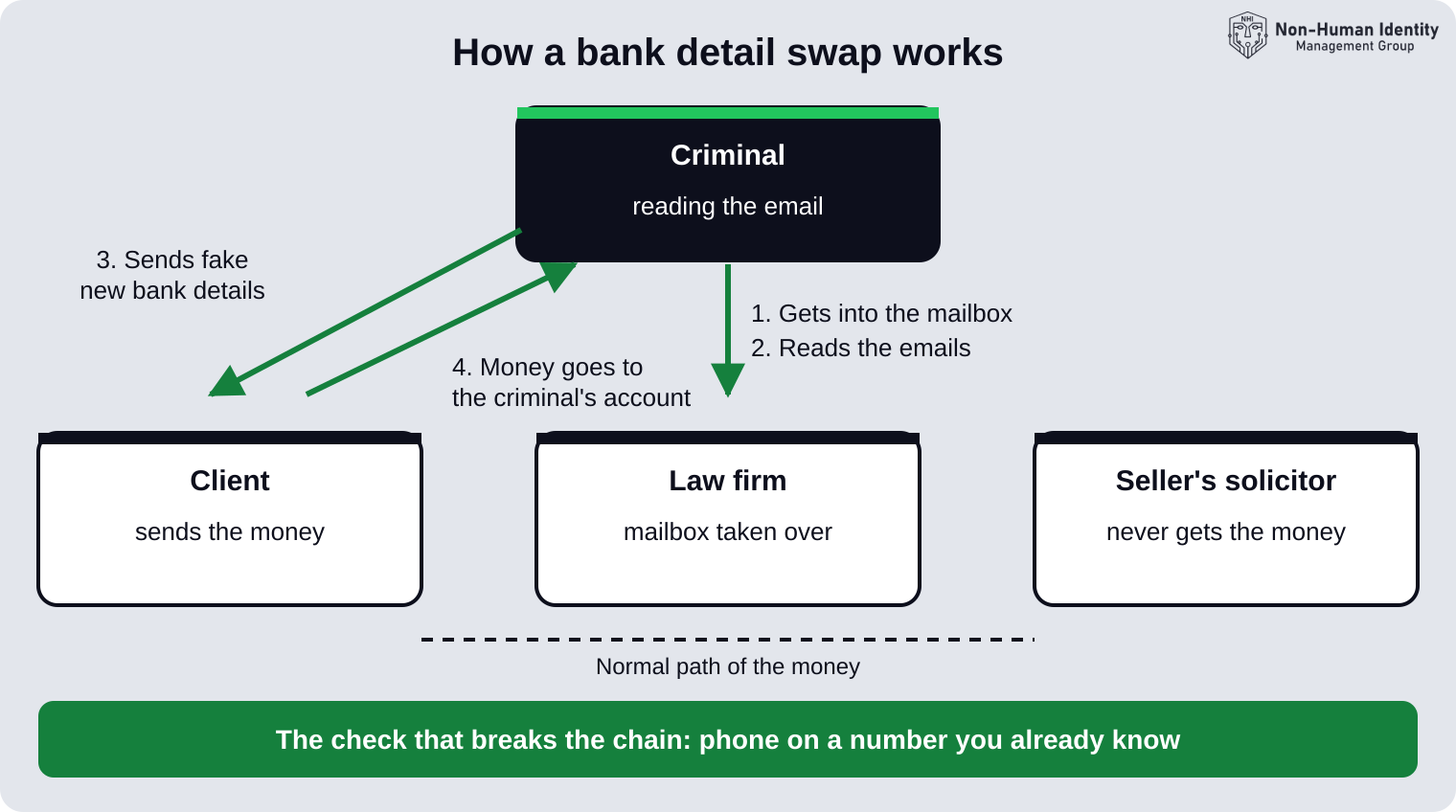
This is how a payment diversion usually plays out.
- The way in. A criminal gets into a mailbox, often through a scam email that steals a password. Scam emails are the most common attack on law firms, according to the UK's national cyber security agency.[2]
- The watching. The criminal reads messages quietly and learns who is paying whom, and when.
- The swap. Just before a payment, they send an email with new bank details. It may come from the real account, or from a lookalike address (one made to look like the real one).[2]
- The payment. A rushed client or staff member sends the money. It is moved on quickly.
- The discovery. The real seller or firm asks where the money is, often days later.
Other threats matter too. Ransomware (software that locks files and demands payment) can stop a firm working, and some gangs also threaten to publish client files. Suppliers who hold the firm's data, such as case management or billing services, are another way in.[2]
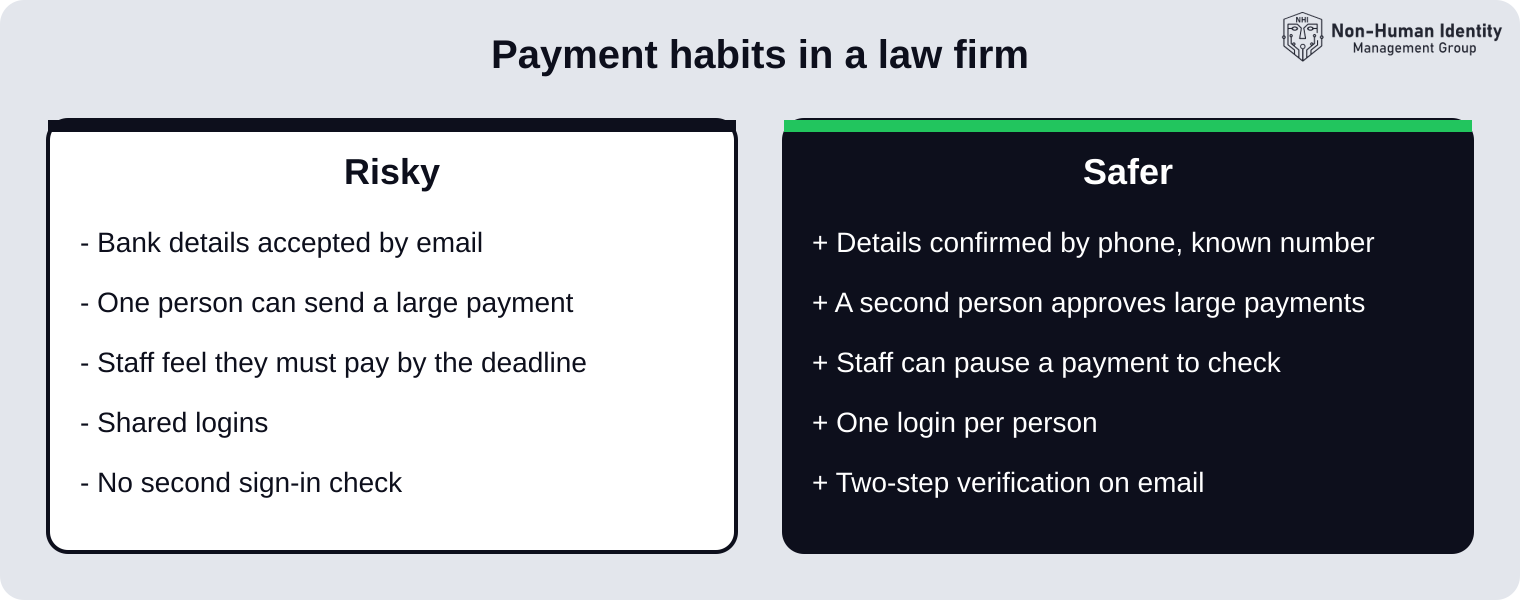
The habits that help are mostly simple. Turn on two-step verification, keep software up to date, keep backups apart from the main system and train staff to spot scam emails. Most firms in the regulator's review saw staff behaviour as their biggest weakness, and it suggests a no-blame culture so people report problems fast.[1]
A worked example
Wanda Gallardo is a partner in a fictional four-person firm that mostly handles house sales. Her client, Umar Pereira, is buying his first flat.
At their first meeting, Wanda gives Umar a short letter. It says the firm will never change its bank details by email, and it gives the office phone number.
Three days before completion, Umar gets an email in the same thread as before. It says the firm's bank has changed and asks him to send his deposit today. It adds that the office line is down.
Umar remembers the letter. He does not reply to the email. He rings the number from the letter instead. The receptionist puts him through to Wanda, who confirms the bank details have not changed.
Wanda thinks of the removal van. The money is safe, but someone has been looking in the back. She asks the firm's IT supplier to check her mailbox. They find a sign-in from an unknown location and a rule that hid replies from Umar.
The supplier resets her password, removes the hidden rule and turns on two-step verification for every mailbox. Cyrus Achterberg, the practice manager, writes down what happened and when. He reports it to Report Fraud and checks with the firm's insurer and regulator about what else they need.
No money was lost, because one phone call broke the chain.
Myths and mistakes
| What people think | What is true |
|---|---|
| We are too small for criminals to bother with. | Small firms handle large sums too, and often rely on outside IT support, which can leave gaps.[2] |
| If it came from the real email address, it is safe. | A criminal who is inside a mailbox can send from the real address. Check bank details by phone.[2] |
| Our IT supplier handles security, so we do not need to. | The regulator's review warned firms not to rely entirely on outside IT providers.[1] |
| Phone the number in the email to check. | Use a number you already have, such as from the first letter or the official website. |
| Staff who fall for a scam should be disciplined. | Blame makes people hide mistakes. Fast, honest reporting limits the damage.[1] |
What can I do this week?
- Add a line to your client letters saying you will never change bank details by email.
- Turn on two-step verification for every mailbox, starting with partners and accounts staff.
- Agree that a second person approves any change of payee details.
- Tell staff they can pause any payment to check it, without getting into trouble.
- Write down who to call first if money goes to the wrong account: your bank, then Report Fraud.
Checklist
- Clients are told in writing how the firm will, and will not, share bank details.
- Bank details are confirmed by phone on a known number before any payment.
- A second person approves new or changed payee details.
- Every mailbox uses two-step verification.
- Each person has their own login, and leavers lose access the day they go.
- Software and devices update automatically.
- Backups are kept apart from the main system and have been tested.
- Staff know how to report a suspicious email or a mistake, with no blame.
- The firm knows who to tell after an incident, including its bank, insurer and regulator.
Common questions
Why are law firms targeted by cyber criminals?
Because they hold client money and sensitive information, and handle deadlines that put people under pressure. The UK's national cyber security agency also notes that smaller firms often rely on outside IT providers. That mix makes law firms attractive to fraudsters and to ransomware gangs.[2]
What should I do if money has gone to the wrong account?
Call your bank straight away on its official number, because acting fast gives the best chance of stopping the money. Then report it to Report Fraud in the UK, or the FBI's online crime centre in the US. Tell your insurer and follow your regulator's reporting rules.
Is a cyber attack a data breach as well?
Often, yes. If client personal information is seen, taken or lost, it may be a personal data breach. In the UK, the firm may need to tell the data protection regulator. If people are likely to be put at risk, it should do so within 72 hours where it can.[3] See Data Breach Notification for Beginners.
Does this only happen in the UK?
No. Email payment scams are common around the world. In the US, the FBI's online crime centre recorded 21,442 business email compromise complaints in 2024, with reported losses of about $2.77 billion.[4] Property deals are a common target in many countries.
Is two-step verification enough?
It helps a lot, but it is one layer. Some scams trick people into approving a sign-in, and a lookalike address needs no login at all. Pair it with the phone check for bank details, staff training and a way to report mistakes quickly.
Where next?
Ready for the detail? Read the practitioner guide: Law Firm Identity and Data Security Guide. It goes further into matter-based access and ethical walls, document management systems and controls for privileged users and suppliers.
Also useful:
- Cybersecurity for Legal Firms Guide
- Conveyancing Completion Fraud
- Business Email Compromise for Beginners
- Ransomware for Beginners
- Small Business Cyber Security for Beginners
Related NHI Mgmt Group resources: Legal Sector Cyber Statistics · Business Email Compromise Response Playbook · Multi-Factor Authentication for Beginners
Key terms
- Business email compromise
- A scam where a criminal fakes or takes over a trusted email account to get money or information.
- Payment diversion fraud
- A scam that sends a real payment to a criminal's account, often by faking changed bank details.
- Lookalike domain
- A web or email address made to look like a trusted one, often with one character changed.
- Phishing
- A fake message or website that tricks people into handing over logins, money or information.
- Ransomware
- Harmful software that locks or steals files and demands payment.
- Multi-factor authentication
- A login that needs two or more different proofs, such as a password and a code from your phone.
- Supply chain attack
- An attack that goes through a trusted supplier to reach its customers.
Sources and further reading
- Cyber security: a thematic review. Solicitors Regulation Authority (SRA), 2 September 2020. https://www.sra.org.uk/sra/research-publications/cyber-security/, accessed 28 Nov 2026.
- Cyber threat report: UK legal sector. National Cyber Security Centre (NCSC), 22 June 2023. https://www.ncsc.gov.uk/files/Cyber-Threat-Report_UK-Legal-Sector.pdf, accessed 28 Nov 2026.
- Personal data breaches: a guide. Information Commissioner's Office (ICO). https://ico.org.uk/for-organisations/report-a-breach/personal-data-breach/, accessed 28 Nov 2026.
- Internet Crime Report 2024. Federal Bureau of Investigation, Internet Crime Complaint Center (IC3). https://www.ic3.gov/AnnualReport/Reports/2024_IC3Report.pdf, accessed 28 Nov 2026.