Cybercrime as a service is the criminal business model in which some criminals build and rent out attack tools, stolen access and support services, so that other criminals can launch attacks without the skills to build those tools themselves.
This guide is for newcomers: students, career changers, small business owners and managers who want to understand why attacks such as ransomware and phishing have become so common. It explains the rental economy in plain English, the main roles in it, how defenders and law enforcement push back, and the basic steps that reduce your exposure. It is written from a defender's point of view and contains no attack instructions.
By the end of this guide you will be able to:
- Explain what cybercrime as a service means.
- Describe the main roles: developers, access brokers, affiliates and launderers.
- Understand the difference between ransomware, malware and phishing as a service.
- Identify the basic controls that break the most common attack chains.
Key takeaways
- Cybercrime has become a supply chain. Different groups specialise in building tools, stealing access, running attacks and laundering money, and they trade with each other.[1]
- Renting lowers the skill needed. A criminal can rent ransomware, an information-stealing program or a phishing kit instead of writing one.
- The person who attacks you is often not the person who wrote the tool. In ransomware as a service, it is typically the affiliate that gets and uses the access, not the ransomware group.[1]
- The same basics break many attack chains. Multi-factor authentication, prompt patching, strong unique passwords and tested backups are repeatedly recommended by the UK and US authorities.[1][6]
- Law enforcement does disrupt these services. Ransomware, phishing and malware platforms have been taken down in international operations, although others often take their place.[2][3][4]
What it is, in plain English
Legitimate businesses rent software every day: email, accounting and storage are sold as monthly services. Criminals copied the idea. In cybercrime as a service, one group builds a tool or service and others pay to use it, by subscription, by one-off purchase or by sharing the proceeds.
There are three well-known forms:
- Ransomware as a service (RaaS): a group supplies ransomware and the systems around it, such as a portal to customise the ransomware, negotiation channels and a leak site for stolen data. Affiliates carry out the attacks, and the group typically takes the smaller share of any ransom.[1]
- Malware as a service (MaaS): harmful software, such as programs that steal passwords, offered to buyers. Microsoft described the Lumma information stealer as malware as a service sold on underground forums with tiered plans priced from $250 to $20,000.[4]
- Phishing as a service (PhaaS): ready-made fake login pages and the tools to run phishing campaigns. Europol described the LabHost platform as phishing as a service sold on a monthly subscription and used to target customers of hundreds of financial institutions.[3]
A helpful comparison is a franchise restaurant chain. Head office designs the menu, supplies the equipment and takes a cut, while local franchise owners run the shops. In RaaS, the ransomware group is head office and the affiliates are the franchisees. Where the analogy breaks down: franchises sign contracts and follow laws, while criminal groups often cheat each other, change names and disappear, which makes them harder to track over time.
Why it matters to you
- If you run a small business: rented tools make attacks cheap and automated, so attackers do not need to pick you specifically. A reused password or an unpatched system can be enough to be caught in a wide net.
- If you are new to a security job: you will hear terms such as "affiliate", "initial access broker" and "infostealer" in threat reports and incident reviews. Knowing the roles helps you understand where an attack started, not only where it ended.
- If you are a manager: because attacks are a business, criminals go where the return is highest. Making your organisation harder and less profitable to attack, through basic controls and good backups, changes their calculation.
The scale is large. When the UK National Crime Agency (NCA) disrupted the LockBit ransomware service in February 2024, it said LockBit had operated for about four years as a ransomware as a service business, attacked thousands of victims worldwide and caused losses of billions of pounds, dollars and euros.[2] In 2025, Microsoft reported identifying more than 394,000 Windows computers infected with the Lumma stealer in two months.[4][5]
How it works, step by step
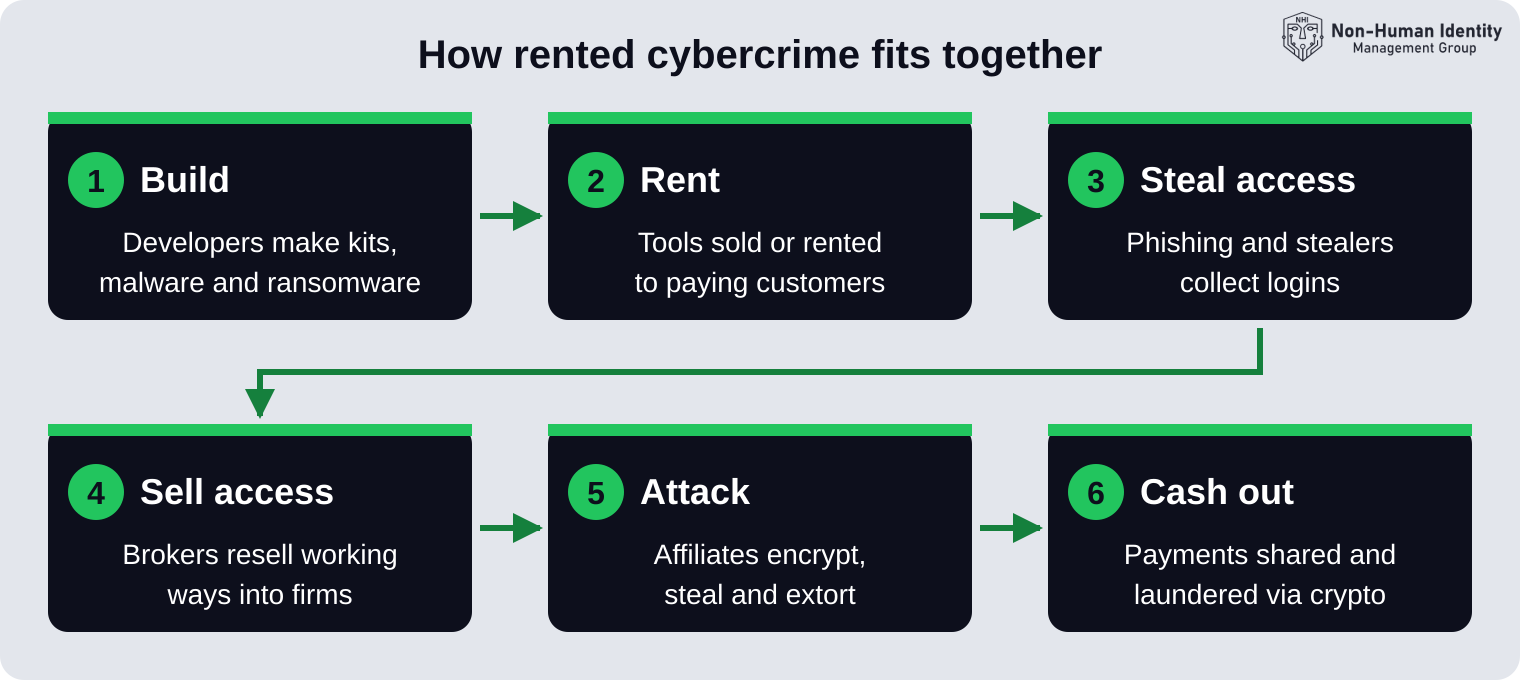
The UK National Cyber Security Centre (NCSC) and the NCA describe a cyber crime ecosystem in which different specialists play different parts.[1] In simplified form, a ransomware attack built from rented parts often looks like this.
- Tools are built. Developers write malware, phishing kits or ransomware. Some sell a finished build; others run the service themselves.[1]
- Tools are rented out. Customers pay a subscription, a one-off price or a share of the proceeds. Some services also offer to disguise malware so that antivirus software is less likely to spot it.[1]
- Access is stolen. Phishing kits and infostealers (malware that collects saved passwords, cookies and card details from infected devices) gather logins at scale.[1]
- Access is sold. Initial access brokers collect access from many sources, check that it works, pick out valuable targets and resell it.[1]
- The attack is run. An affiliate uses the access to spread through the network, steal data and launch ransomware. The NCSC notes that most ransomware also tries to delete local backups to hinder recovery.[1]
- Money is collected and laundered. Ransoms are demanded in cryptocurrency, then moved and split across services to make them harder to trace.[1]
The main services, and how defenders respond
| Service | What is rented or sold | Controls that make it harder |
|---|---|---|
| Phishing as a service | Fake login pages and campaign tools[3] | Phishing-resistant MFA, email filtering, staff reporting suspicious messages[6] |
| Malware as a service (including infostealers) | Password and data-stealing programs[4] | Unique passwords, separate admin accounts, monitoring for compromised credentials[6] |
| Initial access brokers | Working logins and footholds in organisations[1] | MFA on remote access, patching internet-facing systems, not exposing remote desktop to the internet[6] |
| Ransomware as a service | Ransomware, negotiation tools and leak sites[1] | Offline, encrypted, tested backups; separate admin accounts; least privilege; an incident plan[6] |
Disruption by law enforcement
| Operation | Type of service | What was reported |
|---|---|---|
| LockBit (Operation Cronos, NCA-led, February 2024) | Ransomware as a service | Control of the group's services and leak site taken, 28 affiliate servers taken down and over 1,000 decryption keys obtained[2] |
| LabHost (Europol-supported, April 2024) | Phishing as a service | 70 addresses searched worldwide and 37 suspects arrested[3] |
| Lumma (Microsoft with Europol and others, May 2025) | Malware as a service (infostealer) | About 2,300 malicious domains taken down, suspended or blocked[4] |
Takedowns cost criminals money and trust, and can give victims a way to recover data. They do not end the model: affiliates and customers can move to other services, which is why your own controls still matter.
A worked example
Northgate Print is a fictional printing firm with 50 staff. One evening, a member of staff, Leo, downloads what he thinks is a free design tool on a home laptop he also uses for work. It is actually an infostealer. It quietly sends his saved browser passwords, including the login for the company's remote access service, to its operator.
The operator does not attack Northgate itself. The login ends up being offered for sale, along with thousands of others. Two weeks later, someone signs in to Northgate's remote access service from an unfamiliar country at 3am.
This is where Northgate's earlier decisions matter. Six months before, the IT lead, Grace, had turned on multi-factor authentication for remote access. The sign-in attempt stops at the MFA prompt, which Leo never receives because it was not him. Grace sees the failed MFA attempt in the alerts the next morning.
Grace resets Leo's password, signs him out of all sessions and checks which other accounts used the same password. She also asks Leo to stop using the home laptop for work and has it checked. Northgate was not "safe" because of MFA alone: the stolen password could still have worked on any service without MFA, so Grace lists those services and plans to cover them too.
Myths and misunderstandings
| What people think | What is true |
|---|---|
| Attackers are lone genius hackers. | Many attacks are assembled from rented tools and bought access, run by people with modest skills. |
| The group named on the ransom note did everything. | The ransomware group often supplies the tools while an affiliate gained access and ran the attack. |
| We are too small to be worth attacking. | Stolen logins and automated scans are sold and used in bulk, so small firms are caught too. |
| Antivirus is enough. | Some services exist specifically to help malware avoid antivirus, so layered controls such as MFA and backups matter. |
| Paying a ransom gets your data deleted. | The NCSC warns that criminals may claim to delete stolen data even after payment, and payment funds further crime. |
| Once a gang is taken down, the threat is over. | Takedowns disrupt specific services, but customers and affiliates can move to others. |
Key terms
- Cybercrime as a service
- A criminal operating model where tools, infrastructure or attack services are rented or outsourced, lowering the technical barrier for attackers.
- Ransomware as a service
- A model in which ransomware developers lease ransomware and leak site infrastructure to affiliates, who carry out attacks, in return for a share of payments.
- Malware as a service
- A criminal model where attackers rent access to malware, infrastructure and tooling instead of building everything themselves.
- Phishing as a service
- A criminal service that packages phishing infrastructure, templates and delivery tools for reuse by many attackers.
- Phishing kit
- A packaged set of tools that helps an attacker create and run deceptive campaigns with little technical effort.
- Ransomware affiliate
- A criminal partner who uses a ransomware service to carry out attacks, often relying on phishing and stolen credentials.
- Initial access broker
- A criminal intermediary who acquires footholds, such as stolen credentials, and passes or sells them to other attackers.
- Infostealer
- Malware built to collect saved passwords, browser session cookies and other data from a device and send them to the operator.
- Data leak site
- A website used by ransomware groups to list victims and publish stolen data to pressure them into paying.
- Phishing-resistant MFA
- Multi-factor authentication using methods that cannot easily be replayed, intercepted or tricked out of a user, such as device-bound security keys.
Common questions
What is cybercrime as a service?
A business model in which criminals rent or sell attack tools, stolen access and support services to other criminals, so attacks can be run without building everything from scratch.
What is the difference between a ransomware group and an affiliate?
The group supplies the ransomware and infrastructure; the affiliate typically gains access to the victim and runs the attack, keeping the larger share of any ransom.[1]
What does an initial access broker do?
It gathers access to organisations from many sources, checks that the access works and sells it on to other criminals, including ransomware affiliates.[1]
Why do infostealers matter so much?
They harvest saved passwords and cookies from infected devices, and those credentials are used or sold for later attacks.[1] A home or personal device used for work can expose company logins.
What is the single most useful defence?
There is no single fix, but the NCSC and NCA highlight multi-factor authentication, especially on remotely accessible accounts, alongside patching, strong passwords and ransomware-resistant backups.[1]
Should we pay if ransomware hits us?
The NCSC strongly discourages payment and advises reviewing alternatives, such as backups, keeping a log of decisions and seeking expert help.[7] See Incident Response for Beginners for what to do first.
First steps
Three things you can do this week:
- Turn on MFA where it matters most. Check email, remote access and administrator accounts first, and prefer phishing-resistant methods where your services support them.
- Find anything exposed to the internet. Ask whoever runs your IT which systems can be reached from the internet, such as remote access or remote desktop, and make sure they are patched and protected by MFA.
- Check your backups. Confirm you have a copy that is offline or cannot be changed from your main network, and test restoring something from it.
Checklist
- MFA is on for email, remote access and administrator accounts.
- Internet-facing systems are patched promptly, starting with known exploited vulnerabilities.
- Remote desktop is not exposed directly to the internet.
- Staff use unique passwords, ideally with a password manager.
- Administrator accounts are separate from everyday accounts.
- Work logins are not used on unmanaged personal devices without controls.
- At least one backup copy is offline or immutable and restores are tested.
- Staff know how to report a suspicious email or login prompt.
- We have a simple incident plan that says who to call first.
Check your understanding
1. In ransomware as a service, who usually breaks into the victim's network?
Answer: the affiliate, not the group that wrote the ransomware.
2. What does an infostealer do?
Answer: it collects saved passwords, cookies and other data from an infected device and sends them to criminals, who use or sell them.
3. Why does multi-factor authentication help against bought access?
Answer: a stolen password alone is no longer enough to sign in, so the bought login is far less useful.
4. Does a law enforcement takedown remove the need for your own controls?
Answer: no. It disrupts one service, but criminals can move to others.
Suggested learning pathway
- Start with the most damaging rented attack in Ransomware for Beginners.
- Learn how stolen logins are gathered in Phishing for Beginners.
- Understand the wider family of harmful software in Malware for Beginners.
- See how attackers first get in with Initial Access for Beginners.
- Go deeper on the ransomware business model in the Ransomware-as-a-Service Business Model Guide.
- Read the practitioner view of rented malware in the Malware-as-a-Service (MaaS) Economy Guide.
- Learn how phishing platforms work and are countered in the Phishing-as-a-Service Platforms Guide.
- Understand the access trade in the Initial Access Brokers Guide.
Standards and references
- Ransomware, extortion and the cyber crime ecosystem. National Cyber Security Centre (NCSC) and National Crime Agency (NCA) white paper, 11 Sep 2023. https://www.ncsc.gov.uk/whitepaper/ransomware-extortion-and-the-cyber-crime-ecosystem, accessed 27 Nov 2026.
- NCA leads international investigation targeting the world's most harmful ransomware group. National Crime Agency, 20 Feb 2024. https://www.nationalcrimeagency.gov.uk/news/nca-leads-international-investigation-targeting-worlds-most-harmful-ransomware-group, accessed 27 Nov 2026.
- International investigation disrupts phishing-as-a-service platform LabHost. Europol, April 2024. https://europol.europa.eu/media-press/newsroom/news/international-investigation-disrupts-phishing-service-platform-labhost, accessed 27 Nov 2026.
- Disrupting Lumma Stealer: Microsoft leads global action against favored cybercrime tool. Microsoft On the Issues, 21 May 2025. https://blogs.microsoft.com/on-the-issues/2025/05/21/microsoft-leads-global-action-against-favored-cybercrime-tool/, accessed 27 Nov 2026.
- Europol and Microsoft disrupt world's largest infostealer Lumma. Europol, May 2025. https://www.europol.europa.eu/media-press/newsroom/news/europol-and-microsoft-disrupt-world%E2%80%99s-largest-infostealer-lumma, accessed 27 Nov 2026.
- #StopRansomware Guide. Cybersecurity and Infrastructure Security Agency (CISA), MS-ISAC, FBI and NSA, updated Sep 2023. https://www.cisa.gov/stopransomware/ransomware-guide, accessed 27 Nov 2026.
- Guidance for organisations considering payment in ransomware incidents. National Cyber Security Centre (NCSC), 14 May 2024. https://www.ncsc.gov.uk/guidance/organisations-considering-payment-in-ransomware-incidents, accessed 27 Nov 2026.
Related NHI Mgmt Group resources: Infostealer Threat Guide · Top 10 Ransomware Initial Access Vectors · APT vs Cybercrime vs Hacktivists