Delegated access lets a trusted person use your account for you, with their own sign-in and limited rights.
This guide is for anyone who helps a parent, a partner or a boss with their accounts, or who needs that help. Businesses are affected too: banks, health services and email systems all have to decide how helpers get in without sharing passwords.
In short
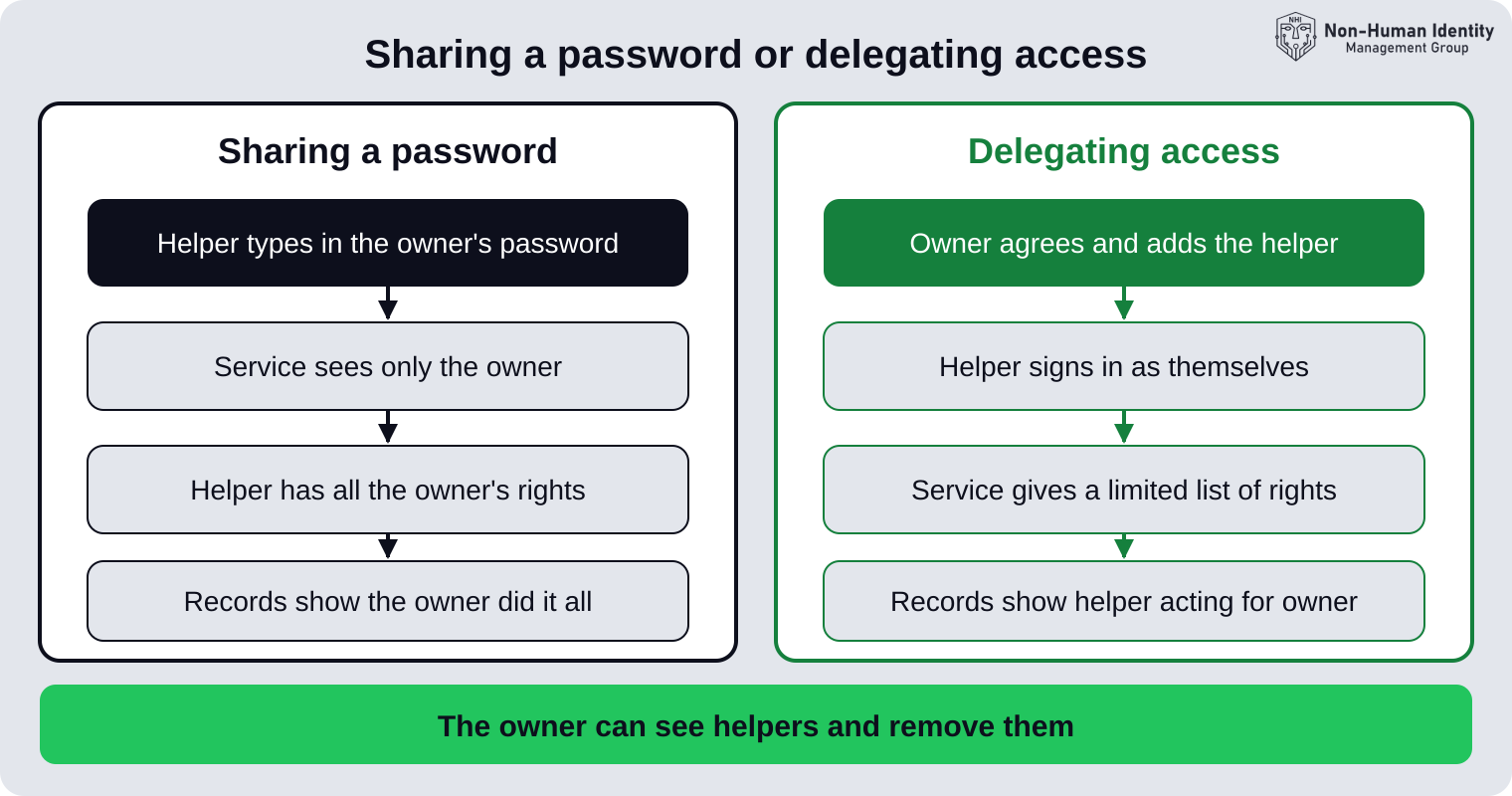
- Sharing your password gives a helper everything, and the records show you doing it all.
- Delegated access gives the helper their own way in, with only the rights they need.
- The service can record who did what, so mistakes and misuse can be traced.
- You should be able to see who can act for you and remove them in a few steps.
What you will learn
- Explain the difference between sharing a password and delegating access.
- Spot the delegate or helper settings in common services.
- Check who can act on your accounts today.
- Ask a bank or care provider how a helper can be added properly.
- Helper (delegate or proxy)
- a person allowed to act on someone else's account, using their own sign-in.
- Account owner
- the person the account belongs to, who gives or ends the helper's rights.
- Permission level (scope)
- the list of things the helper may do, such as read only or read and send.
What is delegated access?
Think of asking a friend to collect a parcel for you. You could hand over your house keys. Or you could give them a signed note that names them and says "collect one parcel".
Delegated access is the signed note. The helper signs in as themselves. The service then lets them do a set list of things on your account. A helper is often called a delegate or a proxy.
Sharing your password is the house keys. The helper becomes you, with all your rights. Experts call this impersonation. With delegation, the helper keeps their own identity and acts for you.[1]
Where the comparison stops working: a note is checked once at the door. Online, the service can check the helper's rights on every action, and keep a record of each one.
Why does it matter?
People need help with accounts all the time. Carers help older relatives, parents help children, and assistants help managers. When there is no proper helper option, people tend to share passwords instead.
If you help a parent or relative
What could happen: you use their password, and a later dispute shows "them" making payments you made.
Check this: ask the bank or service if it has a helper or proxy option.
If someone helps you
What could happen: a helper with your password can change your contact details or lock you out.
Check this: look at who can act for you, and remove anyone who no longer needs it.
If you work as an assistant
What could happen: you send email as your manager using their password, and nobody can tell who wrote it.
Check this: ask IT to give you delegate rights on the mailbox and calendar instead.
If you design a customer service
What could happen: customers share passwords and one-time codes, so your fraud checks learn the wrong "normal".
Check this: offer a helper option that records both people on every action.
What does it look like?
Here is a made-up "add a helper" screen from an online bank.
Example only. All values are made up.
Example Bank: Add a helper
Account owner:  Ms A. Example (signed in)            (1)
Helper email:   [email protected]                  (2)
What they can do:
  [x] View balances and statements                  (3)
  [ ] Make payments up to 0 GBP
  [ ] Change contact details or security settings    (4)
Ends on:        31 March 2027 (or when you remove them)  (5)
[ Send invitation ]
- The owner sets this up while signed in as themselves.
- In a real screen, this line would show the helper's own email address. The helper signs in with their own details.
- A small, ticked list of rights. Here the helper can only look.
- Security settings stay with the owner, so a helper cannot take over the account.
- An end date, so access does not linger after it is needed.
Why this is risky: the risk is the option many people use instead. Writing your password on a note for a helper gives them every right, with no end date and no record of who acted.
The safer way: use a screen like this one. If a service has no helper option, ask it how a carer or attorney can be added.
How does it work?
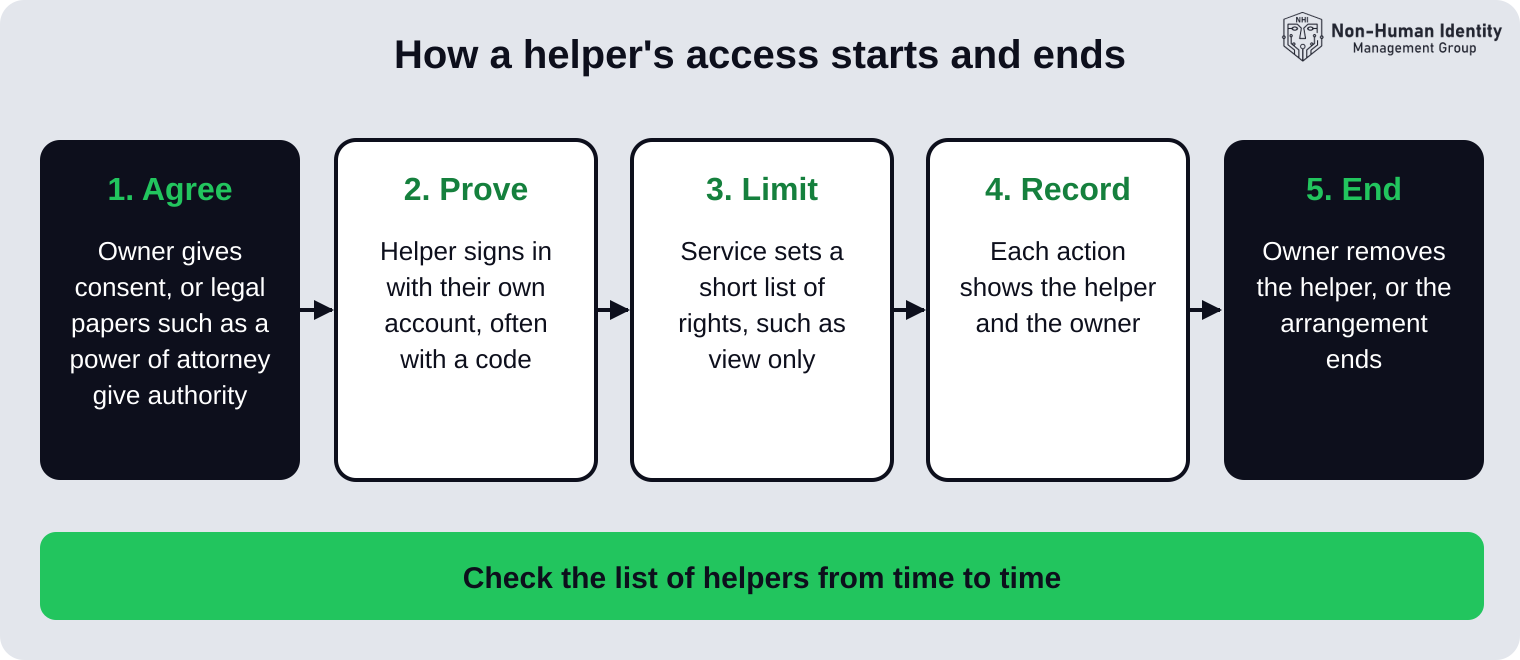
Most helper options follow the same steps.
- The owner agrees. The owner adds the helper from their own account, or shows legal papers that give the helper authority.
- The helper proves who they are. The helper signs in with their own account, often with a second check such as a code.
- The rights are set. The helper gets a limited list, such as read only, or read and reply.
- Every action is recorded. The service notes that the helper acted for the owner, not just "the owner did it".
- Access is reviewed and ended. The owner, or the legal end of the arrangement, removes the helper.
Real services work this way. In Gmail, a delegate can read, send and delete email for you, but cannot chat as you or change your password. You add a delegate in settings and can delete them there later.[2] In Outlook for work accounts, a delegate can be given levels such as Reviewer (read only), Author or Editor.[3]
Some helpers get their authority from the law, not from the owner. In England and Wales, a lasting power of attorney is a legal document that lets someone make decisions for another person. The attorney cannot start acting until it is registered.[4] In US healthcare, a person's legal representative gets access only as far as their legal authority goes.[5]
A worked example
Talia Zamora lives two hours from her father, Idris Sorensen. Idris is 81 and finds online banking hard. For a year, he has read his password to Talia over the phone whenever a bill needs checking.
One day his bank sends a text about a new device. Idris panics, because he thinks someone has broken in. It was only Talia, signing in from her new phone. Nobody at the bank can tell them apart, because both used the same password.
Talia rings the bank and asks about a helper option. The bank explains that Idris can add her from his own account. Idris signs in, picks "view only" and adds Talia's email. Talia accepts the invitation and signs in with her own account and a code sent to her phone.
Now Talia can see statements, but she cannot move money or change Idris's phone number. When she checks a bill, the bank's records show her name acting for Idris. Idris changes his password and keeps it to himself.
A few months later, Idris needs Talia to pay bills too. The bank says that wider rights need either Idris's consent through the helper settings or a registered power of attorney. They choose to add payments with a monthly limit, and to look at the helper list together each spring.
Talia does less guessing now. Idris has his password back, and he can remove her at any time.
Myths and mistakes
| What people think | What is true |
|---|---|
| Sharing a password with family is the same as giving them access. | It gives them all your rights and makes their actions look like yours. A helper option keeps the two of you separate. |
| A helper can do anything the owner can. | Good helper options limit the rights. Many keep security settings, like the password, with the owner. |
| Once added, a helper stays forever. | Helpers can and should be removed when the need ends. Some services let you set an end date. |
| Proving who the helper is proves they may act. | Identity and permission are separate checks. The service also needs the owner's consent or legal papers. |
| Giving a helper your one-time codes is fine. | The codes are there to protect you. Sharing them weakens that protection. |
What can I do this week?
- List the accounts where someone else uses your password, or you use theirs.
- Look for "delegate", "helper", "proxy" or "linked account" in the settings of each one.
- Set up proper helper access where it exists, then change the shared password.
- Review who can act on your email and calendar, and remove anyone who no longer needs it.
- Ask your bank or care provider how they handle helpers and powers of attorney.
Checklist
- No password or one-time code is shared with a helper.
- Each helper signs in with their own account.
- Each helper has only the rights they need.
- Security settings stay with the account owner.
- The owner can see the list of helpers.
- Each helper has an end date or a review date.
- Legal papers, such as a power of attorney, are registered before they are used.
Common questions
Is delegated access the same as sharing my password?
No. Sharing your password lets the helper become you, with every right you have. Delegated access lets them sign in as themselves and do a limited set of things. The service can then record which of you did each action.
What if my bank or app has no helper option?
Ask the service directly how a carer, family member or attorney can be added. Many banks and health services have a process, even if it is not shown in the app. Until then, avoid sharing one-time codes, and change the password when help ends.
Do I need a power of attorney to help someone?
Not always. If the person can agree, they can often add you as a helper themselves. A power of attorney matters when they cannot make decisions, or when a service asks for legal authority. Check the official rules where you live.
Can a helper see everything in my account?
Only what you allow. The helper sees what their permission level covers. In Gmail, for example, a delegate can read and send email but cannot chat as you or change your password. Read the help page for each level.
How do I stop someone acting for me?
Remove them in the service's helper or delegate settings. If they also know your password, change it, and check your recovery phone number and email. If you cannot remove them yourself, contact the service and explain the situation.
Where next?
Ready for the detail? Read the practitioner guide: Delegated and Proxy Access in CIAM. It goes further into relationship types, checking legal authority, and the abuse cases a design must handle.
Also useful:
- Customer IAM (CIAM) Guide
- Account Takeover Prevention Guide
- Mailbox Delegation Review Checklist
- Authentication vs Authorisation for Beginners
Related NHI Mgmt Group resources: Customer Identity and Access Management for Beginners, Least Privilege for Beginners and Account Recovery for Beginners.
Key terms
- Delegation
- The right for one person to act for another within a set scope.
- Impersonation
- Acting as another person in their account, so the system sees only them.
- Delegate or proxy
- A helper allowed to act on someone else's account using their own sign-in.
- Power of attorney
- A legal document that lets one person act or make decisions for another.
- Least privilege
- Giving each person only the access they need, for only as long as needed.
- Audit trail
- A record that shows who did what, and when.
- Multi-factor authentication
- A sign-in that needs two or more checks, such as a password and a code.
Sources and further reading
- IETF, RFC 8693: OAuth 2.0 Token Exchange, section 1.1 Delegation vs. Impersonation Semantics, January 2020. https://www.rfc-editor.org/rfc/rfc8693 (accessed 28 Nov 2026).
- Google, Gmail Help: Set up mail delegation. https://support.google.com/mail/answer/138350 (accessed 28 Nov 2026).
- Microsoft Support, Allow someone else to manage your mail and calendar. https://support.microsoft.com/en-us/office/allow-someone-else-to-manage-your-mail-and-calendar-41c40c04-3bd1-4d22-963a-28eafec25926 (accessed 28 Nov 2026).
- GOV.UK, Use a lasting power of attorney. https://www.gov.uk/use-lasting-power-of-attorney (accessed 28 Nov 2026).
- US Department of Health and Human Services, Personal Representatives (HIPAA Privacy Rule guidance). https://www.hhs.gov/hipaa/for-professionals/privacy/guidance/personal-representatives/index.html (accessed 28 Nov 2026).