An eSIM is a digital SIM built into your phone that you download instead of inserting a card.
This guide is for anyone who uses an eSIM, is thinking of switching, or buys travel eSIMs abroad. You do not need to know anything about phone networks: if your bank texts you codes, your phone number is worth protecting.
In short
- An eSIM does the same job as a plastic SIM card, but your phone downloads it.
- The QR code or activation code that sets it up works like a key. Keep it private.
- Criminals can try to move your number to an eSIM on their phone, often after getting into your email.
- A strong email password, a PIN on your mobile account and quick action on "No service" all help.
What you will learn
- Explain what an eSIM is and how it reaches your phone.
- Spot the signs that someone may have moved your number.
- Check the protections on your mobile account and email.
- Choose a travel eSIM more safely.
- Digital SIM (eSIM)
- a SIM that lives on a chip inside your phone and is downloaded, not inserted.
- Set-up code (activation code)
- a QR code or text code your provider gives you so your phone can download your eSIM.
- Number theft (SIM swap)
- when a criminal gets your phone number moved to a SIM or eSIM they control.
What is an eSIM?
Think of a boarding pass in your phone's wallet app instead of a paper one. It still gets you on the plane. It just arrives by download, not in an envelope. An eSIM does the same for your phone number.
A SIM is what links your phone to your account with your mobile provider. The old kind is a small plastic card. An eSIM is a chip already built into the phone. Your provider sends the details for your number, called a profile, and the phone stores them on that chip.[2]
Many phones can hold several eSIM profiles. You might keep your home number and add a cheap data plan when you travel.[1][3]
Where the comparison stops working: a boarding pass is good for one flight. An eSIM set-up code can carry your phone number, and your number often unlocks your bank and email through text codes.
Why does it matter?
The eSIM chip itself is built to be as secure as a plastic SIM.[3] The weak spots are the people and accounts around it: your email, your mobile account and the set-up code.
If you have just switched to an eSIM
What could happen: a criminal who gets into your email finds your set-up code and uses it on their phone.
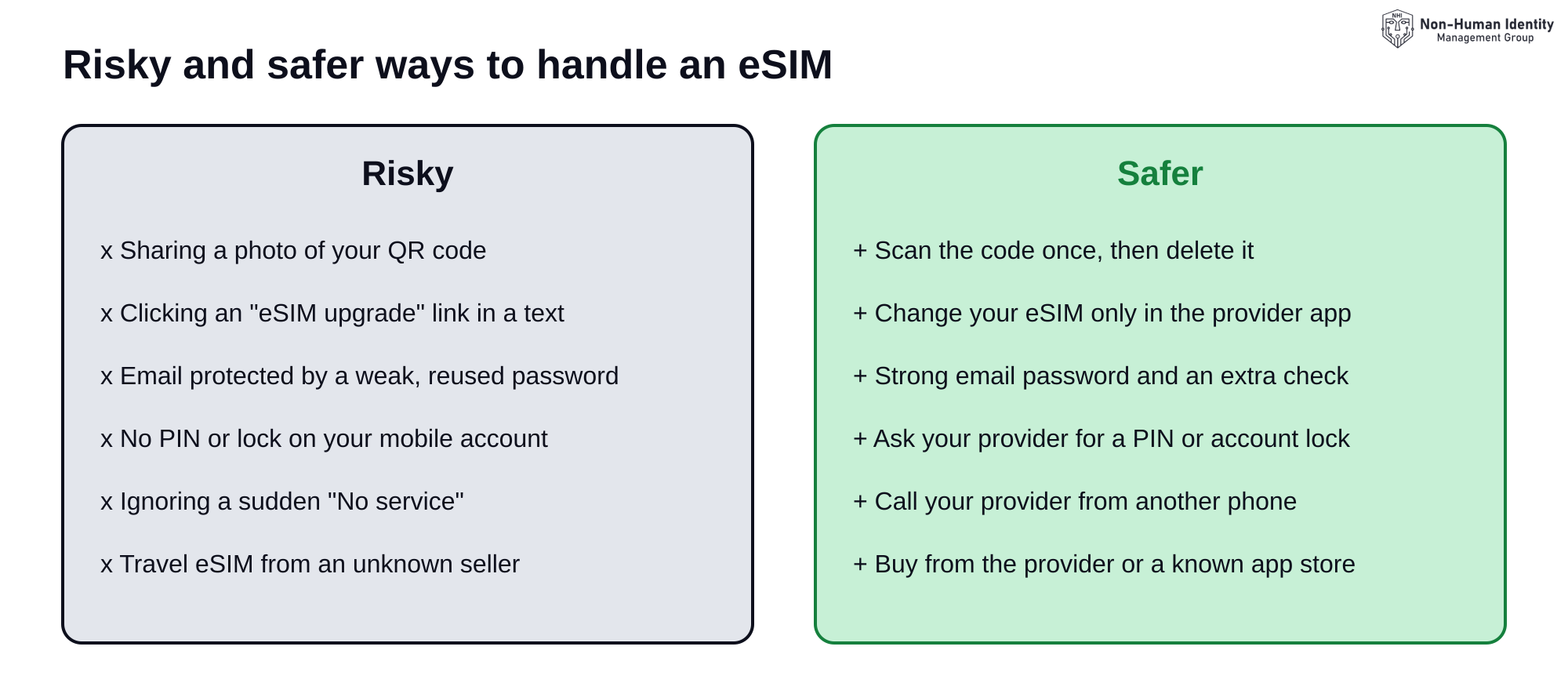
Check this: delete old set-up emails and use a strong, unique email password.
If you travel abroad
What could happen: you buy a travel eSIM from an unknown website and hand over card details to a fake seller.
Check this: buy from your provider, or a seller in your phone's official app store.
If you run a small business
What could happen: a work phone number used for bank codes is moved to a stranger's eSIM.
Check this: ask your provider for a PIN or lock on every work line.
What does it look like?
Here is a fake text message of the kind criminals send. In one case, police in India warned that callers posing as provider staff got people to forward their eSIM QR code.[5]
Example only. All values are made up.
From: FakeMobile                                (1)
Your SIM will stop working today.               (2)
Upgrade to eSIM free here:
https://fakemobile-esim.example.invalid         (3)
Then reply with the 6-digit code we send you.   (4)
Ref EXAMPLE-0000
- The sender name can be faked to look like your provider.
- A deadline is meant to rush you.
- In a real message, this line would point to a fake website that collects your details.
- Your provider should not ask you to send a code back by text or on a call.
Why this is risky: the code you send back may be the very check that lets the criminal move your number to their eSIM.
The safer way: ignore the link. Open your provider's own app, or call the number on its website, and ask if anything needs doing.
How does it work?
This is how an eSIM normally reaches your phone. Knowing the steps shows where a criminal might step in.
- The provider checks you. You buy a plan or ask for an eSIM. The provider should confirm you are the account holder.
- A profile is prepared. The provider puts your number's profile on a secure download server.[2]
- You get a set-up route. This may be a QR code, an activation code, the provider's app, or a transfer from your old phone.[1]
- Your phone downloads it. The phone uses the code to fetch the profile and joins the network. Your old SIM is usually switched off.[1]
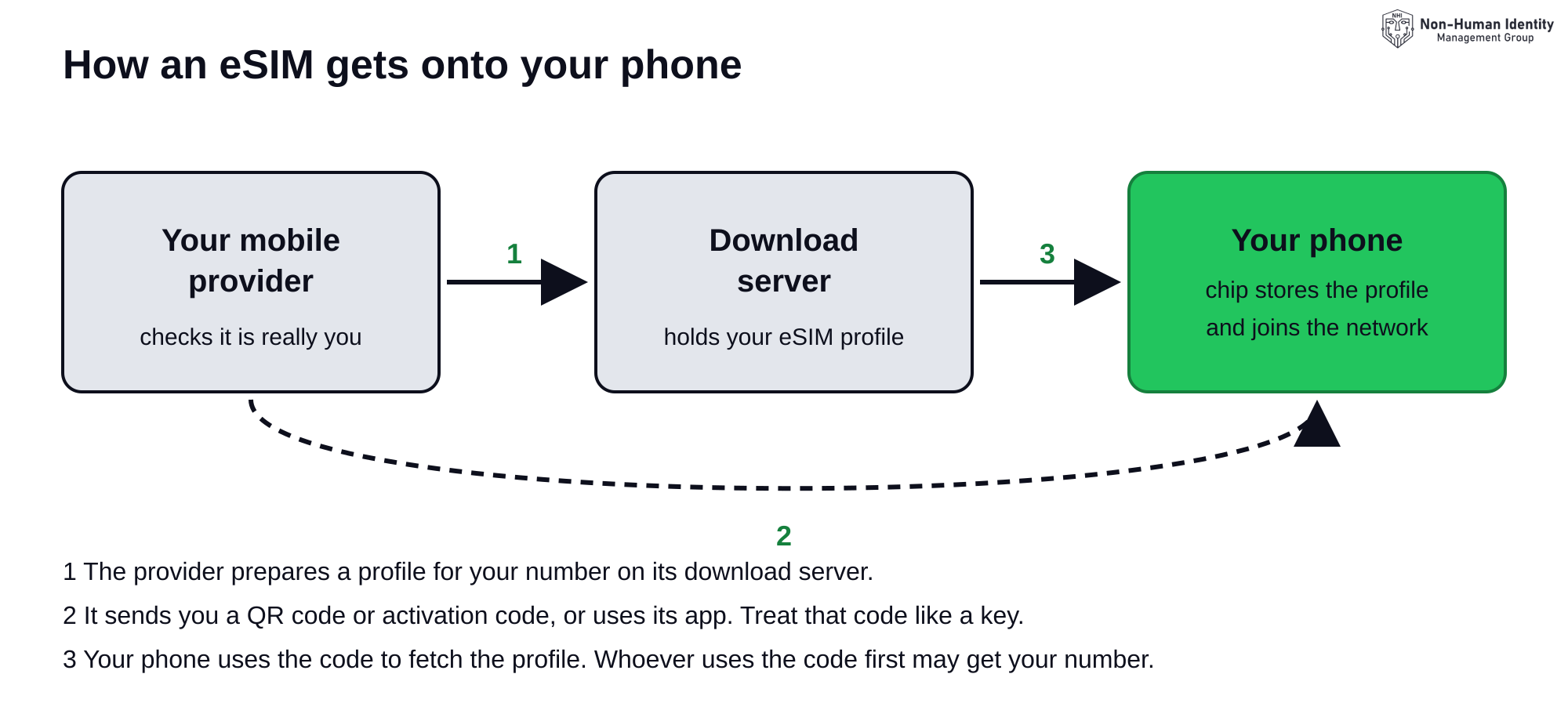
A criminal has two main ways in. They can trick the provider into making a new eSIM for your number, as in a classic SIM swap. Or they can get the set-up code, for example from your email. Finland's national cyber security centre has warned about both.[4]
Once your number is on their phone, they receive your calls and text codes. They can use those codes to reset passwords.[4][6]
In the US, rules from the phone regulator now say providers must check identity securely before a SIM change. They must also tell you straight away about a SIM change request, and offer a free account lock.[7]
A worked example
This story is made up to show how it can happen.
Calla Brandt lives in Bristol and is off to Lisbon for a week. A friend tells her to get a travel eSIM for cheap data.
She searches online and finds a site with very low prices. The site wants her card details and a photo of her passport. That feels like too much. She closes it.
Instead, she opens her phone's official app store and picks a well-known travel eSIM app. She pays in the app and gets a QR code by email. She scans it once, checks the plan works, then deletes the email.
Two days later, a text arrives. It looks like it is from her home provider. It says her SIM must be "upgraded to eSIM" today, and asks her to reply with a code.
Calla does not reply. She opens her provider's own app instead. There is no upgrade waiting. She reports the text to her provider and deletes it.
While she is in the app, she adds a PIN to her account. She also turns on an extra sign-in check for her email, using an authenticator app rather than text codes.
Back home, nothing odd has happened. Her bank shows no strange payments in the records she can see.
What made the difference: Calla treated the set-up code like a key and went to her provider directly, not through a link.
Myths and mistakes
| What people think | What is true |
|---|---|
| An eSIM protects me from SIM swap fraud. | An eSIM can't be pulled out of a stolen phone, but a criminal who fools your provider can still move your number to a new eSIM.[6] |
| The QR code is just a picture, so sharing it is fine. | It can let a phone download your number. Keep it private and delete it once used.[4] |
| My email has nothing to do with my phone number. | Set-up codes are often sent by email. If someone gets into your email, they may get the code too.[4] |
| A message saying it is from my provider must be real. | Sender names can be faked. Go to the provider's app or website yourself. |
| "No service" abroad is always just roaming. | Often it is. But if it comes with password reset emails you did not ask for, call your provider from another phone. |
What can I do this week?
- Ask your mobile provider to add a PIN, password or lock to your account.
- Find any old eSIM set-up emails or QR code photos and delete them.
- Give your email a strong, unique password and turn on an extra sign-in check.
- Move your bank and email from text codes to an app or passkey, where they offer one.
- Write down your provider's help number somewhere you can reach without your phone.
Checklist
- I know whether my phone uses an eSIM, a plastic SIM or both.
- My mobile account has a PIN, password or lock for SIM changes.
- I keep eSIM set-up codes private and delete them after use.
- My email has a strong password and an extra sign-in check.
- I only change my eSIM through my provider's app, website or shop.
- I buy travel eSIMs from my provider or a known app store.
- I know "No service" plus strange emails is a reason to act.
Common questions
Is an eSIM safer than a plastic SIM?
In some ways, yes. It cannot be pulled out of a lost or stolen phone and put in another one. The industry body for mobile networks says it is as secure as a removable SIM. Your number is still only as safe as your mobile account and email.
Can someone steal my number with my eSIM QR code?
Possibly, if the code has not been used yet. A set-up code can let a phone download your number's profile. Many codes work once, but do not count on it. Keep the code private, use it straight away, and then delete it.
Are travel eSIM apps safe to use?
Many are, if you pick carefully. Buy from your own provider or a seller in your phone's official app store. Avoid sites that ask for more than you need, such as passport photos. Keep your home eSIM on the phone so your bank can still reach you.
What should I do if my phone suddenly shows "No service"?
First check simple things, such as airplane mode or a known outage. If it carries on, or you get password reset emails you did not ask for, call your provider from another phone. Then call your bank on the number on your card.
Where do I report it in the UK?
Tell your mobile provider and your bank first. Then report it to Report Fraud if you live in England, Wales or Northern Ireland. In Scotland, report it to Police Scotland online, by phone or in person.[8]
Where next?
Ready for the detail? Read the practitioner guide: eSIM and Remote SIM Provisioning Security Guide. It goes further into provider admin access, the download server setup and how teams detect suspicious eSIM changes.
Also useful:
- SIM Swap Fraud for Beginners
- Mobile Network Security for Beginners
- QR Code Phishing for Beginners
- Multi-Factor Authentication for Beginners
Related NHI Mgmt Group resources: SIM Swap Fraud Guide · Securing Your Smartphone Guide · Passkeys for Everyone Guide
Key terms
- eSIM
- A SIM built into your phone that your provider's details are downloaded onto, instead of a plastic card.
- eSIM profile
- The downloaded set of details that links your phone to your number and plan.
- Activation code
- A QR code or text code that lets a phone download an eSIM profile.
- SIM swap
- When a criminal gets your phone number moved to a SIM or eSIM they control.
- One-time password
- A short code that works once, often sent by text, to prove it is you signing in.
- Smishing
- A scam sent by text message that tries to get you to click a link or share a code.
Sources and further reading
- Set up eSIM on iPhone. Apple Support. https://support.apple.com/en-us/118669, accessed 28 Nov 2026.
- eSIM overview (eUICC, SM-DP+ download server, local profile assistant, activation codes). Android Open Source Project. https://source.android.com/docs/core/connect/esim-overview, accessed 28 Nov 2026.
- eSIM. GSMA. https://www.gsma.com/solutions-and-impact/technologies/esim/, accessed 28 Nov 2026.
- Electronic SIM provides criminals with a new mode of attack. National Cyber Security Centre Finland (NCSC-FI), Traficom, 11 July 2023. https://www.kyberturvallisuuskeskus.fi/en/news/electronic-sim-provides-criminals-new-mode-attack, accessed 28 Nov 2026.
- eSIM fraud: Police issue alert after 18 cases registered in Kerala (news report on eSIM QR codes forwarded to callers posing as provider staff). Onmanorama, 18 September 2024. https://www.onmanorama.com/news/kerala/2024/09/18/e-sim-card-fraud-police-issue-alert-case-registered-kerala.html, accessed 28 Nov 2026.
- Sim-swap fraud: why scammers want your phone number (consumer report; physical SIMs switched to eSIMs). Which?, 9 January 2025. https://www.which.co.uk/news/article/sim-swap-fraud-doubles-year-on-year-how-scammers-steal-your-phone-number-aB0TF1O6hUrv, accessed 28 Nov 2026.
- Protecting Consumers From SIM-Swap and Port-Out Fraud (Report and Order FCC 23-95, 88 FR 85794). Federal Communications Commission, Federal Register, 8 December 2023. https://www.federalregister.gov/documents/2023/12/08/2023-26338/protecting-consumers-from-sim-swap-and-port-out-fraud, accessed 28 Nov 2026.
- SIM swapping. Police Scotland. https://www.scotland.police.uk/advice/scams-and-frauds/sim-swapping, accessed 28 Nov 2026.