Mobile network security is how phone networks protect your calls, texts and data as they travel.
This guide is for anyone with a mobile phone who wants to know what the network protects and what it leaves to you. You do not need technical skills: if your bank or your work sends codes to your phone, the network is part of your security.
In short
- On 4G and 5G, the radio link between your phone and the nearest mast is scrambled, so a nearby listener should not be able to read it.
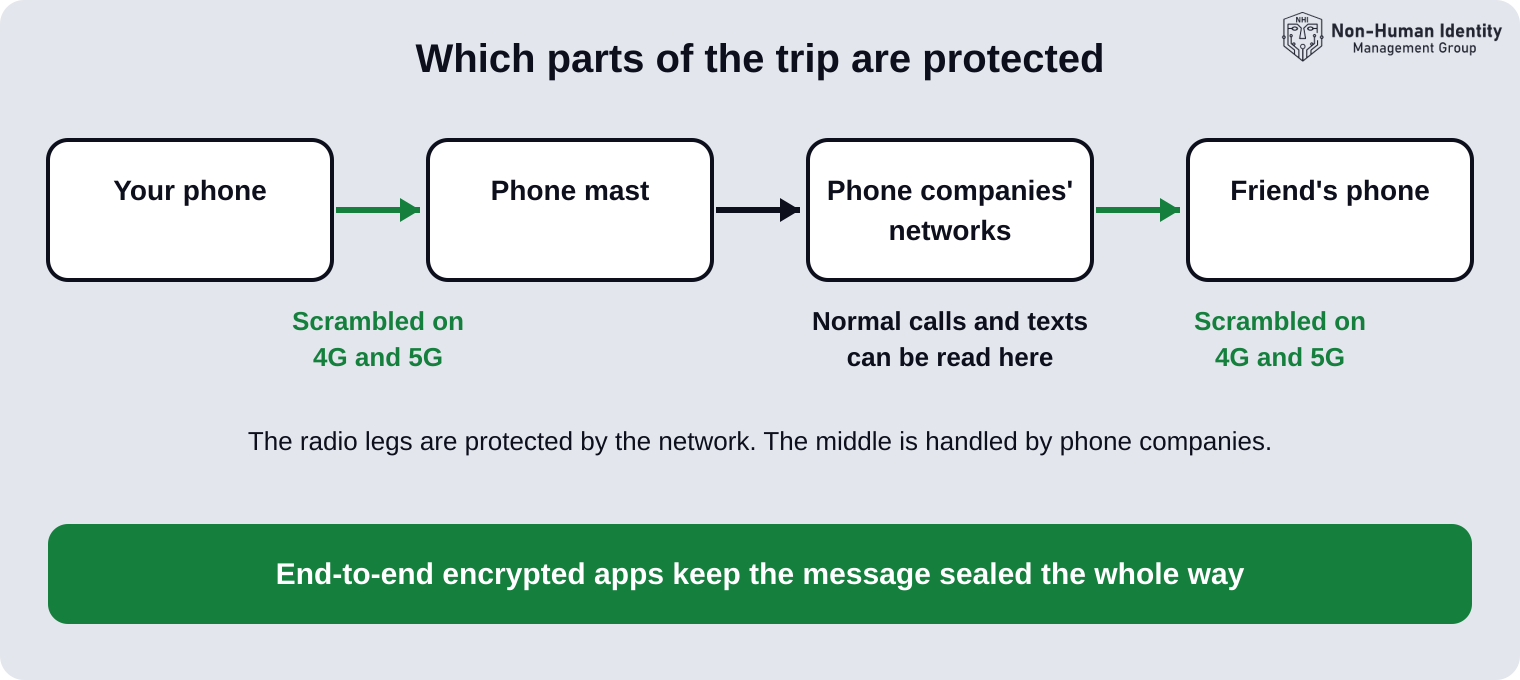
- That protection covers the first leg of the trip. Inside and between phone companies, normal calls and texts are not protected end to end.
- Older 2G networks protect you less, and a fake mast may try to push your phone down to 2G.
- For private chats and login codes, use apps with end-to-end encryption and stronger sign-in methods than text codes where you can.
What you will learn
- Explain which part of a call or text the network protects.
- Spot why a text message code is weaker than other sign-in methods.
- Check the settings on your phone that limit older, weaker networks.
- Ask your phone company what protects your number from being moved.
- Phone mast (base station)
- the tower or box your phone talks to by radio.
- Scrambling (encryption)
- turning a message into code that only the right key can turn back.
- Scrambled the whole way (end-to-end encryption)
- only the sender and the receiver can read the message, not the companies in between.
What is mobile network security?
Think of a sealed tube that carries your letter from your house to the local post office. Nobody in the street can open it on the way.
Mobile networks work in a similar way. When you make a call or send a text, your phone sends it by radio to the nearest mast. On 4G and 5G, that radio link is scrambled with encryption (turning a message into code that only the right key can turn back). Your phone and the network also check each other before they start talking.
After the mast, your call or text travels through your phone company's own network. It may then pass to other phone companies, for example when your friend uses a different provider or when you are abroad. This part of the trip is the network's job too, but you cannot see it or control it.
Where the comparison stops working: at the post office, the letter leaves the tube and is handled by staff. With normal calls and texts, the phone companies can handle your message in the same way. Only apps with end-to-end encryption keep the letter sealed all the way to the reader.
Why does it matter?
Many people treat a text message as private and safe. It is safer than shouting across a room, but it was not built for secrets.
If you get login codes by text
What could happen: a criminal moves your number to their own phone and receives your codes.
Check this: switch important accounts to an authenticator app or a passkey where you can.
If you are a student or new to IT work
What could happen: you assume "the network is encrypted" means nobody can read anything.
Check this: ask which part of the trip a security claim covers.
If you manage a team that travels
What could happen: staff discuss sensitive deals by normal text while abroad, on networks you know little about.
Check this: agree which end-to-end encrypted app the team uses for work chats.
What does it look like?
Here is a made-up scenario card. It follows one text message on its trip.
Example only. All values are made up.
Message: "Your code is 000000" from EXAMPLE-BANK
Leg 1  Phone to mast          scrambled on 4G or 5G   (1)
Leg 2  Inside phone company   readable by the company (2)
Leg 3  Between companies      may pass over old links (3)
Leg 4  Mast to your phone     scrambled on 4G or 5G
If your phone drops to 2G     weaker protection       (4)
- The radio link is protected by the network's own encryption.
- Normal texts are not end-to-end encrypted, so the company handling them can read them.
- Some links between phone companies use older systems that offer no extra protection for texts.
- During an attack, a fake mast may try to push a phone down to 2G, where the checks are weaker.
Why this is risky: a text code is only as safe as every leg of its trip, and the phone number it goes to. Normal voice calls and texts are protected only by the radio link encryption, which the network controls and you cannot see.[1]
The safer way: use an app with end-to-end encryption for private chats. For logins, use an authenticator app or a passkey, so the code never travels as a text.
How does it work?
Here is what happens when your phone joins the network and sends a message.
- The SIM proves who you are. Your SIM card (or eSIM) holds a secret key shared with your phone company. The network uses it to check that you are a real customer.
- The checks go both ways. On newer networks, your phone also checks the network. Old 2G networks lack this two-way check, which makes it easier to fake a mast.[1]
- Your identity is hidden. On 4G, a fake mast called an IMSI catcher can sometimes trick a phone into revealing its customer number.[3] 5G adds a way to send that number in scrambled form, but turning it on is optional for each phone company.[2][3]
- The radio link is scrambled. Calls, texts and data between phone and mast are encrypted. Some networks have been found running with no encryption at all on this link.[1]
- The message crosses the network. Inside and between phone companies, systems pass the message along. Older links between companies, used for texts when roaming, offer no protection for the content.[2]
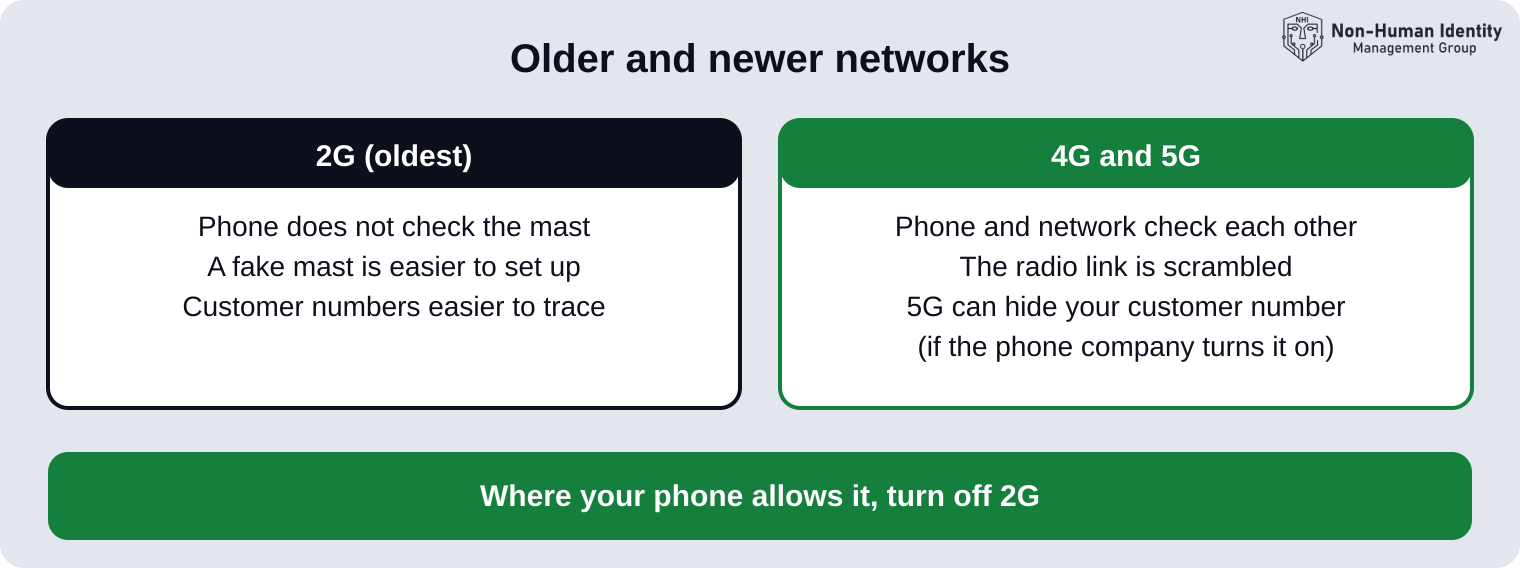
Phone companies are asked to stop phones being pushed down to older, weaker networks without good reason.[2] Some Android phones also let you turn off 2G yourself. Emergency calls are designed to keep working.[1]
A worked example
Odile Whitlock is a student who works weekends at Linden Bakery, a fictional shop. She banks on her phone and gets a code by text each time she logs in.
One evening her bank app asks her to log in again, and no code arrives. Then her phone shows "Emergency calls only". Odile remembers the sealed tube. The tube protects the letter on the road, but it does not help if someone has redirected her post.
She borrows her manager's phone and calls her phone company on the number printed on her bill. They confirm that someone asked for a new SIM in her name an hour earlier. They block it and give her number back.
Next, Odile calls her bank from the number on the back of her card. The bank checks her account and sees a failed login attempt, but no money has moved.
Once things are calm, Odile makes three changes. She sets up an authenticator app for her bank and email instead of text codes. She asks her phone company to add an extra security check before any SIM change. On her Android phone, she turns off 2G in the network settings.
She also moves her group chat with friends to an app with end-to-end encryption. Her manager, Dana Ulrich, asks Odile to show the rest of the bakery team what she changed.
Myths and mistakes
| What people think | What is true |
|---|---|
| My texts are encrypted, so nobody can read them. | Only the radio leg is scrambled. Phone companies can read normal texts as they pass through. |
| 5G fixes every mobile security problem. | 5G adds better protection, but some features are optional for phone companies, and phones can still drop to older networks.[3] |
| A text code is as strong as any other login check. | Text codes can be caught or redirected. A US government guide treats them as a restricted option.[4] |
| Fake masts only matter to spies. | Most people are unlikely to meet one, but turning off 2G is a simple step that reduces the risk. |
| Wi-Fi calling and mobile data are the same as a normal call. | They travel differently. Apps that use end-to-end encryption protect the content whichever route it takes. |
What can I do this week?
- Move your most important accounts from text codes to an authenticator app or a passkey.
- Ask your phone company to add a PIN or extra check before any SIM change or number move.
- Turn off 2G in your phone settings if your phone offers the option.
- Pick one end-to-end encrypted app for private chats with family or colleagues.
- Keep your phone's software up to date.
Checklist
- Important accounts use an authenticator app, a passkey or a security key, not only text codes.
- My phone company account has a PIN or password for SIM changes.
- 2G is turned off where my phone allows it.
- Private conversations happen in an end-to-end encrypted app.
- My phone has its latest security updates.
- I know what to do if my phone suddenly loses signal and shows "Emergency calls only".
- Work teams have agreed which app to use for sensitive chats when travelling.
Common questions
Can someone listen to my mobile calls?
It is unlikely for most people, but it is possible. On 4G and 5G the radio link is scrambled, which protects against casual listeners nearby. Phone companies can still handle normal calls inside their networks, and weak spots exist on older networks. Use an end-to-end encrypted app for calls that must stay private.
Is 5G safer than 4G?
Yes, in several ways. 5G can hide your customer number from fake masts and adds stronger checks inside the network. Some of these features are optional, so how much you gain depends on your phone company and on whether your phone stays on 5G.
Should I turn off 2G on my phone?
Yes, if your phone offers the setting and you live where 4G or 5G coverage is good. It stops your phone joining the weakest network type, which fake masts rely on. Emergency calls are designed to keep working. Turn it back on if you lose signal in remote areas.
Are text message codes still worth using?
Yes, a text code is better than a password alone. It is still one of the weaker second checks, because a number can be moved to another SIM or a message caught. Where an account offers an authenticator app or a passkey, choose that instead. See Authenticator Apps for Beginners.
Is public Wi-Fi safer than mobile data?
Not usually. Mobile data on 4G or 5G is scrambled between your phone and the mast. Public Wi-Fi may have weak or no protection, and you rarely know who runs it. Most websites and apps add their own encryption on top, which helps on both. See Public Wi-Fi Safety for Beginners.
Where next?
Ready for the detail? Read the practitioner guide: 5G Security Guide. It goes further into how 5G hides customer numbers, how network parts trust each other and how roaming links are protected.
Also useful:
- SIM Swap Fraud for Beginners
- Smartphone Security for Beginners
- End-to-End Encryption for Beginners
- Cellular Baseband and IMSI Catcher Guide
- SS7 and Diameter Signalling Security Guide
Related NHI Mgmt Group resources: Telecom Network Security Guide · Mobile Communications Protection for High-Risk Individuals Guide
Key terms
- Encryption
- Turning data into code so only someone with the right key can read it.
- End-to-end encryption
- Encryption where only the sender and receiver can read the message, not the services in between.
- SIM
- The card or built-in chip that holds the secret key linking your phone to your phone company account.
- IMSI catcher
- A fake phone mast that tricks nearby phones into connecting so it can identify or track them.
- SUCI
- The scrambled form of your customer number that 5G can send instead of the real one.
- Downgrade attack
- Forcing a connection onto an older, weaker version so it is easier to attack.
- Signalling
- The behind-the-scenes messages phone networks send each other to set up calls, texts and roaming.
Sources and further reading
- Android 14 introduces first-of-its-kind cellular connectivity security features. Google Security Blog, Google, 8 August 2023. https://security.googleblog.com/2023/08/android-14-introduces-first-of-its-kind.html, accessed 28 Nov 2026.
- 5G Security Guide, FS.40 version 3.0. GSMA, 16 July 2024. https://www.gsma.com/solutions-and-impact/technologies/security/wp-content/uploads/2024/07/FS.40-v3.0.pdf, accessed 28 Nov 2026.
- Protecting Subscriber Identifiers with Subscription Concealed Identifier (SUCI), NIST CSWP 36A. National Institute of Standards and Technology. https://nvlpubs.nist.gov/nistpubs/CSWP/NIST.CSWP.36A.pdf, accessed 28 Nov 2026.
- Digital Identity Guidelines: Authentication and Authenticator Management, SP 800-63B-4, section 3.1.3.3. National Institute of Standards and Technology. https://pages.nist.gov/800-63-4/sp800-63b.html, accessed 28 Nov 2026.