An exploit is a method or piece of code that takes advantage of a weak spot in software.
This guide is for students, newcomers to IT and anyone who reads security news and wants to know what "exploited" means. You do not need to be technical to be affected: whether a weak spot in your software has a working exploit is one of the best clues to how fast you should update.
In short
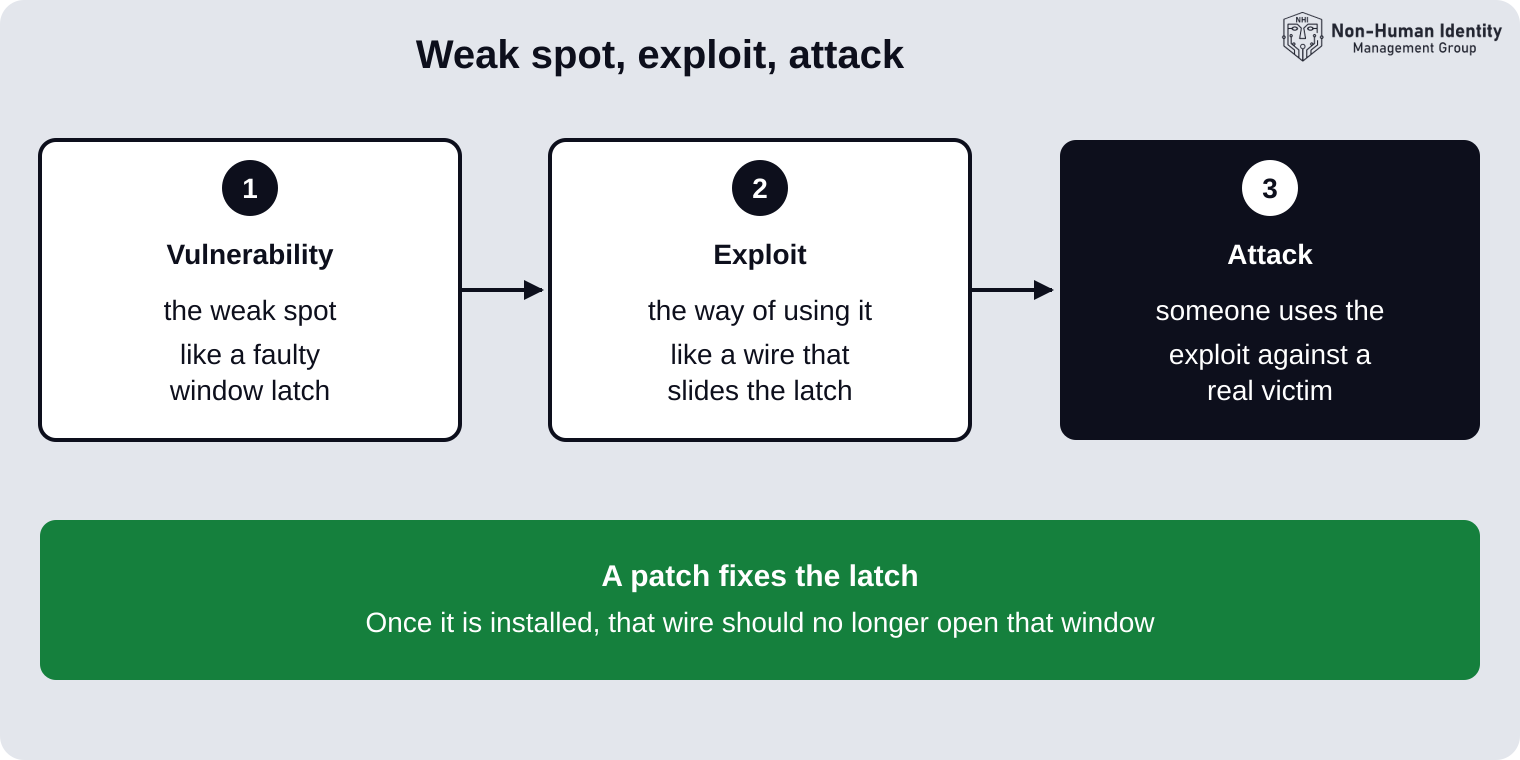
- A vulnerability is the weak spot. An exploit is the way of using it. An attack is someone actually doing it.
- Many weak spots are never used in real attacks. The ones with a working exploit, or seen used "in the wild", need fixing first.
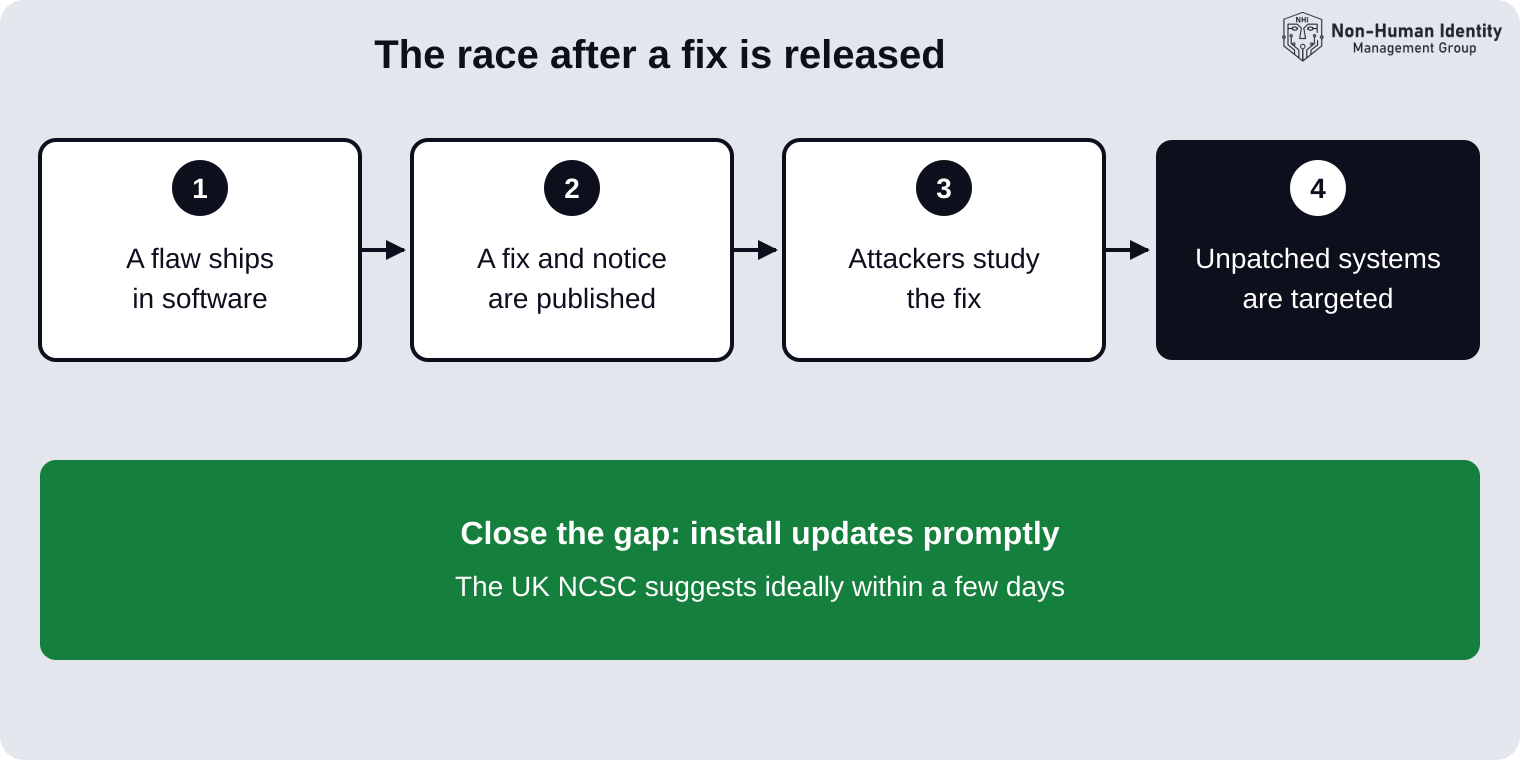
- Once a fix is published, attackers can study it to work out the weak spot, so unpatched systems become easier targets.
- Install updates promptly, and check public lists of flaws known to be used in attacks.
What you will learn
- Explain the difference between a vulnerability and an exploit.
- Spot the words in a security notice that say a flaw is being used.
- Explain why the days after a fix is released matter.
- Check which of your systems to update first.
- Weak spot (vulnerability)
- a mistake or gap in software or settings that an attacker could misuse.
- Way in (exploit)
- a method or piece of code that uses a weak spot to do something it should not.
- Fix (patch)
- an update from the maker that closes a weak spot.
What is an exploit?
Think of a window with a faulty latch. The faulty latch is the weak spot. A bent piece of wire that slides that latch open from outside is the exploit.
In computing, the weak spot is called a vulnerability. The UK's National Cyber Security Centre describes it as a weakness that an attacker can use to carry out a successful attack.[1] It might be a coding mistake, a feature that can be misused, or a setting someone got wrong.[1]
An exploit is the trick, steps or code that turns that weakness into action. It might let someone read files, run their own program or take control of a device. When someone really uses it against a victim, that is an attack.
Where the comparison stops working: a bent wire opens one window at a time. An exploit is software, so it can be copied and run against thousands of computers at once.
Why does it matter?
Most software has some weak spots. Nobody can fix them all at once. If you know which ones have a working exploit, you know what to fix first.
If you run a small organisation
What could happen: an update waits for weeks, and attackers use a known exploit on your system.
Check this: turn on automatic updates. Ask your IT helper how fast urgent fixes go in.
If you are studying security
What could happen: you treat every flaw as just as urgent and waste time on ones nobody uses.
Check this: read the "exploited" line in a security notice first.
If you are new to an IT job
What could happen: you read about an exploited flaw and do not know if it affects you.
Check this: match the product and version in the notice to your own list.
What does it look like?
You will rarely see an exploit itself. What you will see is a security notice from a software maker. Here is a made-up one.
Example only. All values are made up.
Security notice: EXAMPLE-2026-0000
Product:   FakeBooking Server, versions 4.0 to 4.2   (1)
Problem:   a flaw in the login page                  (2)
Impact:    an attacker could run their own code
Exploited in the wild: Yes                           (3)
Fix:       update to version 4.3                     (4)
- The product and the versions that have the flaw.
- The vulnerability: what is wrong, in general terms.
- The key line. "Exploited in the wild" means attackers are already using it against real victims.
- The patch that closes the weak spot.
Why this is risky: a "Yes" on line 3 means a working exploit exists and is in use. Every unpatched server is a possible target.
The safer way: treat "exploited" flaws as the top of your list. Update affected systems first, then work through the rest.[2]
How does it work?
Here is the usual life of a weak spot, from the first mistake to the final fix.
- A mistake ships. A bug or a bad setting ends up in software that lots of people use every day.
- Someone finds it. This might be the maker, a researcher or an attacker. Flaws found first by attackers are called zero days.[1]
- An exploit is built. Researchers may write a harmless test, called a proof of concept, to show the flaw is real. Attackers build tools that use it.
- The fix is released. The maker publishes a patch, along with a notice that explains what it fixes.
- The race starts. Attackers can study the patch to work out what it fixed, then target systems that have not updated.[2]
- The gap closes. Each system that installs the patch is no longer open to that particular exploit.
Public lists help you choose what to fix first. The US cyber defence agency CISA keeps a catalogue of flaws known to have been used in attacks.[3] A scoring system from the security group FIRST estimates how likely a published flaw is to be used in the next 30 days.[4]
Some exploits need you to do something, such as open a file. Others need no action at all. Those are called zero-click exploits, and the practitioner guide covers them.
A worked example
Celia Hollis runs Cedar Tutors, a fictional tutoring company with eight staff. Its online booking system runs on a server looked after by Calla Zeller, a part-time IT helper.
On Tuesday, Calla reads a security notice from the booking software maker. It says versions 4.0 to 4.2 have a flaw in the login page. The line that catches her eye reads "Exploited in the wild: Yes".
Calla explains it to Celia with the window latch picture. "The latch on our booking system is faulty. Someone out there has the wire to open it, and they are trying windows."
Celia asks if they are affected. Calla checks the version number. They run 4.1, so yes.
Calla does not wait for her usual monthly update day. She backs up the system, installs version 4.3 that evening and checks that bookings still work.
Next she looks at the server records for the past two weeks. She finds no strange logins in the records available to her. She notes what she checked in case questions come up later.
Finally, Celia and Calla agree a simple rule. Fixes for flaws marked "exploited" go in within a few days, while other fixes keep to the monthly plan.[2]
Myths and mistakes
| What people think | What is true |
|---|---|
| A vulnerability and an exploit are the same thing. | The vulnerability is the weak spot. The exploit is the way of using it. |
| Every vulnerability is being used by attackers. | Many are never used. Those known to be exploited deserve attention first.[3] |
| Once a fix is out, the danger is over. | The danger can rise, because attackers study fixes to find unpatched systems.[2] |
| Only big companies get exploited. | Exploit tools can scan the internet for any unpatched system, whatever its size. |
| A high severity score is all I need to check. | Also check whether the flaw is being exploited and whether you run the affected version. |
What can I do this week?
- Turn on automatic updates on your phone, laptop and browser.
- List the main software your organisation runs, with version numbers.
- Look up two of them in CISA's catalogue of exploited flaws.
- Agree how fast "exploited" fixes go in, for example within a few days.
Checklist
- Automatic updates are on wherever they are safe to use.
- There is a list of key software and versions.
- Someone reads security notices for that software.
- Flaws marked as exploited are fixed first.
- Urgent fixes have a faster route than the normal update cycle.
- After an urgent fix, someone checks the records for signs of misuse.
- Systems that cannot be updated have a plan, such as taking them offline or limiting access.
Common questions
What is the difference between a vulnerability and an exploit?
A vulnerability is the weak spot, such as a coding mistake. An exploit is the method or code that uses that weak spot to do something harmful. A vulnerability can exist for years without anyone writing an exploit for it.
What does "exploited in the wild" mean?
It means attackers have been seen using the flaw against real victims, not just in a lab. It is a strong sign to update quickly. Security notices and CISA's catalogue of exploited flaws both use this idea.
What is a proof of concept?
A proof of concept is a small test that shows a flaw is real. Researchers write one to prove their finding. Once public, attackers may adapt it into a working attack tool, which is one reason fixes become more urgent.
Is writing exploits illegal?
Not always. Security researchers and penetration testers write exploits with permission to test systems. Using one against a system you do not own or have permission to test can be a crime in many countries. See Penetration Testing for Beginners.
How is a zero day different?
A zero day is a flaw that attackers use before the maker knows about it or has a fix. With other flaws, a patch usually exists. See Zero Day Vulnerabilities for Beginners.
Where next?
Ready for the detail? Read the practitioner guide: Zero-Click Exploits Guide. It goes further into exploits that need no action from the victim, how to spot signs of them and how to protect high-risk devices.
Also useful:
- Zero-Day and Exploited Vulnerabilities Guide
- Exploit Mitigations Guide
- Vulnerability Management for Beginners
- Patch Management for Beginners
- Zero Day Vulnerabilities for Beginners
Related NHI Mgmt Group resources: Exploited Vulnerability Breaches · Patch Management Guide · Bug Bounties for Beginners
Key terms
- Vulnerability
- A weakness in software, hardware or settings that an attacker could misuse.
- Exploit
- A method or piece of code that takes advantage of a vulnerability.
- Patch
- An update from the maker that fixes a flaw.
- Proof of concept
- A small test that shows a flaw is real and can be used.
- Zero-day
- A flaw attackers use before the maker knows about it or has a fix.
- CVE
- A public ID number given to a known security flaw so everyone can refer to it.
- Known exploited vulnerability
- A flaw that attackers have been seen using in real attacks.
Sources and further reading
- Vulnerability management: understanding vulnerabilities. National Cyber Security Centre (UK). https://www.ncsc.gov.uk/collection/vulnerability-management/understanding-vulnerabilities, accessed 28 Nov 2026.
- Device security guidance: keeping devices and software up to date. National Cyber Security Centre (UK). https://www.ncsc.gov.uk/collection/device-security-guidance/managing-deployed-devices/keeping-devices-and-software-up-to-date, accessed 28 Nov 2026.
- Known Exploited Vulnerabilities (KEV) catalog data. Cybersecurity and Infrastructure Security Agency (CISA), GitHub mirror managed by CISA. https://github.com/cisagov/kev-data, accessed 28 Nov 2026. Catalogue page: https://www.cisa.gov/known-exploited-vulnerabilities-catalog.
- Exploit Prediction Scoring System (EPSS). FIRST. https://www.first.org/epss/, accessed 28 Nov 2026.