A group managed service account (gMSA) is a Windows service account whose password Windows creates and changes by itself.
This guide is for new IT staff, students and anyone who looks after a Windows network. You do not need to be an expert to be affected: if your business runs its own servers, some programs on them almost certainly use service accounts.
In short
- A service account is an account a program uses to do its job without a person. It is one kind of non-human identity.
- Old-style service accounts often have a password a person typed in years ago and has not changed since.
- A gMSA has a long random password that Windows changes every 30 days, so nobody needs to know it.
- Use a gMSA wherever the program supports it, and keep its access small.
What you will learn
- Explain what a gMSA is in one sentence.
- Spot a service account with an old, typed-in password.
- Explain how Windows hands the password only to approved servers.
- Ask the right questions before moving a program to a gMSA.
- Program's account (service account)
- an account a program uses to sign in and do its work, with no person behind it.
- Self-changing password (managed password)
- a password the system makes up and replaces on a schedule, so no person has to.
- Central sign-in server (domain controller)
- the server that holds a Windows network's accounts and checks sign-ins.
What is a group managed service account?
Think of a key safe on a wall that changes its own code every month. Only a few named vans may collect the key. No driver ever learns the code.
A gMSA does the same job for programs on a Windows network. A service account is an account a program uses to run, such as a backup tool or a stock app. It is one type of non-human identity (NHI). An NHI is a digital identity, or the credential behind it. It lets a machine, app, service or AI agent connect to systems and do tasks without a person.[4]
With an ordinary service account, a person picks the password and types it into each server. With a gMSA, Windows handles the password for you, even when the program runs on several servers.[1] Microsoft describes the password as a 240-byte random value that Windows changes every 30 days.[2]
The "group" part means one account can serve a group of servers. Windows also has an older single-server version, called a standalone managed service account.[2]
Where the comparison stops working: a key safe sits in one place. A gMSA password is worked out on demand by the central sign-in server, and each approved server asks for it over the network.
Why does it matter?
Service accounts often have wide access. Their passwords are often never changed. If an attacker gets such a password, they can act as the program. Joint advice from several government cyber agencies says to use gMSAs for many service accounts. One reason is that long random passwords are very hard to crack.[3]
If you are new to IT work
What could happen: you are asked to share a service account password in a ticket, and it is copied far and wide.
Check this: ask which service accounts could become gMSAs, so nobody needs the password at all.
If you run a small business
What could happen: a former IT contractor still knows the password your backup tool uses.
Check this: ask your IT supplier which programs still run with a typed-in password, and when it last changed.
If you are studying security
What could happen: you meet weak service account passwords in almost every Windows attack lab.
Check this: learn why a long random password beats a cracking attack, and where gMSAs fit.
What does it look like?
Here is a made-up settings card for a program on a Windows server, before and after a move to a gMSA.
Example only. All values are made up.
Program:          StockSync (EXAMPLE)
BEFORE
Runs as:          EXAMPLE\svc-stocksync        (1)
Password:         FAKE-Summer2019-0000          (2)
Last changed:     2019                          (3)
AFTER
Runs as:          EXAMPLE\gmsa-stocksync$      (4)
Password:         (left blank, Windows fetches it)  (5)
- An ordinary service account, set up by a person.
- In a real file, this line would contain a password a person chose and typed in.
- The password has not changed for years, so anyone who once knew it may still be able to use it.
- The gMSA name ends in a dollar sign, like a computer account in Windows.
- Nobody types a password. Windows gets it from the central sign-in server.
Why this is risky: the old password is short and old. People know it. It may be in a spreadsheet or an old ticket.
The safer way: run the program as a gMSA. Allow only the servers that need it. Give the account only the access the program needs.
How does it work?
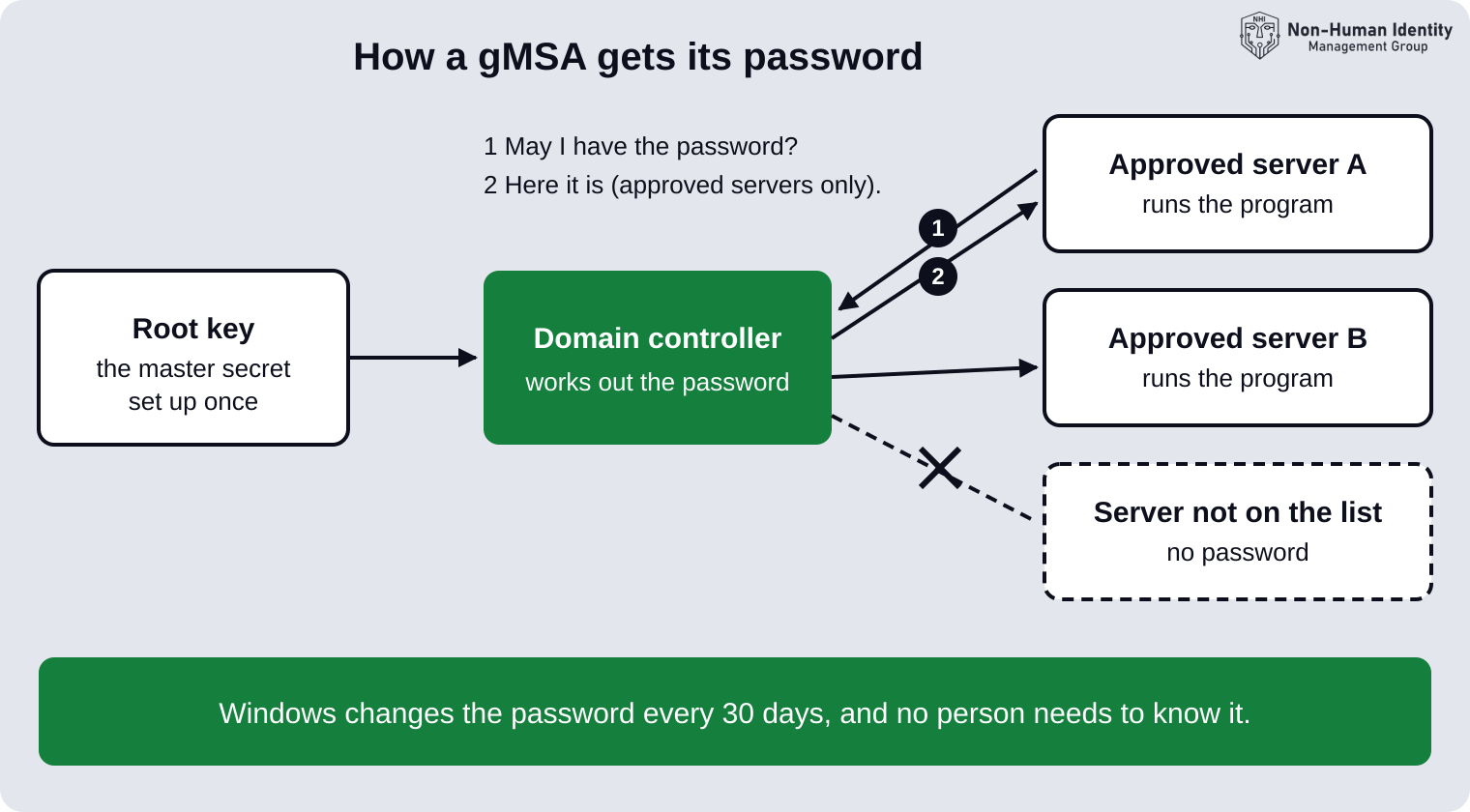
Here is a simple version of what happens behind the scenes.[1]
- A master secret is set up once. An administrator creates a root key for a Windows service called the Key Distribution Service. It is the starting point for gMSA passwords.
- The account is created. The administrator creates the gMSA and lists which servers may use it.
- A server asks for the password. When the program starts, its server asks a domain controller for the current password.
- The domain controller works it out. It calculates the password from the root key and details of the account, and gives it only to approved servers.
- The password changes by itself. On schedule, a new password is worked out. Approved servers can get both the current and the previous one, so nothing breaks during the change.
A gMSA works on Windows Server 2012 and later. Microsoft notes that some services do not support it, such as failover clustering. In that case, a standalone managed service account may fit for a single server. Otherwise, use a normal account with strong password care.[1][2]
The weak spots move rather than disappear. Anyone allowed to fetch the password, or anyone who can reach the root key, holds power over the account. The practitioner guide covers these points.
A worked example
Calla Jensen has just joined Fernbrook Logistics, a fictional delivery firm, as its second IT person. Her first job is to tidy up the servers.
She finds a stock app that runs as an ordinary service account. The password was set in 2019 by a contractor who has since left. It sits in a shared spreadsheet that twenty people can open.
Calla remembers the key safe that changes its own code. She wants this account to work the same way.
First, she checks the app supplier's notes. They say the app supports gMSAs. She asks her manager, Yusuf Osei, for approval to make the change in a quiet hour.
Yusuf checks that the network's root key already exists. Calla then creates a gMSA for the stock app. She lists only the two servers that run it.
Next, she looks at what the old account could reach. It was in a powerful admin group it did not need. She gives the new account access only to the stock database and one shared folder.
She tests the change on one server first. The app starts and syncs as normal, so she moves the second server too.
A week later, she switches off the old account and removes the password from the spreadsheet. She records the change, the owner and the two approved servers. Nobody at Fernbrook now knows the stock app's password, and nobody needs to.
Myths and mistakes
| What people think | What is true |
|---|---|
| A gMSA means the account is safe, whatever it can reach. | The password is safer, but the access still matters. Microsoft advises removing gMSAs from powerful groups they do not need.[2] |
| Every program can use a gMSA. | Some cannot. Check the supplier's notes and test first, as Microsoft advises.[2] |
| Somebody in IT still knows the password. | No person needs to. Approved servers fetch it from a domain controller when they need it. |
| Creating the gMSA finishes the job. | Switch off the old account and delete stored copies of its password, or the old risk stays. |
| Any server can ask for the password. | Only servers on the account's approved list should get it. Keep that list short. |
What can I do this week?
- List the service accounts on your Windows servers and when each password last changed.
- Ask each program's supplier whether it supports gMSAs.
- Pick one low-risk program and plan a tested move to a gMSA.
- Check which powerful groups your service accounts belong to, and question each one.
Checklist
- Every service account has a named owner.
- Programs that support gMSAs run as gMSAs.
- Each gMSA lists only the servers that truly need it.
- No gMSA sits in a powerful admin group it does not need.
- Old service accounts are switched off once the move is tested.
- Old passwords are removed from spreadsheets, tickets and scripts.
- Accounts that cannot move yet are on a written list with a review date.
Common questions
Is a gMSA the same as a normal service account?
Nearly. Both let a program sign in and do its job. The difference is the password. A normal service account has a password a person sets. A gMSA has a long random password that Windows creates and changes by itself every 30 days.
What does the word group mean here?
It means one account can be used by a group of servers. That suits a program that runs on several servers at once. Windows also has an older standalone version that works on one server only.
Can I see or type the gMSA password?
You do not need to. Approved servers fetch the password from a domain controller when they need it. That is the point: with no person handling it, there is no password to share, forget or leave in a spreadsheet.
What if my program does not support gMSAs?
Ask the supplier whether a newer version does. Microsoft suggests a standalone managed service account for a single server. If neither works, use a normal account with a long, unique password, a named owner and a regular change.
Does a gMSA work in the cloud?
A gMSA belongs to a Windows network run with Active Directory, usually on your own servers. Cloud platforms have their own ways to give programs an identity without stored passwords. Microsoft suggests looking at those if you move a service to the cloud.
Where next?
Ready for the detail? Read the practitioner guide: Group Managed Service Accounts (gMSA) Guide. It goes further into who may fetch the password, how to protect the root key and how newer delegated accounts compare.
Also useful:
- Service Accounts for Beginners
- How to convert AD service accounts to gMSA
- Kerberoasting for Beginners
- Active Directory for Beginners
- NHI Foundation Level Training
Related NHI Mgmt Group resources: Rotating a Windows or Linux Service Account Password · How to build a service account inventory from Active Directory · Non-Human Identities for Beginners
Key terms
- Group managed service account
- A Windows service account whose long random password Windows creates and changes by itself.
- Service account
- An account a program uses to sign in and do its work, rather than a person.
- KDS root key
- The master secret Active Directory uses to work out managed service account passwords.
- Domain controller
- The central server that holds a Windows network's accounts and checks sign-ins.
- Least privilege
- Giving each person or program only the access it needs, and no more.
- Active Directory service account
- An account in a Windows network created to run a service, task or app, not tied to a person.
Sources and further reading
- Group Managed Service Accounts overview. Microsoft Learn, Microsoft. https://learn.microsoft.com/en-us/windows-server/identity/ad-ds/manage/group-managed-service-accounts/group-managed-service-accounts/group-managed-service-accounts-overview, accessed 28 Nov 2026.
- Secure group managed service accounts. Microsoft Learn (Microsoft Entra architecture), Microsoft. https://learn.microsoft.com/en-us/entra/architecture/service-accounts-group-managed, accessed 28 Nov 2026.
- Detecting and mitigating Active Directory compromises. Australian Signals Directorate's Australian Cyber Security Centre with CISA, NSA, the Canadian Centre for Cyber Security, NCSC-UK and NCSC-NZ, first published September 2024, updated September 2026. https://www.cyber.gov.au/sites/default/files/2026-11/Detecting%20and%20mitigating%20Active%20Directory%20compromises%20%28September%202026%29.pdf, accessed 28 Nov 2026.
- Non-Human Identities for Beginners: The Machine and AI Identities Behind Every App. NHI Mgmt Group, 28 November 2026. https://nhimg.org/what-are-non-human-identities-beginners-guide.