Google dorking means using search filters to find files and pages a website never meant to show.
This guide is for anyone who runs, owns or pays for a website and wants to know what search engines can see. You do not need to be technical to be affected: a forgotten price list, staff rota or test page can turn up in search results for anyone to find.
In short
- Search engines list whatever they can reach on your website, including files you forgot were there.
- Search filters, such as one that limits results to a single website, make those files easy to find.
- Criminals use this to find leaked documents, passwords and test pages. Defenders use it to find them first.
- The fix is to remove or lock away the file, then ask the search engine to drop it. A robots.txt file does not hide anything.
What you will learn
- Explain what Google dorking is in one sentence.
- Spot the kinds of forgotten files that search engines often list.
- Check what a search engine shows for your own website.
- Ask your web team how unwanted files are removed, not just hidden.
- Search filter (search operator)
- a special word you add to a search to narrow the results, such as to one website or one file type.
- Search engine list (index)
- the huge list of pages and files a search engine has found and stored, ready to show in results.
- Gathering information first (reconnaissance)
- the early stage of an attack, when someone collects public facts about a target.
What is Google dorking?
Think of a big public library with a catalogue. Anything left in the reading room gets catalogued, even a private letter someone forgot on a desk. Anyone who knows how to use the catalogue's filters can find it.
A search engine's index works in a similar way. Automatic programs called crawlers visit websites and follow links. They add what they find to the search engine's list, unless the site owner has told them not to or locked it away.
Google dorking is using a search engine's filters to dig out the odd items in that list. Google documents filters that limit results to a single website, or to one file type, like PDFs.[1] The name comes from slang, but the method works on other search engines too.
Where the comparison stops working: a librarian might notice the private letter and put it away. A search engine does not judge what should be private. If it can reach a file, it may list it.
Why does it matter?
Search engines can show things owners never meant to share. Examples include passwords, setup files, error messages and test copies of websites.[2] Attackers use such searches early, to find weak spots.[3]
If you run a small business website
What could happen: an old staff list or customer spreadsheet uploaded years ago still shows up in search.
Check this: search for your own website's pages and files, and look for anything you do not recognise.
If you build websites for clients
What could happen: a test copy of a client's site, with its admin page, is listed in search results.
Check this: put a password on every test or staging site before it goes online.
If you are learning security
What could happen: you open a file you found through search and step into someone else's private data.
Check this: practise only on your own sites, or with written permission from the owner.
Next: OSINT for Beginners
What does it look like?
Here is a made-up results page for a small firm that has searched its own website, to see what the search engine lists.
Example only. All values are made up.
Results from example.com only

Example Ltd - Home                    example.com/
Contact us                            example.com/contact
staff-rota-2019.xlsx                  example.com/files/staff-rota-2019.xlsx   (1)
Index of /backup                      example.com/backup/                      (2)
EXAMPLE Ltd TEST SITE - admin page    test.example.com/admin                   (3)
- In a real file, this line would contain a link to an old spreadsheet, perhaps with staff names.
- A folder listing. In a real file, this line would contain a link to a page showing every file in the folder.
- A test copy of the website with its admin page open to anyone who finds it.
Why this is risky: anyone can run the same search. The firm did not mean to publish the last three items. A folder that lists its own files is called a directory listing, and it can give away many files at once.
The safer way: delete or move files that should not be public, turn off folder listings, and put a password on test sites. Then ask the search engine to remove the old results.[5]
How does it work?
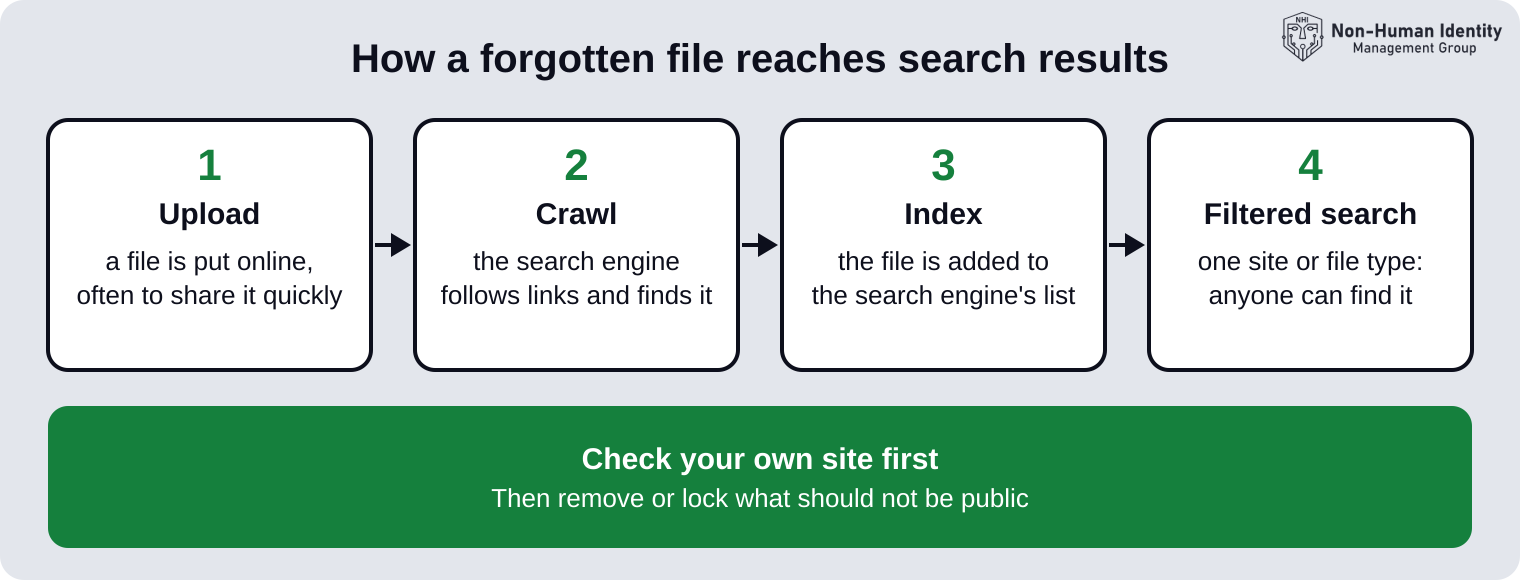
Here is how a forgotten file ends up in someone else's search results.
- The upload. Someone puts a file on the website, or links to it, often as a quick way to share it.
- The crawl. A search engine's crawler finds the file by following links, and adds it to the index.
- The filter. Someone searches with filters, such as one website plus one file type, which narrows millions of results to a few.[1]
- The find. The forgotten file appears in the results, and anyone can open it.
- The fix. The owner removes or locks the file, then asks the search engine to drop the old result.[5]
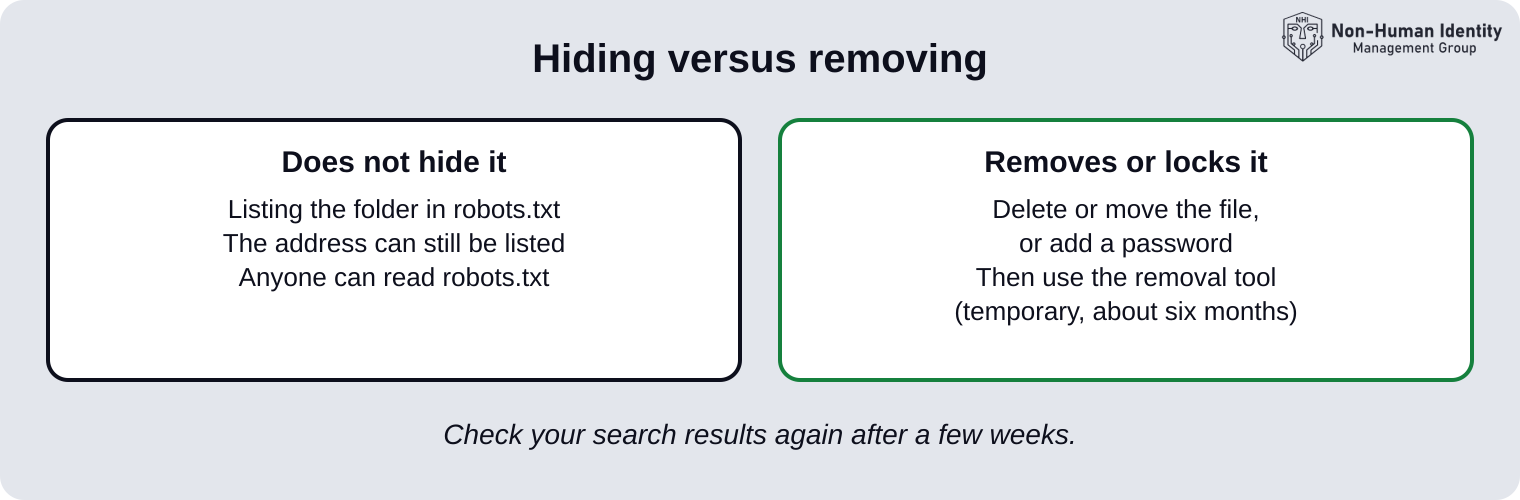
Many people think a small file called robots.txt hides pages. It does not. Google says robots.txt is not a way to keep a page out of its results. A blocked address can still be listed if other websites link to it.[4] Anyone can also read a site's robots.txt file, so listing secret folders there can point people straight to them.
To keep a page out of results, Google suggests a noindex instruction or a password. To remove something you own, the most secure way is to remove or change the content on your site. Google's removal tool in its Search Console is a quick, temporary step: requests last about six months, so pair it with a lasting fix.[5]
A worked example
Gita Quist runs a fictional accountancy practice in Bristol with eight staff. Bodhi Okafor, a freelance web designer, built and looks after its website.
Gita reads about forgotten files showing up in search, and asks Bodhi to check their own site with her. He searches using the filter that limits results to their website only.
Most results are normal pages. Two are not. One is a price list PDF from 2020 with old client names on it. The other is a test copy of the site Bodhi set up last spring, with its admin page showing.
Gita thinks of the library. The papers were left in the reading room, and the catalogue did the rest.
They act in order. First, Bodhi deletes the old PDF from the website. Next, he puts a password on the test site, so it can no longer be opened by strangers or crawled.
Then he uses Google Search Console to ask for both results to be removed quickly. He knows that this request is temporary, so the deletion and the password are the lasting fixes.[5]
Gita asks whether they should add the folders to robots.txt. Bodhi explains that this would not hide them, and that anyone can read that file.[4]
Because the PDF held client names, Gita also asks for advice on whether the exposure needs reporting. She adds a check of the site's search results to the practice's quarterly to-do list.
Myths and mistakes
| What people think | What is true |
|---|---|
| Google dorking is hacking. | It is searching. Using what you find to get into systems or data without permission is a different matter, and can be a crime. |
| If no page links to a file, nobody can find it. | Crawlers can find files through links elsewhere, old pages and folder listings. Assume anything on a public server may be found. |
| robots.txt hides private pages. | It is not a way to keep pages out of results, and anyone can read it.[4] |
| A removal request deletes the file. | It only hides the result for a while. The file stays on your site until you remove it.[5] |
| We checked once, so we are fine. | New files and pages appear all the time. Check regularly, for example every few months. |
What can I do this week?
- Search for your own website's pages and look for files or pages you do not recognise.
- Ask your web team whether any test or staging sites are online without a password.
- Ask whether folder listings are switched off on your web server.
- Set up Google Search Console for your site, if you have not already, so you can see and remove results.
- Add a repeat check of your search results to your calendar.
Checklist
- We have searched our own website and reviewed every file type that appears.
- No staff, customer or financial files sit on the public website.
- Test and staging sites need a password.
- Folder listings are switched off on our web servers.
- We do not rely on robots.txt to hide anything.
- We know how to remove a file and then request removal from search results.
- Someone owns a regular check of what search engines show about us.
Common questions
Is Google dorking legal?
In most places, the search itself is not the problem. What matters is what you do next. Using private data or systems without permission can break the law. Practise on your own sites, or with the owner's written permission, and report anything sensitive you stumble on.
Why is it called dorking?
It is informal slang from the security community. You will also see it called Google hacking. It is not limited to Google. Most search engines have similar filters, so defenders often check several.
How do I see everything Google has listed for my site?
Use Google Search Console. A filtered search gives a quick picture, but Google notes that filters have limits. Search Console's own tools give a more reliable view.[1] See Search Console Security Alerts for Beginners.
What if a password shows up in search results?
Change that password straight away, at the service it belongs to. Then remove the file and ask for the result to be removed. Removing the result alone is not enough, because someone may already have copied it. Check the account's records for sign-ins you do not recognise.
Can I remove my information from someone else's website?
Not directly, because you do not control their site. Ask the site owner first. Google also has a separate help process for removing some personal information from its results, which is different from the tools for your own site.[5]
Where next?
Ready for the detail? Read the practitioner guide: Search Engine Dorking for Defenders Guide. It goes further into the search filters that matter, what to look for across your domains, and how to run a regular defensive dorking programme.
Also useful:
Related NHI Mgmt Group resources: Attack Surface Management Guide · Accidental Data Leaks for Beginners · Website Security for Beginners
Key terms
- Google dorking
- Using search filters to find information a website did not mean to make easy to find.
- Search engine indexing
- How a search engine finds pages and files and adds them to its list so they can appear in results.
- robots.txt
- A public file that asks search engine crawlers which parts of a site to skip. It does not hide anything.
- Noindex
- An instruction in a page that asks search engines not to show it in results.
- Directory listing
- A web server setting that shows every file in a folder when no web page is there.
- Google Search Console
- A free Google service that shows site owners how Google sees their website.
- Reconnaissance
- The early stage of an attack, when someone collects public facts about a target.
Sources and further reading
- Google Search operators. Google Search Central documentation, Google. https://developers.google.com/search/docs/monitor-debug/search-operators, accessed 28 Nov 2026.
- Conduct Search Engine Discovery Reconnaissance for Information Leakage. OWASP Web Security Testing Guide v4.2, OWASP Foundation. https://wstg.owasp.org/v4.2/4-Web_Application_Security_Testing/01-Information_Gathering/01-Conduct_Search_Engine_Discovery_Reconnaissance_for_Information_Leakage/, accessed 28 Nov 2026.
- Search Open Websites/Domains: Search Engines (T1593.002). MITRE ATT&CK, The MITRE Corporation. https://attack.mitre.org/techniques/T1593/002/, accessed 28 Nov 2026.
- Introduction to robots.txt. Google Search Central documentation, Google. https://developers.google.com/search/docs/crawling-indexing/robots/intro, accessed 28 Nov 2026.
- Remove information from Google. Google Search Central documentation, Google. https://developers.google.com/search/docs/crawling-indexing/remove-information, accessed 28 Nov 2026.