An accidental data leak is when information reaches the wrong person by mistake, not by an attack.
This guide is for anyone who sends emails, shares files or handles other people's details at work. You do not need a technical job to cause or fix one: most slips come from ordinary tasks done in a hurry.
In short
- Most accidental leaks are everyday slips: the wrong email address, the wrong attachment or a file shared too widely.
- Undo and recall buttons help only in some cases, and only if you act fast.
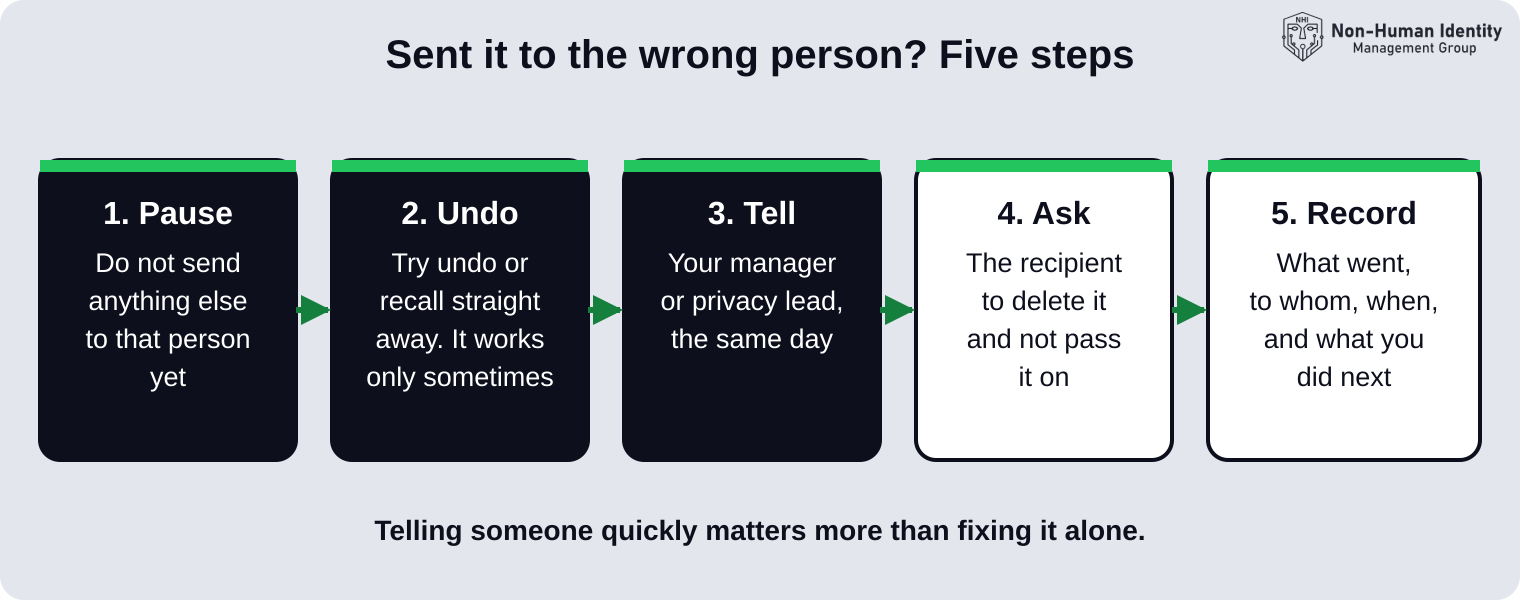
- If you send something to the wrong person, tell your manager or privacy lead the same day. Organisations may have a legal deadline to report some leaks.
- A pause before Send, Bcc for group emails and sending less data make many slips less likely.
What you will learn
- Explain what counts as an accidental data leak.
- Spot the slips that cause most of them.
- Know the first steps if you send something to the wrong person.
- Check three settings and habits that make slips less likely.
- Email to the wrong person (misdirected email)
- an email, often with an attachment, sent to someone who should not have it.
- Personal details (personal data)
- any information about a person who can be identified, such as a name, address or health note.
- Hidden copy (Bcc)
- a way to send one email to many people without showing them each other's addresses.
What is an accidental data leak?
Think of a letter pushed through the wrong door. The letter is fine and the post worked. It simply landed with the wrong neighbour, who can now read it.
An accidental data leak is the same slip with information. Nobody broke in. Someone at work sent, shared or left data where the wrong person could see it.
Common examples are an email to the wrong "Ama" or a spreadsheet with a hidden tab of customer details. Another is a shared folder link that anyone can open. Under UK data protection law, a personal data breach includes personal data seen by the wrong person, whether by accident or on purpose.[1]
Where the comparison stops working: a neighbour can hand a letter back. An email or file can be copied, forwarded or saved before you even notice the mistake.
Why does it matter?
A slip can hurt the people whose details went astray, and it can cost the organisation trust. Choose the card that fits you.
If you work in an office
What could happen: a payslip, medical note or complaint reaches a colleague or stranger who should not see it.
Check this: do you know who to tell if you send something to the wrong person?
If you run a small business
What could happen: one group email that shows every customer's address leads to complaints and a report to the regulator.
Check this: does anyone on your team send group emails with all addresses in the To line?
Next: GDPR for Beginners
If you manage a team
What could happen: staff hide a slip because they fear blame, so nobody acts in time.
Check this: have you told your team that reporting a mistake quickly is the right thing to do?
What does it look like?
Example only. All values are made up.
From:    [email protected]
To:      [email protected]            (1)
Subject: Re: March invoices
Attached: clients_ALL_FAKE.xlsx (3 tabs)        (2)

Hi Ama, here are the invoices you asked for.
To: [email protected]; [email protected];
    [email protected] ... (40 more)       (3)
- Autofill picked a different Ama from an old thread, outside the company.
- The file has three tabs. In a real file, the hidden tabs could hold every client's name and bank details.
- A second email where every parent can see every other parent's address.
Why this is risky: each line looks normal while you type. Once you press Send, the wrong person may already have the data.
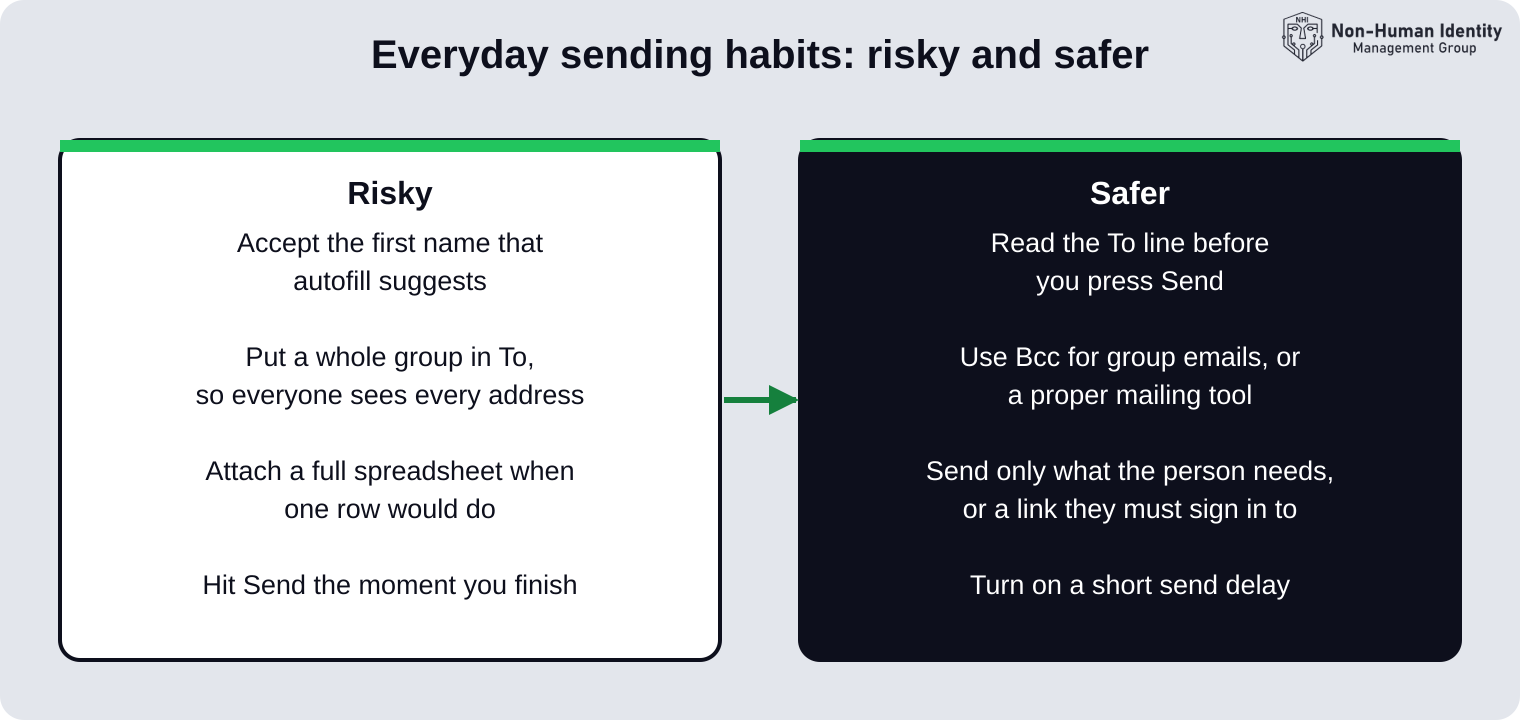
The safer way: check the To line, send only the one invoice needed, and put group addresses in Bcc or use a mailing tool.
How does it work?
Most slips follow the same short path.
- A busy moment. You are rushing, on your phone or doing several things at once.
- The tool helps too much. Autofill, the feature that guesses an address as you type, suggests the wrong person, or a share button offers "anyone with the link".
- Too much goes out. A whole spreadsheet or folder is sent when one line would do.
- The message lands. Once it reaches another mail system, you usually cannot pull it back.
- The response decides the damage. Telling someone quickly gives the organisation time to contain it and decide whether to report it.
Undo and recall tools can help, but only in some cases. Gmail's Undo Send lets you cancel within a delay you choose: 5, 10, 20 or 30 seconds.[2] Outlook's recall needs you and the recipient to have work or school accounts in the same organisation. The message must also be unopened.[3]
A worked example
This story is made up to show how it can happen.
Dev Young works in the office of a small charity in Manchester. On Friday afternoon he is sending the monthly volunteer rota.
He types "Ama" in the To line. Autofill offers Ama, a supplier he emailed last year, not Ama the volunteer lead. He attaches the rota and presses Send.
A minute later he sees the mistake. The rota lists forty volunteers with their phone numbers and two short notes about health needs.
Dev's charity uses work accounts, but the supplier is outside the organisation. He checks the recall option, but it does not apply to an outside address. So he stops trying to fix it alone.
He tells his manager within ten minutes. She contacts the supplier by phone. The supplier agrees to delete the email and confirms it in writing.
She writes down what was sent, to whom and when. The charity's privacy lead then weighs the risk to the volunteers, using the regulator's guidance, and decides whether it needs reporting.[1]
The next week the charity turns on a short send delay for everyone. It also moves the rota to a shared folder that only volunteers can open.
What made the difference: Dev spoke up straight away. That gave the charity time to contain the slip and make a calm decision.
Myths and mistakes
| What people think | What is true |
|---|---|
| Recall will fix it. | Recall works only in narrow cases, such as the same organisation and an unopened message.[3] Treat it as a bonus, not the plan. |
| If nobody notices, it is better to say nothing. | Hiding a slip uses up the time your organisation may need. In the UK, some breaches must be reported to the regulator within 72 hours of becoming aware of them, where feasible.[1][4] |
| It was only one email, so it is not a real leak. | One email can hold hundreds of people's details. The size of the risk depends on what was in it and who got it. |
| Every slip has to be reported to the regulator. | Not always. The organisation weighs the likely risk to the people affected, then decides.[1] |
| Hidden tabs and columns are hidden. | Anyone who opens the file can unhide them. Delete what the person does not need before you send. |
What can I do this week?
- Turn on a send delay in your email, if your organisation allows it.
- Find out who you should tell if you send something to the wrong person, and save their contact details.
- Clear old or wrong suggestions from your email autofill list.
- Before sending a file, check for hidden tabs and remove data the person does not need.
- Check your shared links. Change any set to "anyone with the link" that holds personal details.
Checklist
- I read the To, Cc and Bcc lines before I press Send.
- I use Bcc or a mailing tool for emails to large groups.
- I send only the data the person needs.
- I check files for hidden tabs, columns and comments before sharing.
- My shared links with personal details need a sign-in.
- I know who to tell if I make a slip, and I tell them the same day.
- I write down what went, to whom and when.
Common questions
What do I do if I sent an email to the wrong person?
Try undo or recall straight away, then tell your manager or privacy lead the same day. Do not email the person again on your own. Your organisation can ask them to delete it, record what happened and decide whether it needs reporting.
Will I get into trouble for reporting my mistake?
Reporting quickly is usually the best thing you can do. Many organisations treat a fast, honest report very differently from a hidden one. The early warning gives them time to limit the harm and meet any legal deadline.
Does asking the recipient to delete it solve the problem?
It helps, but it is not the whole answer. Most people will delete it if asked politely. Your organisation should still record the slip and weigh the risk, because the data may already have been read, forwarded or saved.
Is putting everyone in Cc a data leak?
It can be. Each person sees everyone else's email address, and an address can identify a person. If the group itself is sensitive, such as patients of one clinic, that adds to the risk. Use Bcc or a proper mailing tool.
Is an accidental leak the same as a hack?
No. A hack means someone broke in on purpose. An accidental leak is a mistake by someone allowed to handle the data. Both can count as a breach, and both may need the same careful response.
Where next?
Ready for the detail? Read the practitioner guide: Misdirected Email and Email Recall. It goes further into how recall works in each email platform, organisation-wide prevention settings and a step-by-step response process.
Also useful:
- Accidental Data Disclosure Response Playbook
- Data Breach Notification for Beginners
- Data Loss Prevention for Beginners
- Email Security for Beginners
Related NHI Mgmt Group resources: Data Privacy for Beginners · Data Classification for Beginners · UK GDPR for Beginners
Key terms
- Misdirected email
- An email sent to the wrong person by mistake, often because of autofill or a similar name.
- Email recall
- A feature that tries to pull back a sent email, which works only in limited cases.
- Personal data
- Any information about a person who can be identified, directly or with other details.
- Personal data breach
- A security incident that leads to personal data being lost, changed, destroyed or seen by someone who should not see it.
- Data loss prevention
- Tools and rules that warn about or block sensitive data leaving in ways the organisation does not allow.
- Email encryption
- Scrambling an email so only the intended reader can open it, which can limit harm if it goes astray.
Sources and further reading
- 72 hours: how to respond to a personal data breach / Personal data breach. Information Commissioner's Office (ICO). https://ico.org.uk/for-organisations/report-a-breach/personal-data-breach/, accessed 28 Nov 2026. See also: Personal data breach assessment, ICO. https://ico.org.uk/for-organisations/report-a-breach/personal-data-breach-assessment/, accessed 28 Nov 2026.
- Unsend an email (Undo Send). Gmail Help, Google. https://support.google.com/mail/answer/2819488, accessed 28 Nov 2026.
- Recall or replace an email message that you sent. Microsoft Support. https://support.microsoft.com/en-us/office/recall-or-replace-an-email-message-that-you-sent-35027f88-d655-4554-b4f8-6c0729a723a0, accessed 28 Nov 2026.
- UK General Data Protection Regulation, notification of a personal data breach to the supervisory authority (Article 33). legislation.gov.uk. https://www.legislation.gov.uk/eur/2016/679/article/33, accessed 28 Nov 2026.