Hugging Face is a website where people share AI models, datasets and small AI apps for others to use.
This guide is for students, new developers and anyone trying AI tools for the first time. You do not need to train your own AI to be affected: if your team downloads a model or signs in to Hugging Face from code, the same simple habits apply.
In short
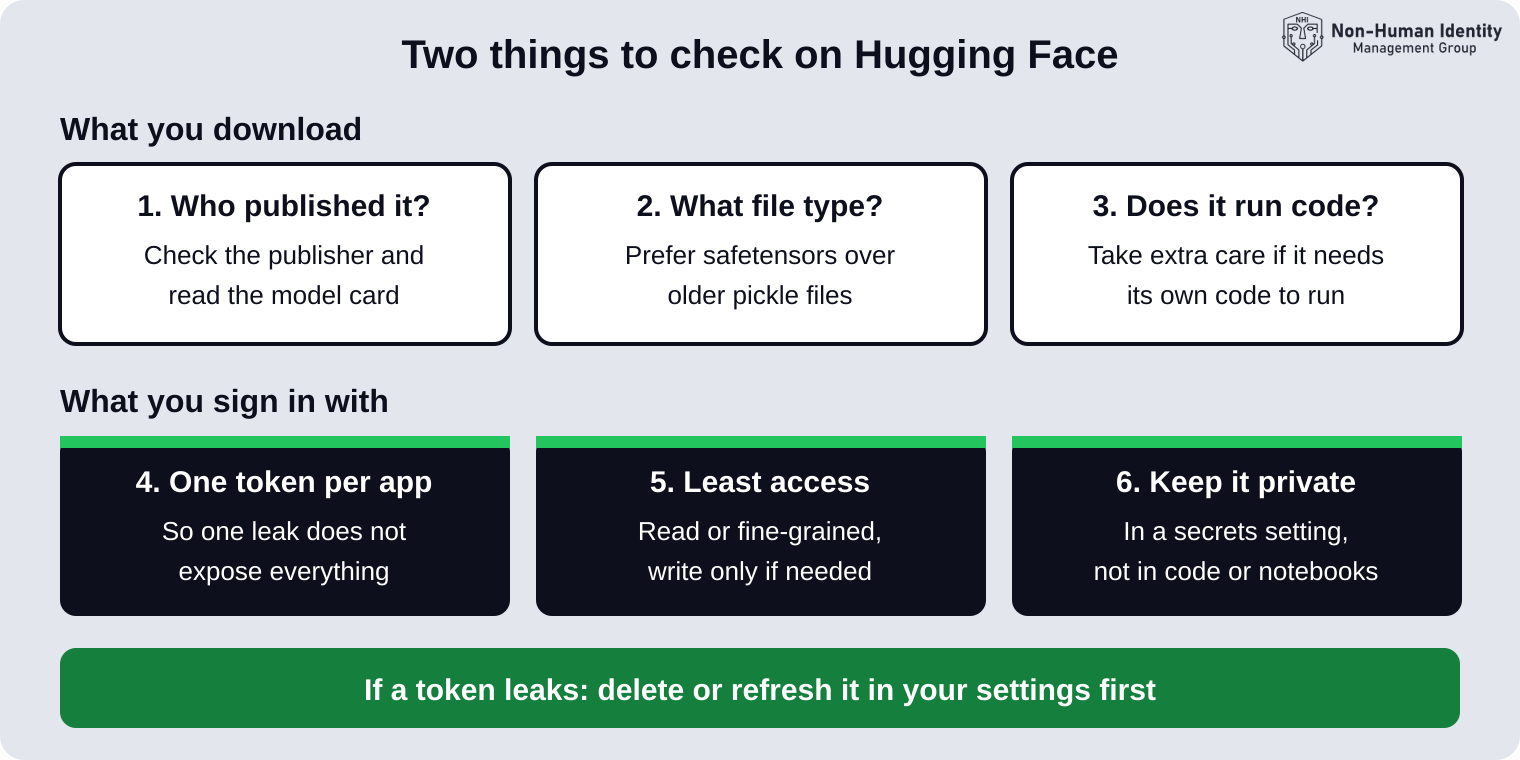
- Anyone can upload to Hugging Face, so a model is only as trustworthy as the person or group who published it.
- Some model files can run hidden code when you open them. Prefer safer file types and trusted publishers.
- Your Hugging Face access token works like a password for your account. Keep it out of code, notebooks and chat.
- Use one token per app, give it only the access it needs, and delete it straight away if it leaks.
What you will learn
- Explain what Hugging Face is and what you can get from it.
- Check a model page for signs it is safe to download.
- Spot an access token left somewhere unsafe.
- Choose the right kind of token for a small project.
- AI program file (model)
- a file of learned patterns that lets software do a task, such as writing text or sorting pictures.
- Software password (access token)
- a secret code your programs use to sign in to Hugging Face as you.
- Model information page (model card)
- the page that explains what a model is for, who made it and its limits.
What is Hugging Face?
Think of a huge open market where anyone can set up a stall. Most traders are honest and some are famous names. But nobody checks every item on every stall before you take it home.
The main part of Hugging Face is called the Hub. It holds shared AI models, sets of data for training them, and small AI apps called Spaces. Each one lives in a repository (a project folder that keeps a history of its files).[1]
You can browse it in a web browser. Developers can also download models straight into their code. Some tasks need you to sign in, such as using private models or uploading your own work. For these, your code signs in with an access token (a secret code that acts like a password for your account).[2]
Where the comparison stops working: a market stall sells you a finished item. A model file is more like a kit you open on your own computer. If the kit has a hidden trap, it goes off in your home, not at the stall.
Why does it matter?
The Hub is big. Hugging Face says it hosts over 3 million models.[1] That makes it easy to find something useful, and easy to pick up something you should not trust.
If you are a student trying AI
What could happen: you open a model from an unknown account and it runs hidden code on your laptop.
Check this: who published the model, and whether it uses a safer file type.
If you are a new developer
What could happen: you paste your token into a shared notebook and someone else uses your account.
Check this: search your notebooks and code for any token before you share them.
If you lead a small team
What could happen: one powerful token is shared by everyone, so nobody can tell who did what.
Check this: each person and each app has its own token, with only the access it needs.
Next: API Keys for Beginners
What does it look like?
Here is a made-up notebook cell from a student project. It downloads a model and signs in.
Example only. All values are made up.
# class project: sort product reviews
MODEL = "unknown-user-0000/super-fast-reviews"   (1)
FILE  = "model.bin  (older file type)"           (2)
TOKEN = "EXAMPLE-TOKEN-0000-FAKE"                (3)
ROLE  = "write"                                  (4)
# notebook shared with the whole class
- In a real file, this line would name a model from an account the student has never heard of.
- In a real file, this line would load an older file type that can run code when it is opened.
- In a real file, this line would contain the student's own access token, typed straight in.
- In a real file, this line would show the token can change things, not just read them.
Why this is risky: the model may not be what it claims. And anyone in the class can copy the token. With write access, they may be able to change or delete the student's work.
The safer way: pick a model from a publisher you trust, in a safer file type. Keep the token out of the notebook. Load it from a private setting, and use a read-only or narrow token.[2]
How does it work?
Here is what happens when you use a model from the Hub, and where to take care.
- You find a model. You read its model card and check who published it. Hugging Face suggests loading models from people and groups you trust.[3]
- The Hub scans the files. It runs a virus scan and lists what some files try to load, and flags anything that looks suspicious. Hugging Face says this is not foolproof, and that checking is still your job.[3]
- You download and open it. Older "pickle" files can run code as they open. A newer type called safetensors was designed to store only the model's numbers.[3]
- Some models bring their own code. A setting called "trust remote code" lets the model's own code run. The library's guide says to take extra care, and to fix the exact version you use.[4]
- Your code signs in with a token. A read token can only download. A write token can upload and change things. A fine-grained token can be limited to chosen projects.[2]
- The Hub watches for leaks. It scans each upload for passwords and keys, and emails you if it finds one that works.[5]
A worked example
Gideon Zamora is in his second year at university. For a group project, he and his teammate Jana Novak want an AI model that sorts customer reviews into happy and unhappy.
Gideon searches the Hub and finds two options. One is from a well-known research group, with a full model card and many downloads. The other promises to be "ten times faster" and comes from an account with no other work and no card.
Jana asks which one they should use. Gideon checks the files tab. The well-known model offers a safetensors file. The fast one has only an older pickle file, and the Hub marks one of its imports as suspicious. They pick the well-known model.
Next, they need a token so their shared notebook can save results to a private project. Gideon's first idea is to paste his token into the top of the notebook. Jana stops him. "The whole class can open that notebook," she says.
Instead, Gideon makes a new fine-grained token just for this project. It can write to their one project folder and nothing else. He stores it in the notebook tool's private secrets setting, not in the code.
A week later, Gideon gets an email from Hugging Face. An old test file he uploaded months ago held one of his older tokens. He goes to the Access Tokens page in his settings and deletes that token straight away.[2] Then he removes the file and checks his account for changes he did not make. He finds no changes in the records available to him.
By the end of term, their project uses one trusted model, one narrow token and no secrets in the code.
Myths and mistakes
| What people think | What is true |
|---|---|
| Hugging Face checks every model, so they are all safe. | The Hub scans files, but says the scans are not foolproof. You still choose what to trust. |
| A model is just data, so opening it cannot harm my computer. | Some older file types can run code when they open. Prefer safetensors where it is offered. |
| One write token for everything is simpler. | It also means one leak exposes everything. Use one token per app, with only the access it needs. |
| A private notebook is a safe place for a token. | Notebooks get shared, copied and uploaded. Keep the token in a private setting instead. |
| If a token leaks, deleting the file is enough. | Delete or refresh the token first. Then clean up the file and its history. |
What can I do this week?
- Open your Hugging Face settings and look at your list of access tokens.
- Delete any token you do not use or do not recognise.
- Replace an all-purpose write token with a read or fine-grained token for each app.
- Search your code and notebooks for any token and move it to a private setting.
- Before your next download, read the model card and check the file type.
Checklist
- I know who published each model I use.
- I read the model card before I download.
- I prefer safetensors files where they are offered.
- I take extra care with models that need their own code to run.
- Each app has its own token.
- My tokens are read-only or fine-grained unless write access is needed.
- No token sits in my code, notebooks or chat messages.
- I know where to delete a token if it leaks.
Common questions
Is Hugging Face safe to use?
Yes, with care. It is a widely used site run by a company that scans uploads. But anyone can publish there, and scans are not foolproof. Choose trusted publishers, prefer safer file types and keep your tokens private, and the risks drop a lot.
Do I need a token to download models?
Not for most public models. You need a token to download private or gated models, to upload your own work, or to use some services. Hugging Face suggests a read token when you only need to download.[2]
What is the difference between pickle and safetensors?
Both are ways to store a model in a file. Pickle is an older Python format that can run code when the file is opened. Safetensors was designed to hold only the model's numbers, which makes it the safer choice when you download.[3]
What should I do if my token leaks?
Delete or refresh the token from the Access Tokens page in your settings first.[2] That should stop the old copy giving access. Then remove the token from wherever it leaked, including file history, and check your account for changes you did not make.
Where should I keep a token for a Space?
In the Space's secrets setting, not in the app's code. Hugging Face says secrets are private and are not copied when someone duplicates your Space. Ordinary variables, by contrast, are public.[6]
Where next?
Ready for the detail? Read the practitioner guide: Hugging Face Security Guide. It goes further into organisation roles, token types for teams, logging and a full hardening baseline.
Also useful:
- Open-Weight AI Models for Beginners
- AI Supply Chain Security for Beginners
- Leaked Secret Response for Beginners
- Non-Human Identities for Beginners
- NHI Foundation Level Training
Related NHI Mgmt Group resources: AI Model File Formats Compared for Security · AI Supply Chain and AI-BOM Guide
Key terms
- Hugging Face
- A website and company that hosts shared AI models, datasets and AI apps.
- Hugging Face token
- A secret code that lets a program act as your Hugging Face account, with the access you chose.
- Model card
- The page that explains what a model does, who made it and where it falls short.
- Pickle
- An older Python file format that can run code when the file is opened.
- Safetensors
- A model file format designed to hold only the model's numbers, not code.
- Hugging Face Spaces
- Small AI apps hosted on Hugging Face that anyone can try in a browser.
- Malicious model
- A model file made or changed to cause harm, for example by running hidden code.
Sources and further reading
- Hugging Face Hub documentation. Hugging Face. https://huggingface.co/docs/hub/index, accessed 28 Nov 2026.
- User access tokens. Hugging Face Hub documentation, Hugging Face. https://huggingface.co/docs/hub/security-tokens, accessed 28 Nov 2026.
- Pickle scanning. Hugging Face Hub documentation, Hugging Face. https://huggingface.co/docs/hub/security-pickle, accessed 28 Nov 2026.
- Loading models: custom models. Transformers documentation, Hugging Face. https://huggingface.co/docs/transformers/models, accessed 28 Nov 2026.
- Secrets scanning. Hugging Face Hub documentation, Hugging Face. https://huggingface.co/docs/hub/security-secrets, accessed 28 Nov 2026.
- Spaces overview: managing secrets and environment variables. Hugging Face Hub documentation, Hugging Face. https://huggingface.co/docs/hub/spaces-overview, accessed 28 Nov 2026.