An IT Health Check (ITHC) is an independent security test of a UK public body's computers and networks.
This guide is for council and government staff, suppliers to the public sector and students who keep meeting the term. You do not need to be technical: if your organisation connects to shared government networks, an ITHC report may land on your desk.
In short
- An ITHC is a set of checks by outside testers who look for weak spots, both from the internet and from inside the network.
- UK government guidance asks for one as part of joining a shared government network called the Public Services Network (PSN).
- The tester writes a report, but the organisation decides what to fix and by when.
- The real value is the fix list and the retest, not the report on its own.
What you will learn
- Explain what an ITHC is and who asks for one.
- Spot the main parts of an ITHC report.
- Check who in your organisation owns the fix list.
- Ask the right questions before the testers arrive.
- Friendly hacking test (penetration test)
- a test where hired experts try to break in, with permission, to find weak spots.
- Weak spot (vulnerability)
- a flaw or setting that an attacker could use to get in or cause harm.
- Fix list (remediation plan)
- a list of each weak spot, what will be done about it, who does it and by when.
What is an IT Health Check?
Think of the gas safety check a landlord must arrange before tenants move in. A qualified outsider checks the boiler and pipes, writes down any faults, and the landlord gets them fixed.
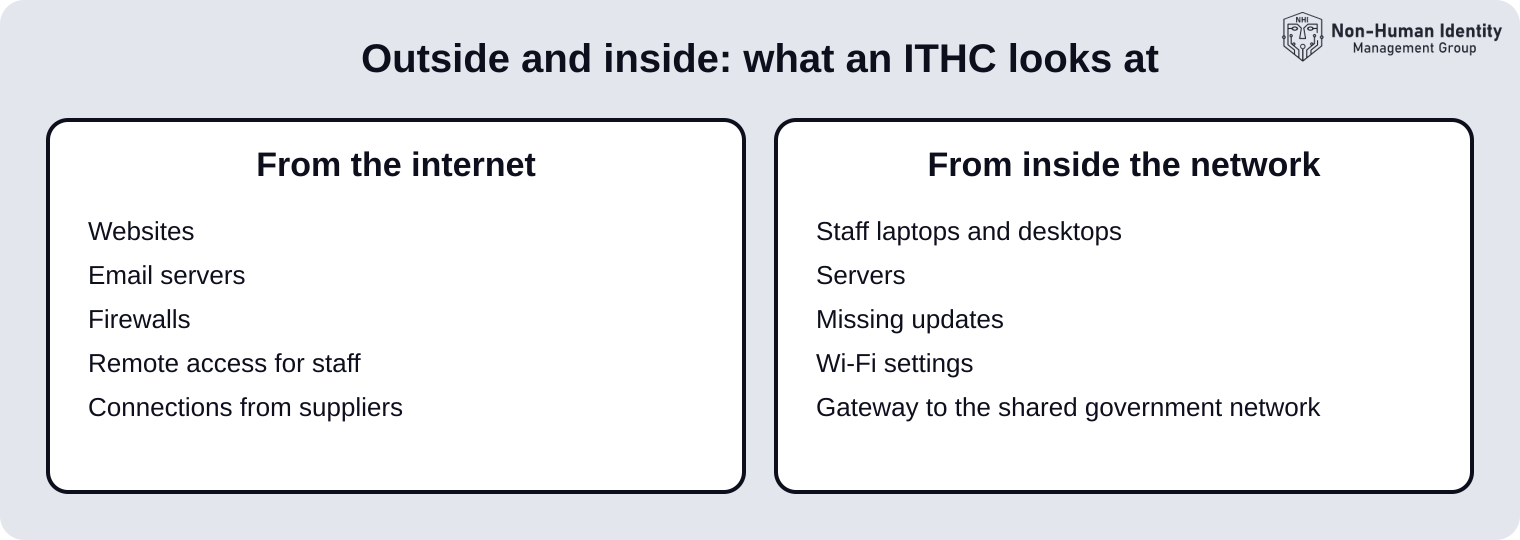
An ITHC works the same way for computer systems. Qualified testers check the systems that face the internet, such as email and websites. They also check the inside of the network, such as staff laptops, servers and Wi-Fi.[1]
The test mixes two kinds of work. A vulnerability scan is a tool that checks systems for known weak spots, like missing updates. A penetration test is where people try, with permission, to get in the way an attacker might.
Where the comparison stops working: a boiler rarely changes after the check. Computer systems change every week, with new updates, new staff and new suppliers. So an ITHC shows how things stood on the test dates, not how they are today.
Why does it matter?
Many public bodies share one network to reach government services. A weak spot in one organisation can put others at risk, so each one is asked to show its systems are in good order.[2]
If you work in a council or public body
What could happen: the report arrives, nobody owns the fixes, and the same issues appear again next year.
Check this: ask who owns the fix list and when it is reviewed.
If you supply IT services to the public sector
What could happen: your remote connection into a customer's network is in scope, and a weak setting shows up in their report.
Check this: ask your customer when their next ITHC is, and what part your service plays.
If you are a student or new to security work
What could happen: you see "ITHC" in a job advert and do not know it is a kind of penetration test.
Check this: learn how a general penetration test works first. An ITHC follows the same ideas.
What does it look like?
Here is a made-up extract from the summary page of an ITHC report for a small council.
Example only. All values are made up.
ITHC SUMMARY - Example District Council (FAKE)
Test dates: 0000-00-00 to 0000-00-00
Scope: external (website, email, remote access)       (1)
       internal (laptops, servers, Wi-Fi)              (2)
Findings: 2 critical, 5 high, 11 medium, 20 low        (3)
EX-01  Remote access missing security update  - High   (4)
EX-02  Shared admin password on 40 laptops    - High
Fix: install update; give each laptop its own password (5)
- The outside part: what an attacker on the internet could see.
- The inside part: what someone already on the network could reach.
- A count of findings by how serious they are. Testers usually score each one.
- Each finding has an ID, a short name and a rating.
- Each finding comes with a suggested fix. The council decides what to do and when.
Why this is risky: a report like this can be filed and forgotten. The weak spots stay open, and next year's report lists them again.
The safer way: turn every finding into a line on the fix list, with an owner and a date. Then ask the testers to check the most serious ones again once they are fixed.
How does it work?
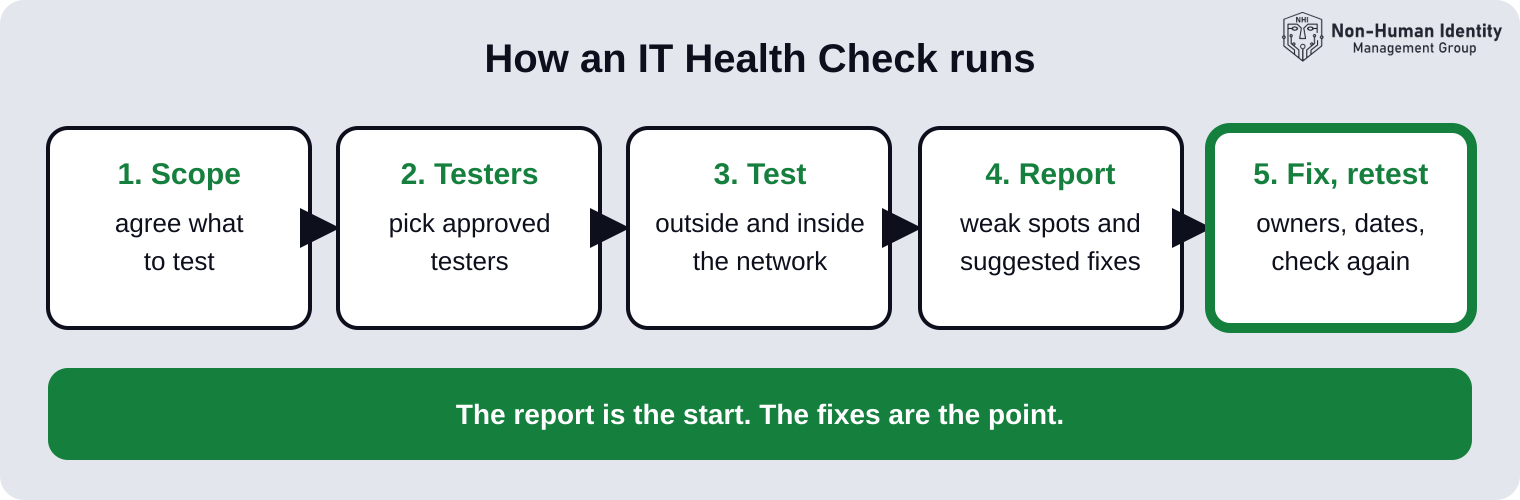
An ITHC usually follows these steps.
- Agree the scope. The organisation and testers agree which systems to test. Government guidance lists a minimum set, both outside and inside.[1]
- Pick the testers. Central government is pointed to firms in CHECK, a scheme run by the UK's National Cyber Security Centre. Other bodies may use other approved schemes.[1][3]
- Test. The testers scan and probe the systems. For large estates they may test a sample, of at least one in ten devices.[1]
- Report. The report explains each weak spot, how serious it is and a suggested fix.[1]
- Fix and retest. The organisation writes its fix list, makes the changes and asks for the worst issues to be checked again.
The UK's National Cyber Security Centre compares a penetration test to a financial audit. Your own team does the daily checks, and the outside test confirms those checks are working.[4] It also says decisions on fixes stay with the organisation, not the testers.[4]
A worked example
Umar Corrigan is the new IT manager at Fenmoor District Council, a made-up council with 600 staff. In his first month, his director asks him to "sort out the ITHC".
Umar has never run one. He thinks of a gas safety check: an outside expert, a list of faults, and fixes that need to be done. He finds last year's report in a shared folder. It has 34 findings, and nobody has marked any as fixed.
First, he agrees the scope with Sana Jovanovic, a tester from a CHECK firm. They include the website, email, staff remote access and a sample of laptops. Umar also adds the link a payroll supplier uses to connect in.
The test takes a week. Sana's report lists two high findings. The remote access system is missing a security update. Forty laptops share the same administrator password, so one stolen laptop could unlock the rest.
Umar turns each finding into a line on a fix list. Each line has an owner and a target date. The update goes on within days. The shared password takes longer, so for now he limits who can use that account and watches for its use.
Six weeks later, Sana retests the two high findings, and both are fixed. Umar shares the fix list with his director, along with last year's open items. They agree to review it every month, not once a year.
Myths and mistakes
| What people think | What is true |
|---|---|
| Passing the ITHC means we are secure. | It shows how things stood on the test dates. Systems change, so keep checking between tests. |
| The testers will fix what they find. | Testers suggest fixes. The organisation decides and does the work. |
| A smaller scope gives a cleaner report. | It hides weak spots. Include suppliers' connections and remote access. |
| Every finding must be fixed at once. | Fix the worst first. A short-term measure, such as limiting access, can help until the full fix is ready. |
| An ITHC is only for the PSN. | Many public bodies and suppliers use one for wider assurance too. |
What can I do this week?
- Find your last ITHC report and check which findings are still open.
- Name an owner for the fix list.
- List the suppliers who connect into your network.
- Ask when your next ITHC is due and who will agree the scope.
Checklist
- The scope covers both the internet-facing and the inside systems.
- Supplier connections and staff remote access are in scope.
- The testers belong to a scheme that fits your type of organisation.
- Every finding has an owner, a fix and a target date.
- Short-term measures are recorded where a full fix will take time.
- Serious findings are retested once they are fixed.
- The fix list is reviewed regularly, not just before the next test.
Common questions
Is an ITHC the same as a penetration test?
Mostly, yes. An ITHC is a penetration test and vulnerability scan with a scope set by UK government guidance. It covers both the systems that face the internet and the inside of the network. The name is used mainly in the UK public sector.
Who needs an ITHC?
Organisations that connect to the Public Services Network are asked for one as part of their compliance submission. Many other public bodies and their suppliers choose one for wider assurance. Check with the body you report to for the exact rules that apply.
How often is an ITHC done?
Many organisations run one each year, often tied to a compliance submission. A big change, such as a new system or network, is also a good reason to test. We suggest checking the rules that apply to you, as they vary by body.
Who can carry out an ITHC?
Approved testing firms. Central government is pointed to firms in the CHECK scheme. Other bodies may use firms approved under other recognised schemes, such as CREST. Ask to see the firm's approval before you sign.
What happens after the report?
You write a fix list. Each finding gets an owner, an action and a date. Fix the most serious issues first, then ask the testers to check them again. Keep the fix list up to date, because it is the evidence that the work was done.
Where next?
Ready for the detail? Read the practitioner guide: IT Health Check (ITHC). It goes further into the minimum scope, choosing testers, what the report must contain and how to run fixes and retests.
Also useful:
- ITHC Remediation Action Plan Template
- Buying a Penetration Test for Beginners
- Vulnerability Management for Beginners
- CVE and CVSS for Beginners
Related NHI Mgmt Group resources: Central Government Cybersecurity Guide · CREST Certifications Guide · Internal Network Penetration Testing Guide
Key terms
- Penetration testing
- A permitted test where experts try to break into systems to find weak spots before attackers do.
- Vulnerability scanning
- Using a tool to check systems automatically for known weak spots, such as missing updates.
- Vulnerability
- A flaw or setting that an attacker could use to get in or cause harm.
- Scope
- The agreed list of systems a test may cover.
- CVSS
- A common scoring system that rates how serious a weak spot is, from 0 to 10.
- Remediation plan
- A list of each weak spot, the fix, its owner and its target date.
- CREST
- A body that approves security testing firms and the people who work for them.
Sources and further reading
- IT Health Check (ITHC): supporting guidance. Cabinet Office, GOV.UK, last updated 23 February 2022. https://www.gov.uk/government/publications/it-health-check-ithc-supporting-guidance/it-health-check-ithc-supporting-guidance, accessed 28 Nov 2026.
- Public Services Network (PSN) compliance. GOV.UK. https://www.gov.uk/guidance/public-services-network-psn-compliance, accessed 28 Nov 2026.
- CHECK penetration testing. National Cyber Security Centre. https://www.ncsc.gov.uk/information/check-penetration-testing, accessed 28 Nov 2026.
- Penetration testing. National Cyber Security Centre guidance. https://www.ncsc.gov.uk/guidance/penetration-testing, accessed 28 Nov 2026.