A Kubernetes Secret is a small record that holds a password or key for apps running in a cluster.
This guide is for students, newcomers to cloud work and anyone whose apps run on Kubernetes. If a supplier runs your app for you, the question of where its passwords live still affects your business.
In short
- A Kubernetes Secret keeps passwords and keys apart from the app's code.
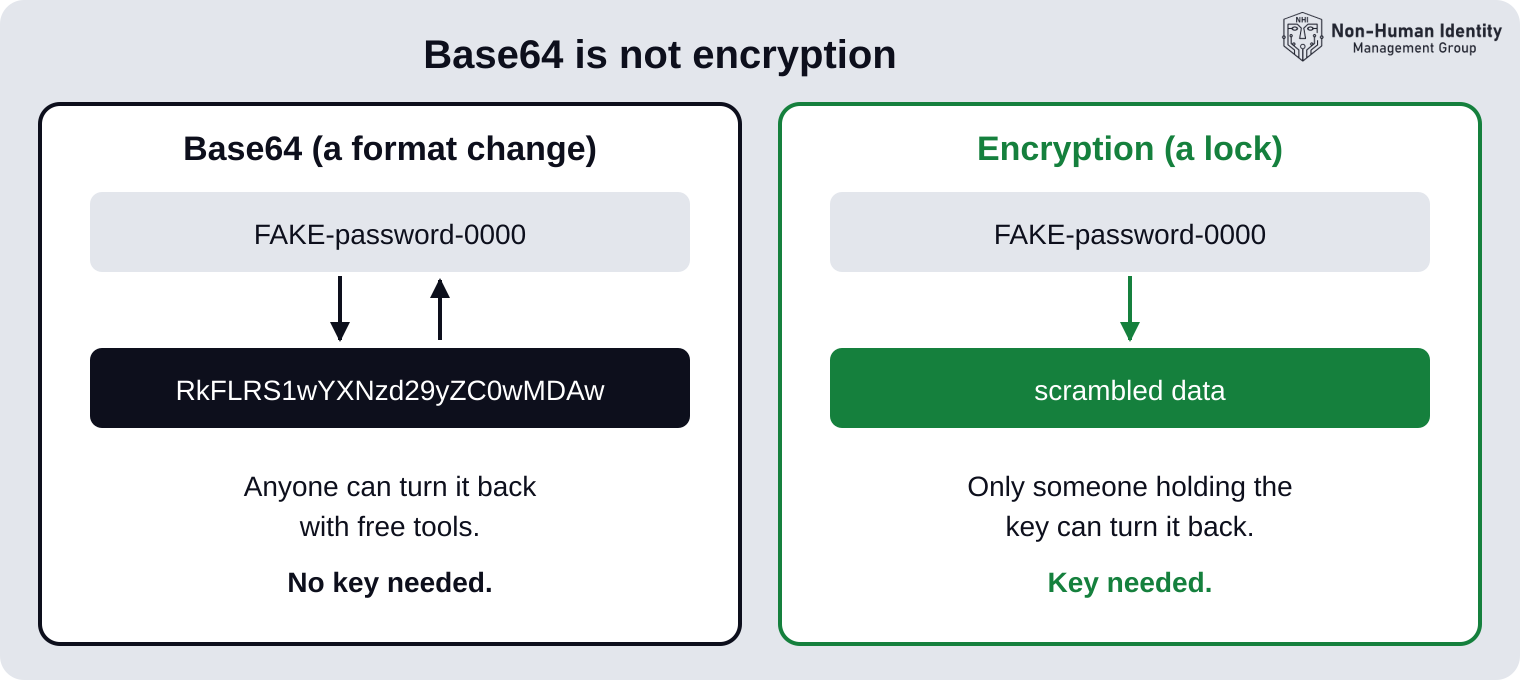
- The values are stored in base64, a format change that anyone can reverse. It is not encryption.
- By default, Secrets are stored unlocked in the cluster's database, so access rules matter a lot.
- Turn on encryption for stored Secrets, limit who can read them and keep Secret files out of shared code.
What you will learn
- Explain what a Kubernetes Secret is and what it is for.
- Spot why base64 text is not a hidden password.
- Check the three basic protections a cluster should have.
- Ask your team who can read your Secrets.
- Group of computers (cluster)
- a set of machines that Kubernetes runs apps on as one system.
- Format change (encoding)
- rewriting data in a different form so systems can carry it. Anyone can reverse it.
- Locking data (encryption)
- scrambling data so only someone with the right key can read it.
What is a Kubernetes Secret?
Think of an envelope in an office post tray, marked "Private". The label tells staff to be careful. But the envelope is not sealed, so anyone who picks it up can read the letter.
Kubernetes is a system that runs apps across a group of computers, called a cluster. Apps often need passwords and keys to reach things like a database. A Secret is the Kubernetes record built to hold them. Kubernetes says using a Secret means you do not need to put confidential data in your application code.[1]
Inside a Secret, the values are written in base64. Base64 is a way of writing data in a different alphabet, so that any system can carry it. It looks like gibberish, but anyone can turn it back with free tools. The Kubernetes project puts it plainly: base64 is not encryption and gives no more privacy than plain text.[2]
Where the comparison stops working: an office envelope sits in one tray. A Secret is stored in the cluster's database and can be read by any person or program with the right access. The real protection comes from who has that access.
Why does it matter?
Kubernetes warns that Secrets are stored unencrypted in the cluster's database by default. Anyone with access to that database, or with the right access to the cluster, can read them.[1] People who mistake base64 for encryption may share Secret files freely.
If you are learning Kubernetes
What could happen: you save a Secret file to a public code project, thinking the base64 hides it.
Check this: treat base64 text in a Secret file as the password itself.
If you manage a platform team
What could happen: many people and tools can read every Secret, because access was set up wide to save time.
Check this: ask who can read or list Secrets, and whether stored Secrets are encrypted.
If a supplier runs your app
What could happen: your database password sits unlocked in a cluster you cannot see.
Check this: ask your supplier how your app's passwords are stored and who can read them.
What does it look like?
Here is a made-up Secret file for a shop's database. Kubernetes files like this are written in a plain text format called YAML.
Example only. All values are made up.
apiVersion: v1
kind: Secret                            (1)
metadata:
  name: shop-db-password-example
type: Opaque
data:
  username: c2hvcF9hcHA=                (2)
  password: RkFLRS1wYXNzd29yZC0wMDAw    (3)
- This tells Kubernetes the record is a Secret.
- Base64 for the made-up user name "shop_app".
- Base64 for the made-up password "FAKE-password-0000". In a real file, this line would contain the database password in base64, readable by anyone who decodes it.
Why this is risky: the password looks hidden, but it is only written in a different alphabet. Kubernetes notes that sharing this file, or saving it to a code project, makes the secret available to everyone who can read it.[2]
The safer way: keep Secret files out of shared code. Turn on encryption for stored Secrets, limit who can read them, or keep the password in an outside vault that the cluster fetches from.[1]
How does it work?
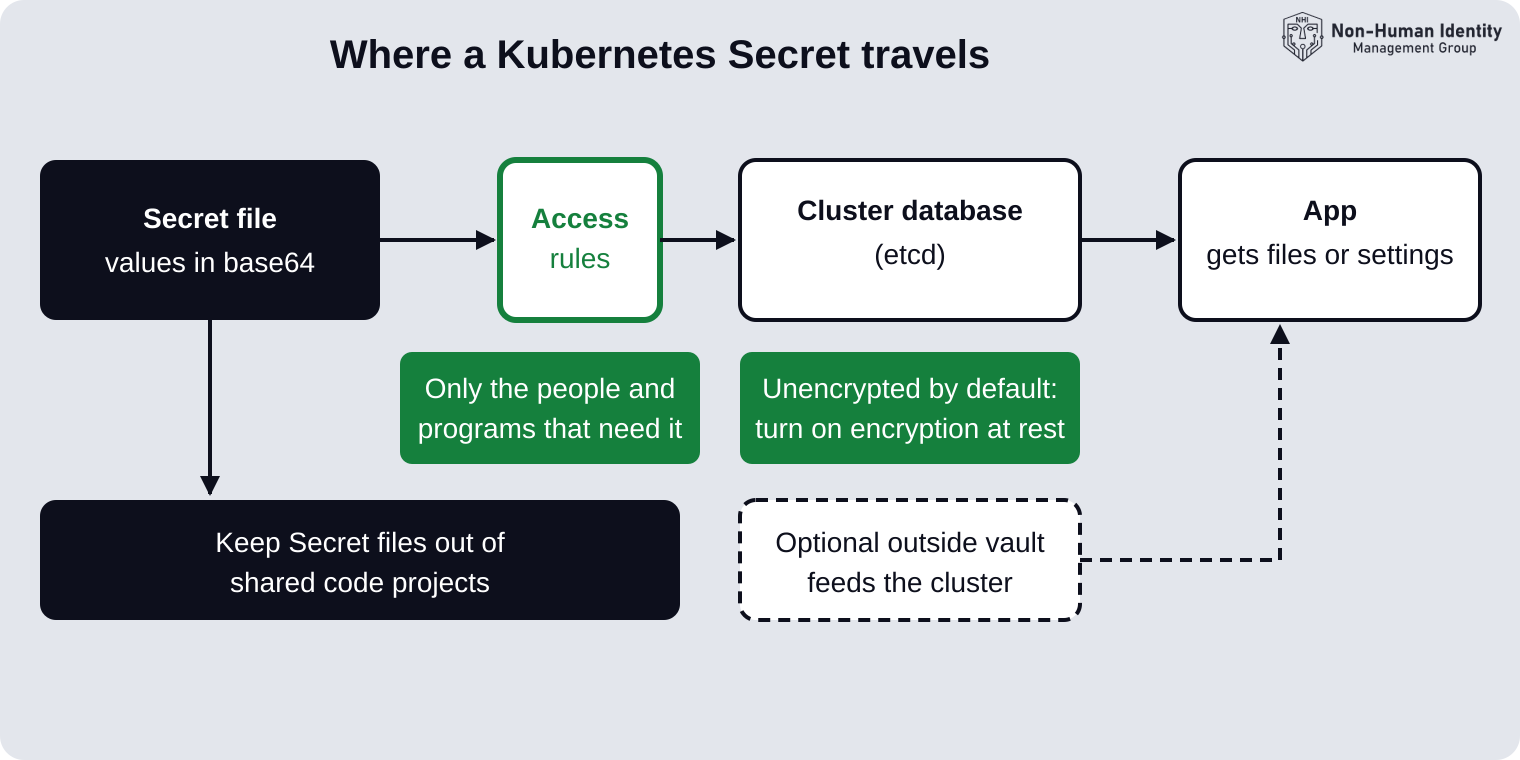
- Create. Someone, or a tool, creates the Secret. Kubernetes stores its values in base64.[1]
- Store. The Secret is saved in the cluster's database, called etcd. By default it is not encrypted there.[1]
- Hand over. When the app starts, Kubernetes passes it the values, as files or as settings the app can read.[1]
- Use. The app reads the password and connects to the database. It needs to avoid writing the password into its logs.[2]
Kubernetes lists four basic steps to use Secrets safely.[1]
- Lock the stored copy. Turn on encryption at rest, so Secrets in the database are scrambled.
- Limit who can read them. Use access rules, called role-based access control, so only the people and programs that need a Secret can read it.
- Limit which parts of an app get them. Give a Secret only to the parts of the app that use it.
- Consider an outside vault. Keep the values in a separate secrets store and let the cluster fetch them.
Access needs special care. An area of the cluster is called a namespace. Kubernetes warns that anyone allowed to start apps in a namespace can use that to read any Secret in it.[1] Being allowed to list Secrets also lets you read their contents.[2]
A worked example
Zane Varga is a student on a cloud computing course. For his final project he builds a small booking app and runs it on Kubernetes. It needs a database password, so he creates a Secret.
He looks at the Secret file and sees only a jumble of letters. "Good, it's hidden," he thinks, and saves the file to his public code project with the rest of his work.
His tutor, Amara Thorne, reviews the project the next day. She copies the jumble into a free online decoder, and the password appears in plain text. She shows Zane. "Base64 is a different alphabet, not a lock," she says. "Think of an envelope marked private that nobody sealed."
Zane changes the database password first, so the copy in his project no longer gives access. Then he removes the Secret file from the project and lists it in the file that tells Git which files to leave out. He keeps a blank example file instead, so others can see which values the app needs.
Amara asks one more question: who can read Secrets on the course cluster? Zane checks. Every student account can list them. He reports it to the course team, who narrow the access rules and turn on encryption for stored Secrets.
Zane writes one line at the top of his project notes: base64 text in a Secret is the password.
Myths and mistakes
| What people think | What is true |
|---|---|
| Base64 hides the password. | Base64 is a format change that anyone can reverse. Kubernetes says it gives no more privacy than plain text.[2] |
| Secrets are encrypted because they are called Secrets. | By default they are stored unencrypted in the cluster's database. Encryption has to be turned on.[1] |
| Only admins can read Secrets. | Anyone allowed to start apps in a namespace can use that to read its Secrets.[1] |
| A Secret file is safe to save with my code. | Anyone who can read the file can decode it. Keep Secret files out of shared code.[2] |
| Secrets and ConfigMaps are the same thing. | ConfigMaps hold ordinary settings. Secrets are meant for sensitive values and get extra care. See Kubernetes ConfigMap vs Secret. |
What can I do this week?
- Search your code projects for files that say "kind: Secret" and move them out.
- Ask your cluster admin whether encryption at rest is turned on for Secrets.
- List who can read or list Secrets in each namespace you use.
- Change any password whose Secret file was ever shared.
Checklist
- Everyone on the team knows base64 is not encryption.
- Secret files are not saved in shared code projects.
- Encryption at rest is on for stored Secrets.
- Only the people and programs that need a Secret can read it.
- Permission to list Secrets is kept to a small group.
- Apps do not write Secret values into their logs.
- Sensitive values come from an outside vault where the team has one.
Common questions
Are Kubernetes Secrets encrypted?
Not by default. Kubernetes stores them unencrypted in its database unless encryption at rest is turned on. The base64 you see is only a format change. Ask your cluster admin to check, or see How to check Kubernetes secrets encryption at rest.
Why does Kubernetes use base64 at all?
Base64 lets Kubernetes store any kind of data, including values that are not plain text, in a text file. It is about carrying data safely through systems, not about hiding it. Kubernetes also offers a field where you can write plain text and it converts it for you.
Is it safe to put a Secret file in Git?
No. Kubernetes warns that saving a Secret file to a code project makes the secret available to everyone who can read it. Keep the file out, change any password that was shared and look at tools that keep the values in a vault instead.
Should I use an outside vault instead?
Often, yes, for important values. Kubernetes suggests considering outside secret stores, which keep values outside the cluster and hand them only to the apps allowed to use them. Smaller projects can still use Secrets well with encryption and tight access rules.
Who can read Secrets in my cluster?
Anyone your access rules allow to read or list them, plus anyone who can start apps in that namespace. Cluster admins and anyone with access to the database can too. Ask your admin for a list, and keep it as short as you can.
Where next?
Ready for the detail? Read the practitioner guide: How to check Kubernetes secrets encryption at rest. It goes further into confirming encryption is on, which settings control it and how to check stored Secrets.
Also useful:
- Kubernetes ConfigMap vs Secret
- Kubernetes Secrets Security Guide
- Kubernetes Service Accounts for Beginners
- Encoding, Encryption and Hashing for Beginners
Related NHI Mgmt Group resources: Kubernetes Secrets vs External Secret Stores · How to migrate Kubernetes secrets to an external Secrets Manager · Container Security for Beginners
Key terms
- Kubernetes Secret
- A Kubernetes record that holds a small amount of sensitive data, such as a password, token or key.
- Kubernetes
- A system that runs and manages apps in containers across a group of computers.
- Encoding
- Changing data into another format so systems can carry it. Anyone can reverse it, and base64 is one example.
- Encryption at rest
- Locking data while it is stored, so a copy of the storage cannot be read without the key.
- etcd
- The database where a Kubernetes cluster keeps its records, including Secrets.
- Namespace
- A named area inside a cluster that groups apps and their records.
- Role-based access control
- Access rules that give people and programs permissions based on their role.
- Secrets manager
- A tool that stores secrets locked away, controls who can read them and records each use.
Sources and further reading
- Secrets. Kubernetes Documentation, The Kubernetes Authors. https://kubernetes.io/docs/concepts/configuration/secret/, accessed 28 Nov 2026.
- Good practices for Kubernetes Secrets. Kubernetes Documentation, The Kubernetes Authors. https://kubernetes.io/docs/concepts/security/secrets-good-practices/, accessed 28 Nov 2026.