The Essential Eight is a list of eight basic security steps from Australia's national cyber agency.
This guide is for anyone who has heard the term at work, in a tender or from an IT supplier. You do not need to be technical: if your business sells to Australian government or big firms, you may be asked how you meet it.
In short
- The Essential Eight is eight practical steps that make common cyber attacks much harder.
- They cover updates, sign-in checks, admin rights, which programs may run, Office macros, app settings and backups.
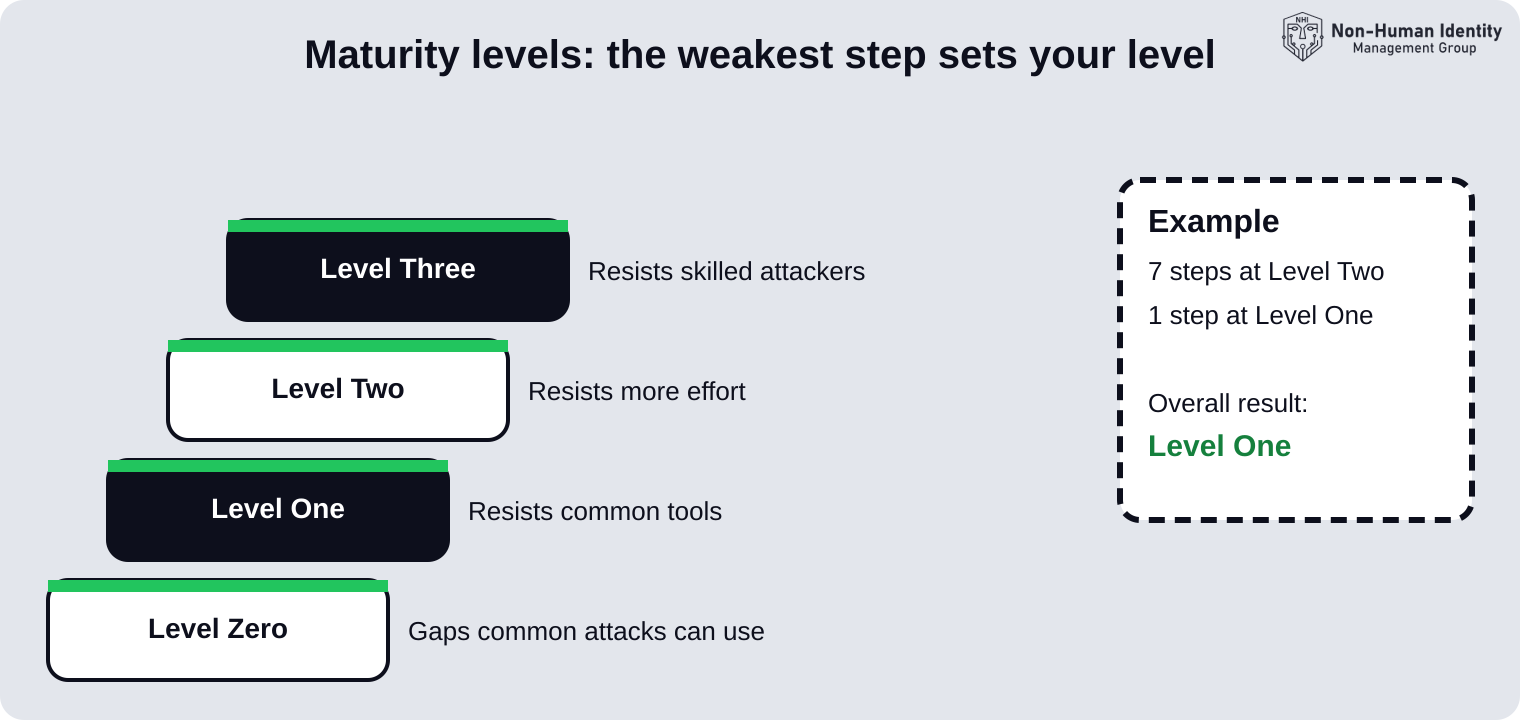
- Progress is measured in maturity levels from Zero to Three, and the weakest step sets your level.
- In October 2026 the agency began moving to a newer framework, but the Essential Eight is still in use during the change.
What you will learn
- Name the eight steps in plain words.
- Explain what a maturity level means.
- Check which steps your organisation already takes.
- Ask a supplier the right questions about their level.
Status: correct as at 28 November 2026, based on the Australian Signals Directorate's Essential Eight pages and its ASD Essentials announcement on cyber.gov.au. Frameworks change; check the official text.
This guide explains the topic in general terms and is not legal advice.
- Basic security steps (mitigation strategies)
- actions that make an attack less likely to work, or less harmful if it does.
- How far you have got (maturity level)
- a score from Zero to Three for how fully the steps are in place.
What is the Essential Eight?
Think of a pilot's checklist before take-off. It does not cover every possible problem. It covers the few checks that stop the most common accidents. The Essential Eight works the same way for computer security.
It comes from the Australian Signals Directorate (ASD). This government agency leads on cyber security in Australia. ASD first put out the model in June 2017 and has updated it since.[1]
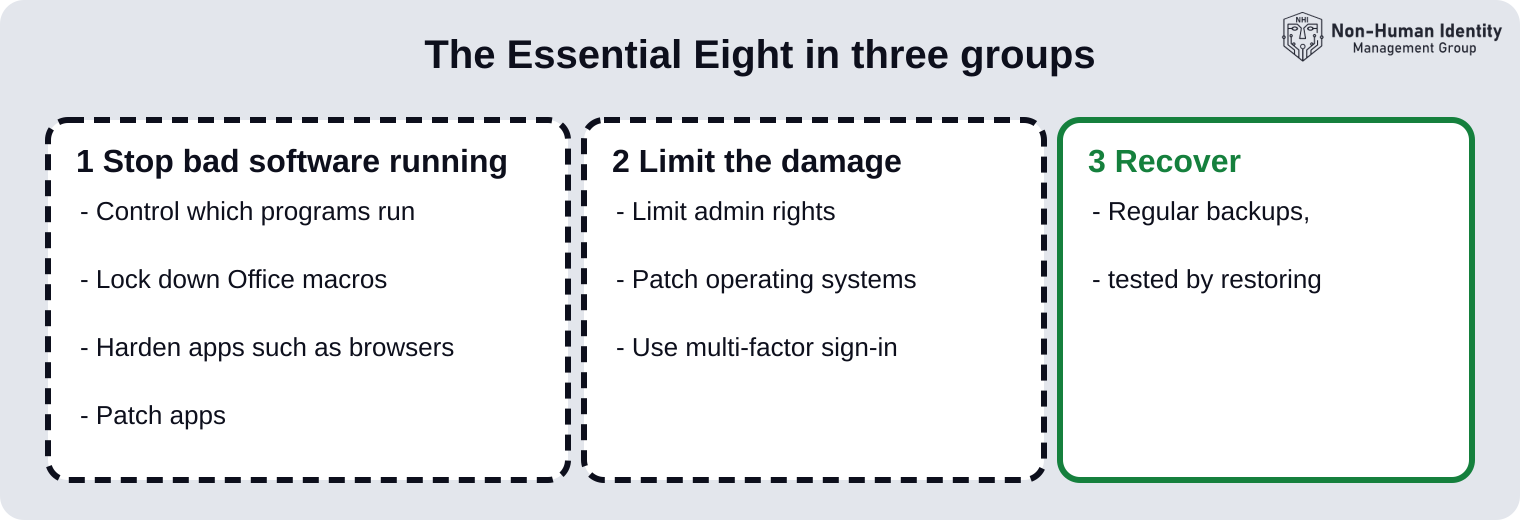
Four steps keep bad software out: update apps, control which programs can run, lock down Office macros, and make apps such as browsers safer. Four more limit harm and help you recover. They are: update the operating system, limit admin rights, use extra sign-in checks, and take backups. The operating system is the computer's main software, such as Windows.[1] A macro is a small program saved inside a file, such as a spreadsheet.
Where the comparison stops working: a pilot's checklist is the same for every flight. The Essential Eight is built for office computers on the internet, not for factory control systems or phones.[1]
Why does it matter?
Many attacks use old, unpatched software, stolen passwords or booby-trapped documents. These eight steps target exactly those routes.
If you run a small business in Australia
What could happen: one missed update or a shared admin login lets ransomware spread across every computer.
Check this: ask your IT provider which of the eight steps you already have.
Next: Ransomware for Beginners
If you sell to government or large firms
What could happen: a tender asks for your maturity level, and you do not know it.
Check this: find out who in your firm can give an honest, evidence-based answer.
Next: Australia IRAP Guide
If you are new to IT work
What could happen: you are asked to "do the Essential Eight" and do not know where to start.
Check this: start with updates, extra sign-in checks and backups, then work through the rest.
What does it look like?
Example only. All values are made up.
EXAMPLE Pty Ltd - Essential Eight quick check (FAKE)
1 Patch applications ......... partly     (1)
2 Patch operating systems .... yes
3 Multi-factor sign-in ....... email only  (2)
4 Restrict admin rights ...... no         (3)
5 Application control ........ no
6 Office macros .............. blocked
7 User app hardening ......... partly
8 Regular backups ............ yes, untested  (4)
Overall level: limited by the weakest row   (5)
- Some apps update themselves; others are months behind.
- Extra sign-in checks cover email but not other systems.
- Staff use admin accounts for everyday work.
- Backups run, but no one has tried a restore. In a real file, this line would show the last restore test date.
- One weak row holds back the overall level.
Why this is risky: a strong row cannot make up for a weak one, because attackers look for the gap.
The safer way: bring all eight steps up together, and keep evidence that each one works.
How does it work?
- Know what you have. List your computers, apps and accounts, so you know what the steps apply to.
- Pick a target level. Higher levels are built to resist more skilled attackers. News reports say Level One is a common first goal for small and medium firms.[3]
- Put all eight in place at that level. A level counts only when every step meets it.[3]
- Check it works. Gather evidence, such as update reports or a test restore of a backup.
- Move up when ready. Raise all eight together to the next level.
The framework is changing. In October 2026 ASD released guidance for a newer series called ASD Essentials, with chapters for business IT, industrial systems and cloud.[2][4] It does not use maturity levels. Instead, organisations report area by area, backed by evidence.[4] ASD says it will keep both on its website during the change. It advises organisations to keep meeting their current obligations until their regulators say otherwise.[2]
A worked example
This story is made up to show how it can happen.
Felipe Romero runs operations at Redwood Robotics, a 40-person firm. It has just opened a small office in Brisbane. A state health service asks the firm to bid for a contract. The tender form asks: "What is your Essential Eight maturity level?"
Felipe has no idea. He asks the firm's IT provider to walk through all eight steps with him, one by one.
The results are mixed. Laptops update themselves. Backups run every night. But staff log in as admins every day, and nobody has ever tested a restore. Extra sign-in checks cover email only.
The provider explains that the weakest steps set the overall level. Felipe decides on an honest answer for the tender. He writes that the firm is working towards Level One and attaches a dated plan.
Over the next two months the provider removes everyday admin rights. It turns on extra sign-in checks for all business apps. It also runs a test restore, which finds one backup that had been failing quietly. They fix it.
Felipe now keeps a simple record for each step: what is in place, when it was checked and by whom. When the next tender arrives, he can answer in an afternoon, with evidence.
What made the difference: Felipe treated the question as a checklist to work through, not a box to tick.
Myths and mistakes
| What people think | What is true |
|---|---|
| Doing six of the eight well gets us most of the way to a level. | A level counts only when all eight meet it. The weakest step sets the score.[3] |
| The Essential Eight is a law every Australian business must follow. | For most private firms it is not a law. It often appears in contracts, tenders and insurance questions.[3] |
| It covers all of security. | It is a baseline for office computers. It was not designed for industrial systems or phones, and you still need other controls.[1] |
| Backups that run every night are enough. | A backup only helps if it can be restored. Test a restore on a schedule. |
| The new ASD Essentials means we can stop our Essential Eight work. | ASD advises keeping current work going. The core steps carry into the new approach.[2] |
What can I do this week?
- Write the eight steps on one page and mark each one yes, partly or no.
- Check that the computers you use install updates on their own.
- Turn on extra sign-in checks for your email and main business apps.
- Ask your IT provider when a backup was last restored as a test.
- Stop using an admin account for everyday work, if you do.
Checklist
- Apps and operating systems install security updates promptly.
- Extra sign-in checks are on for staff and remote access.
- Only the people who need admin rights have them, and not for daily work.
- Only approved programs can run on staff computers.
- Office macros from the internet are blocked.
- Web browsers and other apps use safer settings.
- Backups are taken regularly and test restores work.
- We have written evidence for each of the eight steps.
Common questions
Is the Essential Eight mandatory?
Only for some. Many Australian federal government bodies must apply it under government security rules. For most private firms it is voluntary, but customers, tenders and insurers often ask about it. Check your contracts to see what applies to you.[3]
Which maturity level should a small business aim for?
Level One is a sensible first goal for most small firms. It is built to resist attackers using common, widely available tools. Once all eight steps meet Level One, look at Level Two, especially if customers ask for it.[3]
Is the Essential Eight being replaced?
It is being changed over time. In October 2026 ASD released ASD Essentials, a newer series that builds on the Essential Eight and drops the maturity levels. ASD is keeping both available during the change and has asked organisations to keep their current work going.[2][4]
Can I use the Essential Eight outside Australia?
Yes. It is free to read and the steps suit most office networks anywhere. Outside Australia it is guidance only. Many firms use it alongside local schemes, such as Cyber Essentials in the UK, which covers similar ground.
Where next?
Ready for the detail? Read the practitioner guide: Essential Eight Guide. It goes further into the requirements at each maturity level, how assessments work, and how the model links to Australia's wider government security manual.
Also useful:
- Cyber Essentials for Beginners
- CIS Controls for Beginners
- Multi-Factor Authentication for Beginners
- Backup Security for Beginners
- Least Privilege for Beginners
Related NHI Mgmt Group resources: Australian ISM Guide · Australia Cyber Security Act 2024 Guide · Australia SOCI Act Guide
Key terms
- Essential Eight
- Eight baseline security steps published by the Australian Signals Directorate, measured with a maturity model.
- Patch management
- Finding, testing and installing software updates that fix security flaws.
- Multi-factor authentication
- Asking for two or more kinds of proof, such as a password and a code, before letting someone in.
- Application control
- Allowing only approved programs to run on a computer.
- Least privilege
- Giving each person or program only the access it needs, and no more.
Sources and further reading
- Essential Eight explained. Australian Signals Directorate (ASD), Australian Cyber Security Centre. https://www.cyber.gov.au/resources-business-and-government/essential-cyber-security/essential-eight/essential-eight-explained, accessed 28 Nov 2026. See also: Essential Eight Maturity Model (November 2023), ASD. https://www.cyber.gov.au/resources-business-and-government/essential-cyber-security/essential-eight/essential-eight-maturity-model.
- ASD Essentials: evolving our approach to cyber security resilience. Australian Signals Directorate (ASD). https://www.cyber.gov.au/news/asd-essentials-evolving-our-approach-to-cyber-security-resilience, accessed 28 Nov 2026.
- News report: Essential Eight Maturity Model: what applies now and what ASD is changing. iTWire, 30 September 2026 (used for the description of maturity levels, how levels are scored, and who is required to apply the model). https://itwire.com/business-it-news/security/essential-eight-maturity-model-what-applies-now-and-what-asd-is-changing, accessed 28 Nov 2026.
- News report: ASD's Essential Eight replacement moves away from maturity ladder. iTnews, 15 October 2026 (used for the release date of the ASD Essentials guidance and how it replaces maturity levels). https://www.itnews.com.au/news/asds-essential-eight-replacement-moves-away-from-maturity-ladder-629637, accessed 28 Nov 2026.