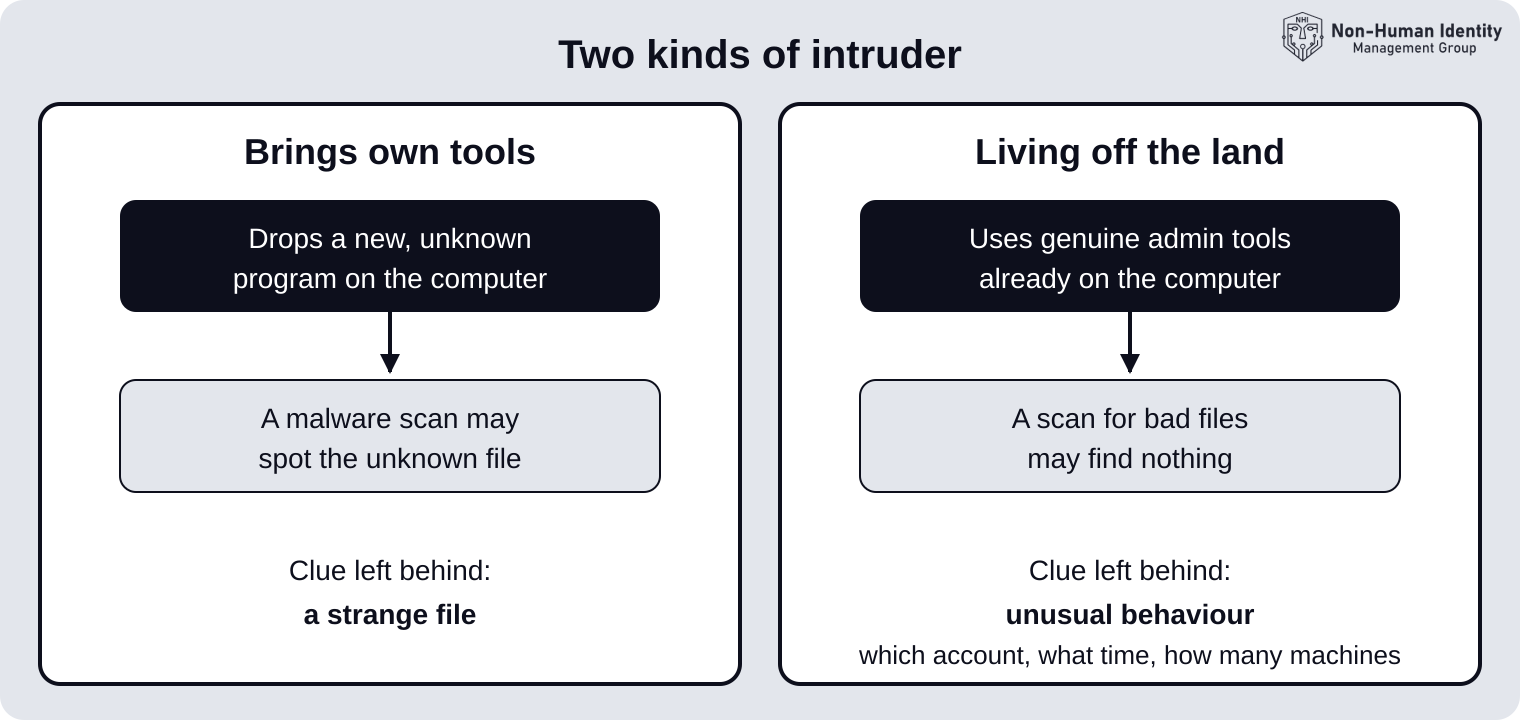
A living off the land attack is when intruders misuse tools already on your computers instead of bringing their own.
This guide is for students, managers and anyone new to IT security who wants to know why some attacks are hard to spot. You do not need to be technical to be affected: if your business has computers or servers, the tools these attackers misuse are probably already on them.
In short
- Windows and Linux computers come with powerful admin tools for IT staff.
- Some attackers use those same tools, so their actions can look like normal IT work.
- Tools that look for unknown bad files may miss this, because the files are genuine.
- The defence is to limit who can use admin tools, keep good records and know what normal looks like.
What you will learn
- Explain what living off the land means in one sentence.
- Explain why antivirus alone may not spot it.
- Spot the kind of activity that should raise a question.
- Ask your IT team or supplier the right questions about admin tools.
- Built-in admin tools (LOLBins)
- genuine programs that come with the computer, which attackers can misuse.
- Normal pattern (baseline)
- a picture of what usual activity looks like, so odd activity stands out.
What is a living off the land attack?
Imagine a burglar who arrives with empty hands. Instead of bringing tools, they use the ladder and spade from your own garden shed. A neighbour sees someone using your ladder and thinks nothing of it.
A living off the land attack works the same way on computers. Every modern computer comes with tools that IT staff use to manage it. These tools can run tasks, copy files, change settings and control other machines. Attackers who get in can use those same tools, so they do not need to bring their own harmful programs.[1]
Security people call these genuine programs LOLBins, short for "living off the land binaries". A binary is simply a program file. One public project lists Windows programs that are signed by Microsoft but can also be used in ways their makers did not intend.[2]
Where the comparison stops working: a neighbour may notice a stranger in your garden. On a computer, the attacker often uses a real account they have stolen, so even the "who" can look familiar.
Why does it matter?
Because the tools are trusted and used every day by IT staff, misuse can blend in with normal work.[1] Government cyber security agencies in several countries have warned about this together, and say state-backed groups use it.[1]
If you manage a team or a business
What could happen: an intruder stays hidden for weeks because everything they do looks like IT work.
Check this: ask whether anyone reviews what admin tools are being used, by whom and when.
Next: SIEM for Beginners
If you are a student or new to security
What could happen: you assume "no virus found" means "no attack", and miss the signs.
Check this: learn what normal admin activity looks like on the systems you look after.
If you look after a few computers
What could happen: every user can run powerful admin tools, so a single stolen login goes a long way.
Check this: limit admin tools to the people and accounts that really need them.
What does it look like?
Here is a made-up summary of activity records from an office network. Each line on its own could be normal. Together they tell a different story.
Example only. All values are made up.
Time   Account           Program used            What happened
02:14  svc-print-FAKE    built-in script tool    ran a script from memory      (1)
02:16  svc-print-FAKE    built-in admin tool     listed all user accounts      (2)
02:21  svc-print-FAKE    remote control tool     connected to 14 office PCs    (3)
02:30  svc-print-FAKE    certificate tool        fetched a file from
                                                 files.example.invalid         (4)
- In a real file, this line would contain a record of a scripting tool such as PowerShell running a script that was never saved as a file.
- A printer service account has no reason to list every user.
- One account reaching many computers at once, in the middle of the night, is unusual.
- A tool meant for handling security certificates is being used to download a file from an unknown site.[1]
Why this is risky: every program here is genuine, so a scan for known bad files may find nothing. The clues are the account, the time and the pattern.
The safer way: the printer account can only do printer tasks. Admin tools are limited to named IT staff. An alert fires when an account acts outside its normal pattern.
How does it work?
This is the general shape of such an attack, seen from the defender's side.
- Getting in. The attacker gets a foothold, often through a stolen password, a phishing email or an unpatched system.
- Looking around. They use built-in tools to list accounts, computers and shared folders, just as an IT person might.[1]
- Spreading out. They use built-in remote admin tools to reach other computers with the accounts they have found.[1]
- Reaching the goal. They copy data, collect more passwords or prepare further harm, still mostly using genuine tools.
- Being caught. Defenders spot them through behaviour: an account doing things it never usually does, at odd times, on many machines.[1]
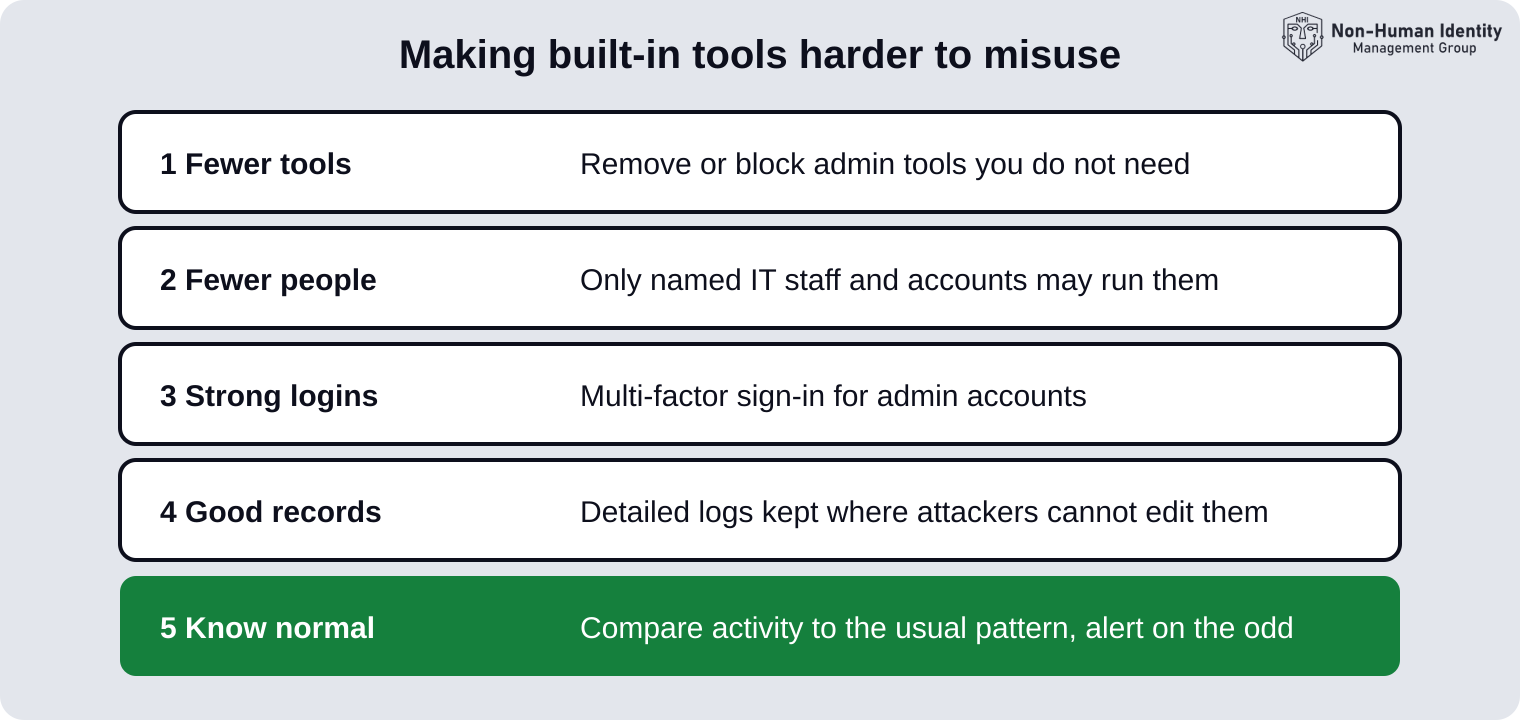
The joint government guidance suggests several of these layers. It advises detailed logs kept in one protected place. It also advises a picture of normal activity, limits on which admin tools can run, and strong sign-in for admins.[1] Some tools watch behaviour on each computer. They are called endpoint detection and response (EDR). They can help spot unusual use, but they need tuning to your normal pattern.[1]
A worked example
Vida Achterberg is the operations manager at Meadow Couriers, a fictional delivery firm with forty staff. Pia Ulrich runs the small IT company that looks after its computers.
On Monday morning Pia calls. Her monitoring tool flagged something overnight. The account used by the firm's route planning software connected to most of the office PCs at 2am. It used the same remote admin tool that Pia's own team uses.
Vida asks the obvious question. "Did your antivirus find anything?" It did not, Pia says, and that is the point. Like a stranger using the ladder from the shed, nothing new was brought in.
Pia explains why it still matters. The route planning account only ever talks to one server. It has never used a remote admin tool before. So she treats it as an intrusion until she can show otherwise.
With Vida's approval, she disables the account and changes its password. She checks which PCs it reached and what it did on each. She finds that the account had far more rights than it needed, and that every PC allowed the remote tool from any account.
Over the next week, Pia limits the remote tool to her team's named accounts. The route planning account gets only the rights its job needs. Admin logins now need a second sign-in step.
Vida adds one line to the monthly IT report: which accounts used admin tools, and whether each use was expected.
Myths and mistakes
| What people think | What is true |
|---|---|
| If antivirus finds nothing, we are fine. | Scans look for harmful files. Living off the land uses genuine files, so the clues are in behaviour and records. |
| We should delete all admin tools. | IT staff need many of them. Remove the ones you do not use, and limit who can run the rest.[1] |
| Programs signed by Microsoft or Apple are safe. | A signature shows where a program came from. It does not show how someone is using it.[2] |
| Default logging is enough. | Default settings often miss the detail needed. Turn on detailed logging and keep the records somewhere protected.[1] |
| Only big companies are targeted this way. | The tools are on almost every business computer, so any organisation with a stolen login can be affected. |
What can I do this week?
- Ask your IT team or supplier which accounts can run admin and scripting tools.
- Check that admin accounts use a second sign-in step.
- Ask whether detailed activity logs are turned on and kept somewhere attackers cannot change.
- Agree who looks at alerts about unusual admin activity, and how fast.
Checklist
- Admin tools that are not needed are removed or blocked.
- Only named IT staff and specific accounts can run remote admin and scripting tools.
- Service accounts used by software have only the rights their job needs.
- Admin accounts use multi-factor sign-in.
- Detailed logging is on, and logs are sent to a central, protected store.
- Someone knows what normal admin activity looks like and reviews the odd cases.
- Alerts on unusual admin activity have a named owner.
Common questions
What does living off the land mean in cyber security?
It means an attacker misuses tools that are already on your computers instead of installing their own. Examples include scripting tools and remote admin tools that IT staff use every day. Because the tools are genuine, the activity can look like normal IT work and is harder to spot.
What is a LOLBin?
A LOLBin is a genuine program that comes with the operating system but can also be misused by attackers. The name is short for "living off the land binary". Public lists describe these programs so that defenders know which ones to limit and watch.[2]
Is living off the land the same as fileless malware?
They overlap but are not the same. Fileless malware avoids leaving a harmful file on disk, often by running in memory. Living off the land is about using genuine built-in tools. Many attacks do both, because built-in tools are a handy way to run code without saving a file.
Can antivirus stop living off the land attacks?
Not on its own. Antivirus is good at spotting known harmful files, but here the files are genuine. Behaviour-watching tools, good logs, limits on admin tools and strong sign-in for admin accounts work together to make these attacks harder and easier to spot.
Should we block PowerShell completely?
Usually not. Windows and many IT tasks rely on PowerShell. It is better to limit who can use it, turn on its detailed logging and watch for unusual use. Our PowerShell Security for Beginners guide explains the main settings.
Where next?
Ready for the detail? Read the practitioner guide: Living off the Land Guide. It goes further into the specific tools attackers favour, detection rules and how to build a baseline of normal admin activity.
Also useful:
- PowerShell Security Guide
- PowerShell Security for Beginners
- Fileless Malware Guide
- Malware for Beginners
- Application Allowlisting for Beginners
Related NHI Mgmt Group resources: EDR Guide · Application Allowlisting Guide · PowerShell Logging Detection Guide
Key terms
- LOLBins
- Genuine built-in programs that attackers can misuse to carry out an attack.
- Fileless attack
- An attack that relies on memory, scripts or trusted system tools instead of saving a harmful file.
- PowerShell
- A scripting and admin tool built into Windows, widely used by IT staff and sometimes misused by attackers.
- Endpoint detection and response (EDR)
- Software on each computer that records activity and flags behaviour that looks like an attack.
- Application allowlisting
- Allowing only approved programs to run, and blocking the rest.
- Service account
- An account used by software rather than a person, often with wide rights that need limiting.
Sources and further reading
- Identifying and Mitigating Living Off the Land Techniques. Joint guidance by CISA, NSA, FBI, the Australian Signals Directorate's ACSC, the Canadian Centre for Cyber Security, NCSC-UK, NCSC-NZ and partners, 8 February 2024. https://www.cyber.gov.au/about-us/view-all-content/alerts-and-advisories/identifying-and-mitigating-living-off-the-land-techniques, accessed 28 Nov 2026.
- LOLBAS: Living Off The Land Binaries, Scripts and Libraries (project README and criteria). LOLBAS Project, GitHub. https://github.com/LOLBAS-Project/LOLBAS, accessed 28 Nov 2026.