PowerShell security means keeping Windows' built-in automation tool useful for staff and hard for attackers to misuse.
This guide is for new IT hires, help desk staff and anyone who looks after Windows computers. You do not need to write scripts to be affected: if your organisation runs Windows, PowerShell is almost certainly on its computers already.
In short
- PowerShell is a typed-command and scripting tool that comes with Windows. IT teams use it every day to automate work.
- Attackers like it for the same reason: it is already there, it is trusted and it is powerful.
- Government security agencies advise keeping PowerShell, but setting it up safely and watching how it is used.
- The key steps are to turn on its logs, send them somewhere safe, remove the old version 2 and limit what ordinary users can run.
What you will learn
- Explain what PowerShell is and why attackers use it.
- Spot a PowerShell log entry that deserves a closer look.
- Check which PowerShell safety settings are turned on.
- Ask the right questions before you remove or block it.
- Typed instructions (script)
- a saved list of commands that a computer runs one after another.
- Activity record (log)
- a time-stamped note a computer writes each time something happens.
- Script recorder (script block logging)
- a PowerShell setting that writes down the text of the scripts it runs.
What is PowerShell security?
Think of the caretaker's master toolbox, kept in a cupboard in every office building. It can open panels, reset alarms and fix almost anything. A burglar who finds it does not need to bring their own tools.
PowerShell is that toolbox for computers. Microsoft describes it as a tool for automating tasks. It is made up of a command line (a window where you type instructions), a scripting language and a way to manage settings.[1] It runs on Windows, Linux and macOS, and it is built into Windows.
IT teams use it to set up hundreds of laptops at once, create user accounts and run nightly jobs. Attackers use it to look around, change settings and run their own code. They can even fetch code from the internet and run it in memory, without saving a file to the disk.[5] Using tools that are already on a computer like this is often called living off the land.
PowerShell security is about two things. First, make misuse harder. Second, make sure that when PowerShell is used, there is a record of what it did.
Where the comparison stops working: you could lock a toolbox away. Removing PowerShell can break the IT jobs that depend on it, and attackers have other ways to reach the same features.
Why does it matter?
A security tool may ignore PowerShell because it is a normal part of Windows. Without the right settings, there may be little or no record of what it did. In 2022, security agencies in the US, UK and New Zealand advised against removing it, and asked organisations to configure and monitor it instead.[4]
If you are new to IT work
What could happen: you see a strange PowerShell alert, assume it is an admin job and close it.
Check this: ask who owns the script and whether the run was expected before you close it.
If you run IT for a small business
What could happen: an attacker uses PowerShell on one laptop, and nothing is written down.
Check this: ask your IT supplier whether PowerShell logs are turned on and kept somewhere central.
If you write scripts
What could happen: a password typed into your script ends up in the logs for anyone with access to read.
Check this: keep passwords out of scripts and use a proper secrets store.
What does it look like?
When script recording is on, Windows writes a note each time PowerShell runs a block of script. Here is a made-up one, kept simple.
Example only. All values are made up.
Log: PowerShell Operational
Event ID: 4104                                  (1)
Time: 03:12 on a Sunday                         (2)
Computer: OFFICE-PC-0000
User: EXAMPLE\reception                         (3)
Script text: [long scrambled text, FAKE0000]    (4)
Also: fetches a file from files.example.invalid (5)
- Event 4104 is the "script block" entry, which holds the text of the script.
- An odd hour, when nobody is in the office.
- A reception account, which has no reason to run scripts.
- The text of the script. Scrambled or very long text is a common warning sign.
- A download from an unknown website.
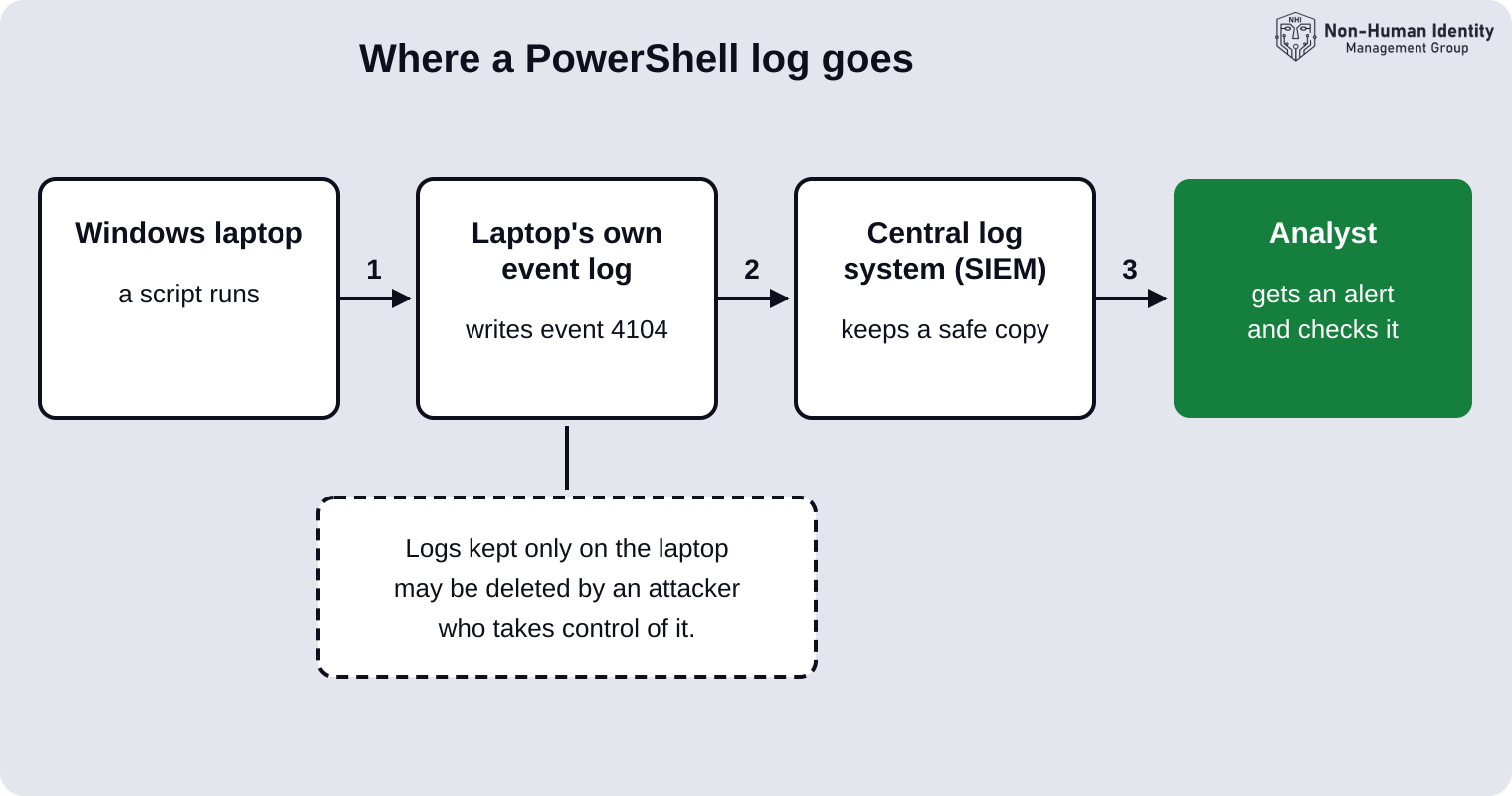
Why this is risky: without script recording, this entry would not exist. Nobody could see what ran. If the log stays only on that computer, an attacker in control of it may delete it.
The safer way: turn on script recording on every computer. Copy the logs to a central place quickly. Then set an alert for odd hours, odd users or downloads.
How does it work?
Defending PowerShell is less about one switch and more about layers.
- Use a current version. The agencies advise removing the old PowerShell version 2, which is out of date and lacks many of the newer safety features.[6]
- Record what runs. Script block logging records the content of the scripts PowerShell runs. Windows saves each one as event 4104, and it can be turned on for many computers at once using Group Policy, a central settings tool.[3]
- Record what was typed and shown. A second feature, called transcription, keeps a written copy of what went in and what came out.[6]
- Let antivirus look inside. A Windows feature called AMSI lets antivirus check scripts as they run, including code that only exists in memory.[6]
- Limit what ordinary users can do. Application control sets rules about which programs may run. With it, PowerShell can run in a cut-down mode called Constrained Language Mode. Ordinary users then cannot use its riskiest features.[6]
- Collect and watch. Copy the logs to a central system, such as a SIEM, and set alerts for patterns that look wrong.
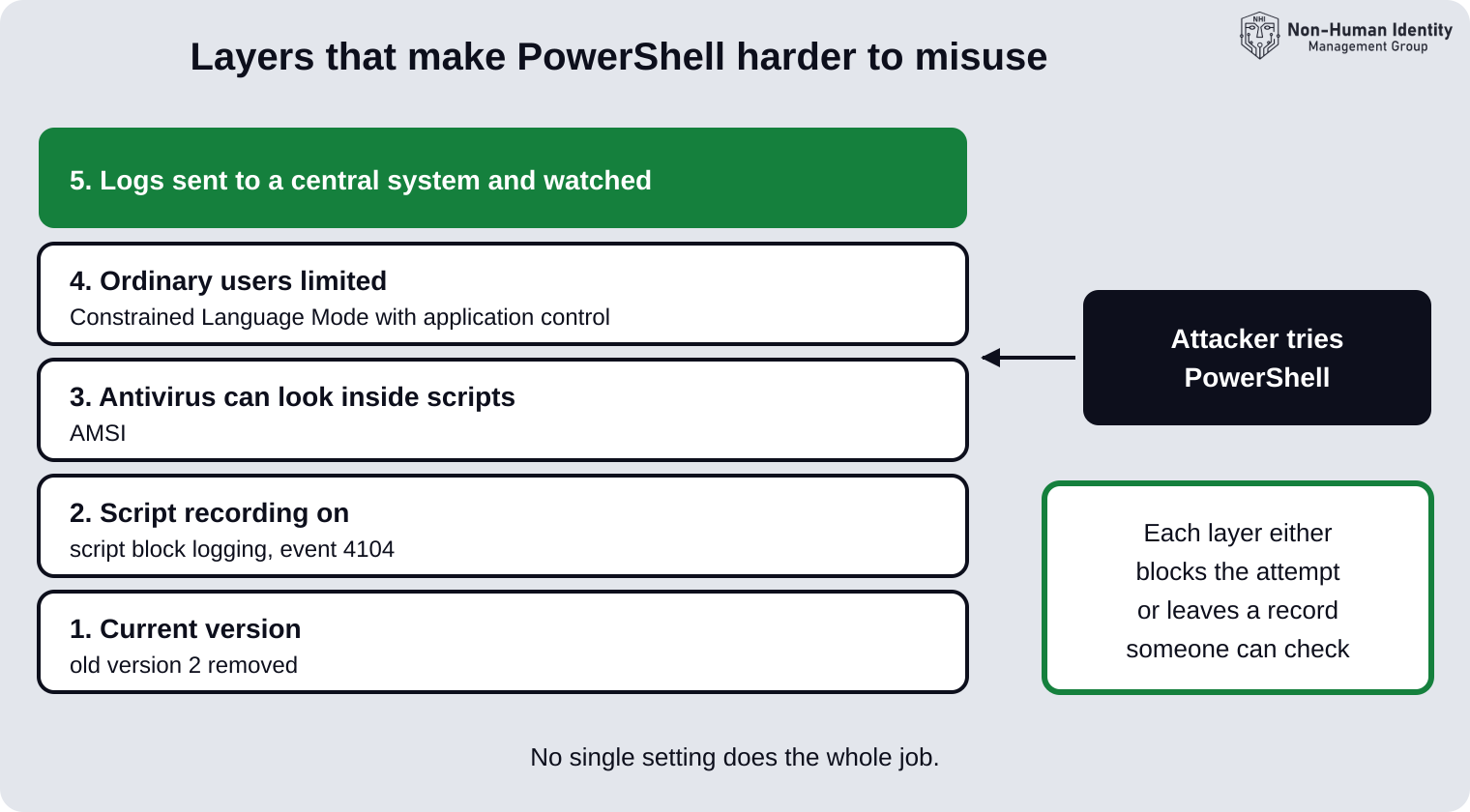
Two cautions. First, the setting called execution policy is not a security wall. Microsoft says users can easily get round it, and that it mainly stops people running scripts by accident.[2] Second, script recording can capture passwords that appear in scripts. Microsoft suggests a feature called Protected Event Logging, which encrypts the log content.[3]
Many scripts run on a schedule under their own accounts, known as non-human identities (NHIs). Their PowerShell activity is recorded the same way, so it is worth knowing which accounts normally run scripts.
A worked example
Fen Abara has just joined Wren Brewery, a fictional company with forty staff, as its second IT person. Her manager, Nils Lomax, asks her to review how the office computers are set up.
She starts with PowerShell, because she remembers the caretaker's toolbox. Anyone who gets onto a computer here finds it waiting.
First she checks the central settings. Script recording is off. The old version 2 is still installed on most computers. Logs stay on each computer and are cleared after a few days.
Nils asks whether they should simply block PowerShell. Fen explains that their nightly backup checks and new-starter set-up both use it. Security agencies also advise keeping it and setting it up safely instead.
Together they make a plan. They turn on script recording and transcription through Group Policy, starting with a small group of computers. After a week with no problems, they roll it out to everyone. They remove version 2, after testing that nothing they rely on still needs it.
Next, Fen sends the PowerShell logs to the log service their IT supplier already runs. She adds one simple alert: PowerShell run by a reception or sales account outside working hours.
A month later the alert fires. It turns out to be a supplier's tool on the sales manager's laptop. Fen checks it with the supplier, notes that it is expected and keeps the alert in place.
Myths and mistakes
| What people think | What is true |
|---|---|
| PowerShell is a hacking tool, so remove it. | It is a normal admin tool. Agencies advise keeping it and setting it up safely.[4] |
| Execution policy stops attackers. | Microsoft says it is not a security boundary and is easy to get round.[2] |
| If antivirus is on, PowerShell is covered. | Antivirus helps more with AMSI, but logs are still needed to see what happened. |
| Logs on each laptop are enough. | An attacker with control of a computer may delete local logs. Copy them to a central place. |
| More logging is always safe. | Script logs can capture passwords. Keep secrets out of scripts and protect the logs.[3] |
What can I do this week?
- Ask whether script block logging is turned on for your computers.
- Find out where PowerShell logs go and how long they are kept.
- Check whether PowerShell version 2 is still installed.
- List the scripts and accounts that normally run PowerShell, so unusual use stands out.
Checklist
- A current version of PowerShell is in use, and version 2 is removed.
- Script block logging is turned on across all computers.
- Transcription is turned on where it is useful.
- PowerShell logs are copied to a central system and kept for an agreed time.
- Antivirus that uses AMSI is installed and up to date.
- Ordinary users run PowerShell in a limited mode where application control allows.
- There is at least one alert for unusual PowerShell use.
- Scripts do not contain passwords or keys.
Common questions
Should I disable PowerShell?
Usually not. US, UK and New Zealand security agencies advised against removing it in 2022. Many IT jobs depend on it, and attackers can reach the same features in other ways. Set it up safely, limit ordinary users and watch the logs instead.
What is event ID 4104?
It is the Windows log entry for PowerShell script block logging. Each entry records the text of a block of script that PowerShell ran. Analysts read these entries to see exactly what a script did, including scripts that were scrambled to hide their purpose.
Is execution policy a security control?
Not really. Microsoft says execution policy is not a security boundary and that users can easily bypass it. It helps stop people running scripts by mistake. Real protection comes from logging, antivirus scanning, application control and limiting who can do what.
Why do attackers like PowerShell?
Because it is already on Windows computers and is trusted. It can look around a network, change settings and run code fetched from the internet, sometimes without saving a file. Using built-in tools like this can help attackers blend in with normal IT work.
Will turning on logging slow computers down?
It adds some extra work, and logs can grow large. We suggest starting with a small group of computers, checking performance and storage, and then rolling out more widely. The value of having a record usually outweighs the cost.
Where next?
Ready for the detail? Read the practitioner guide: PowerShell Logging Detection Guide. It goes further into each log source, how to collect logs without losing them and which detection patterns to build.
Also useful:
- Windows Security for Beginners
- SIEM for Beginners
- EDR, XDR and MDR for Beginners
- Living off the Land Guide
- Non-Human Identities for Beginners
Related NHI Mgmt Group resources: PowerShell Forensics Guide · Windows Event Log Guide · How to Hunt for Living-off-the-Land Binary Abuse
Key terms
- PowerShell
- Microsoft's command-line shell and scripting language for automating tasks on Windows and other systems.
- Command line
- A text-based way to give a computer instructions by typing commands.
- Script block logging
- A PowerShell setting that records the text of the scripts it runs in the Windows event log.
- Execution policy
- A PowerShell setting that influences whether scripts may run. It helps prevent mistakes but is not a security boundary.
- Antimalware Scan Interface (AMSI)
- A Windows feature that lets security tools check scripts and in-memory content as they run.
- Constrained Language Mode
- A restricted PowerShell mode that limits which features ordinary users can use.
- SIEM
- A system that collects logs from many sources in one place so analysts can spot trouble.
Sources and further reading
- What is PowerShell? Microsoft Learn, Microsoft. https://learn.microsoft.com/en-us/powershell/scripting/overview, accessed 28 Nov 2026.
- about_Execution_Policies. Microsoft Learn, Microsoft. https://learn.microsoft.com/en-us/powershell/module/microsoft.powershell.core/about/about_execution_policies?view=powershell-7.5, accessed 28 Nov 2026.
- about_Logging_Windows. Microsoft Learn, Microsoft. https://learn.microsoft.com/en-us/powershell/module/microsoft.powershell.core/about/about_logging_windows, accessed 28 Nov 2026.
- NSA, partners recommend properly configuring, monitoring PowerShell in new report. National Security Agency, 22 June 2022. https://www.nsa.gov/Press-Room/Press-Releases-Statements/Press-Release-View/Article/3069620/nsa-partners-recommend-properly-configuring-monitoring-powershell-in-new-report/, accessed 28 Nov 2026.
- Command and Scripting Interpreter: PowerShell (T1059.001). MITRE ATT&CK. https://attack.mitre.org/techniques/T1059/001/, accessed 28 Nov 2026.
- Keeping PowerShell: Security Measures to Use and Embrace (joint cybersecurity information sheet). NSA, CISA, NCSC New Zealand and NCSC UK, June 2022. https://www.ncsc.govt.nz/assets/NCSC-Documents/CSI-KEEPING-POWERSHELL-SECURITY-MEASURES-TO-USE-AND-EMBRACE-20220622.pdf, accessed 28 Nov 2026.