The OWASP NHI Top 10 is a free list of the ten most serious risks to non-human identities (NHIs).
This guide is for students, new IT staff and managers who keep hearing about this list and want it in plain words. You do not need to write code to be affected: if your business uses cloud services or connected apps, those tools log in to each other with their own keys.
In short
- Programs log in to other programs with their own accounts and keys. These are called non-human identities.
- The list names ten ways these identities go wrong, such as keys that leak, keys with too much power and keys nobody switches off.
- Most of the ten come down to four habits: keep keys secret, keep them small, keep them short-lived and remove them when the job ends.
- You can use the list as a simple checklist when you look at any app, supplier or cloud account.
What you will learn
- Explain what the OWASP NHI Top 10 is in one sentence.
- Name the ten risks in everyday words.
- Spot several of the risks in one simple example.
- Ask the right questions about the keys your team relies on.
- Non-human identity (NHI)
- an account or key that a program uses to prove who it is, with no person typing.
- Software password (secret)
- a key, token or password that a program shows to get in.
- Program account (service account)
- an account made for software to do its job.
What is the OWASP NHI Top 10?
Think of a staff badge issued to a robot. It opens the doors the robot needs, and nobody checks the face behind it. The OWASP NHI Top 10 is a short list of the ten most common ways those robot badges get lost, copied or misused.
A non-human identity, or NHI, is an identity that belongs to software rather than a person. When a shop's website checks stock in its warehouse system, the website logs in with its own key. That key is an NHI.
OWASP is a non-profit community that writes free security guides. It published this list so teams can see their weak spots and fix the worst ones first. Each entry names a risk, explains how it happens and suggests ways to reduce it.
Where the comparison stops working: a lost badge is a physical thing that someone may notice is missing. A software key can be copied perfectly, so the original still works and nobody sees a gap.
Why does it matter?
NHIs often have wide access but few checks. They usually have no manager, no leaving date and no phone for a second check. The list gives everyone a shared set of words for these problems.
If you are new to IT work
What could happen: you inherit keys nobody has listed, and one of them is leaked or misused.
Check this: use the ten names as questions when you look at any system you now look after.
If you manage a team or budget
What could happen: a single forgotten key gives a stranger the same access as your most trusted system.
Check this: ask your team which of the ten risks they have checked, and which they have not.
If you are studying security
What could happen: you learn about people's passwords but miss the accounts and keys that software uses.
Check this: learn the ten names, then read one practitioner page for each.
What does it look like?
Here is a made-up row from a key list. It shows how one key can hit several of the ten risks at once.
Example only. All values are made up.
KEY LIST (example.com)
Name:     main-cloud-key
Value:    stored in deploy-notes.txt          (1)
Can do:   everything in the cloud account     (2)
Ends:     no end date                         (3)
Used by:  website, test site, backup job      (4)
Owner:    contractor who left last year       (5)
Also:     staff copy it to fix things by hand (6)
- In a real file, this line would point to where the key is kept. A plain text note is a leak waiting to happen.
- Far more power than any one job needs.
- It keeps working until someone switches it off.
- One key shared by three jobs, including test and live, so one leak exposes all of them.
- The person who made it has gone, but the key has not.
- People are using a key meant for software, so nobody can tell who did what.
Why this is risky: this one row touches at least six of the ten risks. If the key leaks, whoever holds it may be able to do anything in the cloud account.
The safer way: give each job its own key with only the access it needs. Keep keys in a locked store called a vault. Set an end date, give each key a named owner and give people their own logins.
How does it work?
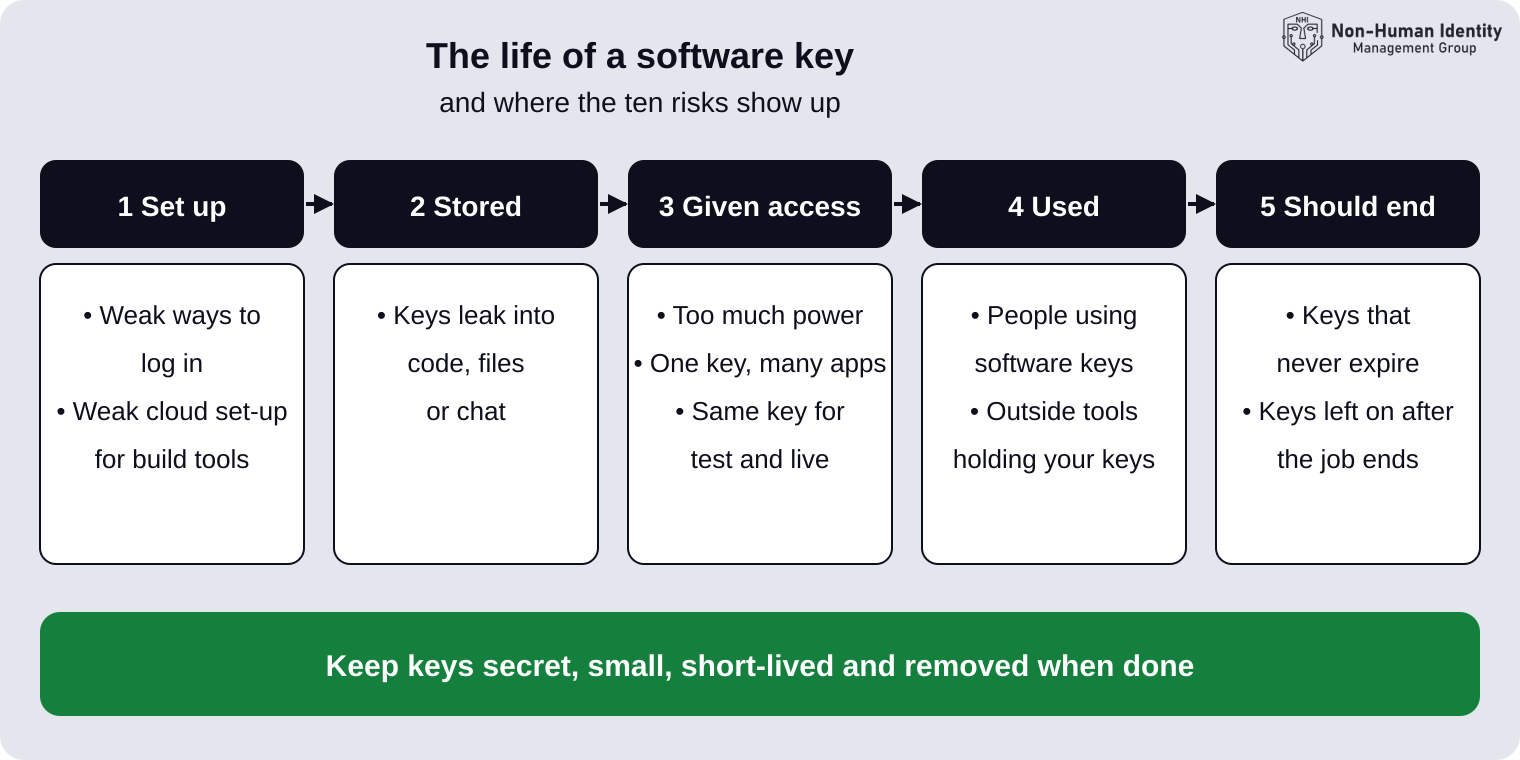
The easiest way to understand the list is to follow one key through its life. The names in bold are OWASP's own.[2] The short meanings follow the project's summaries.[1]
- The key is set up. Insecure Authentication means using old or weak ways for software to log in. Insecure Cloud Deployment Configurations means the tools that release software log in to the cloud weakly. One example is a fixed key that never changes.
- The key is stored. Secret Leakage means keys end up in code, settings files or chat messages where others can read them.
- The key is given access. Overprivileged NHI means a key has far more access than its job needs. NHI Reuse means one key is shared by several apps. Environment Isolation means the same keys are used for testing and for the live service.
- The key is used. Human Use of NHI means people use a software key for manual work, so nobody can tell who did what. Vulnerable Third-Party NHI means an outside tool or add-on holding your keys is attacked or misused.
- The key should end. Long-Lived Secrets means keys that never expire, or expire too far in the future. Improper Offboarding means keys and accounts nobody needs are left switched on.
The list's numbering comes from OWASP's own risk scoring, which drew on real breaches, surveys and other data.[2] In practice, many teams start with the steps that cut several risks at once: a list of keys, an owner for each and narrow access.
A worked example
Odile Jensen has just joined Elm Brewery, a fictional brewery with 30 staff, as its first IT assistant. Her manager, Vik Dube, asks her to look at the brewery's cloud account in her first week.
Odile has read about the OWASP NHI Top 10, so she uses the ten names as a checklist. She asks the web supplier for a list of every key the brewery's apps use.
The list has one key that stands out. It can do everything in the cloud account. It was made by a contractor who left a year ago. It has no end date. The website, the test site and the nightly backup all use it. Two staff also paste it into a tool when they fix orders by hand.
Odile counts six of the ten risks in one key. She explains it to Vik as the robot badge that opens every door, belongs to nobody and never expires.
Vik agrees a plan. The supplier creates three new keys, one for each job, each with only the access that job needs. The test site gets its own separate key. The two staff get their own named logins. Each key gets an owner and a date to be replaced.
Once the apps are moved across, the supplier switches the old key off rather than deleting it at once. After a week with no problems, they delete it. Odile checks the cloud records for odd activity and finds no unexpected use in the records available to her.
Vik asks her to repeat the check every three months.
Myths and mistakes
| What people think | What is true |
|---|---|
| The list is only for big tech firms. | Any business with a website, cloud storage or connected apps has NHIs. |
| Number one is the only one that matters. | Each risk is worth checking. One key can have several of them at once. |
| Strong passwords for staff cover software too. | NHIs are separate. They need their own list, owners and end dates. |
| A key nobody uses is harmless. | An unused key can still work. Switch it off and remove it when the job ends. |
| Sharing one key keeps things simple. | It also means one leak exposes every app that uses it. Give each app its own key. |
What can I do this week?
- Ask your team or supplier for a list of the keys and program accounts your apps use.
- Pick the key with the most access and ask who owns it and when it ends.
- Check that test and live services use different keys.
- Add "check and remove their keys" to your leaver checklist for staff and suppliers.
Checklist
- We have a list of our NHIs, such as service accounts and keys.
- Each key has a named owner.
- Each key has only the access its job needs.
- Each app and each environment has its own key.
- Keys are kept in a vault, not in code, files or chat.
- Keys have an end date or are replaced on a schedule.
- People use their own logins, not software keys.
- Keys are removed when an app, supplier or person leaves.
Common questions
Who makes the OWASP NHI Top 10?
OWASP, a non-profit security community, runs the project with volunteer leaders and contributors. The list is free to read on the OWASP website. It is guidance, not a law, so no one is forced to follow it. Many teams use it to decide what to check first.
How is this different from the main OWASP Top 10?
The main OWASP Top 10 covers weak spots in web applications, such as flaws in how a website handles input. The NHI list covers the accounts and keys that software uses. A website could pass one list and still have problems on the other.
Do small businesses need to care about this list?
Yes, if they use websites, online payments or cloud services. Those tools connect with keys, often set up by a supplier. A small firm may have only a handful of keys, which makes the checklist quick to run once a year or when a supplier changes.
Which risk should I fix first?
Start where one change cuts several risks. A list of your keys, a named owner for each and narrower access help with most of the ten. Then remove keys nobody needs and replace any that may have leaked. We suggest checking the most powerful keys first.
Does the list cover AI agents?
Partly. AI agents log in to other systems with keys and accounts, so the same ten risks apply to them. OWASP keeps a separate list for the wider risks of AI agents, such as being tricked by hidden instructions in text they read.
Where next?
Ready for the detail? Read the practitioner guide: Top 10 NHI Risks. It goes further into real breach examples for each risk, how the risks map to the OWASP entries and the first control to put in place for each.
Also useful:
- NHI Risks for Beginners
- Non-Human Identities for Beginners
- Secrets in Code for Beginners
- OWASP Top 10 for Agentic Applications for Beginners
- NHI Foundation Level Training
Related NHI Mgmt Group resources: OWASP NHI Top 10 NHI1 Improper Offboarding Guide · OWASP NHI Top 10 NHI2 Secret Leakage Guide · OWASP NHI Top 10 NHI5 Overprivileged NHI Guide · OWASP NHI Top 10 NHI7 Long-Lived Secrets Guide
Key terms
- Non-human identity (NHI)
- An identity used by software rather than a person, such as an API key or service account.
- Secret
- The key, token, password or certificate that proves a non-human identity (NHI) may act.
- Service account
- An account used by an app or automated tool rather than a person.
- Least privilege
- Giving each person or program only the access it needs, for only as long as it needs it.
- Long-lived credential
- A key that stays valid long after the task that needed it.
- NHI offboarding
- Switching off and removing NHIs when an app, project or owner ends.
- Secrets rotation
- Replacing keys on a schedule or after an event so old copies stop working.
Sources and further reading
- OWASP Non-Human Identities Top 10 (project page, risk summaries). OWASP Foundation. https://owasp.org/www-project-non-human-identities-top-10/, accessed 28 Nov 2026.
- OWASP Non-Human Identities Top 10 - 2025 (risk names NHI1:2025 to NHI10:2025, ranking method). OWASP Foundation, 2025. https://owasp.org/www-project-non-human-identities-top-10/2025/, accessed 28 Nov 2026.