Secure by design means a product is planned and built to be safe from the start, not fixed later.
This guide is for students, product managers and anyone who buys or builds software or smart devices. You do not need to be technical: the questions you ask a supplier can tell you a lot about how safely their product was made.
In short
- Secure by design puts safety into a product's plans, so fewer flaws reach customers.
- Its close partner, secure by default, means the product is safe out of the box, with no extra setup or cost.
- Government cyber agencies in several countries ask makers to own their customers' security outcomes.
- Common signs include no shared default passwords, extra login checks switched on and clear security updates.
What you will learn
- Explain secure by design and secure by default in plain words.
- Spot signs that a product was, or was not, built with safety in mind.
- Ask a supplier five useful questions before you buy.
- Explain why fixing flaws early usually costs less than fixing them later.
Status: correct as at 28 November 2026, based on CISA guidance and the UK government's product security regime page. Rules change; check the official text.
This guide explains the topic in general terms and is not legal advice.
- Built-in safety (secure by design)
- planning security into a product from the first sketch.
- Safe out of the box (secure by default)
- the safest settings are already on when you first use the product.
- Weak spot (vulnerability)
- a flaw an attacker could use to get in or cause harm.
What is secure by design?
Think of seatbelts and airbags in a car. They are fitted at the factory as standard, not sold as extras you must remember to add.
Secure by design applies that idea to software and connected devices. The maker thinks about how the product could be attacked while it is still being planned. Then they build in protection before it reaches customers.
The US cyber agency says these makers treat customer safety as a core business need. It is not just a technical extra.[1] The partner idea is secure by default. The product is safe when first switched on. It needs little or no setup and costs nothing extra.[1]
Where the comparison stops working: a car's safety features stay the same for years. Software keeps changing, and new attacks appear, so the maker has to keep the product safe with updates.
Why does it matter?
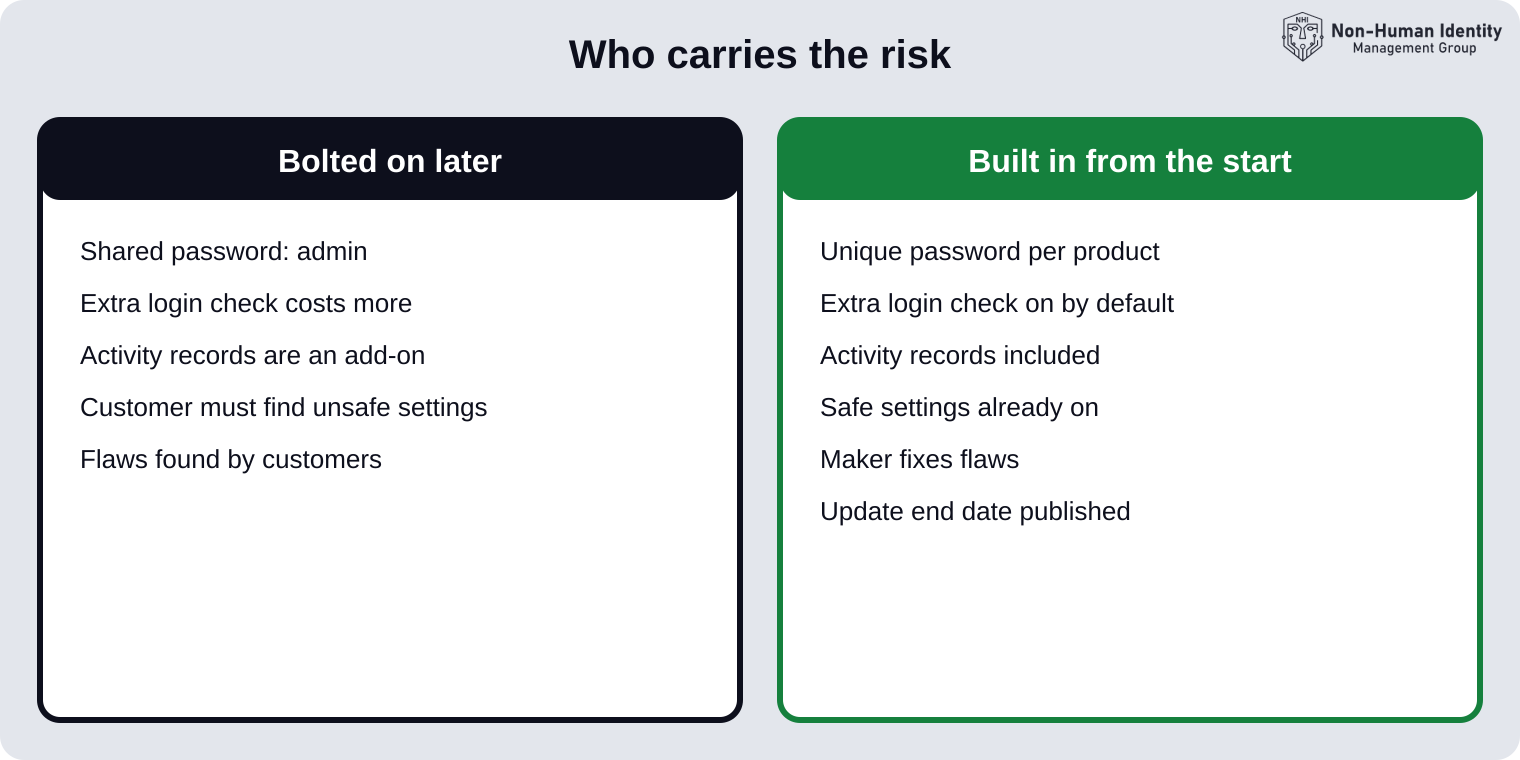
When safety is left to the customer, every customer has to get it right. When the maker builds it in, everyone benefits at once.
If you work on a product team
What could happen: a feature ships with a shared admin password, and customers are blamed when it is misused.
Check this: ask "how could this be misused?" when a feature is planned, not after launch.
If you buy software for a small business
What could happen: extra login checks or activity records cost more, so you go without them.
Check this: ask whether these features are included as standard.
If you are studying technology
What could happen: you learn to build features fast but not to think about misuse.
Check this: for each project, write one line on how someone might abuse it.
What does it look like?
Here is a made-up checklist a buyer might use with a software supplier.
Example only. All values are made up.
Supplier check: EXAMPLE Booking Software
Each customer gets a unique starting password?   yes / no   (1)
Extra login check (MFA) on by default?          yes / no   (2)
Activity records included at no extra cost?     yes / no   (3)
Published date until security updates end?      yes / no   (4)
A public way to report security problems?       yes / no   (5)
- A shared starting password, such as "admin", is easy to guess or look up.
- MFA (multi-factor authentication) asks for a second proof, such as a code, as well as a password.
- Activity records help you spot and look into a break-in.
- Knowing when updates stop helps you plan when to replace the product.
- A reporting route lets researchers tell the maker about flaws.
Why this is risky: if most answers are "no", the work of staying safe falls on you, and it is easy to miss a step.
The safer way: prefer suppliers who answer "yes" and can show it. These checks match examples in guidance from government cyber agencies.[3][4]
How does it work?
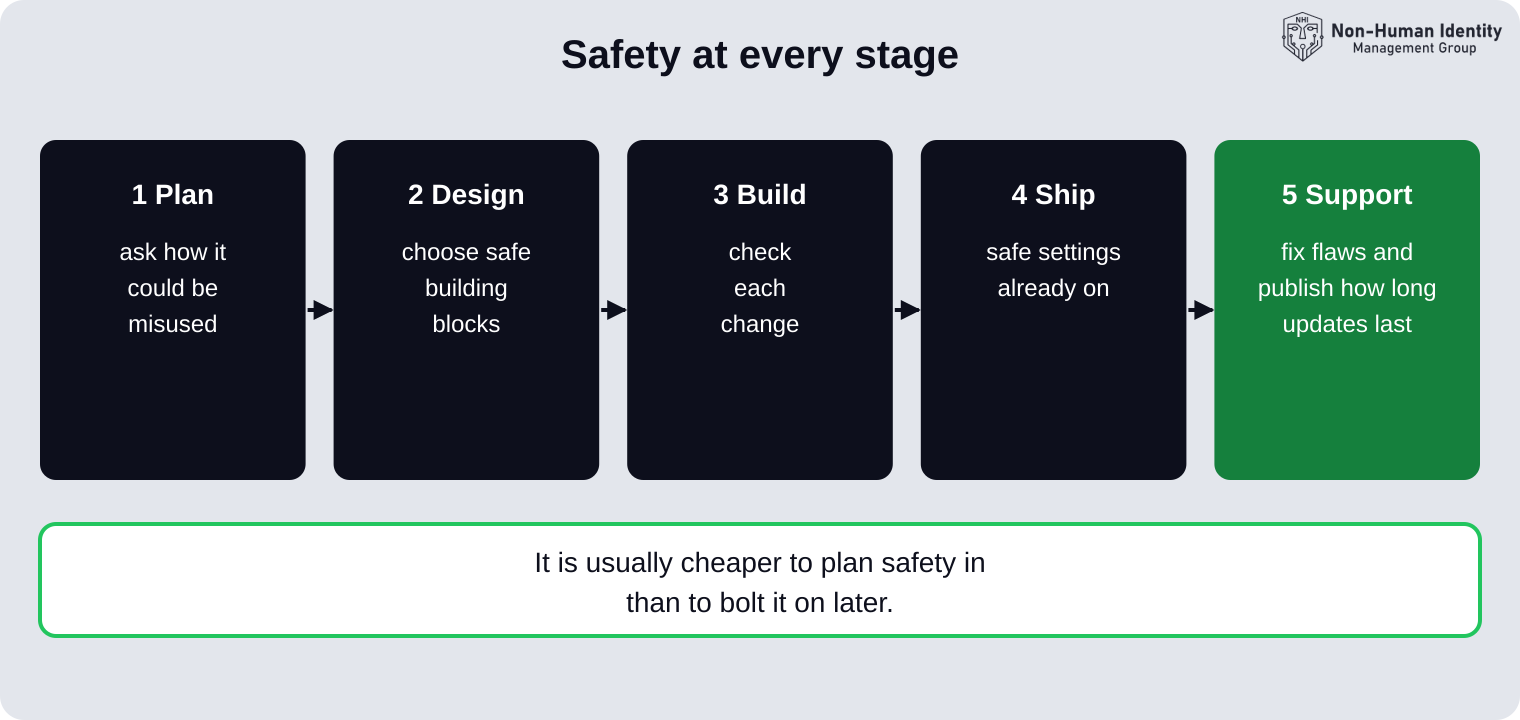
Secure by design follows a product through its whole life.
- Plan. The team asks how the product could be misused and what would hurt customers most.
- Design. They choose safe building blocks, such as programming languages that avoid whole groups of memory errors.[3]
- Build. They check the code as they go, for example with a second person reviewing each change.
- Ship. The product goes out with safe settings already on, such as unique passwords and extra login checks.
- Support. The maker fixes flaws, releases updates and says openly how long updates will last.
In 2023, cyber agencies from the US, the UK, Australia and other countries published joint guidance on this idea. It sets out three principles.[2] In plain words, makers should:
- take responsibility for how safe their customers are, rather than leaving it to them;
- be open about flaws and how they are fixed;
- make security a goal that company leaders own.
Some countries now write parts of this into law. Since 29 April 2024, UK rules for consumer smart devices require that passwords are unique to each product or set by the user. Makers must also publish how to report security issues and how long updates will last.[5]
A worked example
Nadia Whitlock is a product manager at a fictional software firm. Her team is building an online booking system for small firms like Heron Accountants, a fictional practice of eight staff.
In the first planning meeting, Nadia asks a new question: "How could someone misuse this?" The team lists three worries. A stranger could guess an admin password. A staff member could see clients they should not. And nobody would notice a break-in.
Vik Ulrich, the lead developer, suggests answers before any code is written. Each new account gets a unique setup link instead of a shared password. Extra login checks are switched on by default. Staff only see the clients they are assigned to.
Nadia then asks about activity records. The sales team had planned to charge extra for them. Nadia remembers the seatbelts. Safety features work best when everyone has them, so the records are included for every customer.
Before launch, the team writes a page that explains how to report security problems. They also publish how long the product will get security updates.
When Heron Accountants signs up, nobody there has to hunt for unsafe settings. The safer choices are already in place. Their office manager says it is the first system they have set up without a long list of things to switch on.
Myths and mistakes
| What people think | What is true |
|---|---|
| Security can be added at the end, before launch. | Some flaws come from early design choices. They are usually harder and costlier to fix later. |
| Secure by design means the product cannot be hacked. | It lowers the number and impact of flaws. The maker still needs to fix new problems with updates. |
| Safety features should be paid extras. | Government guidance says basic protections, such as activity records, should come at no extra charge.[3] |
| It is only for big tech firms. | The same ideas apply to any team that builds software or devices, including small ones. |
| It is the security team's job alone. | The guidance asks company leaders to own it, with product, design and engineering teams all involved.[2] |
What can I do this week?
- Ask your main software supplier the five questions in the sample checklist.
- Check any smart devices at home or work for shared default passwords.
- If you build products, add "how could this be misused?" to your planning template.
- Find out when security updates end for the devices and software you rely on.
Checklist
- Misuse is discussed when features are planned.
- No product ships with a shared default password.
- Extra login checks are on by default where they fit.
- Activity records are included for every customer.
- Each change is checked before it is released.
- There is a public way to report security problems.
- The end date for security updates is published.
- Leaders review security goals alongside other business goals.
Common questions
What is the difference between secure by design and secure by default?
Secure by design is about how the product is planned and built. Secure by default is about how it arrives: the safest settings are already on, with no extra setup or cost. A product that is secure by design should normally also be secure by default.
Is secure by design a law?
Mostly it is guidance, not law. The US pledge for software makers is voluntary.[4] Some countries have written parts into law, such as UK rules on passwords and updates for consumer smart devices. Check the rules where you sell.
Who came up with secure by design?
The idea is old, but recent guidance comes from government cyber agencies. In 2023, agencies from many countries, including the US cyber agency, shared joint principles. The UK government also has its own secure by design approach for public services.
Does secure by design make products more expensive?
It can add some work early on. In our view, it often saves effort later, because fewer flaws reach customers and fewer rushed fixes are needed. Customers also avoid paying extra for basic protection.
How can I tell if a product is secure by design?
Look for signs you can check. Ask whether passwords are unique, whether extra login checks are on, whether activity records are included and when updates end. A maker who answers clearly and in writing is a good sign.
Where next?
Ready for the detail? Read the practitioner guide: Secure by Design for UK Government Guide. It goes further into the UK government's principles, choosing a controls set and the evidence teams must keep.
Also useful:
- Software Liability and Secure by Design Policy Guide
- Secure Software Development Lifecycle for Beginners
- Memory-Safe Languages for Beginners
- UK Software Security Code of Practice for Beginners
Related NHI Mgmt Group resources: UK PSTI Act Guide · Default Passwords for Beginners · Bug Bounties for Beginners
Key terms
- Secure by design
- Planning and building a product so that safety is part of it from the start.
- Secure by default
- A product whose safest settings are already on when it is first used.
- Default password
- A starting password set by the maker, which is risky when it is shared or easy to guess.
- Multi-factor authentication
- Asking for a second proof, such as a code, as well as a password.
- Threat model
- A planned look at how a product could be attacked and what to do about it.
- Vulnerability disclosure policy
- A public page that explains how to report security problems to a maker.
Sources and further reading
- Secure by Design. Cybersecurity and Infrastructure Security Agency (CISA). https://www.cisa.gov/securebydesign, accessed 28 Nov 2026.
- CISA, NSA, FBI, and International Partners Release Updated Secure by Design Guidance (Shifting the Balance of Cybersecurity Risk: Principles and Approaches for Security-by-Design and -Default). CISA, 16 October 2023. https://cisa.gov/news-events/alerts/2023/10/16/cisa-nsa-fbi-and-international-partners-release-updated-secure-design-guidance, accessed 28 Nov 2026.
- Guidelines for Shifting the Balance of Cybersecurity Risk (secure by design and default, October 2023 update). Australian Signals Directorate, Australian Cyber Security Centre. https://www.cyber.gov.au/node/2159, accessed 28 Nov 2026.
- Secure by Design Pledge. CISA. https://www.cisa.gov/securebydesign/pledge, accessed 28 Nov 2026.
- The UK Product Security and Telecommunications Infrastructure (Product Security) regime. Department for Science, Innovation and Technology, GOV.UK. https://www.gov.uk/government/publications/the-uk-product-security-and-telecommunications-infrastructure-product-security-regime, accessed 28 Nov 2026.