Non-human identity authentication is how software, devices and AI agents prove who they are before they connect.
This guide is for anyone who has heard about keys, tokens or service accounts and wants to know how software logs in. You do not need to write code to be affected: if your business uses apps that connect to each other, each connection uses some kind of proof.
In short
- Software cannot type a password or tap a phone, so it proves itself with keys, tokens or certificates.
- Whoever holds a copy of that proof can often act as the software, so the proof must be kept safe.
- Proof that expires quickly leaves a thief less time than a key with no end date.
- Proving who you are is one step. Deciding what you may do is a separate step.
What you will learn
- Explain how software proves who it is.
- Spot a key with no end date and no named owner.
- Explain the difference between proving who you are and what you may do.
- Ask your team which NHIs still use stored keys that could be swapped for short-lived ones.
- Non-human identity (NHI)
- a digital identity, or the credential behind it, that represents a machine, application, automated process, service or AI agent, so it can authenticate, carry out tasks and connect to other systems without a person.
- Proving who you are (authentication)
- the check that a login or request really comes from who it claims.
- Proof (credential)
- the key, token or certificate that software shows to be let in.
What is non-human identity authentication?
Think of a staff badge issued to a robot. The robot cannot show a face at reception, so it shows its badge at every door. If the badge is right, the door opens.
A non-human identity (NHI) is that robot's badge in the digital world. It belongs to a program, a server, an automated job or an AI agent. Authentication is the moment the badge is checked: "are you really the billing app?"
The badge itself is called a credential. For software it is usually one of three things. An API key is a secret code sent with each request. A token is a short-lived pass handed out by a trusted service. A certificate is a signed digital document that the software proves it owns.
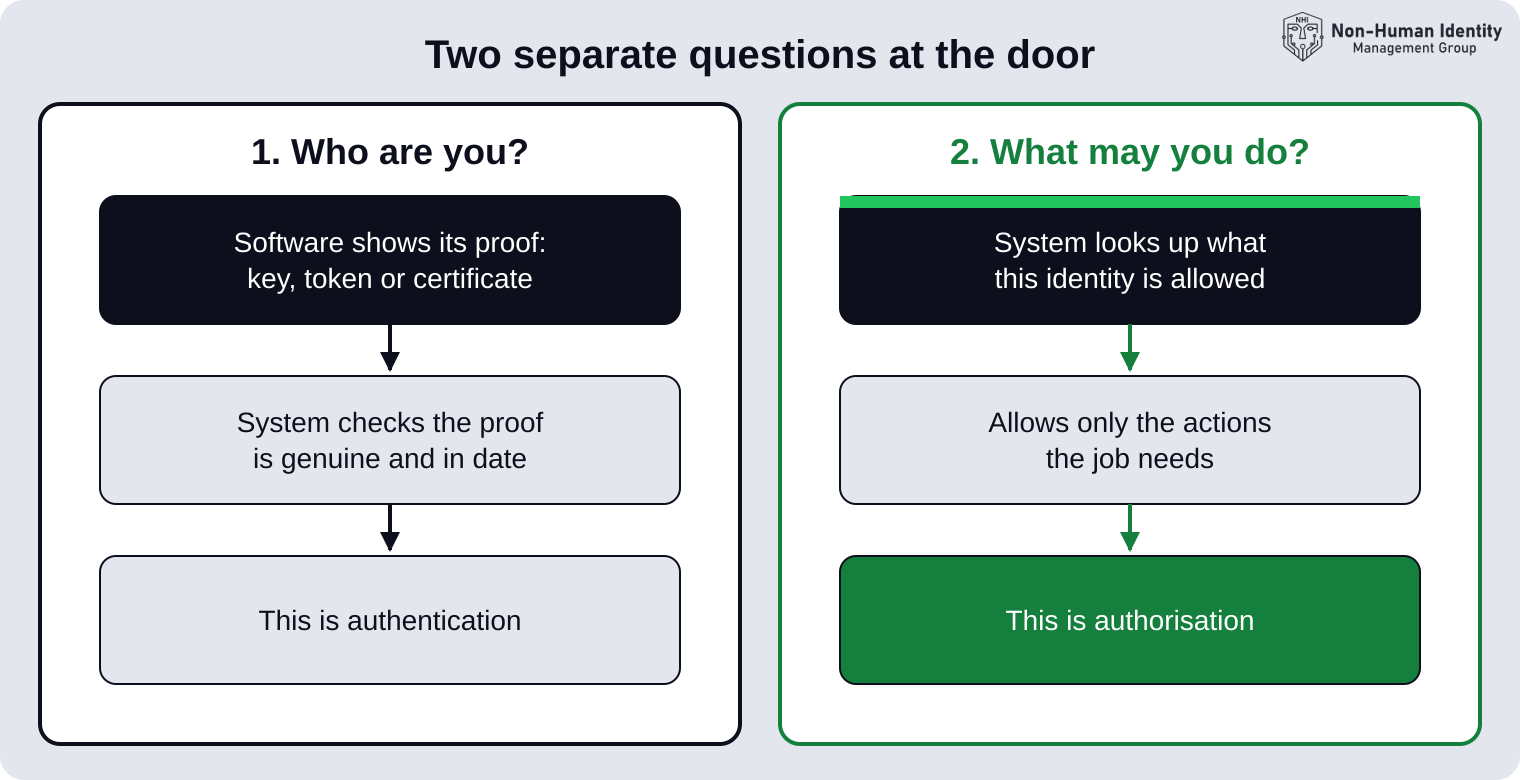
After that check comes a second question: "what is the billing app allowed to do?" That is authorisation, and it is a separate decision.
Where the comparison stops working: a guard might notice a stranger wearing someone else's badge. Software signs in thousands of times a day with nobody watching, so a copied key can be used again and again unnoticed.
Why does it matter?
If a key leaks and it has no end date, the thief may keep using it until someone notices. A community list of the top risks for software identities warns that a long-lived secret gives attackers access "without any time constraints".[1]
If you run a small business
What could happen: your shop app uses a key to reach your payment service. If it leaks, a stranger can act as your app.
Check this: ask your supplier which keys your apps use and whether they ever expire.
Next: API Keys for Beginners
If you are new to IT work
What could happen: you create a key "just for testing", it never expires and it ends up in shared code.
Check this: give every key you create an owner, a purpose and an end date.
If you manage a team
What could happen: nobody owns half the keys in use, so nobody notices when one is exposed.
Check this: ask for a list of NHIs, each with an owner and an end date.
If you are bringing in AI agents
What could happen: an agent borrows a person's login, so its actions are hard to trace or limit.
Check this: give each agent its own identity with only the access its task needs.
What does it look like?
Here is a made-up list of NHIs at a small firm. A good team keeps a list like this.
Example only. All values are made up.
NHIs: EXAMPLE Media (example.com)
Name            Proof used        Ends        Owner
invoice-sync    API key FAKE-0000  no end date  unknown   (1)
web-to-storage  cloud role         1 hour       dev lead  (2)
partner-feed    certificate        2027-01-31   IT team   (3)
chat-helper     borrowed staff login  n/a      unknown   (4)
- In a real file, this line would show a key that never expires and that nobody owns. This is the riskiest line.
- A pass issued by the cloud platform that ends after an hour and is renewed automatically.
- A certificate with an end date. Someone must renew it in time, or the connection breaks.
- An AI helper using a person's login. Its actions look like that person's.
Why this is risky: lines 1 and 4 give a thief lasting reach. Nobody is clearly in charge of them.
The safer way: every NHI has an owner and an end date. Where possible, stored keys are swapped for short-lived passes. Amazon Web Services, for example, says its short-lived passes can last from a few minutes to several hours. Apps then do not need long-term keys built in.[2]
How does it work?
Methods differ, but most follow the same pattern.
- Register. An administrator creates an account for the software in the system it needs to reach, and decides what it may do.
- Give it proof. This is a stored key, a certificate, or a trust rule that lets a platform vouch for the software with nothing stored.
- Show the proof. When the software calls another system, it sends its key or token, or proves it holds a certificate.
- Check. The other system checks the proof is genuine, from a trusted source and still in date.
- Allow and record. If the check passes, the system allows only what this identity may do, and keeps a record. A short-lived pass then runs out, while a stored key lasts until someone changes it.
NHI Mgmt Group's map of non-human identities sorts these proofs into two groups.[5] Static, long-lived proofs, such as API keys, long-lived tokens, database passwords and service account passwords, stay the same until someone changes them. Dynamic, short-lived, just in time proofs are issued only when needed and run out after a short time. Examples are OAuth access tokens, cloud roles, OpenID Connect tokens and SPIFFE identity documents. The full map is in Non-Human Identities for Beginners.
Some build tools can log in to the cloud without a stored key. GitHub, for example, can give each automated job a signed token, which the cloud provider checks against a trust rule before giving short-lived access.[3]
A worked example
Dario Rosen is the only developer at Heron Pharmacy, a fictional chain of pharmacies with 20 staff. Each night a job he wrote copies the day's stock reports into cloud storage.
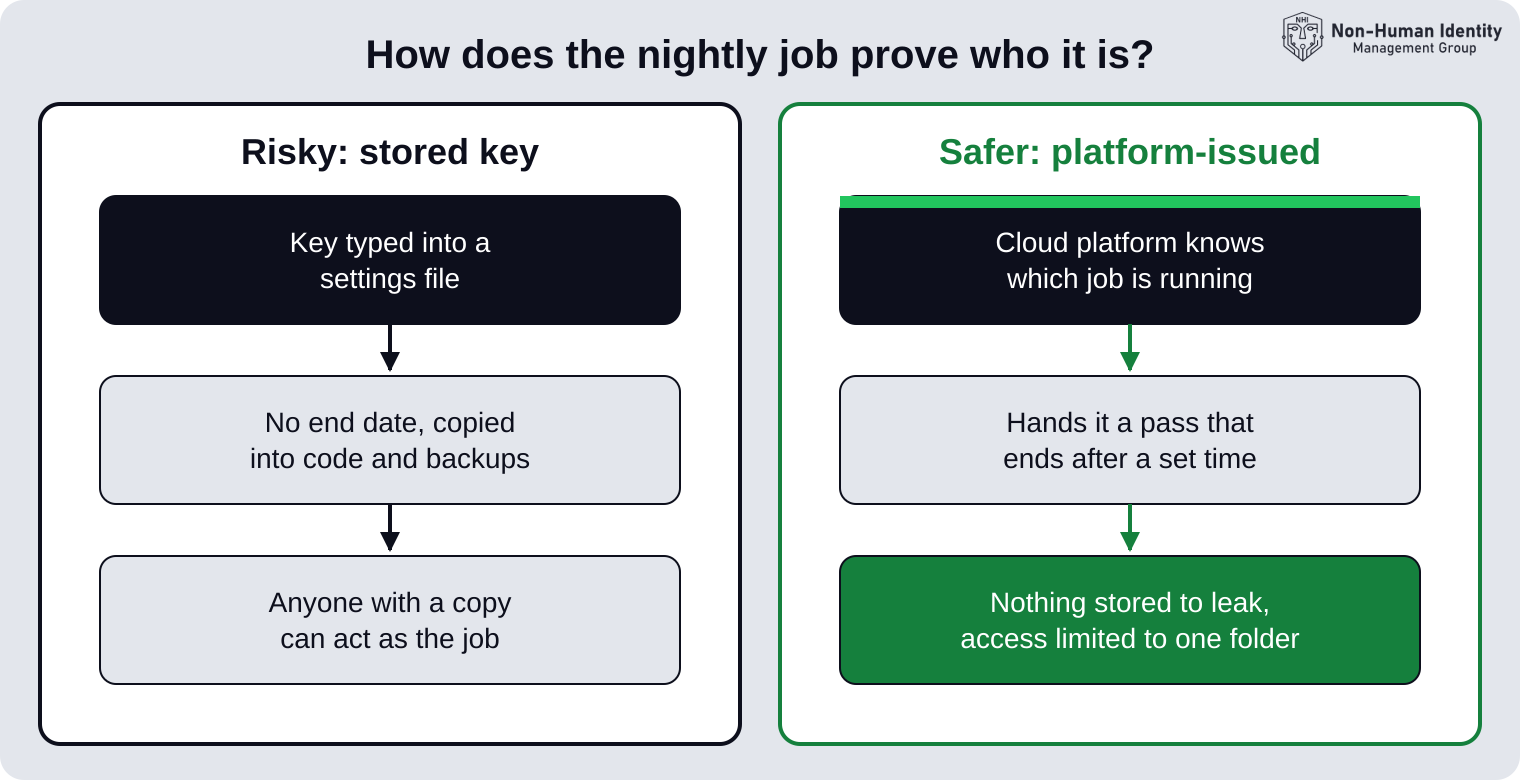
To get it working fast, Dario made a cloud key with no end date and pasted it into the job's settings file. Months later, that file was copied into the shared code project.
During a tidy-up, Dario thinks about the robot's staff badge. His job's badge never expires, and copies of it now sit in several places.
He makes three changes. First, the job now runs on a cloud server with an attached role. The platform hands it a short-lived pass that renews on its own, so no key sits in any file.
Second, he limits the role to writing into one storage folder. It cannot read or delete anything else.
Third, he switches off the old key and watches for errors. After a week with none, he deletes it. He also sets an alert for any new long-term key being created.
The nightly job runs as before. This does not make Heron Pharmacy safe from every attack. Someone who took over the server itself could still use its role while it runs. But a copy of an old settings file is no longer enough to get in, and each use of the role is recorded.
A real case shows why lifetime matters. TechCrunch reported that a Home Depot employee's access token for its code site was exposed online from early 2024. A researcher told the publication that access was cut off soon after it contacted the company in December 2025.[4]
Myths and mistakes
| What people think | What is true |
|---|---|
| Software can use a phone prompt like people do. | Nobody is there to tap it. Software relies on keys, certificates and short-lived passes instead. |
| A key in a private code project is safe. | Private projects are copied, shared and sometimes made public by mistake. Keep keys in a secrets store, or replace them with short-lived passes. |
| If it logged in, it must be allowed. | Logging in only proves identity. What it may do is a separate decision, and should be as narrow as the job needs. |
| Short-lived passes need no care. | A stolen pass still works until it ends. Limit who can get one, keep its access small and record its use. |
| Certificates solve everything. | Certificates are strong proof, but they expire and must be renewed and tracked. Forgotten ones cause outages. |
What can I do this week?
- Pick one important system and list every key, token and certificate it uses.
- Give each one a named owner and write down when it ends.
- Mark any key with no end date, and check whether it sits in code or a settings file.
- Ask whether one stored cloud key could be swapped for a platform-issued pass.
Checklist
- Every NHI has a named owner.
- No keys, tokens or private keys are stored in code or plain settings files.
- Remaining stored keys sit in a secrets store and are changed on a schedule.
- Cloud jobs use platform-issued, short-lived passes where the platform supports them.
- Each identity has only the access its job needs.
- Certificates are tracked with their end dates and renewed in time.
- AI agents and automated jobs have their own identities, not borrowed staff logins.
- NHI activity is recorded, and unusual use raises an alert.
Common questions
What is the safest way for software to log in?
A sensible goal is a short-lived pass from a platform you trust, with narrow access, so there is no lasting secret to leak. Where that is not possible, we suggest certificates, or keys kept in a secrets store and changed on a schedule.
Are API keys bad?
No, but on their own they are a weak kind of proof, because whoever holds one can use it. They can be fine for low-risk uses if stored safely, limited, watched and changed regularly. For anything sensitive, look for a stronger option.
What is the difference between an API key and a token?
An API key is usually a fixed secret that lasts until someone changes it. A token is a pass handed out by a trusted service, carries set permissions and usually ends quickly. See the API Keys vs OAuth Tokens Guide.
Do AI agents need their own identities?
Yes. An agent with its own identity can be limited to what its task needs, and its actions can be traced. If it borrows a person's login, its actions look like that person's and are much harder to control.
What is the "secret zero" problem?
It is the first secret needed to unlock all the others. Even a secrets store needs a first credential. Platform-issued identities help, because the platform vouches for the software instead of a stored secret. See The Secret Zero Problem for Beginners.
Where next?
Ready for the detail? Read the practitioner guide: NHI Authentication Guide. It goes further into comparing methods, tying tokens to certificates and moving from stored keys to platform-issued identities.
Also useful:
- OAuth 2.0 for Beginners
- Mutual TLS for Beginners
- Workload Identity Federation for Beginners
- Cloud Workload Identity Guide
- NHI Foundation Level Training
Related NHI Mgmt Group resources: Non-Human Identity (NHI) Guide · API Key Management Guide · Workload Identity Federation Guide
Key terms
- Non-human identity (NHI)
- A digital identity, or the credential behind it, that represents a machine, application, automated process, service or AI agent, so it can authenticate, carry out tasks and connect to other systems without a person.
- Authentication
- The check that proves an identity is genuine, using a key, token, certificate or other proof.
- The separate decision about what an identity is allowed to do once it is proven.
- Credential
- Any secret or proof used to show who you are, such as a password, token, certificate or API key.
- API key
- A secret code an app sends to prove it may use a service, often long-lived.
- Short-lived credentials
- Proof that expires soon after it is issued, which shortens the time a stolen copy can be misused.
- Mutual TLS (mTLS)
- A secure connection where both sides show and check certificates, so each proves who it is.
- Workload identity federation
- A way for software in one place to log in to another using short-lived tokens instead of stored keys.
Sources and further reading
- OWASP Non-Human Identities Top 10, 2025 (NHI4 Insecure Authentication; NHI7 Long-Lived Secrets). OWASP Foundation. https://owasp.github.io/www-project-non-human-identities-top-10/2025/top-10-2025/, accessed 28 Nov 2026.
- Temporary security credentials in IAM. AWS Identity and Access Management User Guide, Amazon Web Services. https://docs.aws.amazon.com/IAM/latest/UserGuide/id_credentials_temp.html, accessed 28 Nov 2026.
- OpenID Connect (GitHub Actions security concepts). GitHub Docs, GitHub. https://docs.github.com/en/actions/concepts/security/openid-connect, accessed 28 Nov 2026.
- Home Depot exposed access to internal systems for a year, says researcher. TechCrunch (news report), 12 December 2025. https://techcrunch.com/2025/12/12/home-depot-exposed-access-to-internal-systems-for-a-year-says-researcher/, accessed 28 Nov 2026.
- Non-Human Identities for Beginners: The Machine and AI Identities Behind Every App. NHI Mgmt Group, 28 November 2026. https://nhimg.org/what-are-non-human-identities-beginners-guide, accessed 28 Nov 2026.