Open banking lets you share your bank data, or start a payment, with an app you choose.
This guide is for anyone who has been asked to connect an app to their bank and wants to know if it is safe. Small businesses meet it too, often when accounting or payment tools ask to link a business account.
In short
- Open banking only happens when you give clear permission to a regulated firm.
- You sign in on your own bank's screen, so the app should never ask for your bank password.
- You choose what each app can see and how long that lasts, and you can stop it.
- Most of the risk comes from scams that copy the process, so check the firm before you connect.
What you will learn
- Explain what open banking is in one sentence.
- Spot a request that copies open banking but is a scam.
- Check that an app is run by a regulated firm.
- Stop an app's access when you no longer need it.
- Your permission (consent)
- the clear yes you give before an app can see your data or start a payment.
- Outside app (third-party provider)
- a firm that is not your bank but connects to it with your permission.
What is open banking?
Think of a signed permission slip. You write down who may see your bank details, what they may see and until when. You can tear the slip up at any time.
Open banking works the same way. A budgeting app, a savings tool or a payment service asks for your consent, which means your clear permission. If you agree, your bank shares only what you approved.
The app is an outside firm, called a third-party provider. The UK's financial watchdog is the Financial Conduct Authority (FCA). Only firms regulated by the FCA, or a European equivalent, can join the UK open banking system.[1]
There are two main kinds of use. Some apps read your account data, for example to show all your accounts in one place. Others start a payment from your account, but only after you approve it.
Where the comparison stops working: a paper slip can be copied or forged by anyone. With open banking, the bank checks the app is on its approved list, and you approve on the bank's own screen.
Why does it matter?
Open banking can make money tasks quicker. It also means more firms can see your financial life, so it pays to choose them with care.
If you use a budgeting or savings app
What could happen: you connect an app you know little about, and it keeps seeing your spending long after you stop using it.
Check this: look up the firm on the FCA register, and remove apps you no longer use.
If you run a small business
What could happen: a staff member links the business account to a tool nobody approved.
Check this: agree who may connect apps to business accounts, and keep a list of them.
If you help an older relative with money
What could happen: a caller talks them into "linking" their bank to a fake app.
Check this: explain that a real app never needs their bank password or a code read out on the phone.
What does it look like?
Here is a made-up permission screen, the kind your bank shows when an app asks to connect.
Example only. All values are made up.
FakeBank: Share your data with EXAMPLE Budget?    (1)
  Firm: Example Budget Ltd, FCA ref 000000        (2)
  It will see: balances, transactions             (3)
  It will NOT see: your password or PIN
  Access lasts: until 01/01/2099 (EXAMPLE)        (4)
  [ Approve ]  [ Cancel ]                         (5)
- The screen comes from your bank, after the app sends you there.
- In a real screen, this line would show the firm's name and its register number, which you can look up.
- It lists exactly what the app will see. Read it before you approve.
- It says how long access lasts. Shorter is safer if you only need it once.
- You can say no. Nothing is shared unless you approve.
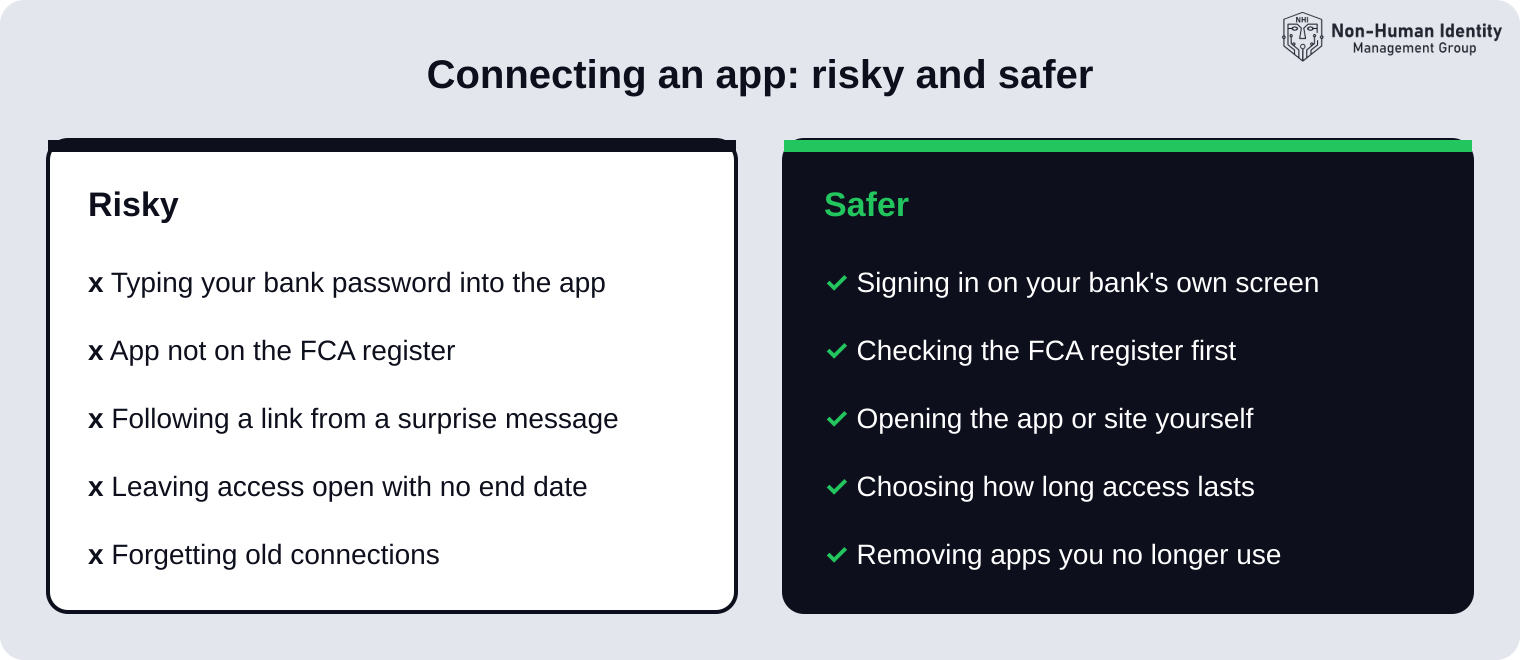
Why this is risky: people tap Approve without reading. A scam may also show a copy of this screen on a fake site.
The safer way: open the app or site yourself, read what will be shared, and approve only inside your own bank's app or website.
How does it work?
- You choose an app. It might help you budget, save money, apply for a loan or pay a bill from your account.
- The app sends you to your bank. You sign in on your bank's own app or website, not inside the app.[1]
- You approve. The bank shows what the app wants to see and how long it wants access, and you choose yes or no.
- The bank shares only what you agreed. It does this through a secure link between computers, called an API. The app does not get your bank password.
- You can stop it. Withdraw consent in the app, or ask your bank to stop that firm's access.[1]
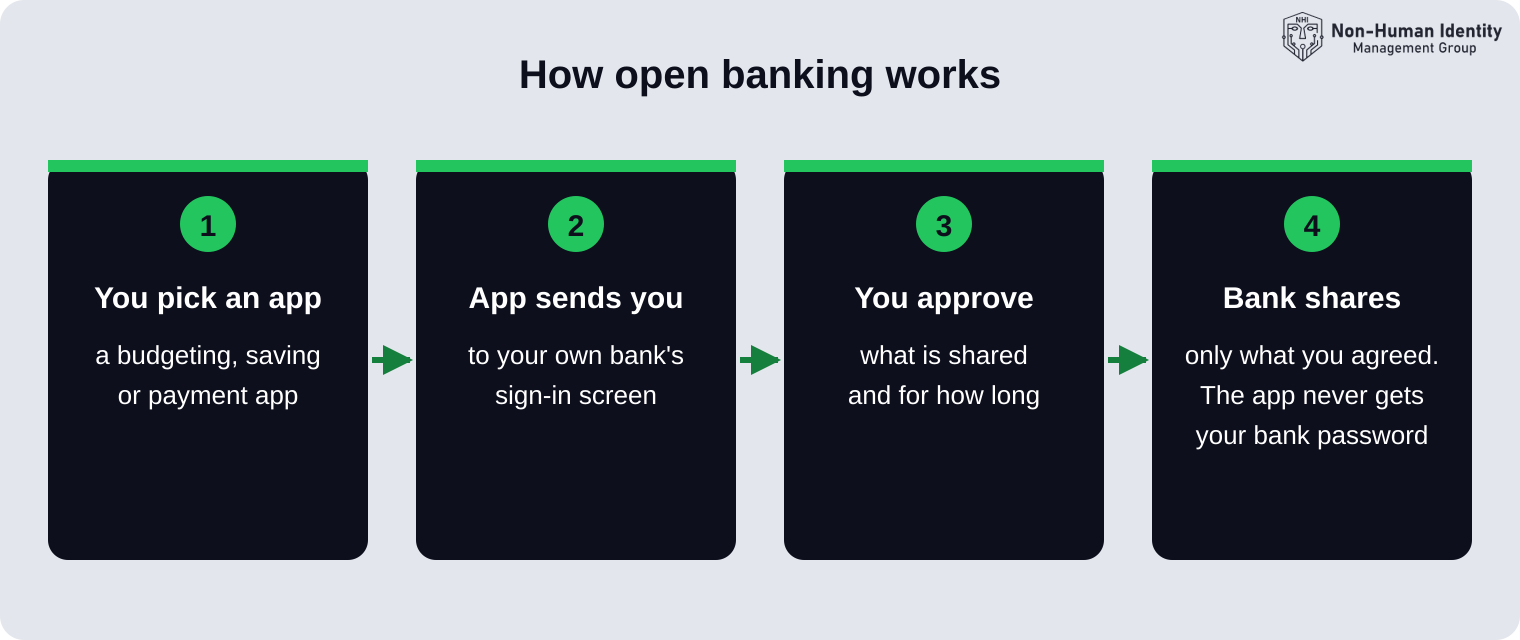
In the UK, the nine largest banks and building societies must offer open banking. Smaller ones can choose to join.[1]
Before open banking, some apps asked for your bank login and read your account by copying what was on screen. This is called screen scraping. Open banking avoids that, because you never hand over your login.
A worked example
This story is made up to show how it can happen.
Halima Arslan works in a café in Bristol. She wants to save for a holiday, and a friend tells her about a budgeting app that shows all her spending in one place.
Halima downloads the app from her phone's official app store. Before she connects anything, she looks up the firm's name on the FCA register. It is there, with the same name and website as the app.
The app asks to connect to her bank. It sends her to her bank's own app, where she signs in with her fingerprint as usual. The bank's screen lists what the app will see: balances and transactions. It does not ask her to share her password with anyone.
She reads the screen, sees the access will last for a set time, and taps Approve.
A week later, Halima gets a text. It says her "open banking link has expired" and gives a link to "reconnect". The message asks for her bank login. Halima remembers that the real process never asked for her password. She does not tap the link.
Instead, she opens the budgeting app herself. It shows no problem with the connection. She reports the text to her mobile provider's scam number, 7726, and deletes it.[4]
Three months later, Halima has saved enough and stops using the app. She withdraws consent in the app settings, so the app can no longer see her account.
What made the difference: Halima knew that real open banking sends you to your bank, so a message asking for her login stood out.
Myths and mistakes
| What people think | What is true |
|---|---|
| Connecting an app means giving it my bank password. | With open banking you sign in on your bank's own screen. You should never need to give your bank login to anyone but your bank.[1] |
| Once I connect, the app can see my account for ever. | You choose how long access lasts, and you can withdraw it in the app or through your bank.[1] |
| Any app in the app store must be regulated. | Being in a store is not the same as being regulated. Check the firm on the FCA register.[2] |
| A payment app can take money whenever it likes. | A payment app starts a payment only when you approve it with your bank. |
| A message saying my "open banking link expired" is normal. | Treat it with care. Open the app yourself rather than tapping a link. |
What can I do this week?
- List the apps you have connected to your bank. Ask your bank if you are not sure.
- Remove any you no longer use, in the app or through your bank.
- Look up any app you still use on the FCA register.
- Tell family members that a real app never asks for their bank password or a code by phone.
Checklist
- I connect apps only from links I opened myself, not from messages.
- I check the firm on the FCA register before I connect.
- I approve on my own bank's app or website, not on a page inside another app.
- I read what will be shared and for how long before I approve.
- I never give my bank password or PIN to an outside app.
- I remove apps I no longer use.
- I know how to report a scam message by forwarding it to 7726.
Common questions
Is open banking safe?
It is designed to be safer than handing over your login. Only regulated firms can join, you sign in with your own bank, and you choose what to share. The main risk is scams that copy the process, so check the firm and never share your bank password.[1]
How do I check an app is regulated?
Search the firm's name on the FCA's Financial Services Register, a public list of firms the FCA has authorised.[2] Check the name, website and contact details match the app. Open Banking Limited also lists the providers enrolled in its system.[3]
How do I stop an app seeing my account?
Withdraw your consent in the app or website you connected. You can also contact your bank or building society and tell them you no longer want that firm to see your information.[1] It is a good habit when you stop using an app.
Can an open banking app move my money?
Only some can, and only with your approval. Payment apps ask you to confirm each payment with your bank. Apps that only read your data cannot move money. The bank's screen tells you which kind you are approving.
Where do I report a scam that used open banking?
Call your bank first, using the number on your card. In England, Wales and Northern Ireland, report it to Report Fraud. In Scotland, contact Police Scotland. Forward scam texts to 7726.[4][5]
Where next?
Ready for the detail? Read the practitioner guide: Open banking and open finance security. It goes further into the rules in the EU, UK and US, how consent and access tokens are managed, and how firms check the providers they connect to.
Also useful:
- Payment Fraud for Beginners
- OAuth Apps and Integrations for Beginners
- Text Message Scams for Beginners
- Data Privacy for Beginners
Related NHI Mgmt Group resources: CFPB Section 1033 Open Banking Rule Guide · Authorised Push Payment (APP) Fraud Guide · Confirmation of Payee and Payee Verification Guide
Key terms
- Open finance
- The wider idea of sharing financial data beyond bank accounts, such as savings and pensions, with your permission.
- Consent
- Your informed permission for your data to be used in a stated way.
- Third-party provider
- A firm that connects to your bank on your behalf, with your permission.
- Account information service provider
- An outside firm that reads your account data, with your consent, to give you a service such as budgeting.
- API
- A set of rules that lets one computer system ask another for data or actions.
- Screen scraping
- Copying data off a screen automatically, which older apps did with your bank login.
Sources and further reading
- What is open banking. Open Banking Limited. https://www.openbanking.org.uk/what-is-open-banking/, accessed 28 Nov 2026.
- Financial Services Register. Financial Conduct Authority (FCA). https://www.fca.org.uk/firms/financial-services-register, accessed 28 Nov 2026.
- Regulated providers. Open Banking Limited. https://www.openbanking.org.uk/regulated-providers/, accessed 28 Nov 2026.
- Report a scam text (Phishing scams: how to spot and report them). National Cyber Security Centre (NCSC). https://www.ncsc.gov.uk/collection/phishing-scams/report-scam-text-message, accessed 28 Nov 2026.
- Report Fraud service goes live. Report Fraud (City of London Police), 4 December 2025. https://www.reportfraud.police.uk/news/report-fraud-service-goes-live/, accessed 28 Nov 2026.