Persistence is how an intruder keeps a way back into a system after the first break-in.
This guide is for students, newcomers to IT and anyone who has cleaned up after a hack and wondered if the intruder is really gone. You do not need to be technical to be affected: if your business has ever reset a password after a scare, persistence is why that may not be enough.
In short
- Intruders who get in often set up extra ways back, so one fix does not lock them out.
- Common ways back are an extra account, a hidden task that runs on a timer, a connected app or a copied key.
- A password reset closes one door. It may leave the others open.
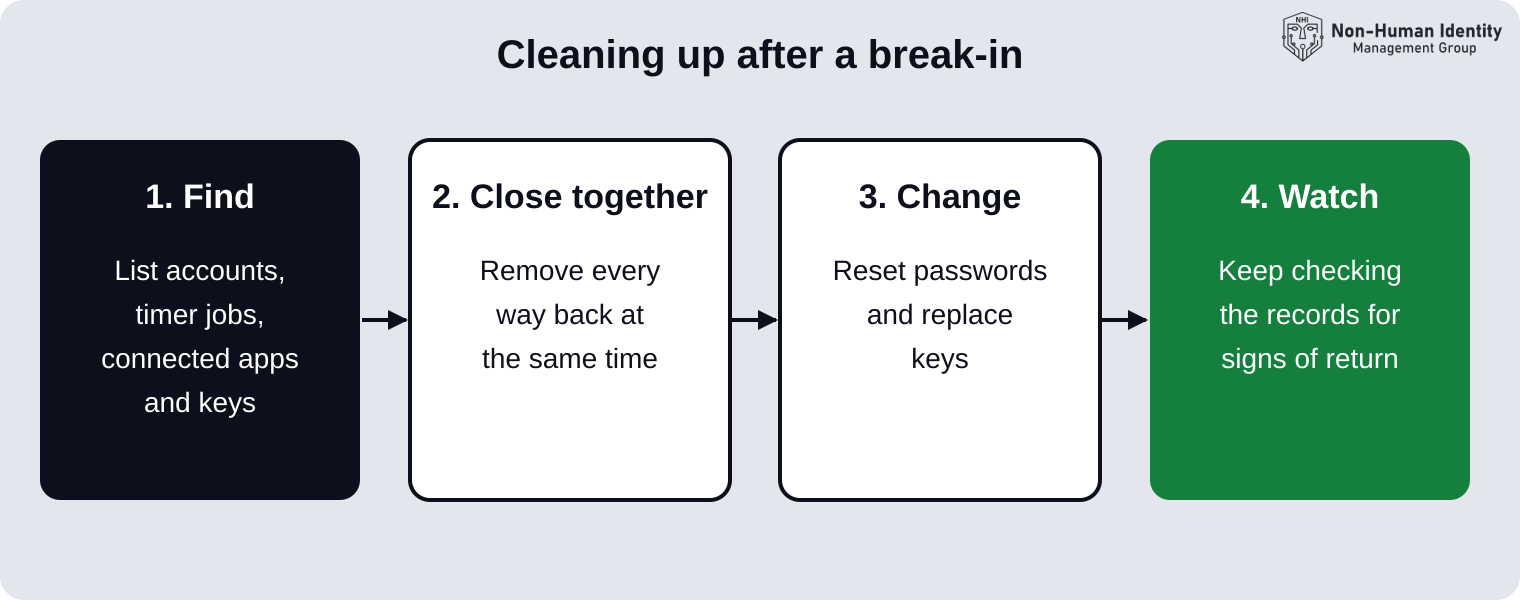
- After a break-in, look for every way back, close them together, then keep watching.
What you will learn
- Explain what persistence means in one sentence.
- Spot the four most common ways an intruder keeps access.
- Explain why a password reset alone may not end a break-in.
- Check the right places after a clean-up.
- Way back in (persistence)
- anything an intruder sets up so they can return after a restart or a password change.
- Timer job (scheduled task)
- a job the computer runs by itself at a set time or event.
- Connected app
- an outside app you have allowed to reach your email, files or other data.
What is persistence?
Think of a burglar who gets into a house through an open door. Before leaving, they quietly unlatch a back window. The owner comes home and locks the front door, but the window is still open.
Persistence works the same way for computers. Once an intruder is inside, they set up ways to come back. Security teams use the word for anything that keeps that access alive after a restart, a log out or a password change.[1]
Not every way back is a hidden program. Often it is something normal, like an extra user account. Another is a timer job, called a scheduled task, which runs a program by itself at a set time.[6] Because these look ordinary, they are easy to miss.
Where the comparison stops working: a house has a few windows you can walk round and check. A business may have thousands of accounts, apps and timer jobs, so checking them takes tools and a plan.
Why does it matter?
If a way back is missed, the intruder may simply return after the clean-up. One US government warning describes a state-backed group that kept access to some victims for at least five years. It mostly used real logins it had stolen.[2]
If you run a small business
What could happen: you reset one hacked password, but an extra account the intruder made still works.
Check this: after any scare, ask for a list of new accounts and connected apps.
If you are studying security
What could happen: you learn to remove harmful programs but forget accounts, apps and keys.
Check this: practise listing every type of way back, not only programs.
If you look after the IT
What could happen: a connected app keeps reading a mailbox after the owner's password is changed.
Check this: review which apps users have allowed into email and files.
What does it look like?
Here is a made-up review sheet from a small firm, filled in after a hacked email account was found.
Example only. All values are made up.
CLEAN-UP REVIEW: office laptop and email, EXAMPLE-0000
Password for mail account reset .......... done
New user accounts since 1 March .......... 1: "helpdesk-backup"   (1)
Timer jobs on the laptop ................. 1 new: "UpdateCheckFAKE"  (2)
Apps allowed into the mailbox ............ 1 new: "PDF Viewer EXAMPLE" (3)
Mail forwarding rules .................... 1: to [email protected] (4)
API keys created this month .............. 1: owner unknown          (5)
- In a real file, this line would contain an account nobody on the team created.
- A timer job with a harmless-looking name that runs a program each time the laptop starts.
- An app that was allowed into the mailbox. Its access does not depend on the user's password.
- A rule that quietly copies new emails to an outside address.
- A software password (API key) with no known owner. It may have been made by the intruder.
Why this is risky: the password reset closed only the first door. Each of the other lines could be a way back.
The safer way: check every line and remove what nobody can explain. Do it all at the same time. Then the intruder cannot use one way back to rebuild another.
How does it work?
Here is the usual pattern, from the break-in to a proper clean-up.
- The way in. The intruder gets in, often with a stolen password or a phishing email.
- The spare ways back. They add one or more ways back, such as an account, a timer job, a connected app or a copied key.[1]
- The quiet wait. They may stay quiet for a while and use normal tools, so they blend in.[2]
- The partial fix. The team spots the first problem and resets one password. A connected app, for example, can keep its access after a password reset.[3]
- The full clean-up. The team looks for every way back, removes them together, changes passwords and keys, and confirms the intruder has gone before going back to normal.[4]
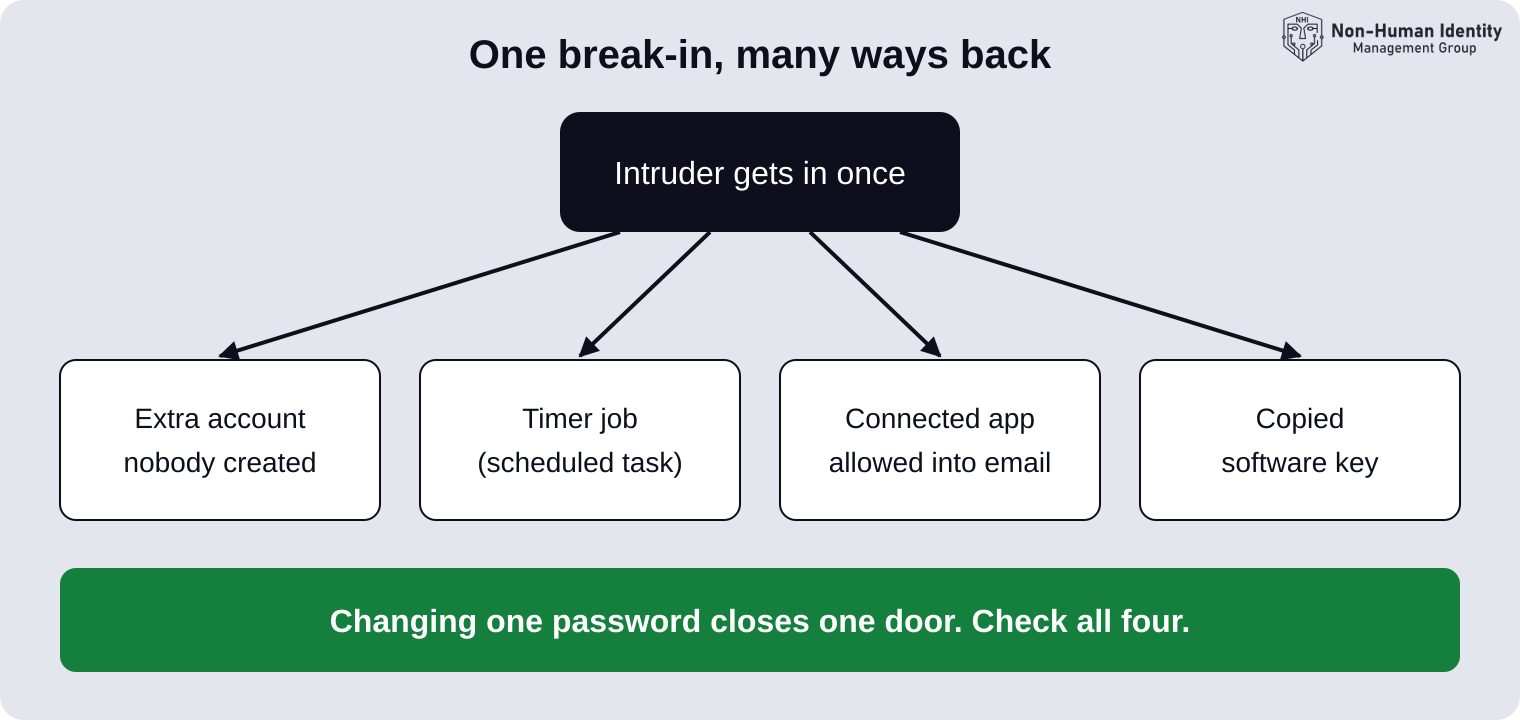
Some of these ways back are non-human identities (NHIs). A non-human identity is a digital identity, or the credential behind it, that represents a machine, application, automated process, service or AI agent. It lets them connect to other systems without a person. Connected apps and software keys are examples. They do not use the person's password, so changing that password leaves them working.
Defenders use tools to list everything set to run by itself. On Windows, a free Microsoft tool called Autoruns shows the programs set to start when the computer starts or someone logs in.[5]
A worked example
Gita Zeller runs Teal Couriers, a fictional delivery firm with fifteen staff. Yusuf Achterberg looks after its IT two days a week.
One Monday a customer rings. They got an odd invoice from a Teal Couriers address. Yusuf finds that the office manager's mailbox was used to send it. He resets her password and turns on a second login check.
On Wednesday, another odd email goes out from the same mailbox.
Yusuf thinks of the burglar and the back window. The password was only the front door. So he sits down with a review sheet and checks each place an intruder might leave a way back.
He finds three things. An app called "Invoice Helper" had been allowed into the mailbox the week before. A mail rule was copying every message to an outside address. And a new user account, "support2", had been created that nobody recognised.
Yusuf removes the app, the rule and the account in one sitting. Then he resets the password again and checks the other staff mailboxes for the same app.
He keeps an eye on the login records for the next fortnight. He sees no further signs of the intruder in the records available to him.
Gita adds one line to the firm's incident plan: "After any hack, check accounts, apps, rules and keys, not just the password."
Myths and mistakes
| What people think | What is true |
|---|---|
| Changing the password locks the intruder out. | It closes one door. Connected apps, extra accounts and keys can keep working.[3] |
| Antivirus will find any way back. | Many ways back are normal features, like accounts or timer jobs, so they may not look harmful. |
| Fix each thing the moment you find it. | Where you can, find them all first and close them together, so the intruder has less time to react. |
| If it has been quiet for a week, they have gone. | Intruders can wait a long time. One group stayed for years in some places.[2] |
| Persistence is only about hidden programs. | It also covers accounts, logins, apps and keys.[1] |
What can I do this week?
- List the user accounts on your main systems and ask about any you do not recognise.
- Review which outside apps have been allowed into your email and files.
- Check your mailbox for forwarding rules you did not set up.
- Write down who owns each software key and connected app.
- Add "check every way back" to your incident plan.
Checklist
- Every user account has a known owner and a reason to exist.
- New accounts trigger an alert or a review.
- Connected apps are reviewed and unused ones are removed.
- Mail forwarding to outside addresses is limited or reviewed.
- Software keys have an owner and are replaced after any incident.
- Timer jobs and start-up programs are checked after a break-in.
- The incident plan says to close all ways back together.
- Login records are watched for a period after a clean-up.
Common questions
Is persistence the same as a backdoor?
Closely related. A backdoor is one kind of way back, such as a hidden program or a secret login. Persistence is the wider idea: anything that keeps an intruder's access alive, including extra accounts, timer jobs, connected apps and copied keys. See Backdoors for Beginners.
Why does a password reset not always work?
Because some ways back do not use that password. An app the user allowed into their mailbox keeps its own access. An extra account has its own password. A copied software key works on its own. Each needs to be found and removed separately.
Should I wipe and rebuild a computer after a break-in?
Often, yes, if you cannot be confident it is clean. Rebuilding removes ways back on that machine. It does not remove accounts, apps or keys stored elsewhere, such as in the cloud, so check those too. We suggest asking your IT support or incident responder.
How do security teams find ways back?
They compare what is set to run, or what accounts exist, against what should be there. Tools list start-up programs, timer jobs and new accounts. Anything rare or unexplained gets a closer look. See How to Hunt for Persistence on Windows.
Can a connected app be a way back?
Yes. If someone is tricked into allowing a harmful app into their email or files, the app can keep reading data after a password reset. It needs to be removed from the account directly.[3]
Where next?
Ready for the detail? Read the practitioner guide: How to Hunt for Persistence on Windows. It goes further into start-up snapshots, the Windows events that record new tasks and services, and how to judge a rare entry.
Also useful:
- Persistence Techniques Guide
- Backdoors for Beginners
- Incident Containment for Beginners
- OAuth Consent Phishing for Beginners
- Non-Human Identities for Beginners
Related NHI Mgmt Group resources: ATT&CK Persistence Tactic · Linux Persistence Forensics Guide · How to check a recovered account for leftover persistence
Key terms
- Persistence
- Anything that keeps an intruder's access alive after a restart, log out or password change.
- Backdoor
- A hidden way of getting in that skips the normal login.
- Scheduled task
- A job the computer runs by itself at a set time or event, which intruders can misuse.
- Connected app
- An outside app given permission to act inside your account, with its own lasting access.
- Valid accounts
- Real logins an intruder uses, so their activity looks normal.
- Non-human identity (NHI)
- A digital identity used by software, such as an app, service or key, rather than a person.
- Incident response
- The steps used to find, contain, investigate and recover from a security problem.
Sources and further reading
- Persistence, Tactic TA0003. MITRE ATT&CK Enterprise, MITRE. https://attack.mitre.org/tactics/TA0003/, accessed 28 Nov 2026.
- PRC State-Sponsored Actors Compromise and Maintain Persistent Access to U.S. Critical Infrastructure (AA24-038A). CISA and partner agencies, 7 February 2024. https://www.cisa.gov/news-events/cybersecurity-advisories/aa24-038a, accessed 28 Nov 2026.
- Detect and remediate illicit consent grants in Microsoft 365. Microsoft Learn, Microsoft. https://learn.microsoft.com/en-us/defender-office-365/detect-and-remediate-illicit-consent-grants, accessed 28 Nov 2026.
- Recovering from a highly disruptive cyber attack: recovery and ongoing investigations. National Cyber Security Centre (NCSC). https://www.ncsc.gov.uk/collection/what-to-do-when-cyber-attacks-disrupt-your-organisation/recovering/recovering-ongoing-investigations, accessed 28 Nov 2026.
- Autoruns for Windows. Microsoft Learn, Sysinternals, Microsoft. https://learn.microsoft.com/en-us/sysinternals/downloads/autoruns, accessed 28 Nov 2026.
- Task Scheduler for developers. Microsoft Learn, Microsoft. https://learn.microsoft.com/en-us/windows/win32/taskschd/task-scheduler-start-page, accessed 28 Nov 2026.