A backdoor is a hidden way into a computer or app that skips the normal login.
This guide is for anyone who looks after a computer, a website or a small business network. You do not need to be technical to be affected: if a supplier sets up your systems or connects to them from afar, a forgotten way in can become a backdoor.
In short
- A backdoor lets someone get back into a system without going through the usual login checks.
- Intruders often add one after they first break in, so they can return later.
- Some backdoors start as honest shortcuts, such as a default password or an old supplier account.
- Find them by looking for new accounts, unknown programs and odd connections. Then fix the way in, not just the door.
What you will learn
- Explain what a backdoor is in one sentence.
- Spot the common signs that a hidden way in may exist.
- Check the everyday gaps that often turn into backdoors.
- Ask the right questions if you think one has been found.
- Hidden way in (backdoor)
- a route into a system that avoids the normal login checks.
- Harmful software (malware)
- a program made to damage, spy on or take over a device.
- Staying in (persistence)
- the tricks an intruder uses to keep access after a restart or a password change.
What is a backdoor?
Think of a builder who quietly fits a side door at the back of a shop. The front door has a lock and a camera. The side door has neither, and only the builder knows it is there.
A backdoor works the same way for computers. It is a way of getting in that is not written down anywhere and does not use the normal login.[1] It might be a small hidden program, an extra user account, or a password that was never changed.
Most backdoors you read about are added by intruders. Once they get in, they leave a hidden program behind so they can come back. Security teams call this persistence, which means staying in after a restart or a password change.
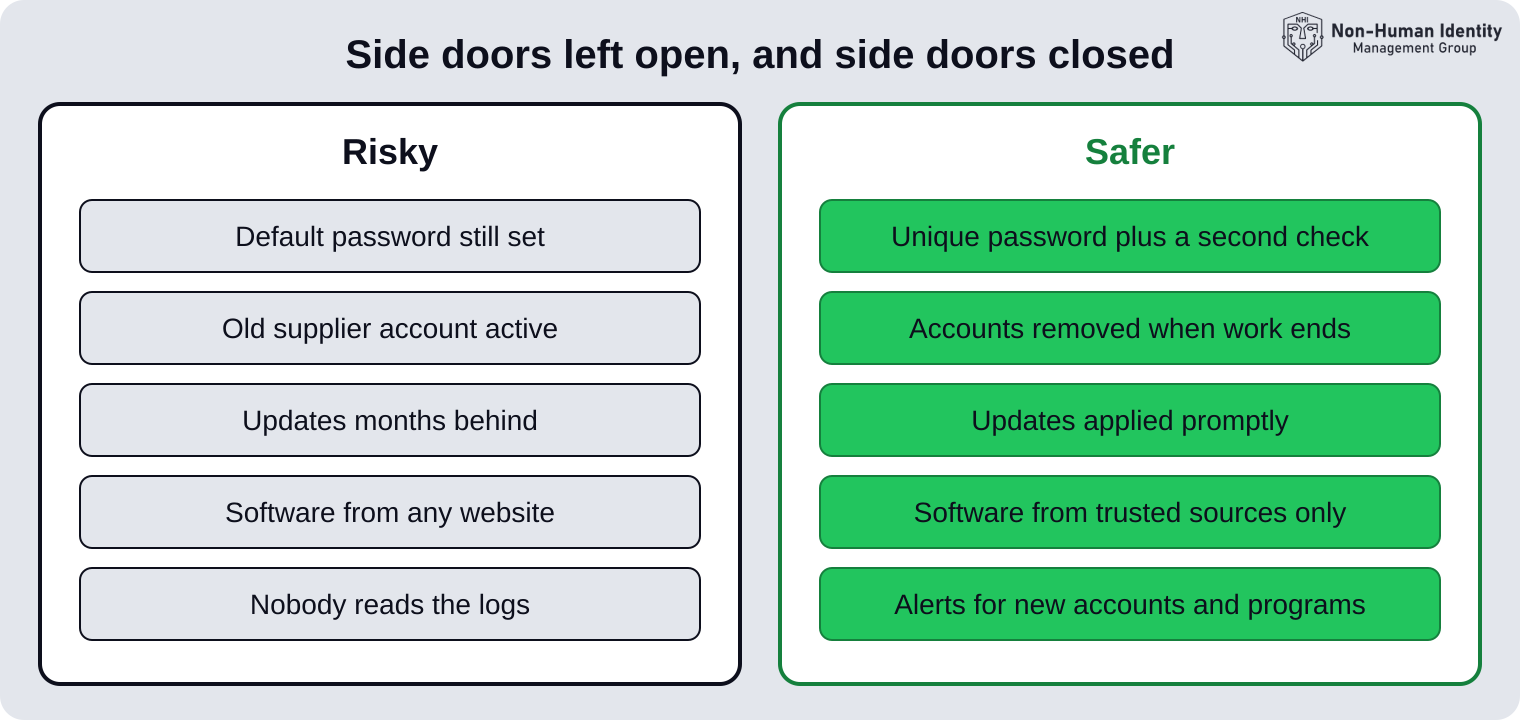
Some start out innocently. A supplier may leave a test account switched on, or a device may still use the password it came with from the factory.
Where the comparison stops working: a real side door is easy to see if you walk round the building. A computer backdoor can look like a normal file or account, so you may need tools and records to find it.
Why does it matter?
A backdoor turns one break-in into ongoing access. Changing the front door lock does not help if the side door is still open, so the intruder may return weeks later.
If you run a small business
What could happen: an intruder who got in once comes back through a hidden account and takes customer records.
Check this: ask your IT supplier for a list of every account that can log in from outside.
If you look after a website
What could happen: a hidden file on the web server lets a stranger run commands on it.
Check this: keep the site and its add-ons updated, and ask how changed files would be noticed.
If you are new to IT work
What could happen: you remove the harmful program but miss the new account it created, and the intruder walks back in.
Check this: after any clean-up, look for new accounts, scheduled tasks and remote access tools.
What does it look like?
Most people meet a backdoor as a line in a report, not as code. Here is a made-up list of the user accounts on a small office server, as an IT supplier might show it.
Example only. All values are made up.
# Accounts allowed to log in to OFFICE-SERVER-EXAMPLE
yara.example        staff     last login: today
reception.example   staff     last login: today
supplier-old        admin     last login: 14 months ago  (1)
admin               admin     password: factory default  (2)
svc-update-FAKE     admin     created: 03:12 last Sunday (3)
- In a real screen, this line would show an old supplier account that nobody switched off.
- In a real screen, this line would show an account still using the password the device came with.
- In a real screen, this line would show an admin account that nobody remembers creating, made at night.
Why this is risky: each of these lines is a possible side door. The first two are forgotten gaps that anyone who learns the details could use. The third looks like a normal system account, which is a common way for an intruder's account to hide.
The safer way: each account has a named owner and a reason to exist. Old accounts are switched off when the work ends. Factory passwords are changed before a device goes live, and new admin accounts raise an alert. Security agencies ask device makers to stop shipping shared default passwords at all.[5]
How does it work?
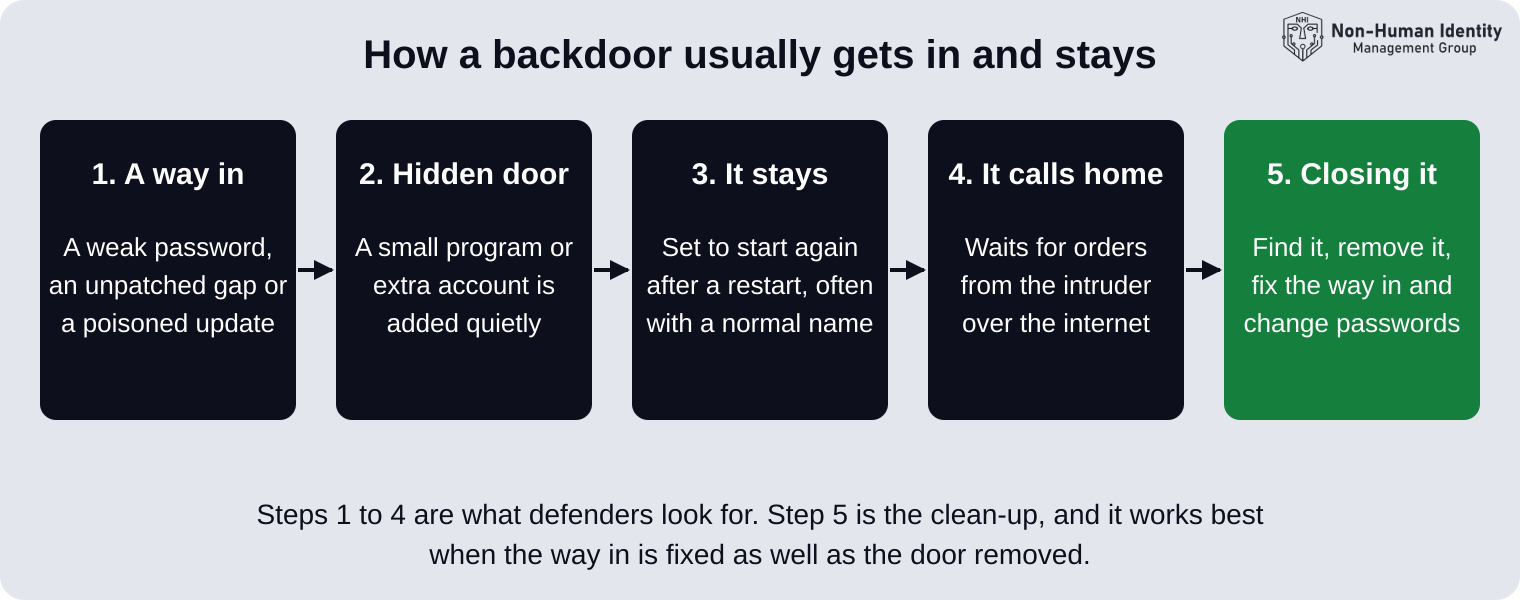
Here is how a backdoor usually gets in and stays. Defenders use the same steps to know where to look.
- A way in. The intruder gets in first, often through a guessed password, an unpatched flaw in public-facing software, or a tampered software update.
- The hidden door. They add something small: a hidden program, an extra account or a changed setting. On websites this is often a web shell, a small file on the web server that lets someone run commands on it.[3]
- It stays. The door is set to start again after a restart, often with a name that looks like normal software.
- It calls home. Many backdoors wait for orders from the intruder over the internet. Security teams call this link command and control. Some simply wait for a connection on a network port, which is a numbered entry point for network traffic.[2]
- Closing it. Defenders find the door, remove it, fix the original way in and change any passwords the intruder may have seen.
A backdoor can also arrive inside software you trust. In 2024 a developer noticed that remote logins on his test computers were using more processing power than usual and taking longer. He traced it to hidden code in two new versions of a widely used data compression tool. The tool runs on Linux, a free operating system used on many servers.[6] The US cyber agency CISA advised people to move back to an earlier, unaffected version.[7] This kind of attack on the makers of software is called a supply chain attack.
There is no single scan that finds every backdoor. Defenders combine checks. They compare files with a known good copy. They read the records that systems keep, called logs. They also watch for programs that behave oddly, such as a web server starting system tools.[3]
A worked example
Yara Urquhart runs Rosewood Opticians, a fictional shop with eight staff. Pia Holm is the freelance IT supplier who looks after its computers.
On Monday Pia gets an alert from the shop's security software. A program called "update helper" is trying to connect to an unknown internet address every hour. Nobody installed it.
Pia thinks of the side door. Removing the program is only part of the job. She also needs to know how it got in, and whether anything else was left behind.
First she takes the affected computer off the network, so the program can no longer call out. Then she checks the server's account list. She finds a new admin account created at three in the morning on Sunday.
The records show how the intruder got in. The shop's remote access tool still had an old account from a previous supplier, with a weak password. That old account was the real way in.
Pia switches off the old account and the new one. She rebuilds the affected computer from a clean copy, rather than trusting a clean-up. She changes the passwords for the server and the remote access tool, and adds a second login check to remote access.
Yara asks what she should do next. Pia suggests a short list. Keep a record of who has remote access, review it every few months, and keep updates switched on.
A week later the records available to Pia show no new unknown accounts and no more calls to the unknown address. Yara writes down what happened and asks her insurer whether anything needs reporting.
Myths and mistakes
| What people think | What is true |
|---|---|
| Deleting the harmful program closes the backdoor. | Intruders often leave more than one way back, such as an extra account. Check accounts, scheduled tasks and remote access too. |
| Antivirus will always catch a backdoor. | Security software helps, but some backdoors look like normal files or accounts. Logs and account reviews add another layer. |
| Only big companies get backdoors. | Automated attacks look for any device with a known weakness or a default password, whatever its size. |
| Software from a well-known project is always safe. | Trusted software can be tampered with, as the 2024 compression tool case showed.[6] Apply the maker's fixes and advisories promptly. |
| Once it is removed, the job is done. | Fix the original way in and change exposed passwords, or the intruder may return the same way. |
What can I do this week?
- Ask your IT supplier for a list of every account that can log in from outside, and who owns each one.
- Change any password that is still the one a device or app came with.
- Check that automatic updates are switched on for computers, phones, routers and your website.[4]
- Switch off accounts for suppliers or staff who no longer need access.
- Agree who to call if security software reports an unknown program.
Checklist
- Every account that can log in has a named owner and a reason to exist.
- No device or app still uses its factory default password.
- Remote access uses a unique password and a second login check.
- Supplier and leaver accounts are switched off when the work ends.
- Updates are applied promptly, with automatic updates on where possible.
- Software is installed only from trusted sources.
- Someone is alerted to new admin accounts and unknown programs.
- After any break-in, the original way in is found and fixed, not just the backdoor.
Common questions
Is a backdoor the same as malware?
Not quite. Many backdoors are a kind of malware, a hidden program left behind by an intruder. But a backdoor can also be an extra account or an unchanged default password. What makes it a backdoor is that it gives access without the normal login checks.
How would I know if my computer has a backdoor?
You may not see it directly. Common signs include accounts nobody remembers creating, programs you did not install, and security alerts about unknown connections. If you see these, we suggest asking your IT contact to check rather than trying to remove things yourself.
Can a backdoor be built in on purpose?
Yes, sometimes. Developers may leave a test login or support account in a product, often for convenience. Even with good intentions, anyone else who learns about it may be able to use it. That is why hidden or shared logins in products are treated as a security risk.
Should I rebuild a computer that had a backdoor?
Often, yes. A rebuild from a clean copy gives more confidence than a clean-up, because intruders may leave changes that are hard to spot. Your IT contact can advise based on what was found. Change any passwords used on that computer as well.
Who should I tell if we find a backdoor?
Tell your IT or security contact straight away, and anyone responsible for the data the system holds. They can decide whether customers, insurers or a regulator need to know. Quick, honest reporting gives the clean-up the best chance of working.
Where next?
Ready for the detail? Read the practitioner guide: ATT&CK Espionage Backdoors and Implants (A to L) Software Hub. It goes further into named backdoor families, how each one stays hidden and how security teams detect them.
Also useful:
- Malware for Beginners
- Persistence Techniques Guide
- How to Hunt for Web Shells on IIS, Apache and Nginx
- Supply Chain Attacks for Beginners
- EDR, XDR and MDR for Beginners
Related NHI Mgmt Group resources: ATT&CK Espionage Backdoors and Implants (M to Z) Software Hub · Web Shell Response Playbook · Threat Hunting for Beginners
Key terms
- Backdoor
- A hidden way into a system that skips the normal login checks.
- Malware
- Software made to damage, spy on or take over a device.
- Persistence
- Tricks that keep an intruder's access alive after restarts, logouts or password changes.
- Web shell
- A small file placed on a web server that lets someone run commands on it from afar.
- Command and control
- The link an intruder uses to send orders to a hidden program and get results back.
- Default password
- The password a device or app comes with, which should be changed before use.
- Supply chain attack
- An attack that tampers with software or updates before they reach the people who use them.
Sources and further reading
- Backdoor (glossary entry, citing NIST SP 800-82r3 and NIST SP 800-12 Rev. 1). NIST Computer Security Resource Center. https://csrc.nist.gov/glossary/term/backdoor, accessed 28 Nov 2026.
- Backdoor (glossary entry, citing NIST SP 800-83 Rev. 1, Guide to Malware Incident Prevention and Handling). NIST Computer Security Resource Center. https://csrc.nist.gov/glossary/term/backdoor, accessed 28 Nov 2026.
- Detect and Prevent Web Shell Malware (PP-20-0901). US National Security Agency and Australian Signals Directorate, 21 April 2020. https://media.defense.gov/2020/Jun/09/2002313081/-1/-1/0/CSI-DETECT-AND-PREVENT-WEB-SHELL-MALWARE-20200422.PDF, accessed 28 Nov 2026.
- Mitigating malware and ransomware attacks. UK National Cyber Security Centre. https://www.ncsc.gov.uk/guidance/mitigating-malware-and-ransomware-attacks, accessed 28 Nov 2026.
- Secure by Design Alert: How Manufacturers Can Protect Customers by Eliminating Default Passwords. US Cybersecurity and Infrastructure Security Agency (CISA). https://www.cisa.gov/resources-tools/resources/secure-design-alert-how-manufacturers-can-protect-customers-eliminating-default-passwords, accessed 28 Nov 2026.
- backdoor in upstream xz/liblzma leading to ssh server compromise. Andres Freund, oss-security mailing list, 29 March 2024. https://www.openwall.com/lists/oss-security/2024/03/29/4, accessed 28 Nov 2026.
- Reported Supply Chain Compromise Affecting XZ Utils Data Compression Library, CVE-2024-3094. US Cybersecurity and Infrastructure Security Agency (CISA), 29 March 2024. https://www.cisa.gov/news-events/alerts/2024/03/29/reported-supply-chain-compromise-affecting-xz-utils-data-compression-library-cve-2024-3094, accessed 28 Nov 2026.