Cyber security for travel agencies means protecting bookings, customer payments and traveller details from online criminals.
This guide is for agency owners, homeworking agents, office staff and anyone new to working in travel. You do not need a technical background. If your agency takes deposits, logs in to booking sites or holds passport details, this applies to you.
In short
- Travel agencies take big payments months ahead, so fake "please pay to our new account" messages are a common trick.
- Your logins to booking sites, supplier portals and email are the keys to the business, so each one needs its own owner and a second check.
- Passport scans and card numbers left in email or notes are easy to steal, so keep them out of those places.
- Criminals also copy real agencies online, so make it easy for customers to check you are genuine.
What you will learn
- Explain why travel agencies attract online criminals.
- Spot a fake bank detail change, from a customer or a supplier.
- Check where passport scans and card numbers sit in your agency.
- Ask your booking platforms and host agency the right questions.
- Trick message (phishing)
- an email or text that pretends to come from someone you trust, to steal a password or money.
- Second check (two-step login)
- a code or app prompt asked for after the password, so a stolen password alone is not enough.
- Payment diversion
- a scam that tricks someone into sending money to a criminal's bank account instead of the real one.
What is cyber security for travel agencies?
Think of closing the agency at the end of the day. You lock the door, put the cash and passports in the safe and check the back window. Cyber security is the same routine for the agency's online side.
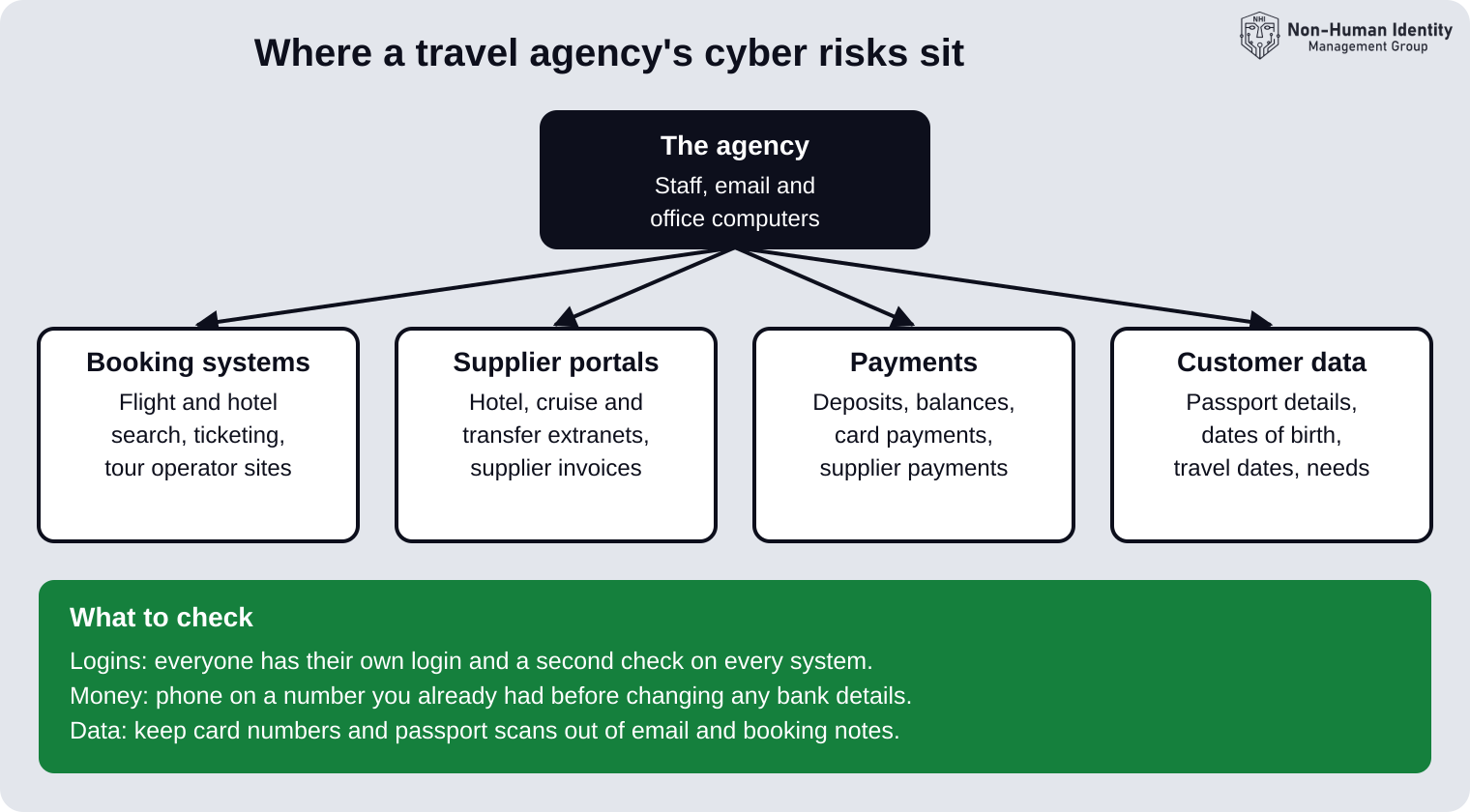
A modern agency runs on many logins. There is email. There are booking systems, where agents search and book flights and hotels. There are supplier portals, which are websites where hotels, airlines and tour operators let agents manage bookings. And there is a payment system for taking deposits and balances.
Each login can make bookings, see traveller details or move money. The job is to know every login, who uses it, and how it is protected.
Where the comparison stops working: a forced door is easy to see in the morning. A stolen password leaves no mark, so you may only find out when a customer says they paid the wrong account.
Why does it matter?
Agencies hold money and personal details for every booking. Customers also expect payment requests by email. So a good fake request is easy to believe. In 2024, holiday fraud reported to the UK's Action Fraud cost people over £11 million. Some fake sellers used the logos of real travel protection schemes.[1]
If you own the agency
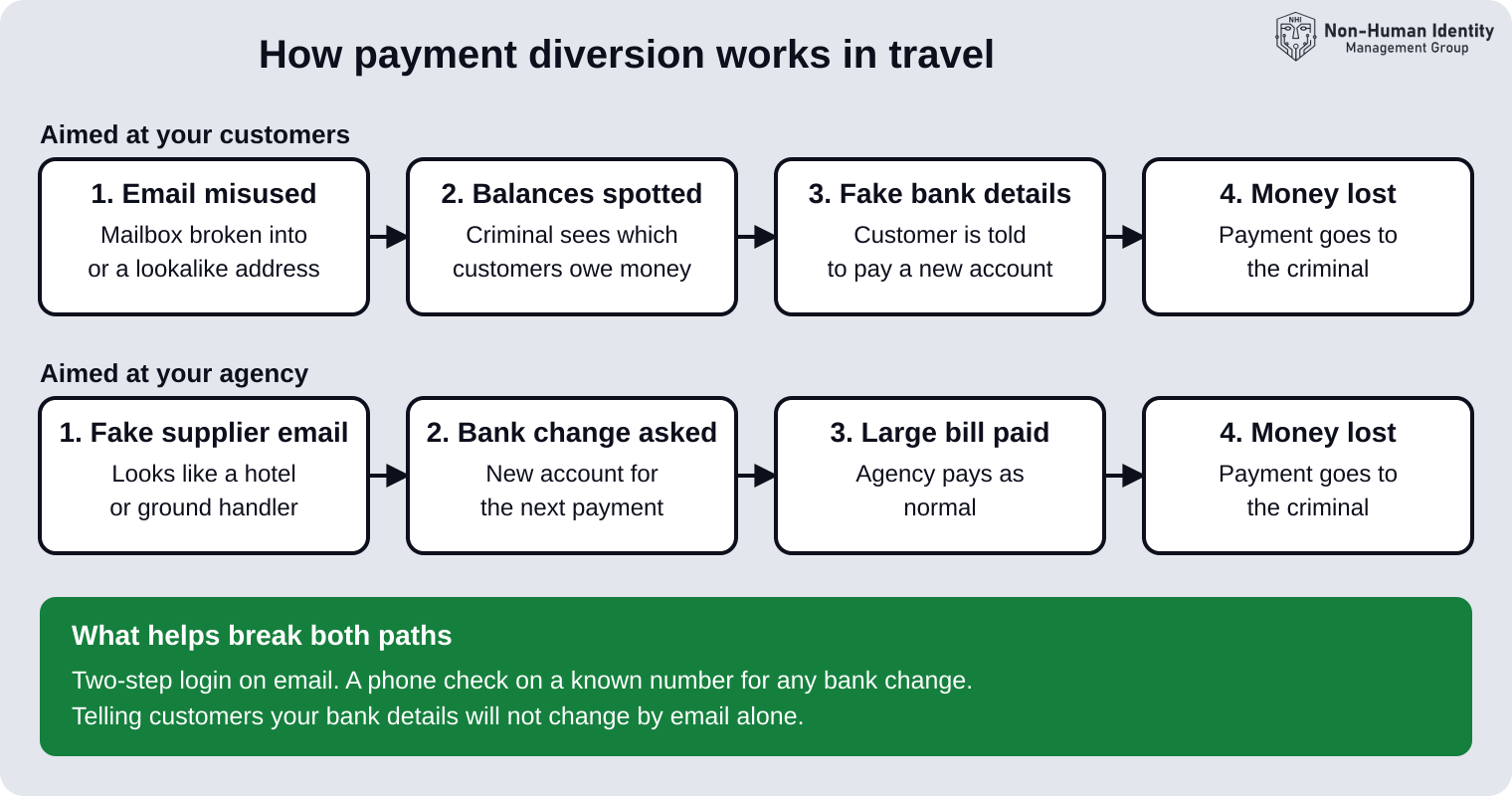
What could happen: a criminal gets into the agency email and tells customers to send balances to a new account.
Check this: turn on two-step login for email and the payment system first.
If you are a homeworking agent
What could happen: one password used on several booking sites is stolen, and someone books trips on your account.
Check this: use a different password for every site, kept in a password manager.
If you handle payments and accounts
What could happen: an email that looks like it is from a hotel asks you to pay a large bill to new bank details.
Check this: phone the supplier on a number you already had before changing any bank details.
If you are new to working in travel
What could happen: you are asked to share an office login written on a sticky note, so nobody can tell who made a booking.
Check this: ask for your own named account on each system you use.
What does it look like?
Here is a made-up email of the kind a customer might receive from a criminal pretending to be their agency.
Example only. All values are made up.
From: Example Travel <[email protected]>   (1)
Subject: URGENT balance due today for your Rome trip            (2)

Hi Noor,
Our bank account has changed due to an audit.                   (3)
Please pay the balance of 0000.00 to:
Account name: EXAMPLE HOLIDAYS LTD
Sort code 00-00-00  Account 00000000                            (4)
Do not call the office, we are very busy today.                 (5)
- The address looks like the agency's, but it is not the same.
- Pressure to act today, so the customer does not stop to check.
- A reason for new bank details that sounds official.
- In a real message, this line would contain the criminal's bank account.
- A request not to phone, which removes the easiest way to check.
Why this is risky: the customer knows a balance is due. So the message fits what they expect. Money sent by bank transfer can be hard to get back.
The safer way: tell customers that your bank details will not change by email alone. Put this in every booking confirmation, with a number to ring.
How does it work?
Many attacks on travel agencies follow a similar path. Most start with people and passwords, not clever software.
- The bait. A trick email arrives, dressed as a booking platform, a hotel partner or a customer.
- The login. An agent types a password into a fake sign-in page, and the criminal now has it.
- The look around. The criminal reads emails to learn which customers owe money and which suppliers are due payment.
- The switch. They send fake bank details to customers or the agency, timed to when a payment is expected.
- The clean-up. They may hide replies, so the agency does not notice until someone complains.
Criminals may also build fake websites or social media pages that copy a real agency. The ATOL alert on holiday fraud said more than half of 2024 reports mentioned social media.[1] Showing your membership numbers, and linking to the official directories, helps customers check you are real.
A worked example
Amara Yilmaz runs a fictional independent travel agency with three office staff and two agents who work from home. Summer is the busy season, and many customers pay their balances in spring.
One Monday, a regular customer, Noor Yeboah, rings the office. She has an email asking her to pay her balance to a new account today, and it says not to call. Something felt wrong, so she called anyway, using the number on her booking confirmation. Amara confirms the account has not changed. Noor has not sent any money.
Amara looks at the email Noor forwards. The sender address is one letter different from the agency's. That means the agency mailbox may not have been broken into, but someone is copying the agency's name. She reports the fake address to her email provider, and the fake message to Report Fraud, the UK fraud reporting service that replaced Action Fraud. She also asks her IT supplier to check the agency's email settings. These settings help other email systems spot fakes sent in the agency's name.
Next, she reviews the office. The team shares one login for a tour operator site. She asks the operator for named accounts, and she turns on two-step login where it is offered. She finds old passport scans sitting in a shared inbox from bookings two years ago. She sets up a secure upload link for new bookings and agrees how long scans are kept.
Last, she adds one line to every booking confirmation: "Our bank details will not change by email. If in doubt, ring us on the number below." Two more customers ring to check in the following month. Both had received the same fake email, and neither paid.
Myths and mistakes
| What people think | What is true |
|---|---|
| We are too small to be a target. | The UK's National Cyber Security Centre says one in two small businesses suffers a cyber incident each year.[2] |
| Our host agency or consortium handles all our security. | They may run some systems, but you usually control your own logins, email and staff. Ask which parts are yours. |
| A shared office login is fine if we trust each other. | Nobody can tell who made a change, and it cannot be closed when one person leaves. Use named accounts. |
| Writing a card number in the booking notes is safe because it is our system. | Card numbers in notes or email are easy to copy. The card industry's rules apply to any business that takes cards.[3] Use your payment provider's secure tools. |
| A bank change email from a known supplier address must be genuine. | The supplier's mailbox may have been broken into. Phone them on a number you already had. |
What can I do this week?
- Turn on two-step login for agency email and the payment system.
- List every booking site and supplier portal you log in to, and who uses each login.
- Add a line to booking confirmations saying your bank details will not change by email.
- Search your inboxes for passport scans and card numbers, and move or delete them safely.
- Agree that any bank detail change is checked by phone on a number you already had.
Checklist
- Every agent has their own named login on each booking and supplier system.
- Two-step login is on for email and every system that offers it.
- Each person uses a password manager and a different password per site.
- Customers are told how to check a payment request is real.
- Supplier bank changes are checked by phone before any payment.
- Card numbers are taken through the payment provider, not by email or in notes.
- Passport scans arrive through a secure route and are deleted on a set schedule.
- Leavers and seasonal staff lose access to every system on their last day.
- Backups of the back office are kept separate and have been tested.
Common questions
What is the biggest cyber risk for a small travel agency?
Payment diversion is one of the most common. A criminal sends fake bank details to a customer or to the agency, timed to a payment that is already expected. Two-step login on email and a phone check for any bank change cover a large part of this risk.
Do we have to follow card payment rules?
Yes, if you take card payments. The card industry's security standard covers any business that handles card data, whatever its size. Your bank or payment provider tells you which checks apply to you. Using their hosted payment pages keeps card numbers off your own computers.
Is it safe to ask customers to email their passport?
It is better not to. Passport scans in email can sit in inboxes for years, where anyone who breaks in can read them. Offer a secure upload route, collect passport details only when a booking needs them, and delete scans once they have been used.
What should we do if a customer has paid a fake account?
Act quickly. The customer should contact their bank straight away, and report it to Report Fraud, the UK's fraud reporting service. You should check your email for signs of a break-in and change passwords. If customer data was exposed, you may need to report it to the data regulator.
Does a data breach always mean stolen data?
Not always. The UK data regulator counts losing access to personal data as a breach too, for example if ransomware locks your booking files. Serious breaches must be reported within 72 hours, and every breach should be recorded.[4]
Where next?
Ready for the detail? Read the practitioner guide: Cyber Security for Travel Agencies and Tour Operators Guide. It goes further into card payment scope, data protection duties for passenger records, and managing homeworker and agent networks.
Also useful:
- Small Business Cyber Security for Beginners
- PCI DSS for Beginners
- Email Authentication for Beginners
- Ticket and Holiday Booking Scams for Beginners
Related NHI Mgmt Group resources: Cybersecurity for Hospitality Guide · Rental and Holiday Booking Scams Guide · Choosing an IT Support Provider or MSP Securely
Key terms
- Phishing
- A trick message that pretends to come from someone trusted, to steal passwords or money.
- Business email compromise
- A scam where a criminal uses or copies a business email account to ask for money or details.
- Multi-factor authentication
- Logging in with a second check, such as a code or app prompt, as well as a password.
- One login used by several people, so nobody can tell who did what.
- PCI DSS
- The card industry's security rules for any business that takes card payments.
- Personal data
- Information that can identify a person, such as a name, passport number or date of birth.
- Data breach
- An incident where personal information is lost, locked, changed or seen by the wrong people.
Sources and further reading
- Don't let fraudsters trip you up this summer: new alert issued as people look to snap up online holiday deals. ATOL (UK Civil Aviation Authority), with Action Fraud figures, 24 February 2025. https://www.atol.org/news-and-blogs/2025/02/24/dont-let-fraudsters-trip-you-up-this-summer-new-alert-issued-as-people-look-to-snap-up-online-holiday-deals/, accessed 28 Nov 2026.
- Small organisations guide to cyber security. National Cyber Security Centre. https://www.ncsc.gov.uk/collection/small-business-guide, accessed 28 Nov 2026.
- Merchant Resources. PCI Security Standards Council. https://www.pcisecuritystandards.org/merchants/, accessed 28 Nov 2026.
- Personal data breaches: a guide. Information Commissioner's Office. https://ico.org.uk/for-organisations/report-a-breach/personal-data-breach/personal-data-breaches-a-guide/, accessed 28 Nov 2026.